https://github.com/yeraze/meshmonitor
Web tool for monitoring a Meshtastic Node Deployment over TCP/HTTP
https://github.com/yeraze/meshmonitor
meshtastic
Last synced: about 1 month ago
JSON representation
Web tool for monitoring a Meshtastic Node Deployment over TCP/HTTP
- Host: GitHub
- URL: https://github.com/yeraze/meshmonitor
- Owner: Yeraze
- License: bsd-3-clause
- Created: 2025-09-25T16:54:50.000Z (9 months ago)
- Default Branch: main
- Last Pushed: 2026-02-11T02:42:28.000Z (4 months ago)
- Last Synced: 2026-02-11T06:54:41.355Z (4 months ago)
- Topics: meshtastic
- Language: TypeScript
- Homepage: https://meshmonitor.org/
- Size: 44.2 MB
- Stars: 301
- Watchers: 5
- Forks: 31
- Open Issues: 8
-
Metadata Files:
- Readme: README.md
- Changelog: CHANGELOG.md
- Contributing: CONTRIBUTING.md
- Funding: .github/FUNDING.yml
- License: LICENSE
- Security: SECURITY_AUDIT_REPORT.md
Awesome Lists containing this project
README
# MeshMonitor
[](https://github.com/Yeraze/meshmonitor/actions/workflows/ci.yml)
[](https://github.com/Yeraze/meshmonitor/actions/workflows/pr-tests.yml)
[](https://github.com/Yeraze/meshmonitor/pkgs/container/meshmonitor)
[](https://github.com/Yeraze/meshmonitor/pkgs/container/meshmonitor)
[](https://github.com/Yeraze/meshmonitor/blob/main/LICENSE)
[](https://hosted.weblate.org/engage/meshmonitor/)
A comprehensive web application for monitoring Meshtastic mesh networks over IP. Built with React, TypeScript, and Node.js, featuring a beautiful Catppuccin Mocha dark theme and multi-database support (SQLite, PostgreSQL, MySQL).


## Documentation
For complete documentation, visit **[meshmonitor.org](https://meshmonitor.org/)**
- **[Getting Started Guide](https://meshmonitor.org/getting-started.html)** - Installation and quick start
- **[FAQ](https://meshmonitor.org/faq.html)** - Frequently asked questions and troubleshooting
- **[Configuration](https://meshmonitor.org/configuration/)** - Detailed configuration options
- **[Development](https://meshmonitor.org/development/)** - Contributing and development setup
## Quick Start
Get MeshMonitor running in **60 seconds**:
```bash
# 1. Create docker-compose.yml
cat > docker-compose.yml << 'EOF'
services:
meshmonitor:
image: ghcr.io/yeraze/meshmonitor:latest
ports:
- "8080:3001"
volumes:
- meshmonitor-data:/data
environment:
- MESHTASTIC_NODE_IP=192.168.1.100 # Seeds the first source on first boot; manage more from Dashboard → Sources
restart: unless-stopped
volumes:
meshmonitor-data:
EOF
# 2. Start MeshMonitor
docker compose up -d
# 3. Open http://localhost:8080
```
**Default login:** `admin` / `changeme` (change after first login!)
For detailed installation instructions, configuration options, and deployment scenarios, see the **[Getting Started Guide](https://meshmonitor.org/getting-started.html)**.
## Proxy Authentication
MeshMonitor supports authentication via reverse proxy headers for seamless single sign-on (SSO) integration with Cloudflare Access, oauth2-proxy, Authelia, Traefik ForwardAuth, and similar solutions.
### Supported Proxies
- **Cloudflare Access** - JWT-based authentication with custom role claims
- **oauth2-proxy** - Standard OAuth2 proxy with email/groups headers
- **Generic proxies** - Configurable header-based authentication
### Quick Setup
```yaml
services:
meshmonitor:
image: ghcr.io/yeraze/meshmonitor:latest
environment:
# Enable proxy authentication
- PROXY_AUTH_ENABLED=true
- PROXY_AUTH_AUTO_PROVISION=true
# Admin detection
- PROXY_AUTH_ADMIN_GROUPS=admins,mesh-admins
- PROXY_AUTH_ADMIN_EMAILS=admin@example.com
# Required: Trust the reverse proxy
- TRUST_PROXY=1
# Optional: Logout redirect
- PROXY_AUTH_LOGOUT_URL=https://auth.example.com/oauth2/sign_out
```
### Security Requirements
⚠️ **IMPORTANT:** Proxy authentication requires:
1. MeshMonitor is **NOT directly accessible** (use Docker networks, firewall rules, or VPN)
2. `TRUST_PROXY` is configured to trust your reverse proxy
3. Your proxy validates authentication before forwarding requests
### Email Uniqueness Caveat
⚠️ **Email uniqueness is NOT enforced** in the database schema. If multiple users share the same email address, the first match will be used. Ensure your proxy provides unique email addresses for each user.
### Configuration Options
```bash
# Core settings
PROXY_AUTH_ENABLED=false # Enable proxy auth (default: false)
PROXY_AUTH_AUTO_PROVISION=false # Auto-create users (default: false)
# Admin detection (at least one recommended)
PROXY_AUTH_ADMIN_GROUPS= # Comma-separated admin groups (case-insensitive match)
PROXY_AUTH_ADMIN_EMAILS= # Comma-separated admin emails (case-insensitive match)
# Normal-user group gate (optional, see below)
PROXY_AUTH_NORMAL_USER_GROUPS= # Comma-separated groups allowed to access (empty = all allowed)
# JWT configuration (for Cloudflare Access)
PROXY_AUTH_JWT_GROUPS_CLAIM=groups # Groups claim path (supports Auth0 custom namespaces)
# Custom headers (optional, for non-standard proxies)
PROXY_AUTH_HEADER_EMAIL= # Custom email header name
PROXY_AUTH_HEADER_GROUPS= # Custom groups header name
# Logout
PROXY_AUTH_LOGOUT_URL= # Redirect URL after logout
# Audit logging
PROXY_AUTH_AUDIT_LOGGING=true # Log auth events (default: true)
```
### Cloudflare Access JWT Subset Tokens
Cloudflare Access application JWTs contain a **subset** of the full identity — typically `email`, `aud`, `iss`, `sub`. Custom OIDC claims (e.g. Auth0 role claims) are only present when the IdP integration is configured to include them. If your `PROXY_AUTH_JWT_GROUPS_CLAIM` (e.g. `https://your-domain/roles`) is **missing** from the `Cf-Access-Jwt-Assertion` header, MeshMonitor will see empty groups and group-based admin will never trigger.
**To verify:** Decode a real request JWT at [jwt.io](https://jwt.io/) using the `Cf-Access-Jwt-Assertion` header from browser DevTools, and confirm the groups claim exists and its shape. Cloudflare often places IdP custom claims under a `custom` object (e.g. `custom["https://your-domain/roles"]`); official examples may show a flatter layout — your decoded token is the ground truth for your tenant.
**Fallback:** Set `PROXY_AUTH_ADMIN_EMAILS` to an operator email allowlist. MeshMonitor matches emails case-insensitively, so admin works even when the app JWT omits custom IdP claims.
See: [Cloudflare Application Token](https://developers.cloudflare.com/cloudflare-one/identity/authorization-cookie/application-token/)
### JWT Groups Normalization
MeshMonitor normalizes groups claims from the JWT to handle different IdP formats:
- **String arrays** (`["admin", "user"]`) — used as-is
- **Single strings** (`"admin"`) — wrapped into an array
- **Role objects** (`[{ "name": "admin" }, { "name": "user" }]`) — `.name` is extracted
This handles Auth0 Post-Login Actions that emit role objects instead of plain strings. All group matching (admin groups, normal-user groups) is **case-insensitive**.
### Normal-User Group Gate
`PROXY_AUTH_NORMAL_USER_GROUPS` adds an application-layer group check as a second gate, on top of the reverse proxy's URL-level access control.
**Two-layer model:**
When configured, only users whose groups contain at least one value from this list (or who are admins) are allowed. Users who passed the proxy but lack a matching group receive `403 FORBIDDEN_PROXY_GROUP`.
When empty (default), all proxy-authenticated users are allowed — the reverse proxy is the only gate.
### Examples
**Cloudflare Access + Auth0 (with normal-user gate):**
```bash
PROXY_AUTH_ENABLED=true
PROXY_AUTH_AUTO_PROVISION=true
PROXY_AUTH_JWT_GROUPS_CLAIM=https://mydomain.com/roles
PROXY_AUTH_ADMIN_GROUPS=admins
PROXY_AUTH_NORMAL_USER_GROUPS=meshmonitor-users
PROXY_AUTH_ADMIN_EMAILS=operator@example.com
PROXY_AUTH_LOGOUT_URL=https://yourteam.cloudflareaccess.com/cdn-cgi/access/logout
TRUST_PROXY=1
COOKIE_SECURE=true
```
**oauth2-proxy:**
```bash
PROXY_AUTH_ENABLED=true
PROXY_AUTH_AUTO_PROVISION=true
PROXY_AUTH_ADMIN_EMAILS=admin@example.com,superuser@example.com
PROXY_AUTH_LOGOUT_URL=https://auth.example.com/oauth2/sign_out
TRUST_PROXY=1
```
### User Migration
When proxy authentication is enabled, existing local users are **automatically migrated** on first login if their email matches:
- `authMethod` updated to `'proxy'`
- Password cleared (same behavior as OIDC migration)
- Admin status updated based on groups
⚠️ **Migration is irreversible without admin intervention.** Migrated users cannot revert to local authentication without a password reset.
## Deployment Options
MeshMonitor supports multiple deployment methods:
- **🐳 Docker** (Recommended) - Pre-built multi-architecture images with auto-upgrade support
- [Docker Compose Guide](docs/deployment/DEPLOYMENT_GUIDE.md)
- Platforms: amd64, arm64, armv7
- **☸️ Kubernetes** - Helm charts for production clusters
- [Helm Chart](helm/meshmonitor/)
- GitOps-ready with ArgoCD/Flux support
- **📦 Proxmox LXC** - Lightweight containers for Proxmox VE
- [Proxmox LXC Guide](docs/deployment/PROXMOX_LXC_GUIDE.md)
- Pre-built templates available
- Community-supported alternative
- **🔧 Manual** - Direct Node.js deployment
- [Manual Installation Guide](docs/deployment/DEPLOYMENT_GUIDE.md#manual-nodejs-deployment)
- For development or custom setups
- **🖥️ Desktop Apps** - Native applications for Windows and macOS
- Download from [GitHub Releases](https://github.com/Yeraze/meshmonitor/releases)
- Runs as a system tray application
- Windows (.exe) and macOS (.dmg) installers available
## Key Features
- **Analysis & Reports (4.2)** - Cross-source analytical workspace at `/reports`; first report is Solar Monitoring Analysis with auto-detection of solar-powered nodes, production overlay, healthy-level reference lines, and multi-day battery forecast simulation
- **Multi-Source (4.0)** - Monitor multiple Meshtastic nodes from a single deployment; per-source permissions, schedulers, and Virtual Nodes
- **Real-time Mesh Monitoring** - Live node discovery, telemetry, and message tracking
- **Modern UI** - Catppuccin theme with message reactions and threading
- **Interactive Maps** - Node positions and network topology visualization
- **Multi-Database Support** - SQLite (default), PostgreSQL, and MySQL via Drizzle ORM
- **Notifications** - Web Push and Apprise integration for 100+ services
- **Authentication** - Local, OIDC/SSO, and reverse proxy authentication with RBAC
- **Security Monitoring** - Encryption key analysis and vulnerability detection
- **Device Configuration** - Full node configuration UI
- **Virtual Node Server** - Remote TCP access for Meshtastic Python clients
- **REST API** - v1 API with Bearer token authentication for external integrations
- **MeshCore Support** - Optional monitoring for MeshCore mesh networks
- **Docker Ready** - Pre-built multi-architecture images
- **One-click Self-Upgrade** - Automatic upgrades from the UI with backup and rollback
- **System Backup & Restore** - Complete disaster recovery with automated backups
For a complete feature list and technical details, visit **[meshmonitor.org](https://meshmonitor.org/)**.
## Development
### Prerequisites
- Node.js 20+
- Docker (recommended) or local Node.js environment
- A Meshtastic device with WiFi/Ethernet connectivity
### Local Development
```bash
# Clone with submodules
git clone --recurse-submodules https://github.com/Yeraze/meshmonitor.git
cd meshmonitor
# Install dependencies
npm install
# Configure environment
cp .env.example .env
# Edit .env to seed the first source (MESHTASTIC_NODE_IP / MESHTASTIC_TCP_PORT); additional nodes are added later via Dashboard → Sources
# Start development servers
npm run dev:full
```
This starts both the React dev server (port 5173) and the Express API server (port 3001).
### Available Scripts
**Development:**
- `npm run dev` - Start React development server
- `npm run dev:server` - Start Express API server
- `npm run dev:full` - Start both development servers
- `npm run build` - Build React app for production
- `npm run build:server` - Build Express server for production
**Testing & Quality:**
- `npm run test` - Run tests in watch mode
- `npm run test:run` - Run all tests once
- `npm run test:coverage` - Generate coverage report
- `npm run lint` - Run ESLint
- `npm run typecheck` - Run TypeScript compiler checks
## Technology Stack
**Frontend:**
- React 19 with TypeScript
- Vite 7 (build tool)
- CSS3 with Catppuccin theme
- Translation support crowdsourced by [Weblate](https://hosted.weblate.org/projects/meshmonitor/)
**Backend:**
- Node.js with Express 5
- TypeScript
- Drizzle ORM with SQLite, PostgreSQL, and MySQL drivers
**DevOps:**
- Docker with multi-stage builds
- Docker Compose for orchestration
- GitHub Container Registry for images
## Contributing
We welcome contributions! Please see our [Contributing Guide](CONTRIBUTING.md) for details on:
- Development setup
- Testing requirements
- Code style guidelines
- Pull request process
- CI/CD workflows
Quick start:
1. Fork the repository
2. Create a feature branch (`git checkout -b feature/amazing-feature`)
3. Make your changes and add tests
4. Run tests locally (`npm run test:run`)
5. Commit with conventional commits (`feat: add amazing feature`)
6. Push and create a Pull Request
## License
This project is licensed under the BSD-3-Clause License - see the [LICENSE](LICENSE) file for details.
## Community & Support
- **Discord**: [Join our Discord](https://discord.gg/JVR3VBETQE) - Chat with the community and get help
- **GitHub Issues**: Report bugs and request features
- **Documentation**: [meshmonitor.org](https://meshmonitor.org/)
## Third-Party Clients
- **[meshmonitor-chat.el](https://git.andros.dev/andros/meshmonitor-chat.el)** - Emacs chat client using the REST API v1. Channel and DM support, delivery confirmation, emoji reactions, polling.
## Acknowledgments
- [Meshtastic](https://meshtastic.org/) - Open source mesh networking
- [Catppuccin](https://catppuccin.com/) - Soothing pastel theme
- [React](https://react.dev/) - Frontend framework
- [Drizzle ORM](https://orm.drizzle.team/) - TypeScript ORM
- [better-sqlite3](https://github.com/WiseLibs/better-sqlite3) - SQLite driver
## Star History
[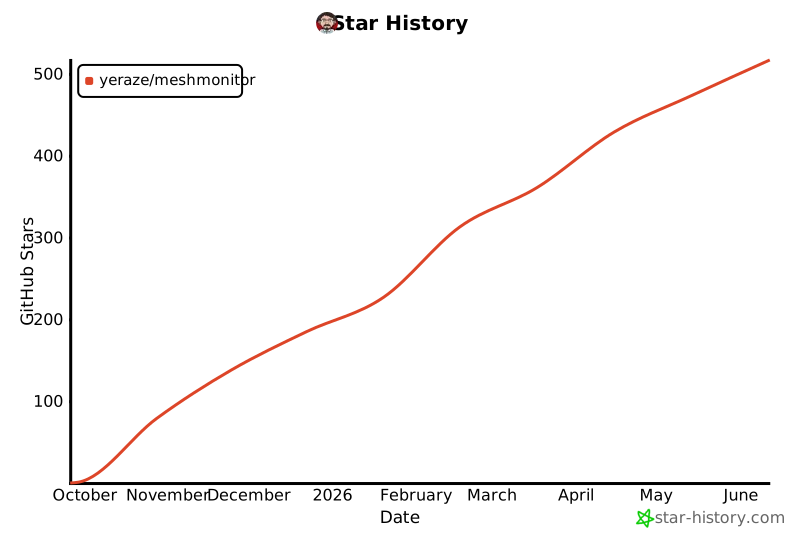](https://www.star-history.com/#Yeraze/meshmonitor&type=date&legend=top-left)
---
**MeshMonitor** - Monitor your mesh, beautifully. 🌐✨
_This application is brought to you with help from [Claude Code](https://claude.ai/code)._