https://github.com/yeraze/meshtastic-ble-bridge
Provide a TCP interface to BLE-connected Meshtastic nodes
https://github.com/yeraze/meshtastic-ble-bridge
ble meshtastic
Last synced: 5 months ago
JSON representation
Provide a TCP interface to BLE-connected Meshtastic nodes
- Host: GitHub
- URL: https://github.com/yeraze/meshtastic-ble-bridge
- Owner: Yeraze
- License: bsd-3-clause
- Created: 2025-10-21T21:49:23.000Z (8 months ago)
- Default Branch: main
- Last Pushed: 2025-10-29T02:19:39.000Z (8 months ago)
- Last Synced: 2026-01-12T17:13:33.046Z (5 months ago)
- Topics: ble, meshtastic
- Language: Python
- Homepage: https://meshmonitor.org/configuration/ble-bridge.html
- Size: 153 KB
- Stars: 13
- Watchers: 0
- Forks: 1
- Open Issues: 0
-
Metadata Files:
- Readme: README.md
- Funding: .github/FUNDING.yml
- License: LICENSE
Awesome Lists containing this project
README
# MeshMonitor BLE Bridge
[](https://github.com/Yeraze/meshmonitor/pkgs/container/meshtastic-ble-bridge)
[](https://github.com/Yeraze/meshmonitor/pkgs/container/meshtastic-ble-bridge)
A Docker-based bridge that exposes a TCP api to Bluetooth Low Energy (BLE) Meshtastic devices. Designed for use with MeshMonitor, but works with any tool that supports the Meshtastic TCP interface.
**Features:**
- BLE-to-TCP protocol translation
- Automatic reconnection on node reboots or disconnects (v1.3+)
- Optional config caching for faster reconnections (v1.4.0+)
- Configurable cache size limits for memory management (v1.4.0+)
- mDNS/Avahi autodiscovery for zero-configuration networking
- Automatic service registration and cleanup
- Graceful shutdown with proper resource cleanup
- Comprehensive test suite with CI/CD
## What's Included
```
meshmonitor-ble-bridge/
├── README.md # This file
├── QUICK_START.md # Get up and running fast
├── docker-compose.ble.yml # Docker Compose configuration
├── src/
│ ├── ble_tcp_bridge.py # Main bridge application
│ ├── Dockerfile # Container build instructions
│ └── .dockerignore # Docker build exclusions
└── docs/
├── CLAUDE_BLE_BRIDGE.md # Claude Code context & technical details
├── BLE_TCP_BRIDGE_ANALYSIS.md # Comprehensive technical analysis
├── README_BLE_BRIDGE.md # User documentation
└── DEPLOY_BLE_BRIDGE.md # Deployment guide
```
## Quick Start
### Prerequisites
- Docker installed
- Bluetooth adapter (built-in or USB)
- Meshtastic device with BLE enabled
### 1. Pull the Container
```bash
docker pull ghcr.io/yeraze/meshtastic-ble-bridge:latest
```
### 2. Find Your Device
```bash
docker run --rm --privileged \
-v /var/run/dbus:/var/run/dbus \
ghcr.io/yeraze/meshtastic-ble-bridge:latest --scan
```
### 3. Pair Your Device (if required)
```bash
bluetoothctl
pair AA:BB:CC:DD:EE:FF # Replace with your device MAC
trust AA:BB:CC:DD:EE:FF
exit
```
### 4. Start the Bridge
```bash
docker run -d --name ble-bridge \
--privileged \
-p 4403:4403 \
--restart unless-stopped \
-v /var/run/dbus:/var/run/dbus \
-v /var/lib/bluetooth:/var/lib/bluetooth:ro \
-v /etc/avahi/services:/etc/avahi/services \
ghcr.io/yeraze/meshtastic-ble-bridge:latest AA:BB:CC:DD:EE:FF
```
The bridge will automatically register an mDNS service for network autodiscovery.
### 5. Connect MeshMonitor
Point MeshMonitor to:
- **IP:** ``
- **Port:** `4403`
Or use mDNS autodiscovery to find the bridge automatically on your network:
```bash
# Test mDNS discovery
avahi-browse -rt _meshtastic._tcp
```
The bridge advertises itself as `_meshtastic._tcp.local.` with TXT records containing:
- `bridge=ble`
- `port=4403`
- `ble_address=`
- `version=1.4.0`
## Documentation
- **Quick Start:** See `QUICK_START.md` for step-by-step setup
- **Deployment:** See `docs/DEPLOY_BLE_BRIDGE.md` for production deployment
- **User Guide:** See `docs/README_BLE_BRIDGE.md` for usage and troubleshooting
- **Technical Details:** See `docs/CLAUDE_BLE_BRIDGE.md` for architecture and development
- **Analysis:** See `docs/BLE_TCP_BRIDGE_ANALYSIS.md` for comprehensive protocol analysis
## Using with Claude Code
This package includes `docs/CLAUDE_BLE_BRIDGE.md` which provides complete context for working on the BLE bridge with Claude Code. Simply:
1. Extract this tarball on your target machine
2. Open the directory in Claude Code
3. Reference `docs/CLAUDE_BLE_BRIDGE.md` for full technical context
## Architecture
```
┌──────────────┐ TCP 4403 ┌───────────────┐
│ MeshMonitor │ ←────────────────→│ BLE Bridge │
└──────────────┘ └───────┬───────┘
↑ │ BLE
│ mDNS autodiscovery ┌───────▼───────┐
└─────────────────────────────│ Meshtastic │
└───────────────┘
```
The bridge translates between:
- **BLE:** Raw protobuf bytes on Meshtastic GATT characteristics
- **TCP:** Framed protocol `[0x94][0xC3][LEN][PROTOBUF]`
And provides:
- **mDNS:** Automatic service discovery via Avahi (`_meshtastic._tcp.local.`)
## Docker Compose Integration
For MeshMonitor users, use the included `docker-compose.ble.yml` as an overlay:
```bash
# Copy to MeshMonitor directory
cp docker-compose.ble.yml /path/to/meshmonitor/
# Create .env file
echo "BLE_ADDRESS=AA:BB:CC:DD:EE:FF" > /path/to/meshmonitor/.env
# Start both services
cd /path/to/meshmonitor
docker compose -f docker-compose.yml -f docker-compose.ble.yml up -d
```
## Common Issues
### "No BLE adapter found"
```bash
sudo systemctl start bluetooth
```
### "Permission denied"
Container needs `--privileged` flag for BLE access
### "Device not found"
- Ensure device BLE is enabled
- Move closer (BLE range ~10-30m)
- Check device not connected to another app
### "Connection refused" from MeshMonitor
- Verify bridge listening on `0.0.0.0:4403`
- Check firewall allows port 4403
- Test with: `telnet 4403`
## Reconnection Behavior (v1.3+)
The bridge now automatically handles node reboots and BLE disconnections:
**Internal Reconnection:**
- Detects disconnections immediately via callback and polling
- Attempts up to 5 reconnections with exponential backoff (2s, 4s, 8s, 16s, 32s)
- Continues operation if reconnection succeeds
**Container Restart:**
- If all reconnection attempts fail, the container exits with error code 1
- Docker's `restart: unless-stopped` policy automatically restarts the container
- Fresh container attempts clean connection to the device
**Recommended Docker Configuration:**
```yaml
services:
ble-bridge:
restart: unless-stopped # Auto-restart on failure
healthcheck:
test: ["CMD-SHELL", "netstat -tln | grep -q :4403 || exit 1"]
interval: 30s
timeout: 10s
retries: 3
```
**Monitoring:**
Check logs to see reconnection activity:
```bash
docker logs -f ble-bridge
```
Look for:
- `⚠️ BLE device disconnected` - Initial disconnect detected
- `🔄 Reconnection attempt X/5` - Retry in progress
- `✅ Reconnected successfully` - Success
- `💀 Failed to reconnect` - Container will exit and restart
## Support & Development
For issues, questions, or contributions:
- MeshMonitor: https://github.com/Yeraze/meshmonitor
- Meshtastic: https://meshtastic.org
## Star History
[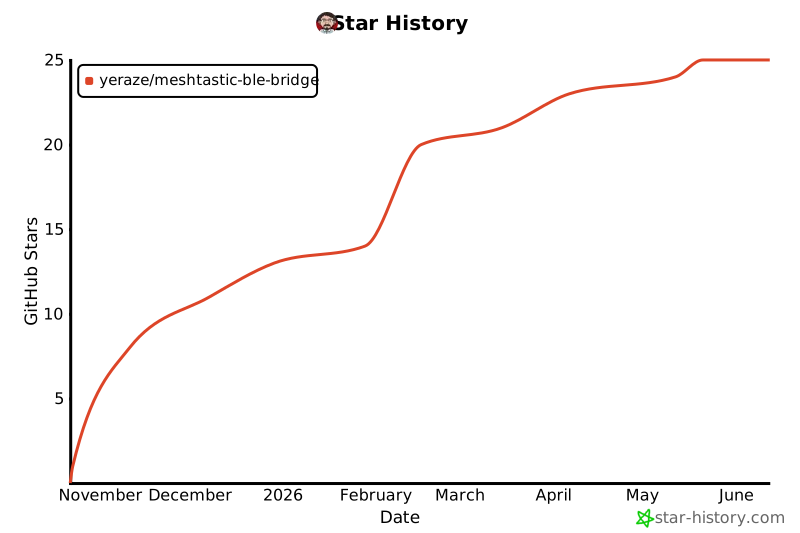](https://www.star-history.com/#yeraze/meshtastic-ble-bridge&type=date&legend=top-left)
## License
BSD-3-Clause (same as MeshMonitor)