https://github.com/yhisaki/plotly.cpp
📈 plotly.cpp: A C++ plotting library for expressive, interactive, real-time and streaming data visualization
https://github.com/yhisaki/plotly.cpp
animation cpp physics-simuation plot plotly plots real-time robotics scatter-plot visualisation
Last synced: 30 days ago
JSON representation
📈 plotly.cpp: A C++ plotting library for expressive, interactive, real-time and streaming data visualization
- Host: GitHub
- URL: https://github.com/yhisaki/plotly.cpp
- Owner: yhisaki
- License: mit
- Created: 2025-09-21T15:14:25.000Z (9 months ago)
- Default Branch: main
- Last Pushed: 2025-10-18T07:28:42.000Z (8 months ago)
- Last Synced: 2025-10-19T04:49:11.172Z (8 months ago)
- Topics: animation, cpp, physics-simuation, plot, plotly, plots, real-time, robotics, scatter-plot, visualisation
- Language: C++
- Homepage: https://yhisaki.github.io/plotly.cpp/
- Size: 51.5 MB
- Stars: 5
- Watchers: 1
- Forks: 0
- Open Issues: 0
-
Metadata Files:
- Readme: README.md
- License: LICENSE
Awesome Lists containing this project
README
🚀 Plotly.cpp
A C++ plotting library for expressive, interactive, real-time & streaming data visualization

[](https://yhisaki.github.io/plotly.cpp/)
[](https://codecov.io/gh/yhisaki/plotly.cpp)


**Plotly.cpp** brings the power of [Plotly.js](https://plotly.com/javascript/) to C++. Most Plotly.js functions have direct C++ equivalents, making it a familiar plotting library for C++ developers.
> [!WARNING]
> **This library is currently under active development**
>
> We welcome feedback, bug reports, and contributions to help stabilize the library!
## 📋 Table of Contents
- [✨ Key Features](#-key-features)
- [🔄 Plotly.js Compatibility](#-plotlyjs-compatibility)
- [🚀 Installation & Quick Start](#-installation--quick-start)
- [Prerequisites](#prerequisites)
- [Installation](#installation)
- [📊 Simple Examples](#-simple-examples)
- [Hello World Example](#hello-world-example)
- [Real-Time Streaming Data](#real-time-streaming-data)
- [3D Surface Plots](#3d-surface-plots)
- [Multi-Trace Styling & Legends](#multi-trace-styling--legends)
- [2×2 Subplots](#22-subplots)
- [Interactive Event Handling](#interactive-event-handling)
- [🎨 Advanced Gallery](#-advanced-gallery)
- [🏗️ Architecture Overview](#️-architecture-overview)
- [Key Components](#key-components)
- [Communication Flow](#communication-flow)
- [Example Message Flow](#example-message-flow)
- [📋 Complete API Reference](#-complete-api-reference)
- [Core Classes](#core-classes)
- [Essential Methods (Direct Plotly.js Equivalents)](#essential-methods-direct-plotlyjs-equivalents)
- [Advanced Methods (Direct Plotly.js Equivalents)](#advanced-methods-direct-plotlyjs-equivalents)
- [Export & Utility Methods](#export--utility-methods)
- [🏗️ Development & Contributing](#️-development--contributing)
- [Building from Source](#building-from-source)
- [Code Quality Tools](#code-quality-tools)
- [📜 License](#-license)
- [🌟 Star History](#-star-history)
## ✨ Key Features
- 🔗 **Plotly.js API Mapping** - Translation of most Plotly.js methods

- 🎨 **Advanced Visualizations** - Rich variety of plot types. See [gallery](gallery/README.md) for more examples.

- ⚡ **Real-Time Updates** - Stream data with smooth animations and live updates

- 🔄 **Bidirectional Events** - Handle user interactions from C++

## 🔄 Plotly.js Compatibility
If you know Plotly.js, you already know Plotly.cpp. The library provides C++ equivalents for Plotly.js functions:
| Plotly.js (JavaScript) | Plotly.cpp (C++) | Purpose |
| -------------------------------------------------------------------------------------------------------- | --------------------------------- | -------------------- |
| [Plotly.newPlot()](https://plotly.com/javascript/plotlyjs-function-reference/#plotlynewplot) | `plotly::Figure::newPlot()` | Create new plot |
| [Plotly.update()](https://plotly.com/javascript/plotlyjs-function-reference/#plotlyupdate) | `plotly::Figure::update()` | Update data & layout |
| [Plotly.restyle()](https://plotly.com/javascript/plotlyjs-function-reference/#plotlyrestyle) | `plotly::Figure::restyle()` | Update styling |
| [Plotly.relayout()](https://plotly.com/javascript/plotlyjs-function-reference/#plotlyrelayout) | `plotly::Figure::relayout()` | Update layout only |
| [Plotly.extendTraces()](https://plotly.com/javascript/plotlyjs-function-reference/#plotlyextendtraces) | `plotly::Figure::extendTraces()` | Stream data |
| [Plotly.addTraces()](https://plotly.com/javascript/plotlyjs-function-reference/#plotlyaddtraces) | `plotly::Figure::addTraces()` | Add new traces |
| [Plotly.deleteTraces()](https://plotly.com/javascript/plotlyjs-function-reference/#plotlydeletetraces) | `plotly::Figure::deleteTraces()` | Remove traces |
| [Plotly.downloadImage()](https://plotly.com/javascript/plotlyjs-function-reference/#plotlydownloadimage) | `plotly::Figure::downloadImage()` | Save image file |
Similar data structures, same parameters, and similar behavior with C++ syntax.
## 🚀 Installation & Quick Start
### Prerequisites
- **Ubuntu Linux** (tested platform)
- **Chrome/Chromium** browser
- **C++17 or higher**
### Installation
#### Install from deb package (Recommended)
```bash
wget https://github.com/yhisaki/plotly.cpp/releases/download/v0.1.0/libplotly-cpp-0.1.0-Linux.deb
sudo apt install ./libplotly-cpp-0.1.0-Linux.deb
```
#### Install from FetchContent
Add to your CMake project using FetchContent:
```cmake
include(FetchContent)
FetchContent_Declare(
plotly-cpp
GIT_REPOSITORY https://github.com/yhisaki/plotly.cpp.git
GIT_TAG v0.1.0
)
FetchContent_MakeAvailable(plotly-cpp)
```
#### Usage
After installation, add the following to your `CMakeLists.txt`:
```cmake
find_package(plotly-cpp REQUIRED)
target_link_libraries(your_target plotly-cpp::plotly-cpp)
```
#### Dependencies
Plotly.cpp requires the following dependencies:
- [**nlohmann/json**](https://github.com/nlohmann/json) - JSON serialization/deserialization. You can install it by `sudo apt install nlohmann-json3-dev`.
## 📊 Simple Examples
You can find more details in [documentation](https://yhisaki.github.io/plotly.cpp/examples.html).
### Hello World Example
```cpp
#include "plotly/plotly.hpp"
#include
int main() {
plotly::Figure fig;
fig.openBrowser(); // Open browser explicitly
std::vector x = {1, 2, 3, 4, 5};
std::vector y = {1, 4, 2, 8, 5};
plotly::Object trace = {
{"x", x}, {"y", y}, {"type", "scatter"},
{"mode", "lines+markers"}
};
fig.newPlot(plotly::Array{trace});
fig.waitClose();
return 0;
}
```
📁 **[Complete example](gallery/gallery_hello_world.cpp)**
**JavaScript equivalent:**
```javascript
Plotly.newPlot("myDiv", [
{
x: [1, 2, 3, 4, 5],
y: [1, 4, 2, 8, 5],
type: "scatter",
mode: "lines+markers",
},
]);
```

### Real-Time Streaming Data
```cpp
#include "plotly/plotly.hpp"
#include
#include
#include
int main() {
plotly::Figure fig;
fig.openBrowser();
// Create initial empty trace
plotly::Object trace = {
{"x", std::vector{}}, {"y", std::vector{}},
{"type", "scatter"}, {"mode", "lines"}
};
std::vector data = {trace};
fig.newPlot(data);
// Stream sine wave data in real-time
for (double t = 0; t < 100 && fig.isOpen(); t += 0.1) {
fig.extendTraces({{"x", {std::vector{t}}},
{"y", {std::vector{std::sin(t)}}}}, {0}, 100);
std::this_thread::sleep_for(std::chrono::milliseconds(50));
}
return 0;
}
```
📁 **[Complete example](gallery/gallery_streaming_data.cpp)**
**JavaScript equivalent:**
```javascript
function streamData() {
const newX = [currentTime];
const newY = [Math.sin(currentTime)];
Plotly.extendTraces("myDiv", { x: [newX], y: [newY] }, [0], 100);
}
```

### 3D Surface Plots
```cpp
#include "plotly/plotly.hpp"
#include
int main() {
plotly::Figure fig;
fig.openBrowser();
// Generate 3D surface data
int size = 50;
std::vector> z(size, std::vector(size));
for (int i = 0; i < size; i++) {
for (int j = 0; j < size; j++) {
double x = (i - size / 2.0) * 0.2;
double y = (j - size / 2.0) * 0.2;
z[i][j] = std::sin(std::sqrt(x * x + y * y));
}
}
plotly::Object trace = {
{"z", z}, {"type", "surface"}, {"colorscale", "Viridis"}
};
fig.newPlot(plotly::Array{trace});
fig.waitClose();
return 0;
}
```
📁 **[Complete example](gallery/gallery_3d_surface.cpp)**
**JavaScript equivalent:**
```javascript
const z = []; // 2D array of surface data
// Generate 3D surface data...
Plotly.newPlot("myDiv", [
{
z: z,
type: "surface",
colorscale: "Viridis",
},
]);
```

### Multi-Trace Styling & Legends
```cpp
#include "plotly/plotly.hpp"
#include
#include
#include
int main() {
plotly::Figure fig;
fig.openBrowser();
int n = 5000;
std::vector x(n), y(n), z(n), w(n, 2.0);
for (int i = 0; i < n; ++i) {
x[i] = i * i;
y[i] = std::sin(2 * std::numbers::pi * i / 360.0);
z[i] = std::log(i + 1); // +1 to avoid log(0)
}
// Multiple traces with different styles
plotly::Object trace1 = {{"x", x}, {"y", y}, {"type", "scatter"},
{"mode", "lines"}, {"name", "sin(2πi/360)"}};
plotly::Object trace2 = {{"x", x}, {"y", w}, {"type", "scatter"}, {"mode", "lines"},
{"line", {{"color", "red"}, {"dash", "dash"}}},
{"name", "constant line (y=2)"}};
plotly::Object trace3 = {{"x", x}, {"y", z}, {"type", "scatter"},
{"mode", "lines"}, {"name", "log(x)"}};
plotly::Object layout = {
{"title", {{"text", "Sample figure"}}},
{"xaxis", {{"range", {0, 1000000}}}}, // xlim equivalent
{"showlegend", true},
{"width", 1200}, {"height", 780}
};
fig.newPlot({trace1, trace2, trace3}, layout);
fig.waitClose();
return 0;
}
```
📁 **[Complete example](gallery/gallery_multi_trace_styling.cpp)**
**JavaScript equivalent:**
```javascript
const trace1 = {
x: x,
y: y,
type: "scatter",
mode: "lines",
name: "sin(2πi/360)",
};
const trace2 = {
x: x,
y: w,
type: "scatter",
mode: "lines",
line: { color: "red", dash: "dash" },
name: "constant line (y=2)",
};
const trace3 = {
x: x,
y: z,
type: "scatter",
mode: "lines",
name: "log(x)",
};
const layout = {
title: { text: "Sample figure" },
xaxis: { range: [0, 1000000] },
showlegend: true,
width: 1200,
height: 780,
};
Plotly.newPlot("myDiv", [trace1, trace2, trace3], layout);
Plotly.downloadImage("myDiv", { format: "png", filename: "basic" });
```

### 2×2 Subplots
```cpp
#include "plotly/plotly.hpp"
#include
#include
int main() {
plotly::Figure fig;
std::vector traces;
// Create traces for each subplot...
plotly::Object layout = {
{"title", {{"text", "2x2 Subplot Grid"}}},
{"grid", {{"rows", 2}, {"columns", 2}, {"pattern", "independent"}}},
{"showlegend", false}};
fig.newPlot(traces, layout);
fig.waitClose();
return 0;
}
```
📁 **[Complete example](gallery/gallery_2x2_subplots.cpp)**

### Interactive Event Handling
```cpp
#include "plotly/plotly.hpp"
#include
int main() {
plotly::Figure fig;
fig.openBrowser();
// Create plot
std::vector x = {1, 2, 3, 4, 5};
std::vector y = {1, 4, 2, 8, 5};
plotly::Object trace = {{"x", x}, {"y", y}, {"type", "scatter"}, {"mode", "markers"}};
fig.newPlot(plotly::Array{trace});
// Register event handlers
fig.on("plotly_click", [](const plotly::Object &event) {
// Do something when a point is clicked
});
fig.on("plotly_hover", [](const plotly::Object &event) {
// Do something when a point is hovered
});
fig.waitClose();
return 0;
}
```
📁 **[Complete example](gallery/gallery_event_handling.cpp)**

## 🎨 Advanced Gallery
More complex examples and use cases are available in the [gallery](gallery).
[](gallery)
## 🏗️ Architecture Overview
You can find more details in [Architecture Overview](https://yhisaki.github.io/plotly.cpp/architecture.html).
### Key Components
**1. C++ Backend (`plotly::Figure`)**
- **WebSocket Server**: Real-time bidirectional communication using libwebsockets
- **HTTP Server**: Serves the web frontend assets (HTML, CSS, JavaScript)
- **JSON-RPC Protocol**: Structured message passing for plot commands and events
- **Browser Integration**: Automatically launches Chrome/Chromium with appropriate configuration
**2. Web Frontend (JavaScript)**
- **Plotly.js Runtime**: The actual plotting engine that renders visualizations
- **WebSocket Client**: Connects to C++ backend for command/event exchange
- **JSON-RPC Handler**: Maps incoming C++ calls to Plotly.js API functions
- **Event Bridge**: Forwards user interactions (clicks, hovers) back to C++
### Communication Flow
1. **Startup**: The `plotly::Figure` constructor starts an HTTP server (with an automatically selected port) and a WebSocket server. The browser is opened separately via the `openBrowser()` method.
2. **Sending Plot Commands**: C++ function calls such as `fig.newPlot(data)` are converted into JSON-RPC messages and return `bool` indicating success/failure.
3. **Rendering**: The frontend receives these messages and invokes the corresponding Plotly.js functions.
4. **Event Handling**: If C++ callbacks are registered with `fig.on()`, the frontend sends event data back to C++ via WebSocket whenever such events occur.
### Example Message Flow
```cpp
fig.newPlot({{"x", {1,2,3}}, {"y", {4,5,6}}, {"type", "scatter"}});
```
Becomes JSON-RPC message:
```json
{
"jsonrpc": "2.0",
"method": "Plotly.newPlot",
"params": {
"data": [{ "x": [1, 2, 3], "y": [4, 5, 6], "type": "scatter" }]
},
"id": 0
}
```
Frontend sends back the following JSON-RPC message when the plot is completed:
```json
{
"jsonrpc": "2.0",
"result": { "success": true },
"id": 0
}
```
## 📋 Complete API Reference
### Core Classes
| Class | Description |
| ---------------- | ----------------------------------------------------------- |
| `plotly::Figure` | Main plotting interface (replaces HTML div element) |
| `plotly::Object` | JSON-compatible data container (same as JavaScript objects) |
### Essential Methods (Direct Plotly.js Equivalents)
| C++ Method | JavaScript Equivalent | Purpose |
| ------------------------------------------ | --------------------------------------------------------------------------------------------------------------------------------------- | -------------------- |
| `newPlot(data, layout, config)` | [`Plotly.newPlot(div, data, layout, config)`](https://plotly.com/javascript/plotlyjs-function-reference/#plotlynewplot) | Create new plot |
| `update(traceUpdate, layoutUpdate)` | [`Plotly.update(div, traceUpdate, layoutUpdate)`](https://plotly.com/javascript/plotlyjs-function-reference/#plotlyupdate) | Update data & layout |
| `relayout(layout)` | [`Plotly.relayout(div, layout)`](https://plotly.com/javascript/plotlyjs-function-reference/#plotlyrelayout) | Update layout only |
| `restyle(aobj, traces)` | [`Plotly.restyle(div, aobj, traces)`](https://plotly.com/javascript/plotlyjs-function-reference/#plotlyrestyle) | Update trace styling |
| `extendTraces(update, indices, maxPoints)` | [`Plotly.extendTraces(div, update, indices, maxPoints)`](https://plotly.com/javascript/plotlyjs-function-reference/#plotlyextendtraces) | Stream new data |
| `react(data, layout, config)` | [`Plotly.react(div, data, layout, config)`](https://plotly.com/javascript/plotlyjs-function-reference/#plotlyreact) | Efficient update |
### Advanced Methods (Direct Plotly.js Equivalents)
| C++ Method | JavaScript Equivalent | Purpose |
| ---------------------------------------- | ----------------------------------------------------------------------------------------------------------------------------------- | -------------------- |
| `addTraces(traces, indices)` | [`Plotly.addTraces(div, traces, indices)`](https://plotly.com/javascript/plotlyjs-function-reference/#plotlyaddtraces) | Add new traces |
| `deleteTraces(indices)` | [`Plotly.deleteTraces(div, indices)`](https://plotly.com/javascript/plotlyjs-function-reference/#plotlydeletetraces) | Remove traces |
| `moveTraces(currentIndices, newIndices)` | [`Plotly.moveTraces(div, currentIndices, newIndices)`](https://plotly.com/javascript/plotlyjs-function-reference/#plotlymovetraces) | Reorder traces |
| `prependTraces(update, indices)` | [`Plotly.prependTraces(div, update, indices)`](https://plotly.com/javascript/plotlyjs-function-reference/#plotlyprependtraces) | Prepend data |
| `addFrames(frames)` | [`Plotly.addFrames(div, frames)`](https://plotly.com/javascript/plotlyjs-function-reference/#plotlyaddframes) | Add animation frames |
| `animate(frames, opts)` | [`Plotly.animate(div, frames, opts)`](https://plotly.com/javascript/plotlyjs-function-reference/#plotlyanimate) | Trigger animations |
### Export & Utility Methods
| C++ Method | JavaScript Equivalent | Purpose |
| ---------------------------------- | ------------------------------------------------------------------------------------------------------------------- | --------------------------- |
| `downloadImage(opts)` | [`Plotly.downloadImage(div, opts)`](https://plotly.com/javascript/plotlyjs-function-reference/#plotlydownloadimage) | Save image file |
| `setDownloadDirectory(path, port)` | N/A (C++-specific) | Set browser download folder |
| `isOpen()` | N/A (C++-specific) | Check connection status |
| `waitClose()` | N/A (C++-specific) | Block until closed |
**Documentation Reference:** Use [Plotly.js documentation](https://plotly.com/javascript/) directly - most examples translate directly to C++.
## 🏗️ Development & Contributing
### Building from Source
```bash
git clone https://github.com/yhisaki/plotly.cpp.git
cd plotly.cpp
# Build everything
make release # or make debug for debug build
# Build with Thread Sanitizer
make tsan
# Build with Address Sanitizer
make asan
```
### Code Quality Tools
```bash
# Set up development environment
pip install pre-commit
pre-commit install
# Format code (with clang-format)
make format
# Run clang-tidy
make tidy
# Build and create coverage report
make coverage
```
## 📜 License
This project is licensed under the [MIT License](LICENSE) - see the LICENSE file for details.
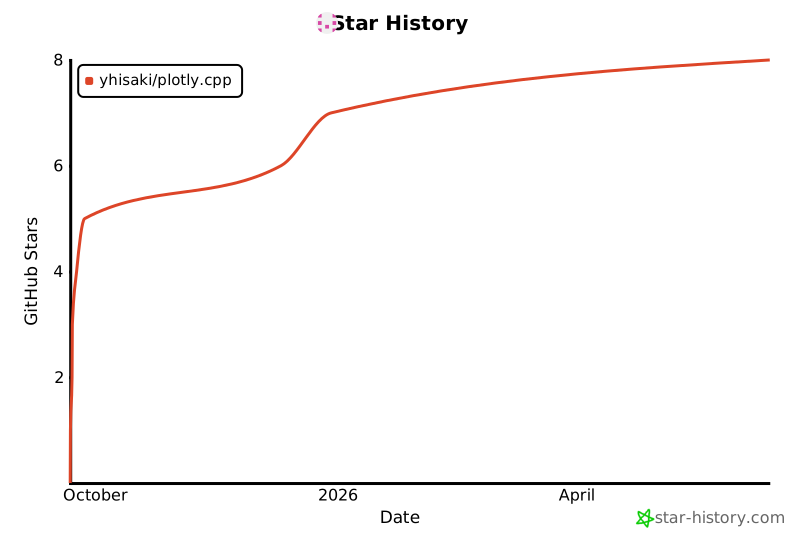
## 🌟 Star History
[](https://star-history.com/#yhisaki/plotly.cpp&Date)