https://github.com/yjl9903/Breadc
🥪 Yet another Command Line Application Framework with fully TypeScript support
https://github.com/yjl9903/Breadc
cli command-line framework typescript vscode
Last synced: about 1 year ago
JSON representation
🥪 Yet another Command Line Application Framework with fully TypeScript support
- Host: GitHub
- URL: https://github.com/yjl9903/Breadc
- Owner: yjl9903
- License: mit
- Created: 2022-06-20T04:55:38.000Z (about 4 years ago)
- Default Branch: main
- Last Pushed: 2024-04-13T22:11:30.000Z (over 2 years ago)
- Last Synced: 2024-04-14T12:14:10.162Z (over 2 years ago)
- Topics: cli, command-line, framework, typescript, vscode
- Language: TypeScript
- Homepage: https://breadc.onekuma.cn/
- Size: 2.24 MB
- Stars: 7
- Watchers: 2
- Forks: 0
- Open Issues: 2
-
Metadata Files:
- Readme: README.md
- Contributing: CONTRIBUTING.md
- License: LICENSE
- Code of conduct: CODE_OF_CONDUCT.md
Awesome Lists containing this project
README
# 🥪 Breadc
[](https://deepwiki.com/yjl9903/Breadc)
[](https://www.npmjs.com/package/breadc)
[](https://github.com/yjl9903/Breadc/actions/workflows/ci.yml)
[](https://codecov.io/gh/yjl9903/Breadc)
Yet another Command Line Application Framework with fully strong **[TypeScript](https://www.typescriptlang.org/) support**.
## Features
+ 🔍 **TypeScript Infer**: IDE will automatically infer the type of your command action function;
+ 💻 **Commands**: support default command, command alias and sub-commands like `git remote add `;
+ 📖 **East to Learn**: very similar with [commander.js](https://github.com/tj/commander.js/), [cac](https://github.com/cacjs/cac) and there are only 5 APIs for building a CLI application: `breadc`, `command`, `option`, `action`, `run`.
+ 🧰 **Toolkits**: contains many useful tools to build your next CLI application, such as [ansi color](https://github.com/yjl9903/Breadc/tree/main/packages/color), [process death handler](https://github.com/yjl9903/Breadc/tree/main/packages/death), [shell compelete script generation](https://github.com/yjl9903/Breadc/tree/main/packages/complete) and so on.
## Installation
```bash
npm i breadc
```
## Usage
Try [./examples/echo.ts](./examples/echo.ts).
```ts
import { breadc } from 'breadc'
const cli = breadc('echo', { version: '1.0.0' })
.option('--host ', { default: 'localhost' })
.option('--port ', { default: '3000', cast: p => +p })
cli
.command('[message]', 'Say something!')
.action((message, option) => {
const host = option.host
const port = option.port
console.log(`Host: ${host}`)
console.log(`Port: ${port}`)
})
cli.run(process.argv.slice(2)).catch(err => console.error(err))
```
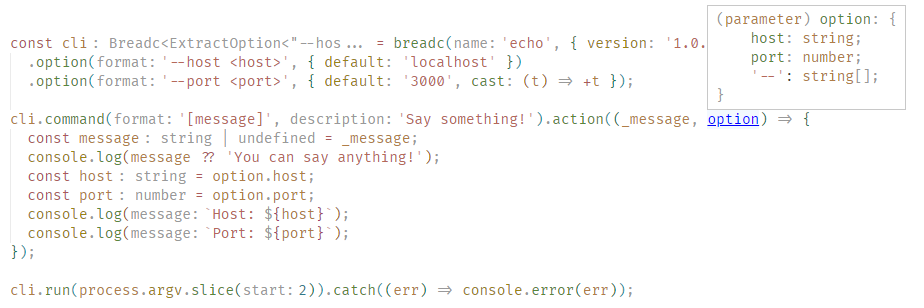
If you are using IDEs that support TypeScript (like [Visual Studio Code](https://code.visualstudio.com/)), input something using `option`, and then you will find the `option` is automatically typed with `{ host: string, port: number }`. In the figure below, [Visual Studio Code](https://code.visualstudio.com/) will automatically infer that the type of `option.host` is `string` and the type of `option.port` is `number`.

### Limitation
For the limitation of TypeScript, in the command format string, you can only write up to **5** pieces. That is to say, you can only write format string like ` [p5]`, but ` [p6]` does not work.
You should always use method chaining when registering options and commands. The example below will fail to infer the option `--host`.
```ts
import { breadc } from 'breadc'
const cli = breadc('cli')
cli
.option('--host')
cli
.option('--port')
.command('')
.action((option) => {
// The type of option is only { port: boolean }
})
```
## Inspiration
+ [cac](https://github.com/cacjs/cac): Simple yet powerful framework for building command-line apps.
+ [TypeScript: Documentation - Template Literal Types](https://www.typescriptlang.org/docs/handbook/2/template-literal-types.html)
## License
MIT License © 2023 [XLor](https://github.com/yjl9903)