https://github.com/yogthos/noir-exception
middleware for displaying Noir style exceptions in the browser
https://github.com/yogthos/noir-exception
Last synced: 10 months ago
JSON representation
middleware for displaying Noir style exceptions in the browser
- Host: GitHub
- URL: https://github.com/yogthos/noir-exception
- Owner: yogthos
- Created: 2014-06-20T20:37:59.000Z (over 11 years ago)
- Default Branch: master
- Last Pushed: 2015-04-26T00:51:07.000Z (over 10 years ago)
- Last Synced: 2024-05-23T00:09:40.806Z (over 1 year ago)
- Language: Clojure
- Size: 530 KB
- Stars: 4
- Watchers: 4
- Forks: 1
- Open Issues: 1
-
Metadata Files:
- Readme: README.md
Awesome Lists containing this project
README
`noir-exception`
==============
Middleware for displaying `noir` style exceptions in the browser.
We missed `noir` exceptions. `noir-exception` brings back `noir` styled back traces
for the browser. You will easily find problems with your code because
`noir-exception` highlights your namespaces with a diferent color. The exception will
be displayed along with the request that caused it.
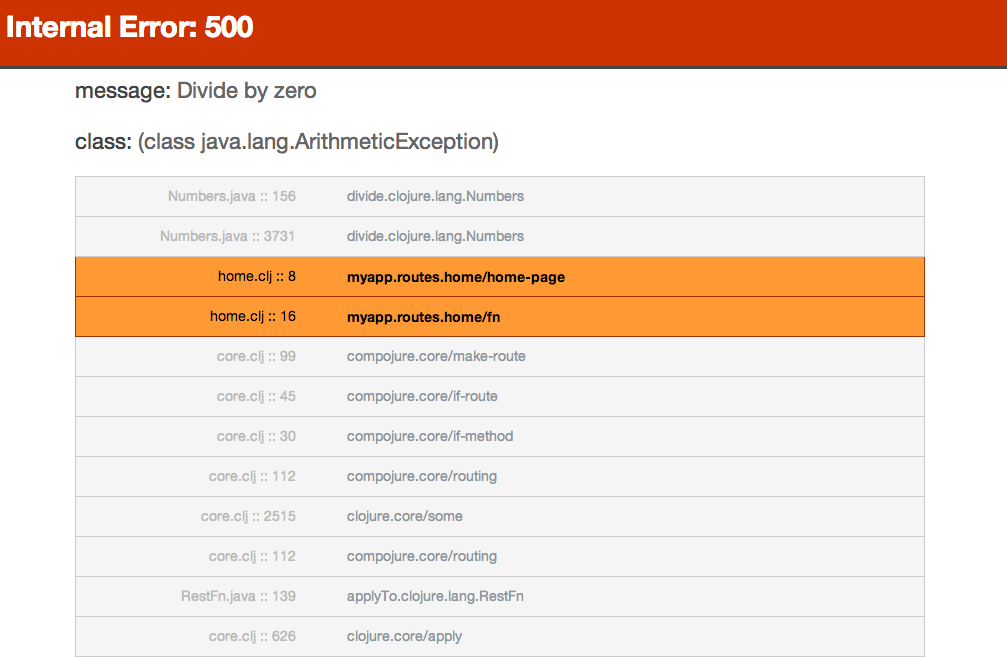
...
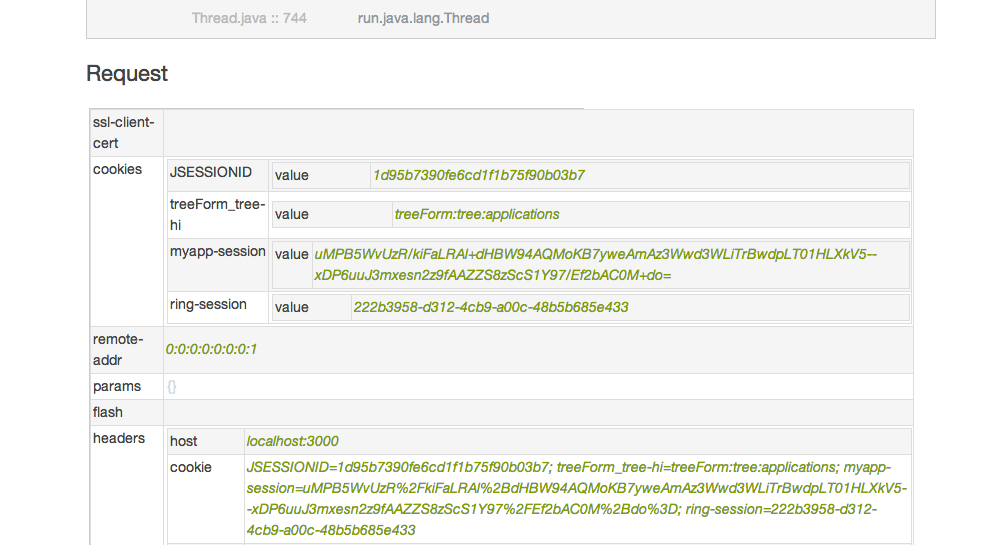
Install
-------
Add the following dependency to your `project.clj` file:
[](http://clojars.org/noir-exception)
Usage
-------
The library provides two middleware functions called `wrap-exceptions` and `wrap-internal-error`.
The `wrap-exceptions` function will create styled stack traces to highlight local namespaces.
This is useful for quickly identifying what matters most in stack traces during development.
If you have, as an example, development and production profiles,
use the `quiet?` optional flag to set the profile - `#(wrap-exceptions % quiet?)`.
If you always want to show the stack traces, just use `wrap-exceptions`.
```clj
(ns my.ns
(:require [noir-exception.core :refer [wrap-exceptions]]
...))
(def quiet? (not (= (System/getenv "PROFILE") "dev")))
(def app
(app-handler [routes]
:middleware [#(wrap-exceptions % quiet?)]))
```
The `wrap-internal-error` function allows catching errors and producing a standard error page.
This function should be used for handling errors in production, where you do not wish to expose
the internals of the application to the user. The function will print the stack trace
and request to standard out by default.
The function accepts two keyword arguments, named `:log` and `:error-response`. The first
allows providing a custom log function for the exceptions and the second can be used to supply
a custom error response.
Alternatively to `:error-response`, it's possible to supply the `:error-response-handler` key that
points to a function which can accept `:request` and `:error` as parameters and return
a string response that will be returned to the client. This can be useful for generating
contextual errors based on the contents of the request.
```clj
(ns my.ns
(:require [taoensso.timbre :as timbre]
[noir-exception.core :refer [wrap-internal-error]]
...))
(def app
(app-handler [routes]
:middleware [#(wrap-internal-error %
:log (fn [{:keys [error]}] (timbre/error error))
:error-response {:status 500
:headers {"Content-Type" "text/html"}
:body "something bad happened!"})]))
```
It's possible to reuse the error page in your handler like this:
```clj
(noir-exception.core/dev-page :error error :request request)
```
e.g., to send the error page to the developer by email.
It's also possible to reuse the production page:
```clj
(noir-exception.core/prod-page :h "We did something dumb"
:msg "Trained monkeys are fixing this mess")
(noir-exception.core/prod-page) ; uses library default messages
```
e.g., to present a custom message to your users.