https://github.com/yohasebe/rginger
RGinger takes an English sentence and gives correction and rephrasing suggestions for it using Ginger proofreading API.
https://github.com/yohasebe/rginger
english grammar proofread ruby
Last synced: over 1 year ago
JSON representation
RGinger takes an English sentence and gives correction and rephrasing suggestions for it using Ginger proofreading API.
- Host: GitHub
- URL: https://github.com/yohasebe/rginger
- Owner: yohasebe
- Created: 2013-11-28T07:12:29.000Z (over 12 years ago)
- Default Branch: master
- Last Pushed: 2020-05-20T02:46:53.000Z (about 6 years ago)
- Last Synced: 2025-04-05T00:46:51.029Z (over 1 year ago)
- Topics: english, grammar, proofread, ruby
- Language: Ruby
- Size: 166 KB
- Stars: 17
- Watchers: 2
- Forks: 2
- Open Issues: 2
-
Metadata Files:
- Readme: README.md
Awesome Lists containing this project
README
# RGinger
RGinger takes an English sentence and gives correction and rephrasing suggestions for it using Ginger proofreading API. It can be used both as a Ruby library and a command line application.
**IMPORTANT**
Version 0.1.5 dropped `rephrase` command-line option and `Rginger#rephrase` function because the API endpoint for these is no longer functioning. The relevant documentation in this readme will be kept as it was for the time being though.
## Installation
$ gem install rginger
## Command Line Usage
### Usage
$ rginger [options] "input text"
### Options
--coloring, --no-coloring, -c: Get colorful output (default: true)
--correction, --no-correction, -o: Get suggestions for correcting the original
sentence (default: true)
--rephrase, --no-rephrase, -r: Get suggestions for rephrasing the original
sentence (default: true)
--version, -v: Print version and exit
--help, -h: Show this message
### Output Sample
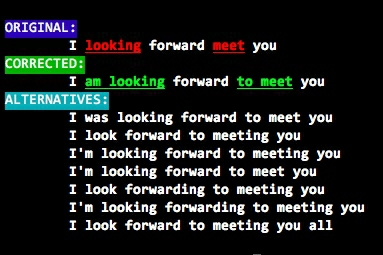
## Library Usage
require 'rginger'
text = "I looking forward meet you"
ginger = RGinger::Parser.new
result = ginger.correct text
# {"original"=>"I looking forward meet you",
# "data"=>
# [{"old"=>"looking",
# "from"=>2,
# "to"=>8,
# "reverse_from"=>-24,
# "reverse_to"=>-18,
# "new"=>"am looking"},
# {"old"=>"meet",
# "from"=>18,
# "to"=>21,
# "reverse_from"=>-8,
# "reverse_to"=>-5,
# "new"=>"to meet"}],
# "corrected"=>"I am looking forward to meet you"}
result = ginger.rephrase text
# {"original"=>"I looking forward meet you",
# "alternatives"=>
# ["I was looking forward to meet you",
# "I look forward to meeting you",
# "I'm looking forward to meeting you",
# "I'm looking forward to meet you",
# "I look forwarding to meeting you",
# "I'm looking forwarding to meeting you",
# "I look forward to meeting you all"]}
### References
Alif Rachmawadi's [Gingerice](https://github.com/subosito/gingerice) may be a better solution than RGinger for those who do not need colored command line output and "rephrase" functionality.
### Thanks
Ginger Software for the great software and services that support learners aspiring for skills of writing good English.