https://github.com/yoheinakajima/mindgraph
proof of concept prototype for generating and querying against an ever-expanding knowledge graph with ai
https://github.com/yoheinakajima/mindgraph
Last synced: about 1 year ago
JSON representation
proof of concept prototype for generating and querying against an ever-expanding knowledge graph with ai
- Host: GitHub
- URL: https://github.com/yoheinakajima/mindgraph
- Owner: yoheinakajima
- Created: 2024-03-16T06:09:37.000Z (over 2 years ago)
- Default Branch: main
- Last Pushed: 2024-04-08T09:52:36.000Z (about 2 years ago)
- Last Synced: 2025-04-12T12:54:24.313Z (about 1 year ago)
- Language: Python
- Homepage:
- Size: 192 KB
- Stars: 892
- Watchers: 15
- Forks: 109
- Open Issues: 4
-
Metadata Files:
- Readme: readme.md
Awesome Lists containing this project
- awesome-github-projects - mindgraph - proof of concept prototype for generating and querying against an ever-expanding knowledge graph with ai ⭐941 `Python` (📦 Legacy & Inactive Projects)
README
# MindGraph
Welcome to MindGraph, a proof of concept, open-source, API-first graph-based project designed for natural language interactions (input and output). This prototype serves as a template for building and customizing your own CRM solutions with a focus on ease of integration and extendibility. Here is the [announcement on X](https://twitter.com/yoheinakajima/status/1769019899245158648), for some more context.
## Getting Started
### Prerequisites
Before you begin, ensure you have the following installed:
- Python 3.6 or higher
- Poetry (dependency management and packaging tool)
### Installation
1. Clone the repository:
```sh
git clone https://github.com/yourusername/MindGraph.git
```
2. Navigate to the project directory:
```sh
cd MindGraph
```
3. Install the project dependencies using Poetry:
```sh
poetry install
```
This command will create a virtual environment for the project and install all the required packages specified in the ```pyproject.toml``` file.
- Note: If you get any dependencies error you can run: ```poetry add ``` to add dependency to the project.
## Environment Setup
1. Create a ```.env``` file in the project root directory.
2. Open the ```.env``` file and add the following line, replacing ```YOUR_API_KEY``` with your actual OpenAI API key:
```sh
OPENAI_API_KEY=YOUR_API_KEY
```
## Running the Application
After installing the dependencies, you can start the Flask server with:
```sh
poetry run python main.py
```
The server will launch on `http://0.0.0.0:81`.
## Project Structure
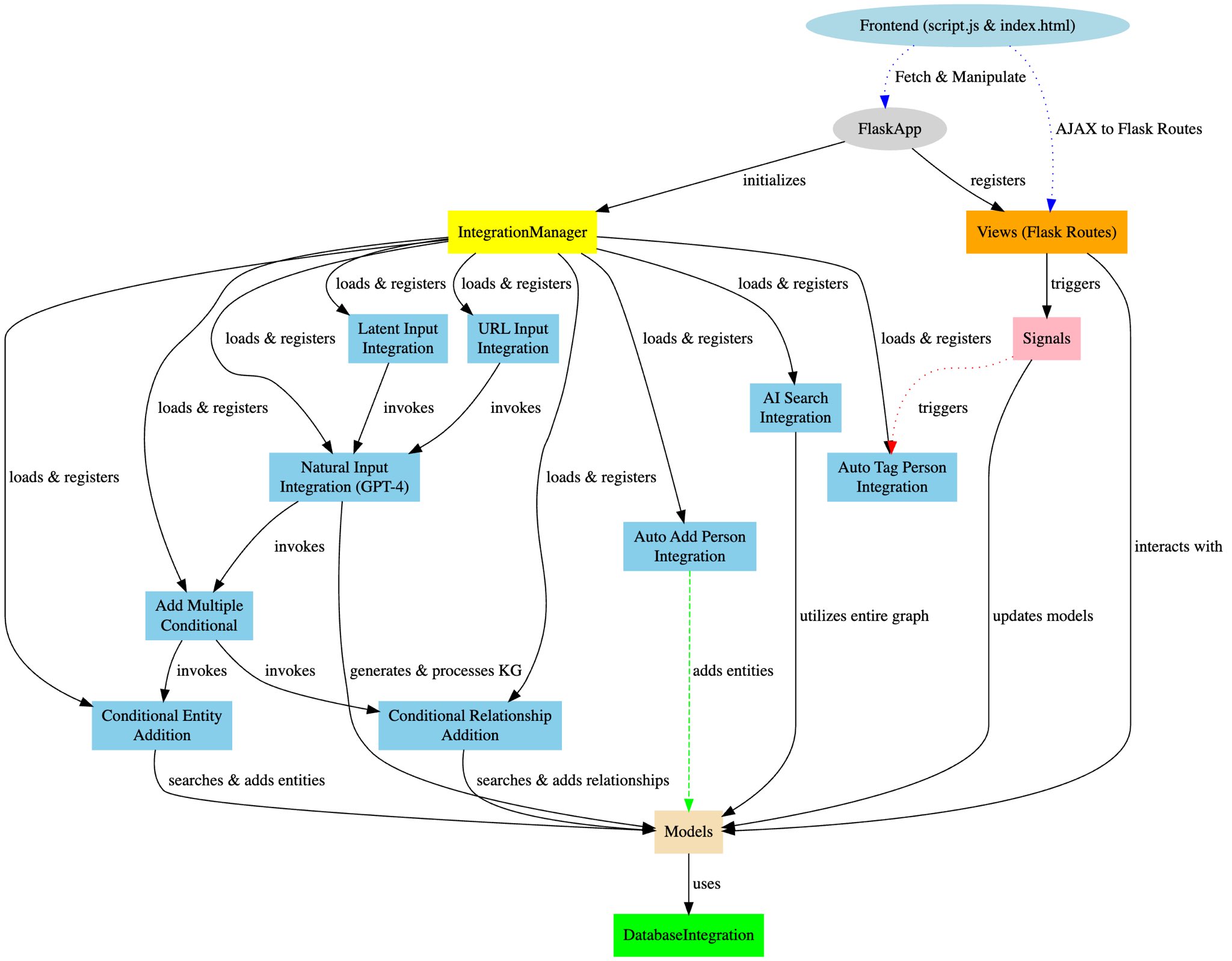
MindGraph is organized into several key components:
- `main.py`: The entry point to the application.
- `app/__init__.py`: Sets up the Flask app and integrates the blueprints.
- `models.py`: Manages the in-memory graph data structure for entities and relationships.
- `views.py`: Hosts the API route definitions.
- `integration_manager.py`: Handles the dynamic registration and management of integration functions.
- `signals.py`: Sets up signals for creating, updating, and deleting entities.
## Integration System
MindGraph employs a sophisticated integration system designed to extend the application's base functionality dynamically. At the core of this system is `integration_manager.py`, which acts as a registry and executor for various integration functions. This modular architecture allows MindGraph to incorporate AI-powered features seamlessly, such as processing natural language inputs into structured knowledge graphs through integrations like `natural_input.py`. Further integrations, including `add_multiple_conditional`, `conditional_entity_addition`, and `conditional_relationship_addition`, work in tandem to ensure the integrity and enhancement of the application's data model.
## Features
**Entity Management**: Entities are stored in an in-memory graph for quick access and manipulation, allowing CRUD operations on people, organizations, and their interrelations.
**Integration Triggers**: Custom integration functions can be triggered via HTTP requests, enabling the CRM to interact with external systems or run additional processing.
**Search Capabilities**: Entities and their relationships can be easily searched with custom query parameters.
**AI Readiness**: Designed with AI integrations in mind, facilitating the incorporation of intelligent data processing and decision-making.
## API Endpoints
MindGraph provides a series of RESTful endpoints:
- `POST /`: Create an entity.
- `GET //`: Retrieve an entity.
- `GET /`: List all entities of a type.
- `PUT //`: Update an entity.
- `DELETE //`: Remove an entity.
- `POST /relationship`: Establish a new relationship.
- `GET /search/entities/`: Search for entities.
- `GET /search/relationships`: Find relationships.
### Custom Integration Endpoint
- `POST /trigger-integration/`: Activates a predefined integration function.
## Frontend Overview
MindGraph's frontend features a lightweight interactive, web-based interface that facilitates dynamic visualization and management of the graph-based data model. While MindGraph is meant to be used as an API, the front-end was helpful for demo purposes. It leverages HTML, CSS, JavaScript, Cytoscape.js for graph visualization, and jQuery for handling AJAX requests.
### Features
- **Graph Visualization**: Uses Cytoscape.js for interactive graph rendering.
- **Dynamic Data Interaction**: Supports real-time data fetching, addition, and graph updating without page reloads.
- **Search and Highlight**: Allows users to search for nodes, highlighting and listing matches. Search form is being double used for natural language queries right now, which doesn't really make sense, but was a quick way to showcase functionality. (This is meant to be used as an API, front-end is for demo purpose)
- **Data Submission Forms**: Includes forms for natural language, URL inputs, and CSV file uploads.
- **Responsive Design**: Adapts to various devices and screen sizes.
### Workflow
1. **Initialization**: On page load, initializes the graph with styles and layout.
2. **User Interaction**: Through the interface, users can:
- Search for nodes, with results highlighted in the graph and listed in a sidebar.
- Add data using a form that supports various input methods.
- Refresh the graph to reflect the latest backend data.
3. **Data Processing**: User inputs are sent to the backend, processed, and integrated, with the frontend graph visualization updated accordingly.
## Schema-driven Knowledge Graph Creation
MindGraph utilizes a `schema.json` file to define the structure and relationships of entities within its knowledge graph. This schema acts as a blueprint for interpreting and structuring natural language inputs into a coherent graph format. It details the types of nodes (e.g., Person, Organization, Concept) and the possible relationships between them, ensuring that the generated knowledge graph adheres to a consistent format. This approach allows for automated, AI-driven processing of natural language inputs to generate structured data that reflects the complex interrelations inherent in the input text.
### Utilizing `schema.json` in AI Integration
When the `create_knowledge_graph` function processes an input, it consults `schema.json` to understand how to map the identified entities and their relationships into the graph. This includes:
- Identifying node types and attributes based on the schema definitions.
- Determining valid relationship types and their characteristics.
- Structuring the output to match the expected graph format, facilitating seamless integration with the application's data model.
The schema ensures that the AI-generated knowledge graph is not only consistent with the application's data model but also rich in detail, capturing the nuanced relationships between entities as described in the input.
### Benefits
- **Consistency**: Ensures that all knowledge graphs generated from natural language inputs adhere to the same structural rules, making data integration and interpretation more straightforward.
- **Flexibility**: Allows for easy updates and expansions of the knowledge graph structure by modifying `schema.json`, without requiring changes to the codebase.
- **AI Integration**: Facilitates the use of advanced AI models for natural language processing by providing a clear structure for the expected output, enhancing the application's ability to derive meaningful insights from unstructured data.
## Development & Extension
### Adding New Integrations
To incorporate a new integration into MindGraph, create a Python module within the `integrations` directory. This module should define the integration's logic and include a `register` function that connects the integration to the `IntegrationManager`. Ensure that your integration interacts properly with the application's components, such as `models.py` for data operations and `views.py` for activation via API endpoints. This approach allows MindGraph to dynamically expand its capabilities through modular and reusable code.
### Utilizing Signals
Signals are emitted for entity lifecycle events, providing hooks for extending functionality or syncing with other systems.
## Database Integration and Usage
MindGraph supports flexible database integration to enhance its data storage and retrieval capabilities. Out of the box, MindGraph includes support for an in-memory database and a more robust, cloud-based option, NexusDB. This flexibility allows for easy adaptation to different deployment environments and use cases.
### Supported Databases
- InMemoryDatabase: A simple, in-memory graph data structure for quick prototyping and testing. Not recommended for production use due to its non-persistent nature.
- NexusDB: An all-in-one cloud database designed for storing graphs, tables, documents, files, vectors, and more. Offers a shared knowledge graph for comprehensive data management and analysis.
Configuring the Database
- NebulaGraph: A distributed, scalable, and lightning-fast graph database that supports real-time queries and analytics. Ideal for large-scale graph data storage and processing.
- FalkorDB: A knowledge DB, providing low latency & high throughput, with built-in support for vector search and wide coverage of the Cypher query language.
Database integration is controlled through the DATABASE_TYPE environment variable. To select a database, set this variable:
- `memory` for the in-memory database.
- `nexusdb` for NexusDB integration.
```sh
export DATABASE_TYPE=nexusdb
```
- `nebulagraph` for NebulaGraph integration.
> Note: For a running [NebulaGraph](https://github.com/vesoft-inc/nebula), consider using the [Docker Desktop Extension](https://hub.docker.com/extensions/weygu/nebulagraph-dd-ext), [NebulaGraph-Lite](https://github.com/nebula-contrib/nebulagraph-lite) for Colab/Linux with pip install, or explore more options in the [Docs](https://docs.nebula-graph.io/).
```sh
export DATABASE_TYPE=nebulagraph
export NEBULA_ADDRESS=127.0.0.1:9669
```
- `falkordb` for FalkorDB integration.
> Note: For a running [FalkorDB](https://www.falkordb.com), consider using the [Docker Image](https://hub.docker.com/r/falkordb/falkordb).
```sh
export DATABASE_TYPE=falkordb
export FALKOR_HOST=127.0.0.1
export FALKOR_PORT=6379
export FALKOR_GRAPH_ID=mindgraph
```
### Adding New Database Integrations
To integrate a new database system into MindGraph:
1) Implement the Database Integration: Create a new Python module under app/integrations/database following the abstract base class DatabaseIntegration defined in base.py. Your implementation should provide concrete methods for all abstract methods in the base class.
2) Register Your Integration: Modify the database type detection logic in app/integrations/database/__init__.py to include your new database type. This involves adding an additional elif statement to check for your database's type and set the CurrentDBIntegration accordingly.
3) Configure Environment Variables: If your integration requires custom environment variables (e.g., for connection strings, authentication), ensure they are documented and set properly in the environment where MindGraph is deployed.
### Schema Management
For databases requiring schema definitions (like NexusDB), include a schema management strategy within your integration module. This may involve checking and updating the database schema on startup to ensure compatibility with the current version of MindGraph.
## Example Command
To create a person via `curl`:
```sh
curl -X POST http://0.0.0.0:81/people \
-H "Content-Type: application/json" \
-d '{"name":"Jane Doe","age":28}'
```
### Example Use Cases
To demonstrate the power of MindGraph's integration system, here are some example commands:
#### Triggering Natural Input Integration
```sh
curl -X POST http://0.0.0.0:81/trigger-integration/natural_input \
-H "Content-Type: application/json" \
-d '{"input":"Company XYZ organized an event attended by John Doe and Jane Smith."}'
```
## Contributions
Let's be honest... I don't maintain projects. If you want to take over/manage this, let me know (X/Twitter is a good channel). Otherwise, enjoy this proof of concept starter kit as it is :)
## License
MindGraph is distributed under the MIT License. See `LICENSE` for more information.
## Contact
Just tag me on Twitter/X [https://twitter.com/yoheinakajima](https://twitter.com/yoheinakajima)
Project Link: [https://github.com/yoheinakajima/MindGraph](https://github.com/yoheinakajima/MindGraph)