https://github.com/yonat/yonautocomplete
Add auto-completion to a UITextField
https://github.com/yonat/yonautocomplete
autocomplete uitextfield
Last synced: about 1 year ago
JSON representation
Add auto-completion to a UITextField
- Host: GitHub
- URL: https://github.com/yonat/yonautocomplete
- Owner: yonat
- License: mit
- Created: 2014-06-26T13:39:24.000Z (about 12 years ago)
- Default Branch: master
- Last Pushed: 2024-04-29T17:37:39.000Z (over 2 years ago)
- Last Synced: 2025-04-14T20:42:05.627Z (over 1 year ago)
- Topics: autocomplete, uitextfield
- Language: Objective-C
- Size: 39.1 KB
- Stars: 9
- Watchers: 3
- Forks: 3
- Open Issues: 0
-
Metadata Files:
- Readme: README.md
- Changelog: CHANGELOG.md
- Funding: .github/FUNDING.yml
- License: LICENSE.txt
Awesome Lists containing this project
README
## YONAutoComplete - Add auto-completion to a UITextField
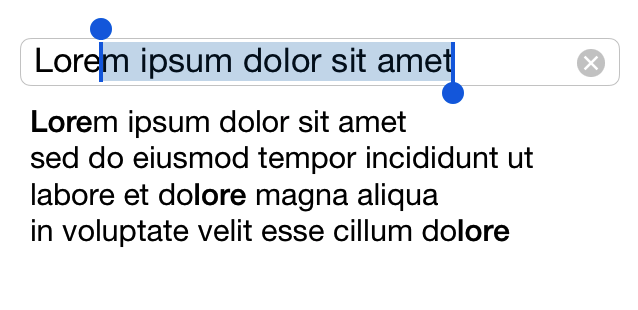
Simplest auto-complete:
just create a `YONAutoComplete` object and assign it as the delegate of a `UITextField`:
```objective-c
YONAutoComplete *autoComplete = [YONAutoComplete new];
textField.delegate = autoComplete;
```
The user can either choose from the list of completions, or type a new value that will be added to the list automatically.
If you need to have your own delegate for the text field, set it on the `YONAutoComplete` instance:
```objective-c
autoComplete.textFieldDelegate = myTextFieldDelegate;
```
### Customization
You can use pre-assembled completions list from a text file:
```objective-c
autoComplete.completionsFileName = @"SomeFileName";
```
Or set the completions list programmatically:
```objective-c
autoComplete.completions = @[@"First Item", @"Second Item"];
```
To prevent user-typed values from being added to the completions list:
```objective-c
autoComplete.freezeCompletionsFile = YES;
```
Limit number of completions shown:
```objective-c
autoComplete.maxCompletions = 7;
```
## Installation
### CocoaPods:
```ruby
pod 'YONAutoComplete'
```