https://github.com/yoonit-labs/android-yoonit-camera
The most advanced and modern Camera module for Android with a lot of awesome features
https://github.com/yoonit-labs/android-yoonit-camera
android camera hacktoberfest kotlin
Last synced: about 1 year ago
JSON representation
The most advanced and modern Camera module for Android with a lot of awesome features
- Host: GitHub
- URL: https://github.com/yoonit-labs/android-yoonit-camera
- Owner: Yoonit-Labs
- License: mit
- Created: 2020-09-10T15:12:15.000Z (almost 6 years ago)
- Default Branch: main
- Last Pushed: 2021-10-04T13:18:13.000Z (almost 5 years ago)
- Last Synced: 2025-03-29T07:22:40.171Z (over 1 year ago)
- Topics: android, camera, hacktoberfest, kotlin
- Language: Kotlin
- Homepage:
- Size: 15.6 MB
- Stars: 55
- Watchers: 4
- Forks: 3
- Open Issues: 2
-
Metadata Files:
- Readme: README.md
- License: LICENSE
Awesome Lists containing this project
README
Android Yoonit Camera


◻ Modern Android Camera API Camera X
◻ Camera preview (Front & Back)
◻ Yoonit Facefy integration
◻ PyTorch integration
◻ Computer vision pipeline
◻ Face detection, capture and image crop
◻ Understanding of the human face
◻ Frame capture
◻ Capture timed images
◻ QR Code scanning
## Table of Contents
* [Installation](#installation)
* [Usage](#usage)
* [Camera Preview](#camera-preview)
* [Start capturing face images](#start-capturing-face-images)
* [Start scanning QR Codes](#start-capturing-face-images)
* [API](#api)
* [Variables](#variables)
* [Methods](#methods)
* [Events](#events)
* [Face Analysis](#face-analysis)
* [Head Movements](#head-movements)
* [Image Quality](#image-quality)
* [KeyError](#keyerror)
* [Message](#message)
* [To contribute and make it better](#to-contribute-and-make-it-better)
## Installation
Add the JitPack repository to your root `build.gradle` at the end of repositories
```groovy
allprojects {
repositories {
..
maven { url 'https://jitpack.io' }
}
}
```
Add the dependency
```groovy
dependencies {
implementation 'com.github.Yoonit-Labs:android-yoonit-camera:master-SNAPSHOT'
}
```
## Usage
All the functionalities that the `android-yoonit-camera` provides is accessed through the `CameraView`, that includes the camera preview. Below we have the basic usage code, for more details, see the [**API**](#api) section.
### Camera Preview
Do not forget request camera permission. Use like this in the your layout XML:
```kotlin
```
And inside your code:
```kotlin
var cameraView: CameraView
this.cameraView = camera_view
this.cameraView.startPreview()
```
### Start capturing face images
With camera preview, we can start capture detected face and generate images:
```kotlin
this.cameraView.startCaptureType("face")
```
Set camera event listener to get the result:
```kotlin
this.cameraView.setCameraEventListener(this.buildCameraEventListener())
..
fun buildCameraEventListener(): CameraEventListener = object : CameraEventListener {
..
override fun onImageCaptured(
type: String,
count: Int,
total: Int,
imagePath: String,
inferences: ArrayList>,
darkness: Double,
lightness: Double,
sharpness: Double
) {
// YOU CODE
}
override fun onFaceDetected(
x: Int,
y: Int,
width: Int,
height: Int,
leftEyeOpenProbability: Float?,
rightEyeOpenProbability: Float?,
smilingProbability: Float?,
headEulerAngleX: Float,
headEulerAngleY: Float,
headEulerAngleZ: Float
) {
// YOU CODE
}
..
}
```
### Start scanning QR Codes
With camera preview, we can start scanning QR codes:
```kotlin
this.cameraView.startCaptureType("qrcode")
```
Set camera event listener to get the result:
```kotlin
this.cameraView.setCameraEventListener(this.buildCameraEventListener())
..
fun buildCameraEventListener(): CameraEventListener = object : CameraEventListener {
..
override fun onQRCodeScanned(content: String) {
// YOUR CODE
}
..
}
```
## API
### Variables
| Variable | Type | Default Value | Description
| - | - | - | -
| detectionTopSize | Float | '0.0f' | Represents the percentage. Positive value enlarges and negative value reduce the top side of the detection. Use the `setDetectionBox` to have a visual result.
| detectionRightSize | Float | '0.0f' | Represents the percentage. Positive value enlarges and negative value reduce the right side of the detection. Use the `setDetectionBox` to have a visual result.
| detectionBottomSize | Float | '0.0f' | Represents the percentage. Positive value enlarges and negative value reduce the bottom side of the detection. Use the `setDetectionBox` to have a visual result.
| detectionLeftSize | Float | '0.0f' | Represents the percentage. Positive value enlarges and negative value reduce the left side of the detection. Use the `setDetectionBox` to have a visual result.
| ComputerVision.enable | Boolean | `false | Enable/disable computer vision usage.
| ComputerVision.modelPaths | ArrayList | `[]` | The computer vision model paths.
| ComputerVision.inputSize | Size | `(0, 0)` | Image input size to use the loaded model paths.
### Methods
| Function | Parameters | Valid values | Return Type | Description
| - | - | - | - | -
| startPreview | - | - | void | Start camera preview if has permission.
| startCaptureType | `captureType: String` |

- `"none"`
- `"face"`
- `"qrcode"`
- `"frame"`
| stopCapture | - | - | void | Stop any type of capture.
| destroy | - | - | void | Destroy camera preview.
| toggleCameraLens | - | - | void | Set camera lens facing front or back.
| setCameraLens | `cameraLens: String` |
- `"front"`
- `"back"`
| getCameraLens | - | - | Int | Return `Int` that represents lens face state: 0 for front 1 for back camera.
| setNumberOfImages | `numberOfImages: Int` | Any positive `Int` value. | void | Default value is 0. For value 0 is saved infinity images. When saved images reached the "number os images", the `onEndCapture` is triggered.
| setTimeBetweenImages | `timeBetweenImages: Long` | Any positive number that represent time in milli seconds. | void | Set saving face/frame images time interval in milli seconds.
| setOutputImageWidth | `width: Int` | Any positive `number` value that represents in pixels. | void | Set face image width to be created in pixels.
| setOutputImageHeight | `height: Int` | Any positive `number` value that represents in pixels. | void | Set face image height to be created in pixels.
| setSaveImageCaptured | `enable: Boolean` | `true` or `false`. | void | Set to enable/disable save image when capturing face and frame.
| setDetectionBox | `enable: Boolean` | `true` or `false`. | void | Set to enable/disable detection box when face/qrcode detected. The detection box is the the face/qrcode bounding box normalized to UI.
| setDetectionBoxColor | `alpha: Int, red: Int, green: Int, blue: Int` | Value between `0` and `1`. | void | Set detection box ARGB color. Default value is `(100, 255, 255, 255)`.
| setDetectionMinSize | `minimumSize: Float` | Value between `0` and `1`. Represents the percentage. | void | Set face/qrcode minimum size to detect in percentage related with the camera preview.
| setDetectionMaxSize | `maximumSize: Float` | Value between `0` and `1`. Represents the percentage. | void | Set face/qrcode maximum size to detect in percentage related with the camera preview.
| setFaceContours | `enable: Boolean` | `true` or `false`. | void | Set to enable/disable face contours when face detected.
| setFaceContoursColor | `alpha: Int, red: Int, green: Int, blue: Int` | Positive value between 0 and 255. | void | Set face contours ARGB color. Default value is `(100, 255, 255, 255)`.
| setROI | `enable: Boolean` | `true` or `false`. | void | Enable/disable the region of interest capture.
| setROITopOffset | `topOffset: Float` | Value between `0` and `1`. Represents the percentage. | void | Camera preview top distance in percentage.
| setROIRightOffset | `rightOffset: Float` | Value between `0` and `1`. Represents the percentage. | void | Camera preview right distance in percentage.
| setROIBottomOffset | `bottomOffset: Float` | Value between `0` and `1`. Represents the percentage. | void | Camera preview bottom distance in percentage.
| setROILeftOffset | `leftOffset: Float` | Value between `0` and `1`. Represents the percentage. | void | Camera preview left distance in percentage.
| setROIAreaOffset | `enable: Boolean` | `true` or `false`. | void | Set to enable/disable region of interest offset visibility.
| setROIAreaOffsetColor | `alpha: Int, red: Int, green: Int, blue: Int` | Any positive integer between 0 and 255. | void | Set face region of interest area offset color. Default value is `(100, 255, 255, 255)`.
| setBlurFaceDetectionBox | `enable: Boolean` | `true` or `false`. | void | Enable/disable blur in face detection box.
| setColorEncodingCapture | `colorEncoding: String` |
- `"RGB"`
- `"YUV"` | void | Set the color encoding for the saved images.
- type: '"face"' or '"frame"'
- count: current index
- total: total to create
- imagePath: the image path
- inferences: each array element is the image inference result.
- darkness: image darkness classification.
- lightness: image lightness classification.
- sharpness: image sharpness classification.
| setTorch | `enable: Boolean` | `true` or `false`. | void | Set to enable/disable the device torch. Available only to camera lens `"back"`.
| ComputerVision.clear | - | - | void | Clear computer vision model paths.
### Events
| Event | Parameters | Description
| - | - | -
| onImageCaptured | `type: String, count: Int, total: Int, imagePath: String, inferences: ArrayList>, darkness: Double, lightness: Double, sharpness: Double` | Must have started capture type of face/frame (see `startCaptureType`). Emitted when the image file is created:
| onFaceDetected | `x: Int, y: Int, width: Int, height: Int, leftEyeOpenProbability: Float?, rightEyeOpenProbability: Float?, smilingProbability: Float?, headEulerAngleX: Float, headEulerAngleY: Float, headEulerAngleZ: Float` | Must have started capture type of face. Emit the [face analysis](#face-analysis).
| onFaceUndetected | - | Must have started capture type of face. Emitted after `onFaceDetected`, when there is no more face detecting.
| onEndCapture | - | Must have started capture type of face/frame. Emitted when the number of image files created is equal of the number of images set (see the method `setNumberOfImages`).
| onQRCodeScanned | `content: String` | Must have started capture type of qrcode (see `startCaptureType`). Emitted when the camera scan a QR Code.
| onError | `error: String` | Emit message error.
| onMessage | `message: String` | Emit message.
| onPermissionDenied | - | Emit when try to `startPreview` but there is not camera permission.
#### Face Analysis
The face analysis is the response send by the `onFaceDetected`. Here we specify all the parameters.
| Attribute | Type | Description |
| - | - | - |
| x | `Int` | The `x` position of the face in the screen. |
| y | `Int` | The `y` position of the face in the screen. |
| width | `Int` | The `width` position of the face in the screen. |
| height | `Int` | The `height` position of the face in the screen. |
| leftEyeOpenProbability | `Float?` | The left eye open probability. |
| rightEyeOpenProbability | `Float?` | The right eye open probability. |
| smilingProbability | `Float?` | The smiling probability. |
| headEulerAngleX | `Float` | The angle in degrees that indicate the vertical head direction. See [Head Movements](#headmovements) |
| headEulerAngleY | `Float` | The angle in degrees that indicate the horizontal head direction. See [Head Movements](#headmovements) |
| headEulerAngleZ | `Float` | The angle in degrees that indicate the tilt head direction. See [Head Movements](#headmovements) |
#### Head Movements
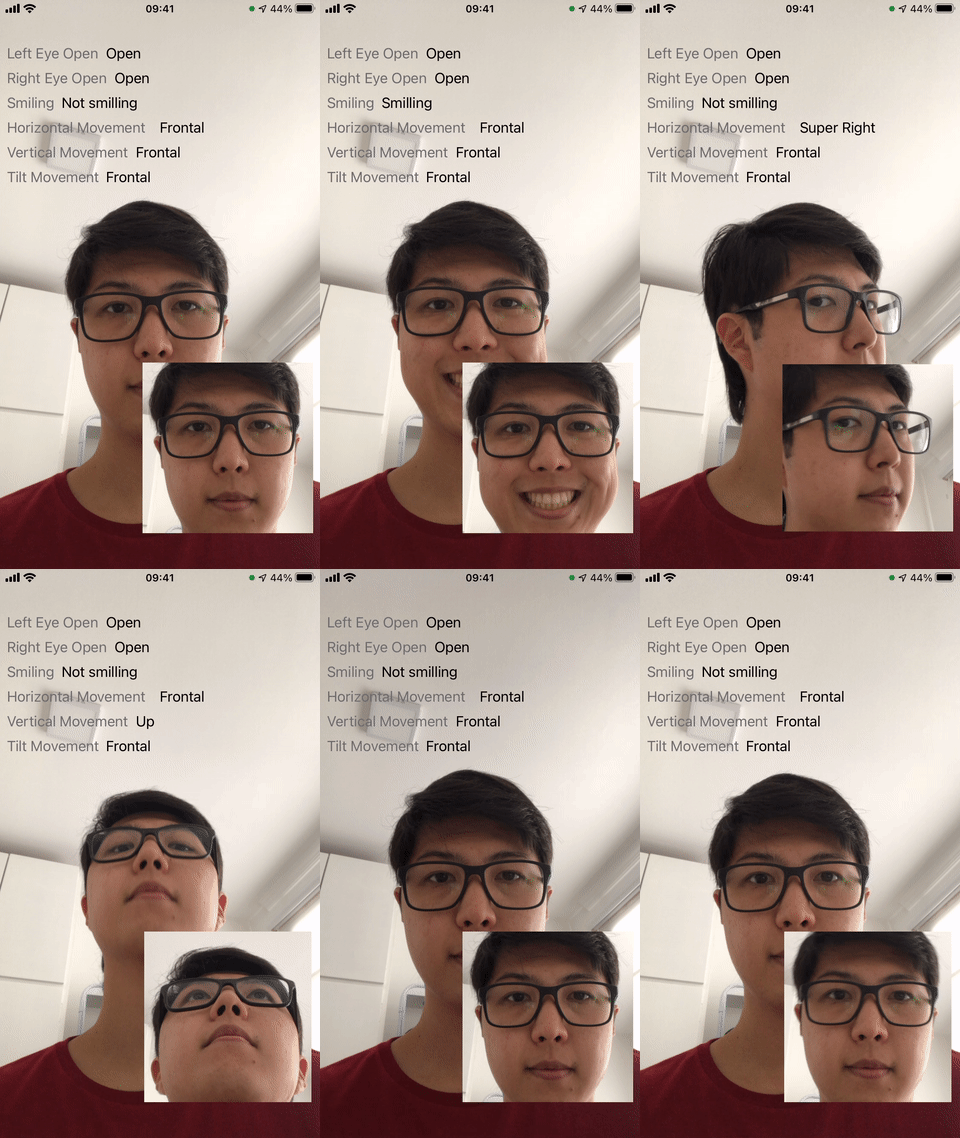
Here we explaining the above gif and how reached the "results". Each "movement" (vertical, horizontal and tilt) is a state, based in the angle in degrees that indicate head direction;
| Head Direction | Attribute | _v_ < -36° | -36° < _v_ < -12° | -12° < _v_ < 12° | 12° < _v_ < 36° | 36° < _v_ |
| - | - | - | - | - | - | - |
| Vertical | `headEulerAngleX` | Super Down | Down | Frontal | Up | Super Up |
| Horizontal | `headEulerAngleY` | Super Left | Left | Frontal | Right | Super Right |
| Tilt | `headEulerAngleZ` | Super Right | Right | Frontal | Left | Super Left |
### Image Quality
The image quality is the classification of the three attributes: darkness, lightness and sharpness. Result available in the `onImageCaptured` event. Let's see each parameter specifications:
| Threshold | Classification
| - | -
| **Darkness** |
| darkness > 0.7 | Too dark
| darkness <= 0.7 | Acceptable
| **Lightness** |
| lightness > 0.65 | Too light
| lightness <= 0.65 | Acceptable
| **Sharpness** |
| sharpness >= 0.1591 | Blurred
| sharpness < 0.1591 | Acceptable
### KeyError
Pre-define key error constants used by the `onError` event.
| KeyError | Description
| - | -
| INVALID_CAPTURE_TYPE | Tried to start a non-existent capture type.
| INVALID_CAMERA_LENS | Tried to input invalid camera lens.
| INVALID_NUMBER_OF_IMAGES | Tried to input invalid face/frame number of images to capture.
| INVALID_TIME_BETWEEN_IMAGES | Tried to input invalid face time interval to capture face.
| INVALID_OUTPUT_IMAGE_WIDTH | Tried to input invalid image width.
| INVALID_OUTPUT_IMAGE_HEIGHT | Tried to input invalid image height.
| INVALID_DETECTION_BOX_COLOR | Tried to input invalid detection box ARGB value color.
| INVALID_MINIMUM_SIZE | Tried to input invalid minimum size.
| INVALID_MAXIMUM_SIZE | Tried to input invalid maximum size.
| INVALID_FACE_CONTOURS_COLOR | Tried to input invalid face contour ARGB value color.
| INVALID_ROI_TOP_OFFSET | Tried to input invalid region of interest top offset.
| INVALID_ROI_RIGHT_OFFSET | Tried to input invalid region of interest right offset.
| INVALID_ROI_BOTTOM_OFFSET | Tried to input invalid region of interest bottom offset.
| INVALID_ROI_LEFT_OFFSET | Tried to input invalid region of interest left offset.
| INVALID_ROI_COLOR | Tried to input invalid region of interest area offset ARGB value color.
| INVALID_IMAGE_CAPTURE_COLOR_ENCODING | Tried to input invalid image capture color encoding.
| INVALID_COMPUTER_VISION_MODEL_PATHS | Tried to input a non existent computer vision model paths.
### Message
Pre-define message constants used by the `onMessage` event.
| Message | Description
| - | -
| INVALID_MINIMUM_SIZE | Face/QRCode width percentage in relation of the screen width is less than the set (`setDetectionMinSize`).
| INVALID_MAXIMUM_SIZE | Face/QRCode width percentage in relation of the screen width is more than the set (`setDetectionMaxSize`).
| INVALID_OUT_OF_ROI | Face bounding box is out of the set region of interest (`setROI`).
| INVALID_TORCH_LENS_USAGE | Torch not available with camera lens "front" (`setTorch`).
## To contribute and make it better
Clone the repo, change what you want and send PR.
For commit messages we use Conventional Commits.
Contributions are always welcome!
---
Code with ❤ by the [**Yoonit**](https://yoonit.dev/) Team