https://github.com/yosebyte/passport
Powerful yet simple solution for network tunneling and port forwarding with access control all using 1-URL command.
https://github.com/yosebyte/passport
access-controls forwarding golang networking tunneling
Last synced: 8 months ago
JSON representation
Powerful yet simple solution for network tunneling and port forwarding with access control all using 1-URL command.
- Host: GitHub
- URL: https://github.com/yosebyte/passport
- Owner: yosebyte
- License: mit
- Created: 2024-11-06T02:10:01.000Z (over 1 year ago)
- Default Branch: main
- Last Pushed: 2025-04-05T00:21:19.000Z (about 1 year ago)
- Last Synced: 2025-04-05T01:22:44.381Z (about 1 year ago)
- Topics: access-controls, forwarding, golang, networking, tunneling
- Language: Go
- Homepage:
- Size: 1.5 MB
- Stars: 171
- Watchers: 4
- Forks: 14
- Open Issues: 0
-
Metadata Files:
- Readme: README.md
- License: LICENSE
Awesome Lists containing this project
README


[](https://goreportcard.com/report/github.com/yosebyte/passport)
[](https://pkg.go.dev/github.com/yosebyte/passport)



> **Note**
> The tunnel functionality of the `passport` project has been separated into a new project called [NodePass](https://github.com/yosebyte/nodepass), which focuses on secure and efficient TCP tunneling. The remaining port forwarding components in `passport` are currently being refactored.
"Access pass required to pass through port."
## Overview
**Passport** is a powerful connection management tool that simplifies network tunneling, port forwarding and more. By seamlessly integrating three distinct running modes within a single binary file, Passport bridges the gap between different network environments, redirecting services and handling connections seamlessly, ensuring reliable network connectivity and ideal network environment. Also with highly integrated authorization handling, Passport empowers you to efficiently manage user permissions and establish uninterrupted data flow, ensuring that sensitive resources remain protected while applications maintain high performance and responsiveness.
## Features
- **Unified Operation**: Passport can function as a server, client, or broker, three roles from a single executable file.
- **Authorization Handling**: By IP address handling, Passport ensures only authorized users gain access to sensitive resources.
- **In-Memory Certificate**: Provides a self-signed HTTPS certificate with a one-year validity, stored entirely in memory.
- **Network Tunneling**: Supports both TCP and/or UDP intranet penetration services with full-process TLS encryption processing.
- **Port Forwarding**: Efficiently manage and redirect your TCP and/or UDP services from one port to entrypoints everywhere.
- **Auto Reconnection**: Providing robust short-term reconnection capabilities, ensuring uninterrupted service.
- **Zero Dependencies**: Fully self-contained, with no external dependencies, ensuring a simple and efficient setup.
- **Zero Configuration File**: Simply execute with a single URL command, making it ideal for containerized environments.
## Designs
### Network Tunneling
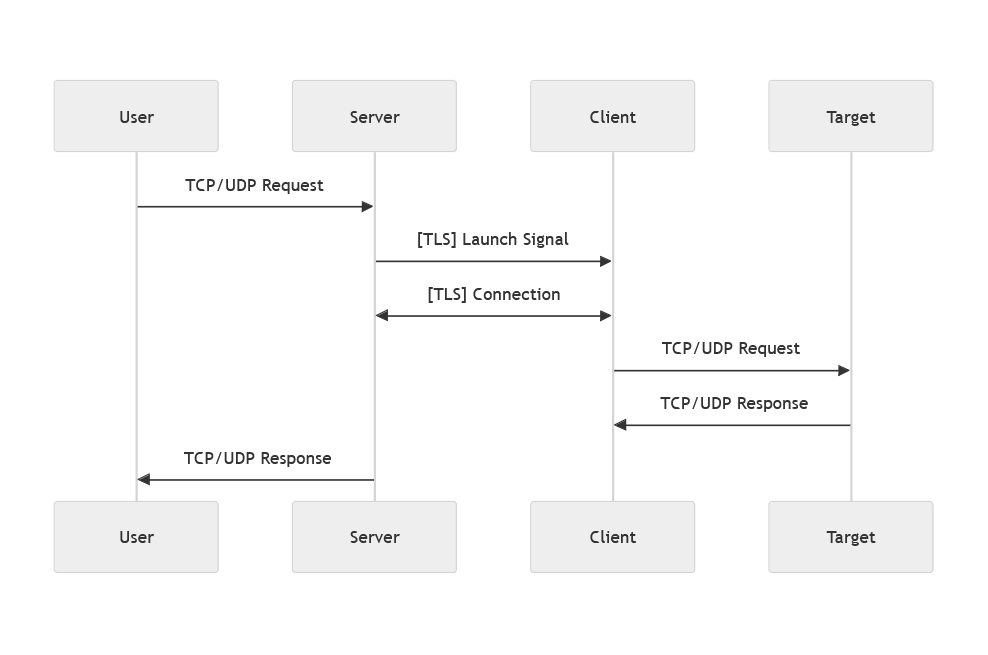
Tunneling establishes seamless access to otherwise unreachable resources. A user’s request is sent to the server, which forwards it through a pre-established TLS-encrypted channel to the client. The client then connects to the target service, creating two secure links: one to the server and another to the target. This enables data exchange between the client and the target, and subsequently between the server and the user. For concurrent user requests, multiple TLS-encrypted connections are established, supporting native high-concurrency performance. Notably, UDP tunneling leverages the same TLS-encrypted TCP channels between the server and client, ensuring security and eliminating latency caused by unsuccessful NAT traversal attempts.
### Port Forwarding
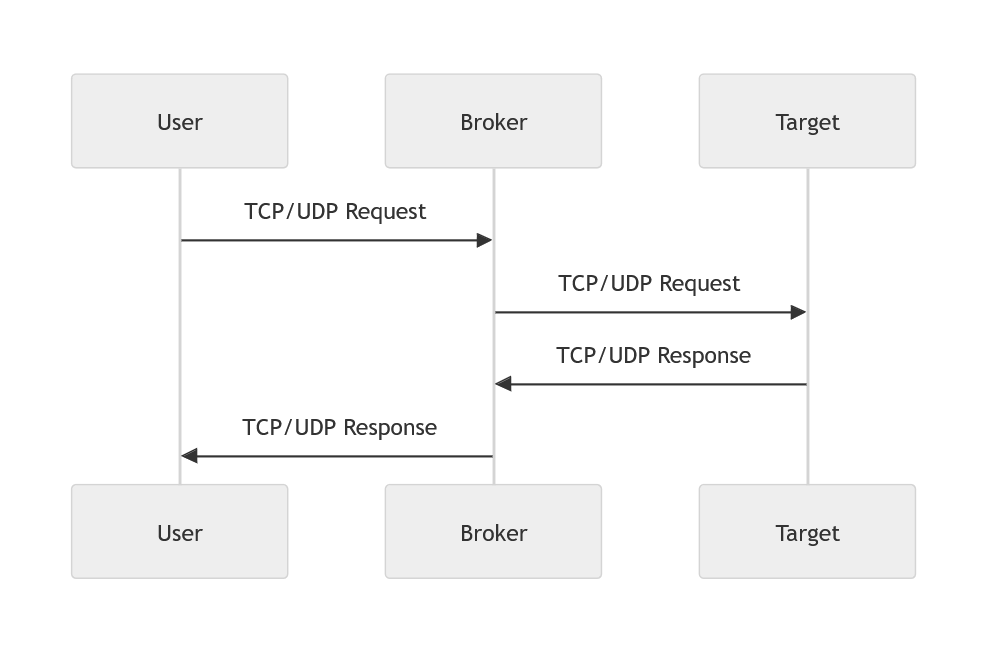
Forwarding simplifies the process by directly relaying user TCP/UDP requests to the target service via a broker. The broker establishes a connection with the target, exchanges data with the service, and returns responses to the user. While this mode supports high concurrency if the user-side supports multithreading, it does not employ TLS encryption. For secure usage, ensure the target service provides its own transmission security.
### Access Control
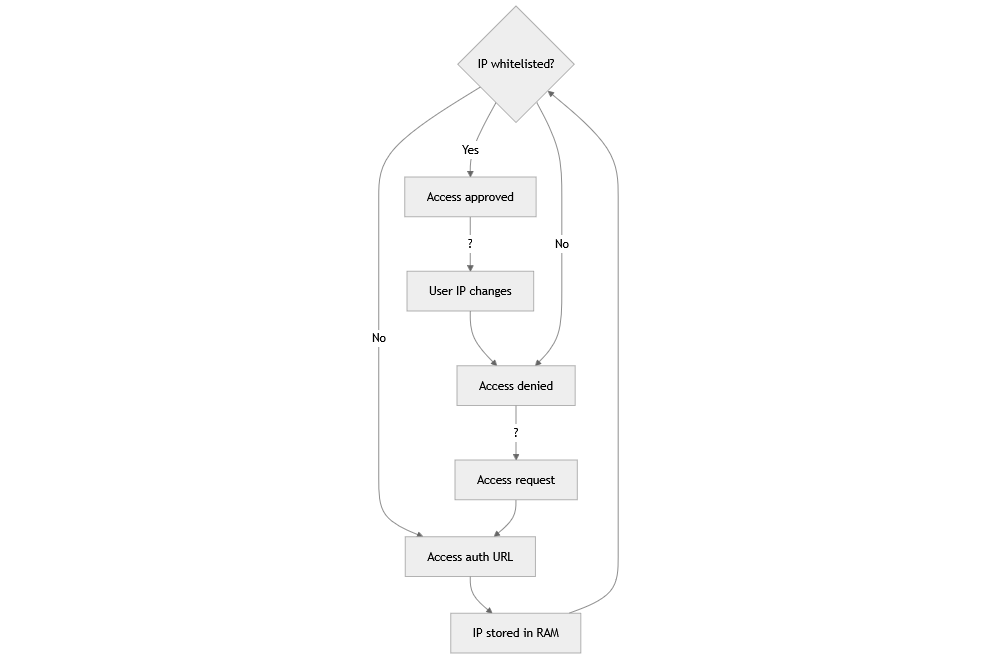
The authentication system employs a secure and dynamic IP whitelisting mechanism designed to manage access control effectively. Verified IP addresses are stored in memory for the duration of the server or broker's runtime, with all entries cleared upon server restart to ensure that no stale or unauthorized IPs remain active. This design prioritizes security by requiring reauthentication after a restart. When a user attempts to access a resource, their IP is checked against the whitelist. If the IP is present, access is granted seamlessly. If the user's IP has changed, or if the IP is not whitelisted, the system blocks access and redirects the user to an authentication URL. Successful authentication not only verifies the user's access but also updates the whitelist by temporarily storing the IP in memory and returning the current IP address to confirm the process. Unauthorized IPs remain blocked until proper authentication is completed. This approach combines real-time validation, adaptability to changing IPs, and enhanced security measures to provide a reliable access control solution.
## Basic Usage
You can easily learn how to use it correctly by running passport directly without parameters.
```
Usage:
passport :///#
Examples:
# Run as server
passport server://10.0.0.1:10101/:10022#http://:80/secret
# Run as client
passport client://10.0.0.1:10101/127.0.0.1:22
# Run as broker
passport broker://:8080/10.0.0.1:8080#https://:443/secret
Arguments:
Select from "server", "client" or "broker"
Tunneling or forwarding address to connect
Service address to be exposed or forwarded
Optional authorizing options in URL format
```
### Server Mode
- `linkAddr`: The address for accepting client connections. For example, `:10101`.
- `targetAddr`: The address for listening to external connections. For example, `:10022`.
**Run as Server**
```
./passport server://:10101/:10022
```
- This command will listen for client connections on port `10101` , listen and forward data to port `10022`.
**Run as Server with authorization**
```
./passport server://:10101/:10022#https://hostname:8443/server
```
- The server handles authorization at `https://hostname:8443/server`, on your visit and your IP logged.
- The server will listen for client connections on port `10101` , listen and forward data to port `10022`.
### Client Mode
- `linkAddr`: The address of the server to connect to. For example, `server_ip:10101`.
- `targetAddr`: The address of the target service to connect to. For example, `127.0.0.1:22`.
**Run as Client**
```
./passport client://server_hostname_or_IP:10101/127.0.0.1:22
```
- This command will establish link with `server_hostname_or_IP:10101` , connect and forward data to `127.0.0.1:22`.
### Broker Mode
- `linkAddr`: The address for accepting client connections. For example, `:10101`.
- `targetAddr`: The address of the target service to connect to. For example, `127.0.0.1:22`.
**Run as Broker**
```
./passport broker://:10101/127.0.0.1:22
```
- This command will listen both `tcp` and `udp` on port `10101` , connect and forward data to `127.0.0.1:22`.
**Run as Broker with authorization**
```
./passport broker://:10101/127.0.0.1:22#https://hostname:8443/broker
```
- The server handles authorization at `https://hostname:8443/broker`, on your visit and your IP logged.
- This command will listen both `tcp` and `udp` on port `10101` , connect and forward data to `127.0.0.1:22`.
## Container Usage
You can also run **Passport** using docker or podman. The image is available at [ghcr.io/yosebyte/passport](https://ghcr.io/yosebyte/passport).
To run the container in server mode with or without authorization:
```
docker run -d --rm \
ghcr.io/yosebyte/passport \
server://:10101/:10022#https://hostname:8443/server
```
```
docker run -d --rm \
ghcr.io/yosebyte/passport \
server://:10101/:10022
```
To run the container in client mode:
```
docker run -d --rm \
ghcr.io/yosebyte/passport \
client://server_hostname_or_IP:10101/127.0.0.1:22
```
To run the container in server mode with or without authorization:
```
docker run -d --rm \
ghcr.io/yosebyte/passport \
broker://:10101/127.0.0.1:22#https://hostname:8443/broker
```
```
docker run -d --rm \
ghcr.io/yosebyte/passport \
broker://:10101/127.0.0.1:22
```
## License
This project is licensed under the [MIT](LICENSE) License.
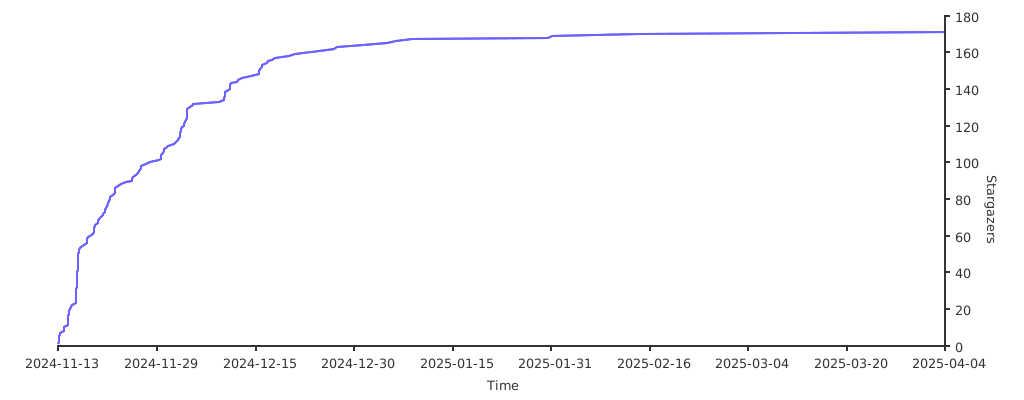
## Stargazers
[](https://starchart.cc/yosebyte/passport)