https://github.com/youngyangyang04/kvstoragebaseraft-cpp
【代码随想录知识星球】项目分享-基于Raft的k-v存储数据库🔥
https://github.com/youngyangyang04/kvstoragebaseraft-cpp
Last synced: 7 months ago
JSON representation
【代码随想录知识星球】项目分享-基于Raft的k-v存储数据库🔥
- Host: GitHub
- URL: https://github.com/youngyangyang04/kvstoragebaseraft-cpp
- Owner: youngyangyang04
- Created: 2023-12-07T08:45:06.000Z (about 2 years ago)
- Default Branch: main
- Last Pushed: 2025-01-16T07:30:00.000Z (12 months ago)
- Last Synced: 2025-06-04T03:57:44.272Z (7 months ago)
- Language: C++
- Homepage:
- Size: 10.1 MB
- Stars: 824
- Watchers: 4
- Forks: 158
- Open Issues: 19
-
Metadata Files:
- Readme: README.md
Awesome Lists containing this project
README
# KVstorageBaseRaft-cpp
> ⭐️ 本项目为[【代码随想录知识星球】](https://programmercarl.com/other/kstar.html) 教学项目
> ⭐️ 在 [分布式KV存储项目文档](https://www.programmercarl.com/other/project_fenbushi.html) 里详细讲解:**项目前置知识 + 项目细节 + 代码解读 + 项目难点 + 面试题与回答 + 简历写法 + 项目拓展**。 全面帮助你用这个项目求职面试!
> notice:本项目的目的是学习Raft的原理,并实现一个简单的k-v存储数据库。因此并不适用于生产环境。
## 分支说明
- main:最新内容,已经实现一个简单的clerk
- rpc:基于muduo和rpc框架相关内容
- raft_DB:基于Raft的k-v存储数据库,主要用于观察选举过程
## 使用方法
### 1.库准备
- muduo
- boost
- protoc
- clang-format(可选)
**安装说明**
- clang-format,如果你不设计提交pr,那么不用安装,这里也给出安装命令:`sudo apt-get install clang-format`
- protoc,本地版本为3.12.4,ubuntu22使用`sudo apt-get install protobuf-compiler libprotobuf-dev`安装默认就是这个版本
- boost,`sudo apt-get install libboost-dev libboost-test-dev libboost-all-dev`
- muduo,https://blog.csdn.net/QIANGWEIYUAN/article/details/89023980
> 如果库安装编译本仓库的时候有错误或者需要确认版本信息,可以在issue页面查看其他人遇到的问题和分享: [链接](https://github.com/youngyangyang04/KVstorageBaseRaft-cpp/issues)
### 2.编译启动
#### 先启动rpc
```
cd KVstorageBaseRaft-cpp // 进入项目目录
mkdir cmake-build-debug
cd cmake-build-debug
cmake ..
make
```
之后在目录bin就有对应的可执行文件生成:
* provider
* consumer
```
./provider
```

换一个窗口,在执行 consumer
```
./consumer
```

运行即可,注意先运行provider,再运行consumer,原因很简单:需要先提供rpc服务,才能去调用。
#### 使用raft集群
之后在目录bin就有对应的可执行文件生成,
```
// make sure you in bin directory ,and this has a test.conf file
./raftCoreRun -n 3 -f test.conf
```

这里更推荐一键运行,使用clion/clion nova,点击这个按钮即可:

正常运行后,命令行应该有如下raft的运行输出:
```
20231228 13:04:40.570744Z 615779 INFO TcpServer::newConnection [RpcProvider] - new connection [RpcProvider-127.0.1.1:16753#2] from 127.0.0.1:37234 - TcpServer.cc:80
[2023-12-28-21-4-41] [Init&ReInit] Sever 0, term 0, lastSnapshotIncludeIndex {0} , lastSnapshotIncludeTerm {0}
[2023-12-28-21-4-41] [Init&ReInit] Sever 1, term 0, lastSnapshotIncludeIndex {0} , lastSnapshotIncludeTerm {0}
[2023-12-28-21-4-41] [Init&ReInit] Sever 2, term 0, lastSnapshotIncludeIndex {0} , lastSnapshotIncludeTerm {0}
[2023-12-28-21-4-41] [ ticker-func-rf(1) ] 选举定时器到期且不是leader,开始选举
[2023-12-28-21-4-41] [func-sendRequestVote rf{1}] 向server{1} 發送 RequestVote 開始
[2023-12-28-21-4-41] [func-sendRequestVote rf{1}] 向server{1} 發送 RequestVote 開始
[2023-12-28-21-4-41] [func-sendRequestVote rf{1}] 向server{1} 發送 RequestVote 完畢,耗時:{0} ms
[2023-12-28-21-4-41] [func-sendRequestVote rf{1}] elect success ,current term:{1} ,lastLogIndex:{0}
[2023-12-28-21-4-41] [func-sendRequestVote rf{1}] 向server{1} 發送 RequestVote 完畢,耗時:{0} ms
[2023-12-28-21-4-41] [func-Raft::doHeartBeat()-Leader: {1}] Leader的心跳定时器触发了
[2023-12-28-21-4-41] [func-Raft::doHeartBeat()-Leader: {1}] Leader的心跳定时器触发了 index:{0}
[2023-12-28-21-4-41] [func-Raft::doHeartBeat()-Leader: {1}] Leader的心跳定时器触发了 index:{2}
[2023-12-28-21-4-41] [func-Raft::sendAppendEntries-raft{1}] leader 向节点{0}发送AE rpc開始 , args->entries_size():{0}
[2023-12-28-21-4-41] [func-Raft::sendAppendEntries-raft{1}] leader 向节点{2}发送AE rpc開始 , args->entries_size():{0}
[2023-12-28-21-4-41] [func-Raft::doHeartBeat()-Leader: {1}] Leader的心跳定时器触发了
```
#### 使用kv
在启动raft集群之后启动`callerMain`即可。
## Docs
- 如果你想创建自己的rpc,请参考example中rpc的md文件和friendRPC相关代码.此外可以见rpc分支
- 各个文件夹文件内容说明:[这里](./docs/目录导览.md)
> notice:在代码编写过程中可能有一些bug改进,其他分支可能并没有修复这些bug以及相应的改进。注意甄别
>同时欢迎issue提出这些bug或者pr改进。
## todoList
- [x] 完成raft节点的集群功能
- [ ] 去除冗余的库:muduo、boost
- [ ] 代码精简优化
- [x] code format
- [ ] 代码解读 maybe
## 贡献者列表
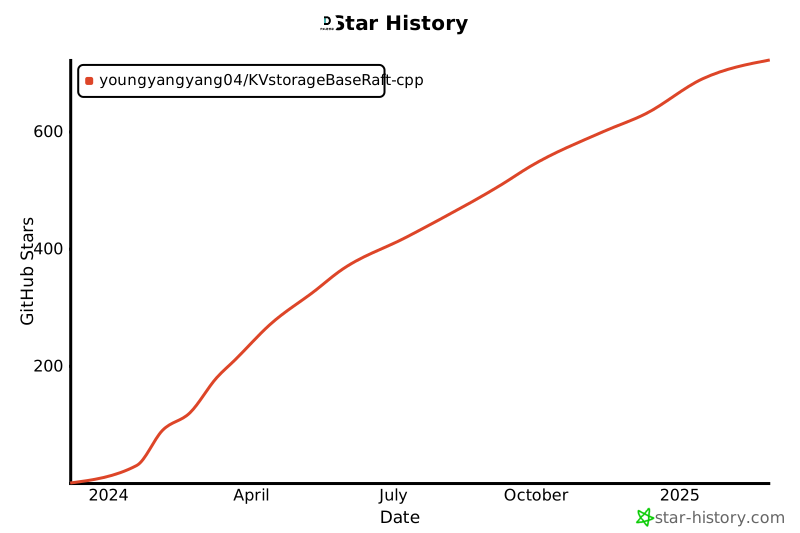
## Star History