https://github.com/yousryessam/endless-runner-game-with-unity
Endless runner game
https://github.com/yousryessam/endless-runner-game-with-unity
animation csharp game-development unity visual-studio
Last synced: about 1 month ago
JSON representation
Endless runner game
- Host: GitHub
- URL: https://github.com/yousryessam/endless-runner-game-with-unity
- Owner: YousryEssam
- Created: 2024-06-29T17:28:19.000Z (about 2 years ago)
- Default Branch: main
- Last Pushed: 2024-07-07T12:19:01.000Z (about 2 years ago)
- Last Synced: 2025-08-12T06:49:27.996Z (12 months ago)
- Topics: animation, csharp, game-development, unity, visual-studio
- Homepage:
- Size: 7.81 KB
- Stars: 0
- Watchers: 1
- Forks: 0
- Open Issues: 0
-
Metadata Files:
- Readme: README.md
Awesome Lists containing this project
README
# Endless Runner Game
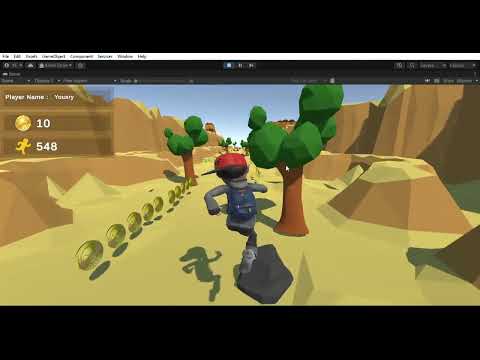
Click the image below to watch the demo video:
[](https://youtu.be/DMh2iTJNRn8)
## Description
This project is an endless runner game similar to Subway Surfers or Temple Run, where the player runs in one direction and switches between lanes to avoid obstacles. The game includes various features to enhance the gameplay experience.
## Features
- **Obstacles**: Both static and dynamic obstacles in the path of the player.
- **Collectables**: Items such as coins that the player can collect.
- **PowerUps**: Special items that give the player temporary abilities.
- **GUI**: Includes score display and count of collected items.
- **Sound Effects and Background Music**: Adds an auditory element to the game.
- **Animation**: Smooth animations for the player character.
- **Basic Main Menu**: A simple main menu to start the game.
- **Name Selection**: Option to choose your name.
- **High Score**: Save and display the highest score of all time.
## Getting Started
### Prerequisites
- Unity 2021.3 or higher
### Installation
1. Download the project source code from the following [Google Drive link](https://drive.google.com/drive/folders/1CE1Tk_qsPekdO1h4oknfNs48VqP99UnA?usp=sharing).
2. Unzip the downloaded file.
3. Open Unity Hub.
4. Click on the `Add` button and navigate to the unzipped folder.
5. Select the folder to add the project to Unity Hub.
6. Open the project from Unity Hub.
### Running the Game
1. In Unity, open the `Scenes` folder.
2. Open the `MainMenu` scene.
3. Click on the `Play` button to start the game.
## Controls
- **Arrow Keys**: Move left and right between lanes.
- **Space Bar**: Jump over obstacles.
## Authors
- [YousryEssam](https://github.com/yourprofile](https://github.com/YousryEssam))
- [NourhanHanna](https://github.com/NourhanHanna)
## License
This project is licensed under the MIT License - see the [LICENSE](LICENSE) file for details.
## Acknowledgments
- Inspiration: Subway Surfers, Temple Run