https://github.com/yoyoberenguer/bloomeffect
How to create a bloom Effect with python
https://github.com/yoyoberenguer/bloomeffect
bloom bloom-effect bloom-filter bright-pass-filter cython pygame
Last synced: 4 months ago
JSON representation
How to create a bloom Effect with python
- Host: GitHub
- URL: https://github.com/yoyoberenguer/bloomeffect
- Owner: yoyoberenguer
- License: mit
- Created: 2020-03-06T10:19:41.000Z (over 6 years ago)
- Default Branch: version-1.0.2
- Last Pushed: 2023-02-27T19:13:05.000Z (over 3 years ago)
- Last Synced: 2025-03-10T00:05:29.343Z (over 1 year ago)
- Topics: bloom, bloom-effect, bloom-filter, bright-pass-filter, cython, pygame
- Language: Cython
- Homepage:
- Size: 85.1 MB
- Stars: 10
- Watchers: 1
- Forks: 3
- Open Issues: 1
-
Metadata Files:
- Readme: README.md
- License: LICENSE
Awesome Lists containing this project
README
# BloomEffect for image processing or 2D video game
Bloom artefact

* real time processing


This library contains Gaussian blur kernel 5x5 algoritms, bright pass filters and bloom
methods designed to work with ```Pygame``` and ```python```.
It provides fast algorithms to create ```2D bloom effect```
for pygame.Surface (SDL surface) or images (PNG, JPG etc), see
pygame image format compatibility for more information.
These algorithms can be used offline or in real time processing for
Indy Game such as pygame or Arcade game as long as the game resolution
do not exceed 1280x1024. A modern CPU with at least 8
logical processor is required to keep the game running between 30-60 fps.
For minimum hardware specifications, the library can be used for
post-processing (surface transformation such as blur and bloom effect)
before your game main loop e.g :
Texturing effect, Sprite or SpriteSheet additional effect.
The algorithms are written using ```cython``` with OPENMP capability (multi-
processing). This library is build by default with the flag OPENMP,
providing the best performance for real time processing.
You can also turn off the multi-processing to balance evenly the
CPU load between your game and the real time bloom processing.
Please refer to the section ```OPENMP``` for more details on how to turn
the multi-processing on/off.
The bloom effect can also be used for different applications such
as : image processing, 2D light effect, spritesheet, demos and
```text enhancement```, neon effect etc
The project is under the ```MIT license```
### Bloom effect definition (from wikipedia) :
Bloom (sometimes referred to as light bloom or glow) is a computer
graphics effect used in video games, demos, and high dynamic range
rendering (HDRR) to reproduce an imaging artifact of real-world cameras.
The effect produces fringes (or feathers) of light extending from the
borders of bright areas in an image, contributing to the illusion of
an extremely bright light overwhelming the camera or eye capturing the
scene. It became widely used in video games after an article on the
technique was published by the authors of Tron 2.0 in 2004.
REF https://en.wikipedia.org/wiki/Bloom_(shader_effect)
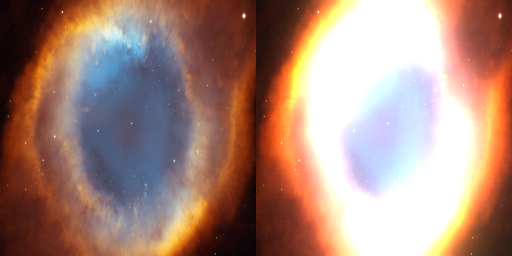
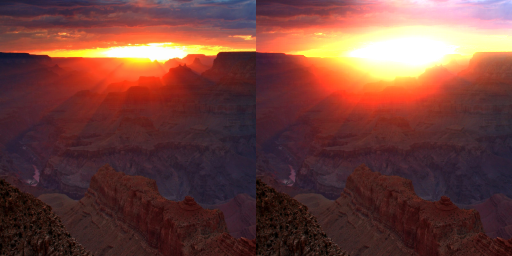
* Right image with bloom effect
## Installation
check the link for newest version https://pypi.org/project/BloomEffect/
```
pip install BloomEffect
# or version 1.0.2
pip install BloomEffect==1.0.2
```
* version installed
* Imported module is case sensitive
```python
>>>from BloomEffect.bloom import __version__
>>>__version__
```
## Bloom technique
```
Acronyme : bpf (bright pass filter)
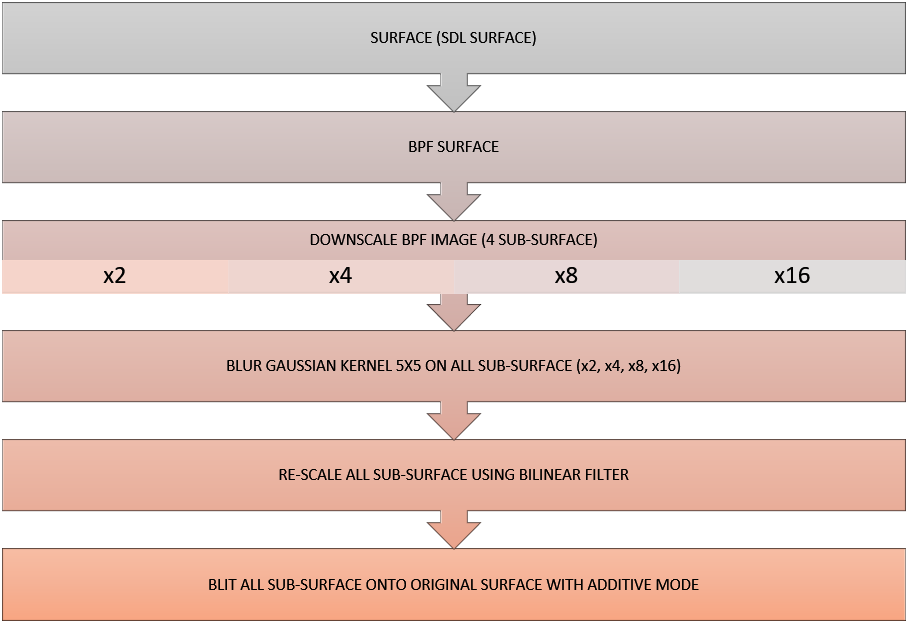
1) First we apply a bright pass filter to the pygame surface(SDL surface) using one
of the following method:
bpf24_c for 24-32bit surface with or without alpha transparency channel or
bpf32_c compatible with 32-bit image format containing alpha transparency (per-pixel alpha)
These two methods have a threshold argument that can be adjust in order to filter bright
pixels and control the overall image luminence.
2) The bpf image is then downscale into sub-surface x2, x4, x8, x16 using
pygame transform.scale method. No need to use smoothscale (bilinear filtering method).
3) A Gaussian blur 5x5 filter is apply on each of the downsized bpf images (the variable smmooth
define the number of passes).
4) The blurred sub-surface images are up-scale using a bilinear filtering method (pygame
smoothscale method. Note : Using an un-filtered rescaling method will pixelate the final
output image.
5) To create the final bloom effect, all the sub-surfaces are blit to the original surface
with the special flag BLEND_RGB_ADD (additive blend mode effect).
```
## Blur method details
* The mask is set be default to None (this feature is not available yet) for
the blur algorithms
```cython
blur5x5_array24(rgb_array_, mask=None)
blur5x5_array32(rgba_array_, mask=None)
blur5x5_array24_inplace(rgb_array_, mask=None)
blur5x5_array32_inplace(rgba_array_, mask=None)
```
## Bloom method details
* The mask argument is working for bloom_effect24, bloom_effect32
```cython
bloom_effect24(surface_, threshold_, smooth_ = 1, mask_ = None, fast_ = False)
bloom_effect32(surface_, threshold_, smooth_ = 1, mask_ = None, fast_ = False)
bloom_effect24_inplace(surface_, threshold_, fast_ = False)
bloom_effect32_inplace(surface_, threshold_, fast_ = False)
```
## Quick example
```python
import pygame
from BloomEffect.bloom import *
import time
width, height = 512 + 128, 128
screen = pygame.display.set_mode((width, height))
pygame.display.set_caption("Bloom effect")
image = pygame.image.load('BloomEffect/Assets/Aliens.jpg').convert()
image = pygame.transform.smoothscale(image, (128, 128))
bloom_image_128 = bloom_effect24(image, 128)
bloom_image_100 = bloom_effect24(image, 100)
bloom_image_80 = bloom_effect24(image, 80)
bloom_image_20 = bloom_effect24(image, 20)
timer = time.time()
while 1:
pygame.event.pump()
screen.blit(image, (0, 0))
screen.blit(bloom_image_128, (128, 0))
screen.blit(bloom_image_100, (256, 0))
screen.blit(bloom_image_80, (384, 0))
screen.blit(bloom_image_20, (512, 0))
if time.time() - timer > 5:
break
pygame.display.flip()
```
#### - Smooth factor
The ```smooth``` option allows to create realistic bloom effect by smoothing the sub-surface
with a define number of blur passes.
With multiple blur passes, the light source will spread evenly accross the image without
altering the image quality.
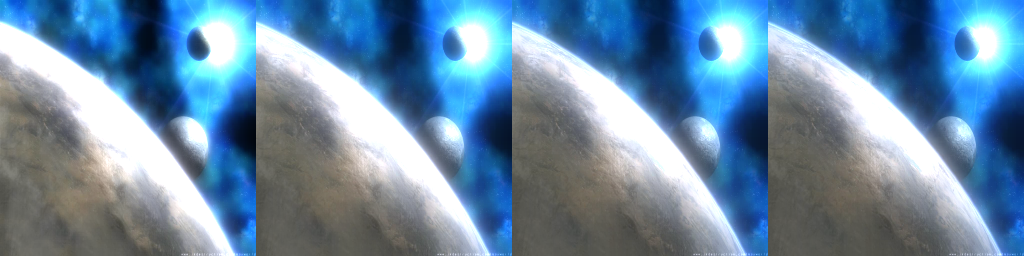
* Left image with smooth = 1 and right with smooth 5, 8, 10
The smooth effect (right image) produce a less intense bloom effect on the planet surface
and on the first moon (light refraction). With blur>1 the image looks more sharp and the
light source appear to be more evenly spread
#### - Fast flag
The ```fast``` flag will boost the overall performance of the bloom algorithm.
When fast is True, only the smallest sub-surface (x16) is used for the bloom
effect providing a good compromise between speed and effect quality.
#### - Still not fast enough ?
If you are still looking for better performance, you can also downscale the
image time 2 and rescale it to its original size after processing.
However this technique has a limit, as downscaling / upscaling the image will
alter the image quality and provide a lower resolution to a texure/image, e.g
Jagged lines or pixalated aspect when the downsacle factor is too high). To minimize
the image quality degradation, use pygame smoothscale (bilineare filtering) instead
of the method scale
## Building cython code
#### When do you need to compile the cython code ?
```
Each time you are modifying any of the following files
bloom.pyx, bloom.pxd, __init__.pxd or any external C code if applicable
1) open a terminal window
2) Go in the main project directory where (bloom.pyx &
bloom.pxd files are located)
3) run : python setup_bloom.py build_ext --inplace --force
If you have to compile the code with a specific python
version, make sure to reference the right python version
in (python38 setup_bloom.py build_ext --inplace)
If the compilation fail, refers to the requirement section and
make sure cython and a C-compiler are correctly install on your
system.
- A compiler such visual studio, MSVC, CGYWIN setup correctly on
your system.
- a C compiler for windows (Visual Studio, MinGW etc) install
on your system and linked to your windows environment.
Note that some adjustment might be needed once a compiler is
install on your system, refer to external documentation or
tutorial in order to setup this process.e.g https://devblogs.
microsoft.com/python/unable-to-find-vcvarsall-bat/
```
## OPENMP
In the main project directory, locate the file ```setup_bloom.py```.
The compilation flag /openmp is used by default.
To override the OPENMP feature and disable the multi-processing remove the flag ```/openmp```
####
```setup_bloom.py```
```python
ext_modules=cythonize([
Extension("bloom", ["BloomEffect/bloom.pyx"],
extra_compile_args=["/openmp", "/Qpar", "/fp:fast", "/O2", "/Oy", "/Ot"], language="c")]),
```
Save the change and build the cython code with the following instruction:
```python setup_bloom.py build_ext --inplace --force```
If the project build successfully, the compilation will end up with the following lines
```
Generating code
Finished generating code
```
If you have any compilation error refer to the section ```Building cython code``` and make sure your system has the following program & libraries installed. Check also that the code is not running in a different thread.
- Pygame version >3
- numpy >= 1.18
- cython >=0.29.21 (C extension for python)
- A C compiler for windows (Visual Studio, MinGW etc)
## Credit
Yoann Berenguer
## Dependencies :
```
numpy >= 1.18
pygame >=2.0.0
cython >=0.29.21
```
## License :
MIT License
Copyright (c) 2019 Yoann Berenguer
Permission is hereby granted, free of charge, to any person
obtaining a copy of this software and associated documentation
files (the "Software"), to deal in the Software without
restriction, including without limitation the rights to use,
copy, modify, merge, publish, distribute, sublicense, and/or
sell copies of the Software, and to permit persons to whom the
Software is furnished to do so, subject to the following
conditions:
The above copyright notice and this permission notice shall be
included in all copies or substantial portions of the Software.
THE SOFTWARE IS PROVIDED "AS IS", WITHOUT WARRANTY OF ANY KIND,
EXPRESS OR IMPLIED, INCLUDING BUT NOT LIMITED TO THE WARRANTIES
OF MERCHANTABILITY, FITNESS FOR A PARTICULAR PURPOSE AND
NONINFRINGEMENT. IN NO EVENT SHALL THE AUTHORS OR COPYRIGHT
HOLDERS BE LIABLE FOR ANY CLAIM, DAMAGES OR OTHER LIABILITY,
WHETHER IN AN ACTION OF CONTRACT, TORT OR OTHERWISE, ARISING
FROM, OUT OF OR IN CONNECTION WITH THE SOFTWARE OR THE USE OR
OTHER DEALINGS IN THE SOFTWARE.
## Testing:
```python
>>> import BloomEffect
>>> from BloomEffect import *
>>> run_testsuite()
```
## Timing :
In the directory tests under the main project path
C:...tests\python profiling.py
```
TESTING WITH IMAGE 1280x1024
Performance testing blur5x5_array24 per call 0.01726947 overall time 0.17269 for 10
Performance testing blur5x5_array32 per call 0.01853967 overall time 0.1854 for 10
Performance testing blur5x5_array32_inplace per call 0.01757621 overall time 0.17576 for 10
Performance testing blur5x5_array24_inplace per call 0.01774338 overall time 0.17743 for 10
Performance testing bloom_effect_array24 per call 0.01998457 overall time 0.19985 for 10
Performance testing bloom_effect_array32 per call 0.06955424 overall time 0.69554 for 10
Performance testing bloom_effect_array24_inplace per call 0.01692769 overall time 0.16928 for 10
Performance testing bloom_effect_array32_inplace per call 0.01692682 overall time 0.16927 for 10
Performance testing test_bpf24_c per call 0.00290582 overall time 0.02906 for 10
Performance testing test_bpf32_c per call 0.00561693 overall time 0.05617 for 10
Performance testing test_bpf24_inplace per call 0.00192679 overall time 0.01927 for 10
Performance testing test_bpf32_inplace per call 0.00187691 overall time 0.01877 for 10
Performance testing build_mask_from_surface per call 0.00380404 overall time 0.03804 for 10
Performance testing filtering24 per call 0.00337253 overall time 0.03373 for 10
Performance testing filtering32 per call 0.00324777 overall time 0.03248 for 10
Performance testing test_array32_rescale per call 0.00543668 overall time 0.05437 for 10
```
### Links
```
Links
https://learnopengl.com/Advanced-Lighting/Bloom
https://kalogirou.net/2006/05/20/how-to-do-good-bloom-for-hdr-rendering/
https://catlikecoding.com/unity/tutorials/advanced-rendering/bloom/
```