https://github.com/ysocrius/diligent_jarvis
Personal AI Assistant with RAG (Retrieval-Augmented Generation) - OpenAI GPT-4 + Pinecone Vector DB + Flask. Live Demo: https://diligent-jarvis.onrender.com
https://github.com/ysocrius/diligent_jarvis
ai chatbot flask langchain machine-learning openai pinecone python rag vector-database
Last synced: 3 months ago
JSON representation
Personal AI Assistant with RAG (Retrieval-Augmented Generation) - OpenAI GPT-4 + Pinecone Vector DB + Flask. Live Demo: https://diligent-jarvis.onrender.com
- Host: GitHub
- URL: https://github.com/ysocrius/diligent_jarvis
- Owner: ysocrius
- Created: 2025-11-07T04:33:31.000Z (8 months ago)
- Default Branch: main
- Last Pushed: 2025-11-07T06:15:10.000Z (8 months ago)
- Last Synced: 2025-11-07T07:08:08.527Z (8 months ago)
- Topics: ai, chatbot, flask, langchain, machine-learning, openai, pinecone, python, rag, vector-database
- Language: JavaScript
- Size: 15.3 MB
- Stars: 0
- Watchers: 0
- Forks: 0
- Open Issues: 0
-
Metadata Files:
- Readme: README.md
Awesome Lists containing this project
README
# Build Your Own Jarvis - Personal AI Assistant
A complete implementation of the "Build Your Own Jarvis" assignment requirements, featuring OpenAI API integration, Pinecone vector database, and a web-based chatbot interface.
## 🌐 Live Demo
**Try it now:** [https://diligent-jarvis.onrender.com](https://diligent-jarvis.onrender.com)
The application is deployed on Render with full RAG capabilities. Ask questions about the uploaded documents!
## 🎥 Demo Video
[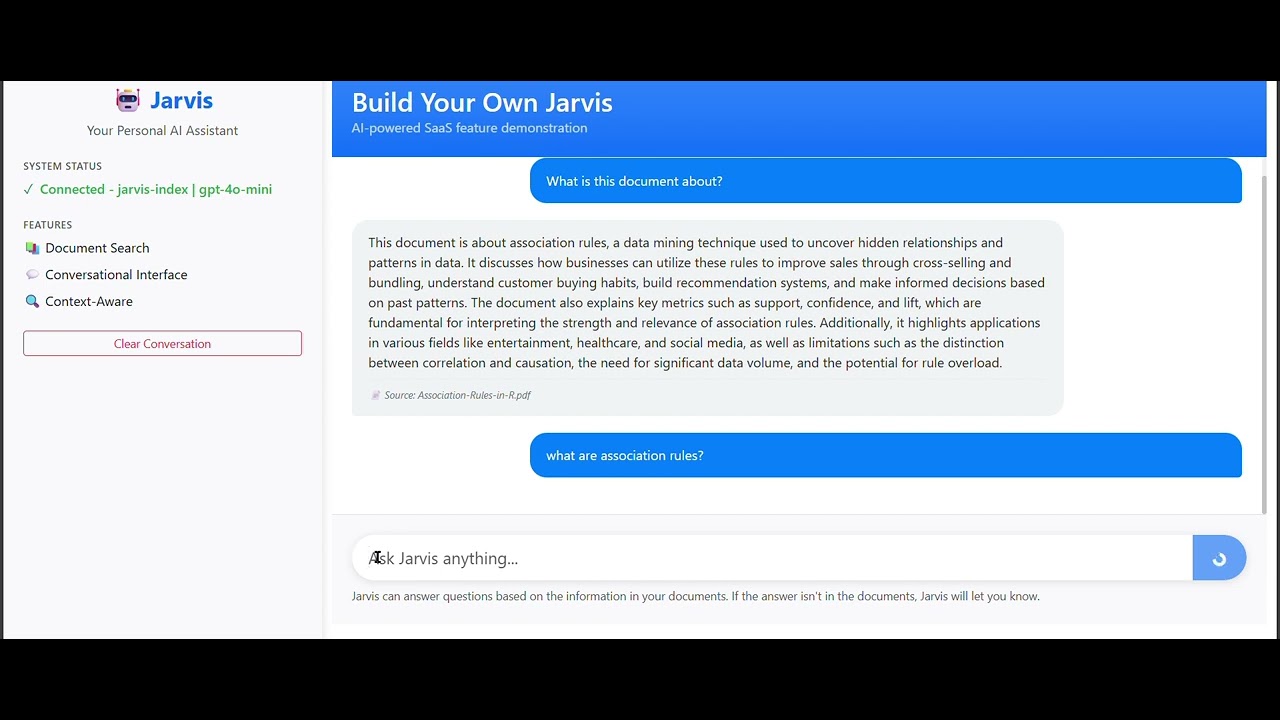](https://www.youtube.com/watch?v=XngJYt-7AAg)
**[▶️ Watch Full Demo on YouTube](https://www.youtube.com/watch?v=XngJYt-7AAg)**
## 📸 Screenshots
### Render Deployment Dashboard

### Environment Configuration

## 🎯 Assignment Requirements Met
✅ **Cloud-based LLM via OpenAI API** - GPT-4o-mini integration for intelligent responses
✅ **Vector Database** - Pinecone for knowledge storage and retrieval
✅ **Conversational Interface** - Web-based chatbot UI with Flask
✅ **Query Understanding** - RAG system for contextual responses
✅ **SaaS Feature** - Ready for enterprise deployment
## 🚀 Quick Start
### Prerequisites
- Python 3.8+
- OpenAI API Key
- Pinecone API Key
- Web browser
### Installation
1. **Create virtual environment**
```bash
cd jarvis_assistant
python -m venv venv
# Windows
venv\Scripts\activate
# Mac/Linux
source venv/bin/activate
```
2. **Install dependencies**
```bash
pip install -r requirements.txt
```
3. **Configure environment variables**
Edit the `.env` file with your API keys:
```
OPENAI_API_KEY=your_actual_openai_api_key_here
PINECONE_API_KEY=your_actual_pinecone_api_key_here
PINECONE_ENVIRONMENT=your_pinecone_environment_here
PINECONE_INDEX_NAME=jarvis-assistant-index
```
4. **Set up Pinecone**
- Log into [Pinecone Console](https://app.pinecone.io/)
- Create a new index (suggested: `jarvis-assistant-index`)
- Get your API key and environment name
- Add them to your `.env` file
5. **Add documents**
Place your PDF files in the `docs/` folder:
```bash
# Example: Add your documents
copy my_document.pdf docs/
copy another_file.pdf docs/
```
6. **Ingest documents**
```bash
python ingest.py
```
7. **Start Jarvis**
```bash
python jarvis_assistant.py
```
8. **Access the interface**
Open your browser to: `http://127.0.0.1:5000`
## 🏗️ Architecture
```
jarvis_assistant/
├── docs/ # Your PDF documents
├── static/ # CSS and JavaScript files
│ ├── style.css
│ └── app.js
├── templates/ # HTML templates
│ └── index.html
├── .env # Environment variables
├── requirements.txt # Python dependencies
├── ingest.py # Document ingestion script
├── jarvis_assistant.py # Main Flask application
└── README.md # This file
```
## 💬 Usage
1. **Document Processing**: Run `ingest.py` to process your PDF files and store them in Pinecone
2. **Chat Interface**: Access the web interface at `http://127.0.0.1:5000`
3. **Ask Questions**: Type your questions about the document content in the chat interface
4. **Get Contextual Answers**: Jarvis uses the stored document knowledge to provide accurate, contextual responses
## 🎨 Features
- **Clean Web Interface**: Modern responsive chat UI
- **PDF Processing**: Automatic text extraction and chunking
- **Vector Search**: Semantic similarity search with Pinecone
- **Context-Aware Responses**: LLM-powered answers based on retrieved context
- **Error Handling**: Comprehensive error messages and status indicators
- **Real-time Feedback**: Typing indicators and response status
## 🔧 Technical Stack
- **Backend**: Flask web framework
- **AI Models**: OpenAI gpt-4o-mini and embeddings
- **Vector Database**: Pinecone
- **Document Processing**: PyPDF2
- **Frontend**: Bootstrap 5, vanilla JavaScript
- **Orchestration**: LangChain
## 📋 Example Questions
Based on your documents, try questions like:
- "What is the main topic of these documents?"
- "Summarize the key points about [topic]"
- "What are the technical requirements mentioned?"
- "Explain the concept of [specific term]"
## 🛠️ Troubleshooting
**Pinecone Connection Issues:**
- Verify your Pinecone API key and environment
- Ensure the index name matches what's in your `.env` file
- Check that you've created the Pinecone index
**Document Ingestion Problems:**
- Ensure PDF files are placed in the `docs/` folder
- Add only accessible, non-encrypted PDF files
- Check that Pinecone is properly configured
**Web Interface Issues:**
- Make sure Flask is running (stop with Ctrl+C and restart)
- Clear your browser cache
- Check browser console for JavaScript errors
**API Key Problems:**
- Verify OpenAI API key is valid and has credits
- Check Pinecone API key permissions
- Ensure `.env` file is correctly formatted
## 🚀 Deployment
### Live on Render
This application is deployed and running at: **https://diligent-jarvis.onrender.com**
**Deployment Configuration:**
- **Platform**: Render.com
- **Runtime**: Python 3.10.13
- **Web Server**: Gunicorn
- **Auto-deploy**: Enabled from `main` branch
- **Environment**: Production with full RAG stack
### Deploy Your Own
1. Fork this repository
2. Sign up at [Render.com](https://render.com)
3. Create a new Web Service
4. Connect your GitHub repository
5. Set environment variables:
- `OPENAI_API_KEY`
- `PINECONE_API_KEY`
- `PINECONE_ENVIRONMENT`
- `PINECONE_INDEX_NAME`
6. Deploy!
### Production Considerations
- Using Gunicorn WSGI server for production
- Environment variables for secure credential management
- Auto-deployment on git push
- Scalable architecture ready for load
- Consider adding user authentication for multi-tenant use
- Implement rate limiting for API protection
## 🎓 Assignment Fulfillment
This implementation directly addresses all assignment requirements:
1. ✅ Cloud-based LLM via OpenAI API (GPT-4o-mini)
2. ✅ Vector database for knowledge storage (Pinecone)
3. ✅ Conversational interface (Web chatbot)
4. ✅ Query understanding (RAG pipeline)
5. ✅ Contextual responses (Retrieval-augmented generation)
6. ✅ SaaS-ready feature (Web app with proper architecture)
**Built for:** Diligent India Workshop (Nov 6, 2025)
**Topics:** Agentic AI, RAG, MCP Servers in Enterprise Applications