https://github.com/yuanwu0000/cryptoexchange
即時更新的加密貨幣訂單簿 & K線圖,支援切換不同時框。 (Vue3 + Pinia + WebSocket)
https://github.com/yuanwu0000/cryptoexchange
pinia vue3 websocket
Last synced: about 1 year ago
JSON representation
即時更新的加密貨幣訂單簿 & K線圖,支援切換不同時框。 (Vue3 + Pinia + WebSocket)
- Host: GitHub
- URL: https://github.com/yuanwu0000/cryptoexchange
- Owner: YuAnWu0000
- Created: 2024-01-29T04:52:10.000Z (over 2 years ago)
- Default Branch: main
- Last Pushed: 2025-02-19T01:46:33.000Z (over 1 year ago)
- Last Synced: 2025-02-25T02:35:19.689Z (over 1 year ago)
- Topics: pinia, vue3, websocket
- Language: JavaScript
- Homepage: https://yuanwu0000.github.io/cryptoExchange/
- Size: 563 KB
- Stars: 0
- Watchers: 1
- Forks: 0
- Open Issues: 0
-
Metadata Files:
- Readme: README.md
Awesome Lists containing this project
README
# Crypto Exchange
### Implement real-time order book and candlestick charts like a crypto exchange.
#### https://yuanwu0000.github.io/cryptoExchange/
[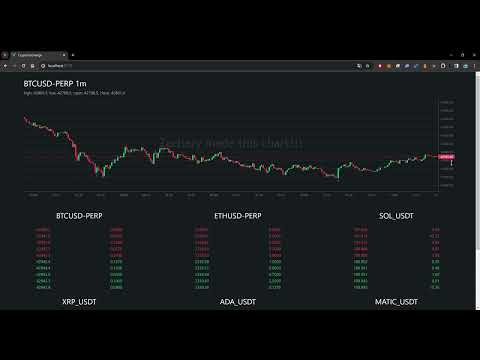](https://www.youtube.com/watch?v=Z-fJEUXQLNs)
## Tech Stack
**Frontend Framework:** `vue 3`
**CSS Preprocessor:** `scss`
**UI Library:** `lightweight-charts`
**State Management:** `pinia`
**Build Tool:** `vite`
**WebSocket API source:** [Crypto.com](https://exchange-docs.crypto.com/exchange/v1/rest-ws/index.html#book-instrument_name)
## Directory Structure
```
├── src
| │ App.vue
| │ main.js
| │
| ├─assets
| │ logo.svg
| │ main.css
| │
| ├─components
| │ Candles.vue
| │ OrderBook.vue
| │
| ├─stores
| │ candles.js
| │ orderBook.js
| │ ws.js
```
## WebSocket Flow Chart
```mermaid
sequenceDiagram
actor User
participant Web Client
participant Crypto.com
User ->>+ Web Client: Enter page
Web Client ->>+ Crypto.com: Establish websocket connection
opt socket.onopen = () => {}
Web Client->>+ Crypto.com: Send message { id: 1, method: 'subscribe', params: { channels: ['book.BTCUSD-PERP.10'] } }
Web Client->>+ Crypto.com: Send message { id: 2, method: 'subscribe', params: { channels: ['candlestick.1m.BTCUSD-PERP'] } }
end
opt socket.onmessage = () => {}
Crypto.com->>+ Web Client: Send message { code, id, method, channel?, result?}
Note over Web Client: Check if code = 0 (success)
Web Client->>+ Web Client: Proceed
Note over Web Client: Check if method = 'public/heartbeat'
Web Client->>+ Crypto.com: Send message { id, method: 'public/respond-heartbeat' }
Note over Web Client: Check if id = -1 (updated) and result != null
Web Client->>+ Web Client: Assign result.data to different stores (base on channel)
Web Client->>+ User: Re-render component
end
opt socket.onclose = () => {}
Web Client->>+ Crypto.com: Reconnect websocket
end
opt Switch Timeframe
User->>+ Web Client: Click timeframe option
Web Client->>+ Crypto.com: Send message { id: 2, method: 'unsubscribe', params: { channels: ['candlestick.1m.BTCUSD-PERP'] } }
Web Client->>+ Crypto.com: Send message { id: 2, method: 'subscribe', params: { channels: ['candlestick.5m.BTCUSD-PERP'] } }
Web Client->>+ User: Re-render component
end
```
## Commands
### Install Dependencies
```sh
npm install
```
### Compile and Hot-Reload for Development
```sh
npm run dev
```
### Lint with [ESLint](https://eslint.org/)
```sh
npm run lint
```
### Compile and Minify for Production
```sh
npm run build
```
### Deploy to Github Page
```sh
npm run deploy
```
### Serve dist locally
```sh
npm install -g serve
```
```sh
serve -s dist
```