https://github.com/yureutaejin/yob
YOB: Your own OS using bootc
https://github.com/yureutaejin/yob
bootc immutable
Last synced: 5 months ago
JSON representation
YOB: Your own OS using bootc
- Host: GitHub
- URL: https://github.com/yureutaejin/yob
- Owner: yureutaejin
- License: mit
- Created: 2025-08-27T04:14:49.000Z (10 months ago)
- Default Branch: main
- Last Pushed: 2025-11-27T05:08:58.000Z (7 months ago)
- Last Synced: 2026-01-18T05:29:39.643Z (5 months ago)
- Topics: bootc, immutable
- Language: Makefile
- Homepage: https://quay.io/repository/yuntae/yob
- Size: 194 KB
- Stars: 12
- Watchers: 0
- Forks: 2
- Open Issues: 0
-
Metadata Files:
- Readme: README.md
- License: LICENSE
Awesome Lists containing this project
README
# YOB : Your own OS using bootc
## Index
- [Contributors](#contributors)
- [Introduction](#introduction)
- [Overall pipeline workflows](#overall-pipeline-workflows)
- [Quick Start](#quick-start)
## Translation
- [한국어](./docs/README-KO.md)
## Contributors
## Introduction
Base project YOB referenced
- [bootc](https://bootc-dev.github.io/)
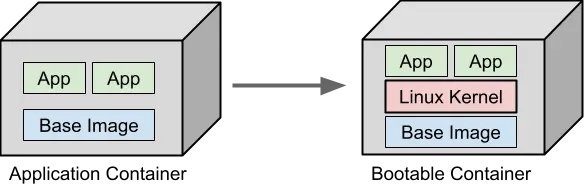
As everybody knows, The Linux container usually shares kernel with host OS,
so that we can easily create a "Container" which is more lightweight and faster than Virtual Machine.
The bootc project uses the method in reverse to create OS using the Linux container techniques.
Unlike usual OCI containers, the base OCI container (so called, bootable container) that bootc uses have below things already.
- Linux kernel
- Bootloader
- systemd
- System utilities & drivers
So we can create OS image using OCI container techniques which is familiar to modern developers/engineers.
## Overall pipeline workflows
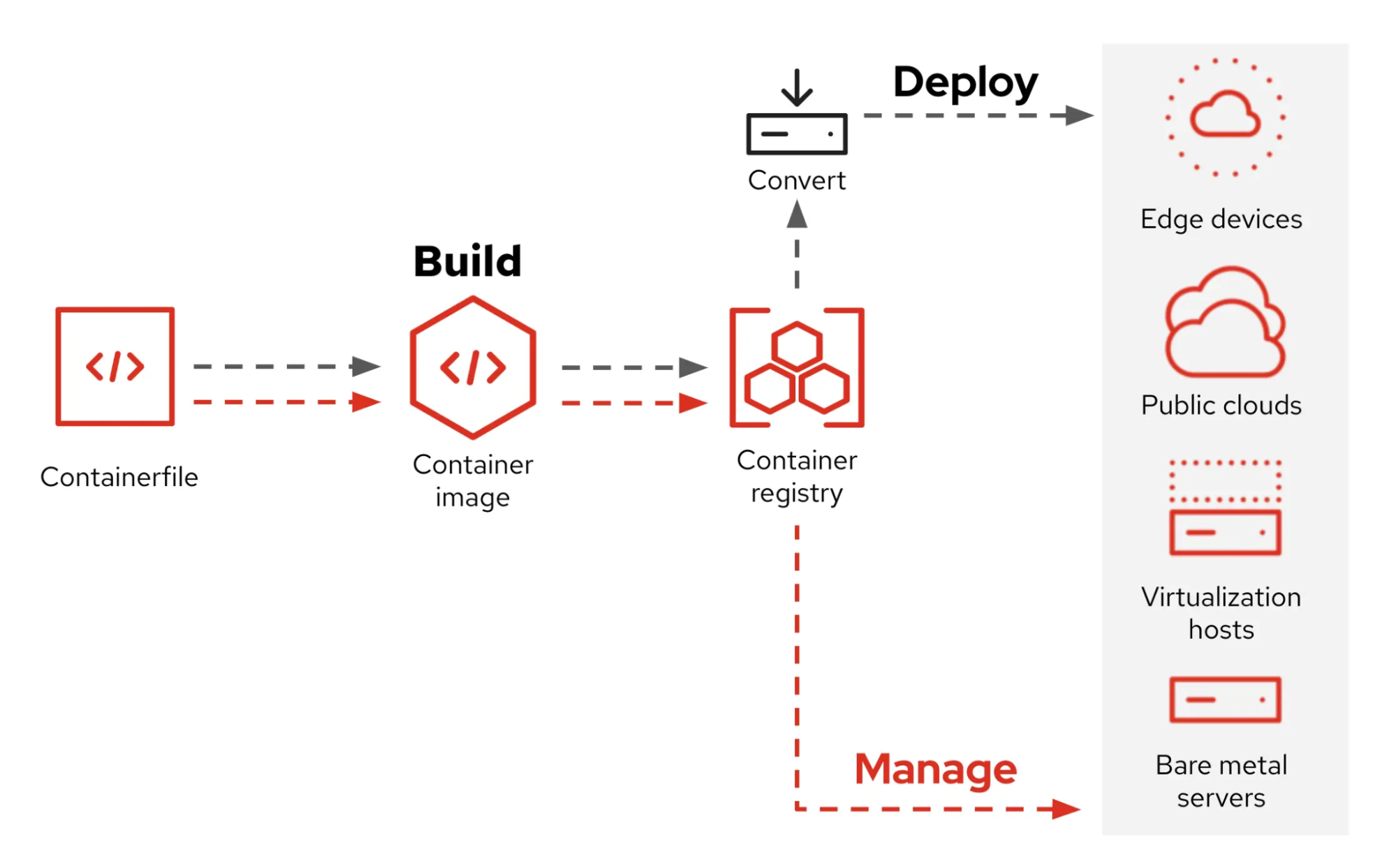
Currently, this project referred RHEL image mode pipeline diagram.
- [what-image-mode-means-users-rhel-edge](https://www.redhat.com/en/blog/what-image-mode-means-users-rhel-edge)
## Quick Start
Quick start without editing few configurations.
### Prerequisites
- Docker
- Make
- OCI Registry
- Get your account of OCI Registry (e.g. Docker Hub, Quay.io, etc.)
- Just define local variables in host shell without fixing Makefile (Refer to default value in [Makefile](./Makefile))
### 1. Build bootc
It will build OCI container based on bootc project and push it to your OCI Registry.
1. `make build-bootc`
2. `make push-bootc`
### 2. (Just for first boot) Convert bootc to disk format
- `make pull-bootc-image`
- Pull bootc image from OCI Registry (if you haven't yet)
- `make save-image-as-tgz`
- `make convert-to-{iso,ami,qcow2}`
- Currently, only iso and ami format is tested.
### 3. Flash bootable disk
There are too many ways to make bootable disk.
Just leave Bare Metal case for now.
- (Bare Metal) Recommend to flash USB drive (3.0, color blue) with at least 8GB
- [Ventoy](https://www.ventoy.net/en/index.html)
- [BalenaEtcher](https://etcher.balena.io/)
### 4. Boot OS
Boot with created bootable disk
Since we've set host's config with [config.toml](./config.toml) already, Just wait until first booting is done.
### 5. (On target machine) Rollback/Upgrade/Switch OS
> [!NOTE]
> No need to make bootable disk again after first boot.
Simply push the new image to the OCI Registry, and the OS switching will be complete after downloading and rebooting.
- `sudo bootc upgrade`
- Upgrade to latest pushed image with same tag you booted
- `sudo bootc switch OCI_REGISTRY/OCI_IMAGE_REPO:OCI_IMAGE_TAG`
- Switch to specified bootc image
- You can switch any bootc image if it is accessible
- e.g. `sudo bootc switch quay.io/fedora/fedora-bootc:latest`
- `sudo bootc rollback`
- Rollback to previous image
- (Important) OS will keep just 1 previous version of image for rollback

