https://github.com/yushulx/python-document-scanner-sdk
Python document detection SDK built with Dynamsoft Document Normalizer for Windows and Linux
https://github.com/yushulx/python-document-scanner-sdk
document document-detection document-rectification edge-detection python
Last synced: about 1 year ago
JSON representation
Python document detection SDK built with Dynamsoft Document Normalizer for Windows and Linux
- Host: GitHub
- URL: https://github.com/yushulx/python-document-scanner-sdk
- Owner: yushulx
- License: mit
- Created: 2022-09-02T06:49:12.000Z (almost 4 years ago)
- Default Branch: main
- Last Pushed: 2024-10-17T05:42:37.000Z (over 1 year ago)
- Last Synced: 2025-04-29T16:19:33.717Z (about 1 year ago)
- Topics: document, document-detection, document-rectification, edge-detection, python
- Language: C++
- Homepage: https://pypi.org/project/document-scanner-sdk/
- Size: 32 MB
- Stars: 2
- Watchers: 2
- Forks: 1
- Open Issues: 0
-
Metadata Files:
- Readme: README.md
- License: LICENSE
Awesome Lists containing this project
README
# Python Document Scanner SDK
This project provides Python bindings for the [Dynamsoft C/C++ Document Scanner SDK v1.x](https://www.dynamsoft.com/document-normalizer/docs/core/introduction/?ver=latest&ver=latest), enabling developers to quickly create document scanner applications for Windows and Linux desktop environments.
> Note: This project is an unofficial, community-maintained Python wrapper for the Dynamsoft Document Normalizer SDK. For those seeking the most reliable and fully-supported solution, Dynamsoft offers an official Python package. Visit the [Dynamsoft Capture Vision Bundle](https://pypi.org/project/dynamsoft-capture-vision-bundle/) page on PyPI for more details.
## About Dynamsoft Capture Vision Bundle
- Activate the SDK with a [30-day FREE trial license](https://www.dynamsoft.com/customer/license/trialLicense/?product=dcv&package=cross-platform).
- Install the SDK via `pip install dynamsoft-capture-vision-bundle`.
### Comparison Table
| Feature | Unofficial Wrapper (Community) | Official Dynamsoft Capture Vision SDK |
| --- | --- | --- |
| Support | Community-driven, best effort | Official support from Dynamsoft |
| Documentation | README only | [Comprehensive Online Documentation](https://www.dynamsoft.com/capture-vision/docs/server/programming/python/?lang=python) |
| API Coverage | Limited | Full API coverage |
|Feature Updates| May lag behind the official SDK | First to receive new features |
| Compatibility | Limited testing across environments| Thoroughly tested across all supported environments|
| OS Support | Windows, Linux | Windows, Linux, **macOS** |
## Supported Python Versions
* Python 3.x
## Dependencies
Install the required dependencies using pip:
```bash
pip install opencv-python
```
## Command-line Usage
- Scan documents from images:
```bash
scandocument -f -l
```
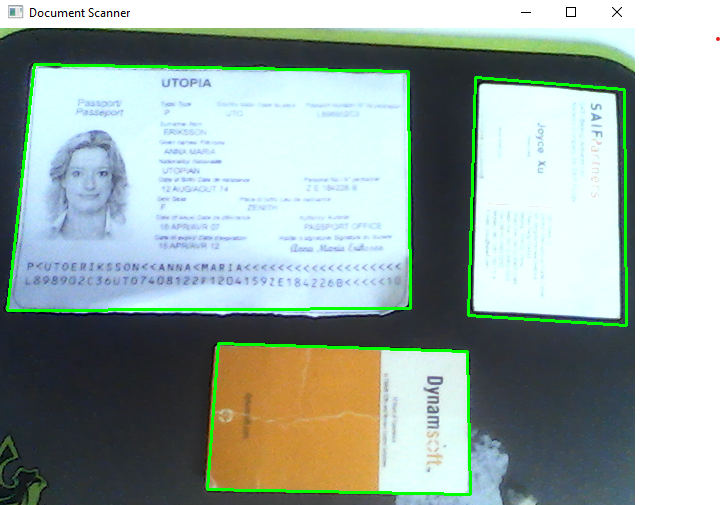
- Scan documents from a camera video stream:
```bash
scandocument -c 1 -l
```
## Quick Start
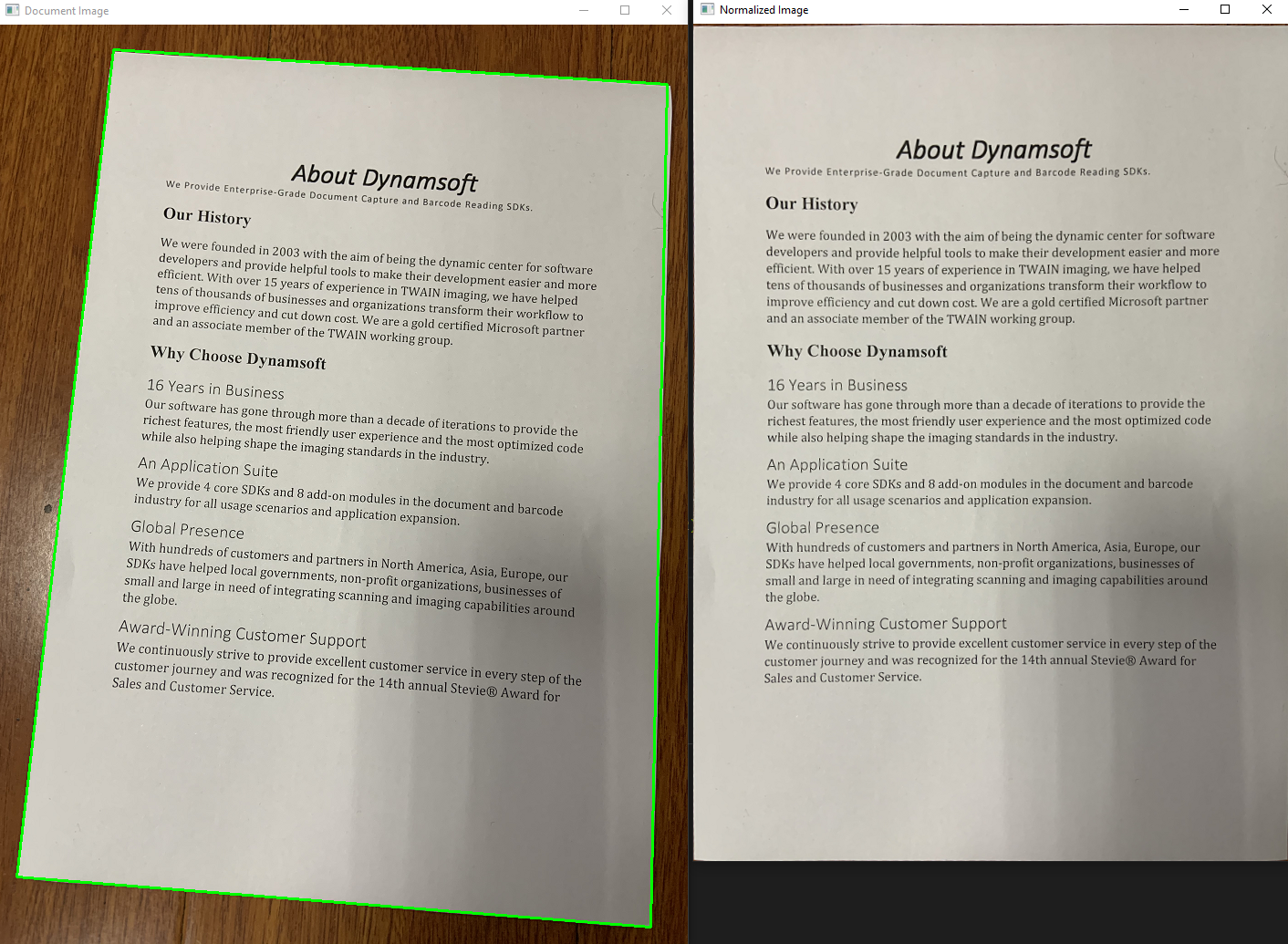
- Scan documents from an image file:
```python
import argparse
import docscanner
import sys
import numpy as np
import cv2
import time
def showNormalizedImage(name, normalized_image):
mat = docscanner.convertNormalizedImage2Mat(normalized_image)
cv2.imshow(name, mat)
return mat
def process_file(filename, scanner):
image = cv2.imread(filename)
results = scanner.detectMat(image)
for result in results:
x1 = result.x1
y1 = result.y1
x2 = result.x2
y2 = result.y2
x3 = result.x3
y3 = result.y3
x4 = result.x4
y4 = result.y4
normalized_image = scanner.normalizeBuffer(image, x1, y1, x2, y2, x3, y3, x4, y4)
showNormalizedImage("Normalized Image", normalized_image)
cv2.drawContours(image, [np.intp([(x1, y1), (x2, y2), (x3, y3), (x4, y4)])], 0, (0, 255, 0), 2)
cv2.imshow('Document Image', image)
cv2.waitKey(0)
normalized_image.save(str(time.time()) + '.png')
print('Image saved')
def scandocument():
"""
Command-line script for scanning documents from a given image
"""
parser = argparse.ArgumentParser(description='Scan documents from an image file')
parser.add_argument('-f', '--file', help='Path to the image file')
parser.add_argument('-l', '--license', default='', type=str, help='Set a valid license key')
args = parser.parse_args()
# print(args)
try:
filename = args.file
license = args.license
if filename is None:
parser.print_help()
return
# set license
if license == '':
docscanner.initLicense("LICENSE-KEY")
else:
docscanner.initLicense(license)
# initialize mrz scanner
scanner = docscanner.createInstance()
ret = scanner.setParameters(docscanner.Templates.color)
if filename is not None:
process_file(filename, scanner)
except Exception as err:
print(err)
sys.exit(1)
scandocument()
```
- Scan documents from camera video stream:
```python
import argparse
import docscanner
import sys
import numpy as np
import cv2
import time
g_results = None
g_normalized_images = []
def callback(results):
global g_results
g_results = results
def showNormalizedImage(name, normalized_image):
mat = docscanner.convertNormalizedImage2Mat(normalized_image)
cv2.imshow(name, mat)
return mat
def process_video(scanner):
scanner.addAsyncListener(callback)
cap = cv2.VideoCapture(0)
while True:
ret, image = cap.read()
ch = cv2.waitKey(1)
if ch == 27:
break
elif ch == ord('n'): # normalize image
if g_results != None:
g_normalized_images = []
index = 0
for result in g_results:
x1 = result.x1
y1 = result.y1
x2 = result.x2
y2 = result.y2
x3 = result.x3
y3 = result.y3
x4 = result.x4
y4 = result.y4
normalized_image = scanner.normalizeBuffer(
image, x1, y1, x2, y2, x3, y3, x4, y4)
g_normalized_images.append(
(str(index), normalized_image))
mat = showNormalizedImage(str(index), normalized_image)
index += 1
elif ch == ord('s'): # save image
for data in g_normalized_images:
# cv2.imwrite('images/' + str(time.time()) + '.png', image)
cv2.destroyWindow(data[0])
data[1].save(str(time.time()) + '.png')
print('Image saved')
g_normalized_images = []
if image is not None:
scanner.detectMatAsync(image)
if g_results != None:
for result in g_results:
x1 = result.x1
y1 = result.y1
x2 = result.x2
y2 = result.y2
x3 = result.x3
y3 = result.y3
x4 = result.x4
y4 = result.y4
cv2.drawContours(
image, [np.intp([(x1, y1), (x2, y2), (x3, y3), (x4, y4)])], 0, (0, 255, 0), 2)
cv2.putText(image, 'Press "n" to normalize image',
(10, 30), cv2.FONT_HERSHEY_SIMPLEX, 0.8, (0, 0, 255), 2)
cv2.putText(image, 'Press "s" to save image', (10, 60),
cv2.FONT_HERSHEY_SIMPLEX, 0.8, (0, 0, 255), 2)
cv2.putText(image, 'Press "ESC" to exit', (10, 90),
cv2.FONT_HERSHEY_SIMPLEX, 0.8, (0, 0, 255), 2)
cv2.imshow('Document Scanner', image)
docscanner.initLicense(
"LICENSE-KEY")
scanner = docscanner.createInstance()
ret = scanner.setParameters(docscanner.Templates.color)
process_video(scanner)
```
## API Methods
- `docscanner.initLicense('YOUR-LICENSE-KEY')`: Set the license key.
```python
docscanner.initLicense("LICENSE-KEY")
```
- `docscanner.createInstance()`: Create a Document Scanner instance.
```python
scanner = docscanner.createInstance()
```
- `detectFile(filename)`: Perform edge detection from an image file.
```python
results = scanner.detectFile()
```
- `detectMat(Mat image)`: Perform edge detection from an OpenCV Mat.
```python
image = cv2.imread()
results = scanner.detectMat(image)
for result in results:
x1 = result.x1
y1 = result.y1
x2 = result.x2
y2 = result.y2
x3 = result.x3
y3 = result.y3
x4 = result.x4
y4 = result.y4
```
- `setParameters(Template)`: Select color, binary, or grayscale template.
```python
scanner.setParameters(docscanner.Templates.color)
```
- `addAsyncListener(callback function)`: Start a native thread to run document scanning tasks asynchronously.
- `detectMatAsync()`: Queue a document scanning task into the native thread.
```python
def callback(results):
for result in results:
print(result.x1)
print(result.y1)
print(result.x2)
print(result.y2)
print(result.x3)
print(result.y3)
print(result.x4)
print(result.y4)
import cv2
image = cv2.imread()
scanner.addAsyncListener(callback)
scanner.detectMatAsync(image)
sleep(5)
```
- `normalizeBuffer(mat, x1, y1, x2, y2, x3, y3, x4, y4)`: Perform perspective correction from an OpenCV Mat.
```python
normalized_image = scanner.normalizeBuffer(image, x1, y1, x2, y2, x3, y3, x4, y4)
```
- `normalizeFile(filename, x1, y1, x2, y2, x3, y3, x4, y4)`: Perform perspective correction from an image file.
```python
normalized_image = scanner.normalizeFile(, x1, y1, x2, y2, x3, y3, x4, y4)
```
- `normalized_image.save(filename)`: Save the normalized image to a file.
```python
normalized_image.save()
```
- `normalized_image.recycle()`: Release the memory of the normalized image.
- `clearAsyncListener()`: Stop the native thread and clear the registered Python function.
## How to Build the Python Document Scanner Extension
- Create a source distribution:
```bash
python setup.py sdist
```
- setuptools:
```bash
python setup_setuptools.py build
python setup_setuptools.py develop
```
- Build wheel:
```bash
pip wheel . --verbose
# Or
python setup.py bdist_wheel
```