https://github.com/yusong652/itasca-mcp
MCP server connecting AI agents to ITASCA engines (PFC, FLAC, 3DEC, MPoint, MassFlow) — run numerical simulations through natural conversation
https://github.com/yusong652/itasca-mcp
3dec ai-agent claude claude-code codex dem discrete-element-method flac gemini-cli geomechanics itasca itasca-pfc llm-tools mcp mcp-server model-context-protocol particle-flow-code pfc simulation
Last synced: 7 days ago
JSON representation
MCP server connecting AI agents to ITASCA engines (PFC, FLAC, 3DEC, MPoint, MassFlow) — run numerical simulations through natural conversation
- Host: GitHub
- URL: https://github.com/yusong652/itasca-mcp
- Owner: yusong652
- License: mit
- Created: 2026-02-11T09:31:43.000Z (5 months ago)
- Default Branch: main
- Last Pushed: 2026-07-04T14:13:20.000Z (10 days ago)
- Last Synced: 2026-07-04T16:04:58.126Z (10 days ago)
- Topics: 3dec, ai-agent, claude, claude-code, codex, dem, discrete-element-method, flac, gemini-cli, geomechanics, itasca, itasca-pfc, llm-tools, mcp, mcp-server, model-context-protocol, particle-flow-code, pfc, simulation
- Language: Python
- Homepage: https://pypi.org/project/itasca-mcp/
- Size: 13.8 MB
- Stars: 117
- Watchers: 2
- Forks: 10
- Open Issues: 0
-
Metadata Files:
- Readme: README.md
- Changelog: CHANGELOG.md
- License: LICENSE
- Agents: AGENTS.md
Awesome Lists containing this project
README

# itasca-mcp
[English](https://github.com/yusong652/itasca-mcp/blob/main/README.md) | [简体中文](https://github.com/yusong652/itasca-mcp/blob/main/README.zh-CN.md)
[](https://pypi.org/project/itasca-mcp/)
[](https://pepy.tech/project/itasca-mcp)
[](https://github.com/yusong652/itasca-mcp/stargazers)
[](LICENSE)
[](https://www.python.org/)
`itasca>model new ;now, with LLM.`
**itasca-mcp** connects AI agents to [ITASCA](https://www.itascacg.com/)'s numerical modeling software — PFC, FLAC, 3DEC, MPoint, and MassFlow — through the [Model Context Protocol](https://modelcontextprotocol.io/). Browse documentation, run simulations, and execute code, all through natural conversation. Pick the engine with the `software` parameter.
`itasca>model solve ;LLM solves.`

## Tools (10)
**5 documentation tools** — browse and search the selected engine's commands, Python API, and reference docs (`software` parameter). No bridge required.
**5 execution tools** — interactive REPL, task submission, progress monitoring, interruption, and history. Requires bridge.
## First-time Setup
### Prerequisites
- **An ITASCA engine installed** — PFC, FLAC, 3DEC, MPoint, or MassFlow. 9.0+ recommended; PFC 6.0 / 7.0 and FLAC 7.0 are also supported.
- **[uv](https://docs.astral.sh/uv/getting-started/installation/)** installed (for `uvx`)
### Agentic Setup (Recommended)
Copy this to your AI agent and let it self-configure:
```text
Fetch and follow this bootstrap guide end-to-end:
https://raw.githubusercontent.com/yusong652/itasca-mcp/main/docs/agentic/itasca-mcp-bootstrap.md
```
### Manual Setup
**1. Register the MCP server** with your agent.
Most agents register it with a single command:
```bash
# Claude Code
claude mcp add itasca-mcp -- uvx itasca-mcp
# Codex / Codex-cli
codex mcp add itasca-mcp -- uvx itasca-mcp
# Gemini CLI
gemini mcp add itasca-mcp uvx itasca-mcp
```
Or fill in the MCP config file manually:
```json
{
"mcpServers": {
"itasca-mcp": {
"command": "uvx",
"args": ["itasca-mcp"]
}
}
}
```
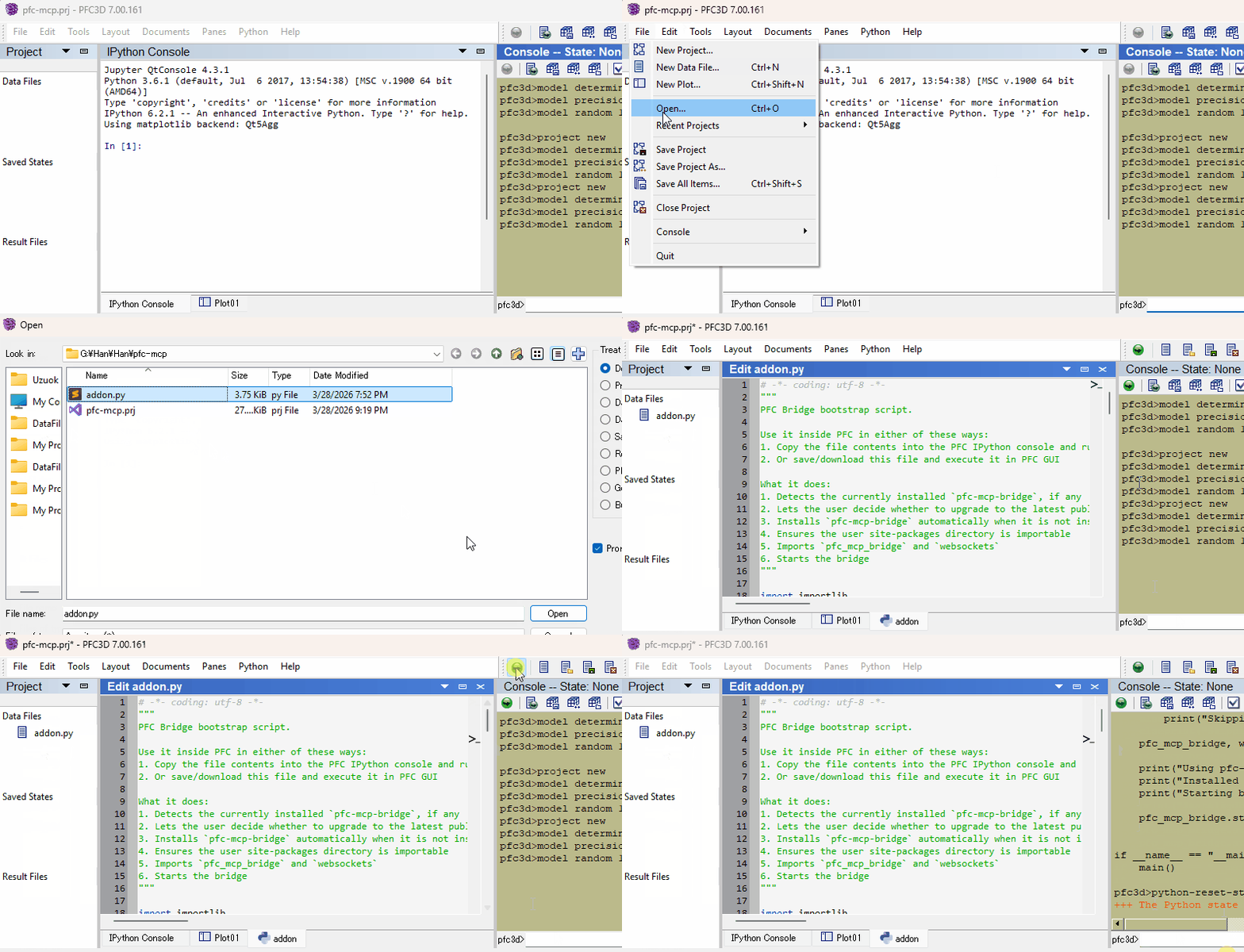
**2. Start the bridge from inside the ITASCA engine:**
Download [`addon.py`](addon.py), then use either of these two flows inside the engine GUI (PFC, FLAC, 3DEC, ...):
- Copy the file contents into the engine's IPython console and run them
- Or download the file and execute it in the engine GUI
### Verify
Restart your AI agent (Claude Code, Codex CLI, Gemini CLI, etc.) and ask it to call `itasca_execute_code` to verify the connection.
## Daily Startup
Once first-time setup is done, each new engine session only needs the bridge re-started — run this in the engine's IPython console and you're back online:
```python
import itasca_mcp_bridge
itasca_mcp_bridge.start()
```
`start()` checks PyPI for a newer bridge release and self-upgrades before starting. The MCP client config persists.
## Features
- **Multi-engine corpus** - command, Python API, and reference docs for PFC, FLAC, 3DEC, MPoint, and MassFlow, selected via the required `software` parameter
- **Multi-version support** - command docs across engine versions (PFC: 6.0/7.0/9.0, FLAC: 7.0/9.0) via the `version` parameter
- **Hierarchical documentation browsing** - agents navigate the engine command tree to discover capabilities and boundaries, reducing hallucinated commands
- **Enhanced plot documentation** - plot items reference docs supplementing the official documentation
- **Interactive REPL** - rapid iteration before committing to full scripts; agents can quickly test and refine code
- **Task lifecycle management** - submit long-running simulations, monitor progress, interrupt running tasks, and browse task history
- **Multi-client compatible** - works with Claude Code, Codex CLI, Gemini CLI, GitHub Copilot CLI, OpenCode, toyoura-nagisa, and other MCP clients
## Troubleshooting
See [Troubleshooting](docs/agentic/itasca-mcp-bootstrap.md#troubleshooting) in the bootstrap guide.
## Development
See [Developer Guide: Install and Run from Source](docs/development/source-install.md).
## Contributing
PRs and issues are welcome! See the [Developer Guide](docs/development/source-install.md) to get started.
## License
MIT - see [LICENSE](LICENSE).