https://github.com/yusukebe/cf-s3-uploader
Cloudflare Worker for uploading images to Amazon S3
https://github.com/yusukebe/cf-s3-uploader
Last synced: 8 months ago
JSON representation
Cloudflare Worker for uploading images to Amazon S3
- Host: GitHub
- URL: https://github.com/yusukebe/cf-s3-uploader
- Owner: yusukebe
- License: mit
- Created: 2021-11-02T02:48:43.000Z (over 4 years ago)
- Default Branch: master
- Last Pushed: 2021-11-02T03:24:59.000Z (over 4 years ago)
- Last Synced: 2025-06-30T10:47:18.022Z (12 months ago)
- Language: TypeScript
- Size: 131 KB
- Stars: 15
- Watchers: 3
- Forks: 1
- Open Issues: 0
-
Metadata Files:
- Readme: README.md
- License: LICENSE
Awesome Lists containing this project
README
# cf-s3-uploader
Cloudflare Worker for uploading images to Amazon S3.
## Set up
First, git clone:
```bash
$ https://github.com/yusukebe/cf-s3-uploader.git
$ cd cf-s3-uploader
```
Copy `wrangler.exmple.toml` to `wrangler.tmol`:
```bash
$ cp wrangler.example.toml wrangler.toml
```
## Variables
### Environment variables
Enviroment variables are:
- `S3_BUCKET` - Your S3 bucket name
- `S3_REGION` - S3 region name
To set these, `wrangler.toml`
```toml
[vars]
S3_BUCKET = "your_bucket_name"
S3_REGION = "s3_region_name"
```
### Secret variables
Secret variables are:
- `NAME` - User name of basic auth
- `PASS` - User password of basic auth
- `AWS_ID` - AWS access key ID
- `AWS_SECRET` - AWS secret access key
To set these, use `wrangler secret put` command:
```bash
$ wrangler secret put NAME
```
## Publish
To publish to your Cloudflare Workers:
```bash
$ wrangler publish
```
## Endpoints
### `/upload`
Header:
To pass the Basic Auth, add the Base64 string of "user:pass" to `Authorization` header.
```
Authorization: Basic ...
```
Body:
Value of `body` is Basic64 string of image binary.
```json
{
"body": "Base64 Text..."
}
```
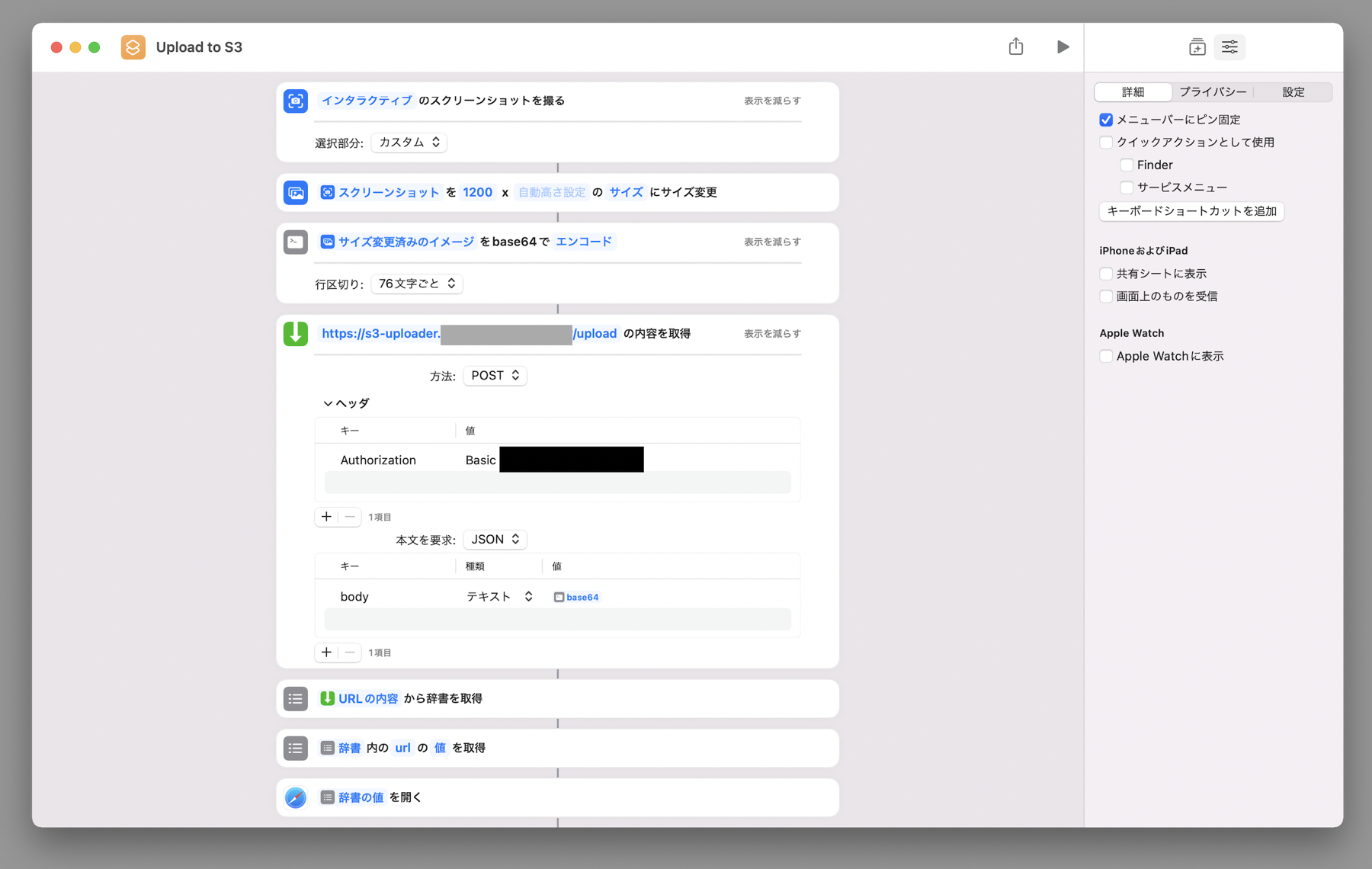
## Use with Shortcuts
Awesome!!!

Setting shortcuts like this:
## Author
Yusuke Wada
## LICENSE
MIT