https://github.com/yvgude/lean-ctx
The Context OS for AI Development. Reduce token waste in Cursor, Claude Code, Copilot, Windsurf, Codex, Gemini & more by 60–95% (up to 99% on cached reads) Shell Hook + MCP Server · 49 tools · 10 read modes · 90+ patterns · Single Rust binary
https://github.com/yvgude/lean-ctx
agentic-coding ai ai-coding claude-code context-engineering copilot cursor developer-tools gemini-cli llm mcp mcp-server reduce-token-costs rust token-optimization
Last synced: about 2 months ago
JSON representation
The Context OS for AI Development. Reduce token waste in Cursor, Claude Code, Copilot, Windsurf, Codex, Gemini & more by 60–95% (up to 99% on cached reads) Shell Hook + MCP Server · 49 tools · 10 read modes · 90+ patterns · Single Rust binary
- Host: GitHub
- URL: https://github.com/yvgude/lean-ctx
- Owner: yvgude
- License: apache-2.0
- Created: 2026-03-23T19:48:59.000Z (4 months ago)
- Default Branch: main
- Last Pushed: 2026-05-05T19:45:11.000Z (3 months ago)
- Last Synced: 2026-05-05T21:28:57.443Z (3 months ago)
- Topics: agentic-coding, ai, ai-coding, claude-code, context-engineering, copilot, cursor, developer-tools, gemini-cli, llm, mcp, mcp-server, reduce-token-costs, rust, token-optimization
- Language: Rust
- Homepage: https://leanctx.com
- Size: 407 MB
- Stars: 1,087
- Watchers: 11
- Forks: 118
- Open Issues: 1
-
Metadata Files:
- Readme: README.md
- Changelog: CHANGELOG.md
- Contributing: CONTRIBUTING.md
- License: LICENSE
- Code of conduct: CODE_OF_CONDUCT.md
- Security: SECURITY.md
- Notice: NOTICE
- Agents: AGENTS.md
Awesome Lists containing this project
- awesome-mcp-zh - yvgude/lean-ctx - 99%。单一 Rust 二进制文件,46 个 MCP 工具。Apache-2.0 开源。 | 社区实现, Rust 开发 🦀, 本地运行 🏠, [leanctx.com](https://leanctx.com), 900+ Stars, 32k+ 安装。 | (MCP 服务器精选列表 / 💻 开发与代码执行)
- awesome-ChatGPT-repositories - lean-ctx - The Context OS for AI Development. Reduce token waste in Cursor, Claude Code, Copilot, Windsurf, Codex, Gemini & more by 60–95% (up to 99% on cached reads) Shell Hook + MCP Server · 49 tools · 10 read modes · 90+ patterns · Single Rust binary (CLIs / Usage)
- awesome-context-engineering - LeanCTX (lean-ctx) - first design (🛠️ Tools & Projects / Memory & Compression)
- awesome-claude-skills - lean-ctx - MCP server and context runtime for AI coding agents: session caching, AST-aware compression, and 90+ shell patterns to reduce token usage. Supports Claude Code, Cursor, Copilot, and other integrations. Install the Claude Code skill with `lean-ctx init --agent claude-code`; docs at [leanctx.com](https://leanctx.com). *By [@yvgude](https://github.com/yvgude)* (Skills / Development & Code Tools)
- awesome-claude-skills-zh - lean-ctx - AI 编码代理的 MCP 服务器和上下文运行时:会话缓存、AST 感知压缩和 90+ shell 模式以减少 token 使用。支持 Claude Code、Cursor、Copilot 和其他集成。使用 `lean-ctx init --agent claude-code` 安装 Claude Code 技能;文档见 [leanctx.com](https://leanctx.com)。*作者 [@yvgude](https://github.com/yvgude)* (技能列表 / 开发与代码工具)
- awesome-llmops - lean-ctx - aware compression, and shell output patterns. [Website](https://leanctx.com) |  | (Optimizations / Profiling)
- awesome-cli-apps - lean-ctx - Token-saving context runtime for agents. (AI / Agents)
- awesome-rust - yvgude/lean-ctx - ctx](https://crates.io/crates/lean-ctx)] - Context runtime for AI coding agents: MCP server and shell hook that compresses tool and terminal output to reduce LLM token use; Tree-sitter parsing, session caching. [](https://github.com/yvgude/lean-ctx/actions/workflows/ci.yml) (Development tools / Workflow Automation)
- awesome-ai-agents - LeanCTX - binary Rust context layer between AI coding agents and their environment. Compresses file reads and shell output, caches results, keeps persistent session memory, enforces path-jail security, and tracks token budgets. MCP-native with 30+ agent compatibility. Apache-2.0. (Agent Infrastructure / Memory & State)
- awesome-rust-with-stars - yvgude/lean-ctx - ctx) | Context runtime for AI coding agents: MCP server and shell hook that compresses tool and terminal output to reduce LLM token use; Tree-sitter parsing, session caching. | 2026-05-07 | (Development tools / Workflow Automation)
- fucking-awesome-cli-apps - lean-ctx - Token-saving context runtime for agents. (AI / Agents)
- awesome-ai-devtools - lean-ctx - source context runtime for AI coding agents. MCP server (optional shell hook) that compresses file reads, shell output, and codebase search to reduce token usage, often 60–99% on supported workflows. 46 tools, session caching, AST-aware compression for 18 languages, 90+ shell patterns. [Website](https://leanctx.com). Apache-2.0. (Agent Infrastructure / Configuration & Context Management)
- awesome-cli-apps - lean-ctx - Token-saving context runtime for agents. (AI / Agents)
- fucking-awesome-rust - yvgude/lean-ctx - ctx](crates.io/crates/lean-ctx)] - Context runtime for AI coding agents: MCP server and shell hook that compresses tool and terminal output to reduce LLM token use; Tree-sitter parsing, session caching. [](https://github.com/yvgude/lean-ctx/actions/workflows/ci.yml) (Development tools / Workflow Automation)
- awesome - lean-ctx - Context runtime for AI coding agents: MCP server and shell hook that compresses tool and terminal output to reduce LLM token use; Tree-sitter parsing, session caching. Part of Awesome Rust Development tools / Workflow Automation updates. ([Read more](/details/lean-ctx.md)) `Rust` `Ai` `Mcp Server` `Open Source` (Development Tools)
README
██╗ ███████╗ █████╗ ███╗ ██╗ ██████╗████████╗██╗ ██╗
██║ ██╔════╝██╔══██╗████╗ ██║ ██╔════╝╚══██╔══╝╚██╗██╔╝
██║ █████╗ ███████║██╔██╗ ██║ ██║ ██║ ╚███╔╝
██║ ██╔══╝ ██╔══██║██║╚██╗██║ ██║ ██║ ██╔██╗
███████╗███████╗██║ ██║██║ ╚████║ ╚██████╗ ██║ ██╔╝ ██╗
╚══════╝╚══════╝╚═╝ ╚═╝╚═╝ ╚═══╝ ╚═════╝ ╚═╝ ╚═╝ ╚═╝
### **Control what your AI can see.**
**LeanCTX — Lean Context Intelligence for AI agents**
LeanCTX — short for **Lean Context** — is the context intelligence layer for
AI agents. It runs as a single local binary between your agents and your code,
shell and data: it **decides** what they read, **remembers** what they learn,
**guards** what they touch — and **proves** what they save with a signed,
verifiable savings ledger. The result: 60–90% fewer tokens — and that's the
receipt, not the product. Zero config required. Local-first.
| Problem | With LeanCTX |
|---------|-------------|
| Repeated file reads: ~2000 tokens each | Cached re-reads: **~13 tokens** |
| Raw `git status`: ~800 tokens | Compressed: **~120 tokens** |
| Context resets every chat | Session memory persists across chats |
| No visibility into context usage | Real-time dashboard + budget control |
---






Website · Docs · Install · Scenarios · Demo · Benchmarks · Cookbook · Security · Changelog
---
> **Control what your AI can see.** LeanCTX — short for **Lean Context** — is the **context intelligence layer** for AI agents: one local Rust binary that decides what your agents read, remembers what they learn, guards what they touch — and proves what they save.
> Token savings are the receipt. Intelligence is the product. Works with **Cursor, Claude Code, Copilot, Windsurf, Codex, Gemini** and 30+ other agents — no config needed.
See it in action:

Read + Shell
Map-mode reads + compressed CLI output

Gain (live)
Tokens + USD savings in real time

Benchmark proof
Measure compression by language + mode
All GIFs are generated from reproducible VHS tapes in demo/.
## Why developers use LeanCTX
- **Longer useful coding sessions** — less context waste = more room for actual code reasoning
- **Lower API costs** — 60–90% fewer tokens on reads and shell output, cached re-reads cost ~13 tokens
- **No more "I already showed you this file"** — session memory persists across chats
- **Works with your existing setup** — one `lean-ctx setup` command, no config changes needed
- **Full visibility** — see exactly where your context window budget goes
---
Saves you tokens? Give it a star — it helps others discover LeanCTX.
---
## What it does — the four dimensions of context
LeanCTX treats context as a managed resource, not an afterthought. One binary
covers the four dimensions that decide how well an AI agent actually performs:
### 1. Compression — input efficiency
Your AI agent reads files and runs commands. LeanCTX compresses both automatically.
- **File reads**: 10 read modes (`full`, `map`, `signatures`, `diff`, `lines:N-M`, `density:X`, …) — cached re-reads cost ~13 tokens
- **Target density** (`density:0.4`): SDE-style budget compression — keeps the highest-entropy lines until ~40% of the original tokens remain, deterministic
- **JIT disclosure**: `signatures` carries line spans and points at `lines:N-M` for targeted expansion — outline first, bodies on demand
- **Shell output**: 95+ shell-output patterns compress git, npm, cargo, docker, kubectl, terraform and more (270 passthrough rules)
- **Tree-sitter AST**: structural understanding for 18 languages — not just text compression
### 2. Routing — the right fidelity per read
Not every file needs the same depth. LeanCTX sends the signal, not the noise.
- **10 read modes**: from full content down to AST signatures and entropy-filtered views
- **Adaptive `ModePredictor`**: learns the optimal read mode per file type from past sessions
- **`IntentEngine`**: classifies query complexity so simple lookups stay cheap
### 3. Memory — context that persists
Context doesn't disappear between chats anymore.
- **Session memory (CCP)**: persist task/facts/decisions across chats — structured recovery queries survive compaction
- **Knowledge graph**: temporal facts with validity windows, episodic + procedural memory
- **Property Graph**: multi-edge code graph (imports, calls, exports, type_ref) powers impact analysis and search ranking
### 4. Verification — control what reaches the model
Performance is accuracy, not just speed. You stay in control of the window.
- **Context Manager**: browser dashboard with real-time token tracking, compression stats, utilization gauge
- **Budgets & SLOs**: profiles, roles, per-agent budgets, and throttling policies
- **Context Proof** (`ctx_proof`, `ctx_verify`): 4-layer verification engine with CI drift gates
Full feature list (76 MCP tools)
- **Web & Research** (`ctx_url_read`): pull a public web page, PDF, or YouTube transcript into context as compressed, citation-backed text — `facts`/`quotes` return claims with a confidence score + source URL, relevance-ranked research-compression distils to a token budget, SSRF-guarded (http/https only)
- **Graph-Powered Intelligence**: hybrid search (BM25 + embeddings + graph proximity via RRF), incremental git-diff updates
- **LSP Refactoring** (`ctx_refactor`): language-server-powered rename, references, go-to-definition via rust-analyzer, typescript-language-server, pylsp, gopls
- **Multi-Agent** (`ctx_agent`, `ctx_handoff`): agent handoff with context transfer bundles, diary system, synchronized shared state
- **Archive Full-Text Search** (`ctx_expand search_all`): FTS5-powered cross-archive search over all previously archived tool outputs
- **PR Context Packs**: `lean-ctx pack --pr` builds a PR-ready context pack (changed files, related tests, impact, artifacts)
- **Context Packages**: `lean-ctx pack create` bundles Knowledge + Graph + Session into portable `.ctxpkg` files with SHA-256 integrity
- **Observability**: `lean-ctx gain --live` for real-time savings, `lean-ctx wrapped` for weekly/monthly summaries (`gain --svg`/`--share` for a shareable card or self-hostable page), `lean-ctx watch` for TUI monitoring
- **Verified savings**: `lean-ctx savings` is an auditable, per-event ledger (tokenizer transparency, bounce-netting, tamper-evident SHA-256 chain) — local-only, on by default
- **HTTP mode**: `lean-ctx serve` for Streamable HTTP MCP + `/v1/tools/call` (used by the Cookbook + SDK)
## Where it's going
LeanCTX is growing from a single context *layer* into a full **cognitive context
layer** for whole teams: version-controlled context strategy, one unified graph, and a
governance layer across many agents.
- **Context as Code** — declarative pipelines, profiles, and policies in TOML, versioned like infrastructure
- **Unified Context Graph** — code, tests, commits, CI runs, and knowledge entries in a single semantic graph
- **Agent Harness** — roles, budgets, and tool permissions for multi-agent governance
- **Context Observability** — SLOs on context consumption, anomaly detection, OpenTelemetry / Prometheus export
The full roadmap lives in **[VISION.md](VISION.md)**.
## How it works (30 seconds)
```
AI tool → (MCP tools + shell commands) → lean-ctx → your repo + CLI
```
- **MCP server**: exposes `ctx_*` tools (read modes, caching, deltas, search, memory, multi-agent)
- **Shell hook**: transparently compresses common commands so the LLM sees less noise
- **Property Graph**: multi-edge code graph powers impact analysis, related file discovery, and search ranking
- **Session memory**: persists state with structured recovery so long-running work never "cold starts"
- **Context Manager**: browser dashboard for real-time visibility into what's in your context window
## Get started (60 seconds)
```bash
# 1) Install (pick one)
curl -fsSL https://leanctx.com/install.sh | sh # universal (no Rust needed)
brew tap yvgude/lean-ctx && brew install lean-ctx # macOS / Linux
npm install -g lean-ctx-bin # Node.js
cargo install lean-ctx # Rust
pi install npm:pi-lean-ctx # Pi Coding Agent
# 2) Connect your AI tools (zero prompts, sensible defaults)
lean-ctx onboard # or: lean-ctx setup (guided, full control)
# 3) Verify
lean-ctx doctor
# 4) Restart your shell + AI tool, use it normally, then see the payoff
lean-ctx gain # savings appear after your AI's first lean-ctx call
```
After onboarding, restart your shell and your editor/AI tool once so the MCP + hooks are active. `lean-ctx gain` is empty until your AI tool makes its first lean-ctx call — that's expected, not a misconfiguration.
Troubleshooting / Safety
- Disable immediately (current shell): `lean-ctx-off`
- Run a single command uncompressed: `lean-ctx -c --raw "git status"`
- Only activate in AI agent sessions: set `shell_activation = "agents-only"` in `~/.config/lean-ctx/config.toml`
- Per-project config override: create `.lean-ctx.toml` in your project root (auto-merged with global config)
- Docker projects sharing `/workspace`: create `.lean-ctx-id` with a unique name to prevent context collisions
- Update: `lean-ctx update`
- Diagnose (shareable): `lean-ctx doctor --json`
## Real-world scenarios
LeanCTX grows with you. Below are the journeys most people actually take — each
links to a complete, function-by-function walkthrough in the
**[Reference](docs/reference/README.md)** (every CLI command and all 76 MCP
tools are documented there).
### 🟢 Your first 60 seconds
*"I just installed it — now what?"*
```bash
lean-ctx onboard # connect every detected AI tool
lean-ctx doctor # confirm you're wired up
```
One command auto-detects Cursor/Claude/Codex/… and configures MCP + hooks.
→ **[Journey 1 — Setup & Onboarding](docs/reference/01-setup-and-onboarding.md)**
### 📖 Coding every day
*"Stop re-reading the same files."*
```bash
lean-ctx read src/server.rs -m map # API surface, ~13 tok on re-read
lean-ctx -c "git status" # compressed shell output
```
Your agent reads less and searches smarter — automatically.
→ **[Journey 2 — Daily Use](docs/reference/02-daily-use.md)**
### 🧠 Resume where you left off
*"My new chat forgot everything."*
```bash
lean-ctx overview # task-aware project recap
lean-ctx knowledge recall "auth" # facts that survive resets
```
Session memory + a project knowledge graph persist across chats.
→ **[Journey 3 — Memory & Knowledge](docs/reference/03-memory-and-knowledge.md)**
### 🗺️ Understand a new codebase
*"Where does this function ripple to?"*
```bash
lean-ctx graph impact src/auth.rs # blast radius
lean-ctx smells scan # code-smell hotspots
```
A multi-edge property graph powers impact analysis + ranked search.
→ **[Journey 4 — Code Intelligence](docs/reference/04-code-intelligence.md)**
### 🔌 Wire in proxy, providers, plugins
*"Pull in GitHub issues and our Postgres schema."*
```bash
lean-ctx provider list
lean-ctx serve --root ./api --root ./web # multi-repo
```
External data flows through the same consolidation pipeline.
→ **[Journey 5 — Advanced & Integrations](docs/reference/05-advanced.md)**
### 🛠️ Keep it healthy
*"Update, fix, or cleanly remove."*
```bash
lean-ctx doctor --fix
lean-ctx update
```
Self-healing diagnostics; surgical uninstall that only removes its own blocks.
→ **[Journey 6 — Lifecycle & Troubleshooting](docs/reference/06-lifecycle.md)**
### 🎛️ Take control of the window
*"Budget my context like a pro."*
```bash
lean-ctx plan "refactor billing" --budget 8000
lean-ctx compile --mode balanced
```
Phi-scored planning + knapsack compilation + a context ledger.
→ **[Journey 7 — Context Engineering](docs/reference/07-context-engineering.md)**
### 🤝 Run a team of agents
*"Planner + coder + reviewer on one repo."*
```text
ctx_agent action=register role=dev
ctx_handoff action=create # baton-pass with full context
```
Shared message bus, diaries, knowledge, and deterministic handoffs.
→ **[Journey 8 — Multi-Agent Collaboration](docs/reference/08-multi-agent.md)**
### 🏢 Share across a team / CI
*"One shared index, headless in pipelines."*
```bash
lean-ctx team serve --config team.toml
lean-ctx bootstrap # zero-prompt CI setup
```
Scoped tokens, optional cloud sync, verifiable context gates.
→ **[Journey 9 — Team, Cloud & CI](docs/reference/09-team-cloud-ci.md)**
### 🎚️ Tune & govern
*"Make it behave exactly how we want."*
```bash
lean-ctx compression standard
lean-ctx harden # enforce token discipline
```
Compression levels, tool profiles, themes, and rules governance.
→ **[Journey 10 — Customization & Governance](docs/reference/10-customization-and-governance.md)**
### 📊 Prove the payoff
*"Show me the numbers."*
```bash
lean-ctx gain --deep # savings, cost, per-agent, heatmap
lean-ctx wrapped # shareable recap (also: gain --svg / gain --share)
lean-ctx savings # verified per-event ledger (auditable; savings verify)
```
All analytics live in the CLI/dashboard — never burning agent tokens.
→ **[Journey 11 — Analytics & Insights](docs/reference/11-analytics-and-insights.md)**
### 📚 The full reference
*"I want to read everything."*
Every command and all 76 MCP tools, organized as user journeys, plus
appendices for the [CLI map](docs/reference/appendix-cli-map.md),
[MCP tools](docs/reference/appendix-mcp-tools.md), and
[paths & config](docs/reference/appendix-paths-and-config.md).
→ **[Reference index](docs/reference/README.md)**
## Supported IDEs & AI tools
LeanCTX is a standard **MCP server**, so it works with any MCP-compatible client. Two integration modes are auto-selected per agent:
| Mode | How it works | Best for |
|---|---|---|
| **Hybrid** | MCP for cached reads (~13 tokens) + shell hooks for command compression | Agents with shell access (Cursor, Claude Code, Codex, ...) |
| **MCP** | All 76 tools via MCP protocol, no shell hooks | Protocol-only agents (JetBrains, VS Code, Zed, ...) |
### Agent compatibility matrix
| Agent | Hybrid | MCP | Setup |
|---|:---:|:---:|---|
| Cursor | ● | | `lean-ctx init --agent cursor` |
| Claude Code | ● | | `lean-ctx init --agent claude` |
| CodeBuddy | ● | | `lean-ctx init --agent codebuddy` |
| Augment CLI / VS Code | ● | | `lean-ctx init --agent augment` |
| Codex CLI | ● | | `lean-ctx init --agent codex` |
| Gemini CLI | ● | | `lean-ctx init --agent gemini` |
| Windsurf | ● | | `lean-ctx init --agent windsurf` |
| GitHub Copilot | ● | | `lean-ctx init --agent copilot` |
| CRUSH | ● | | `lean-ctx init --agent crush` |
| Hermes | ● | | `lean-ctx init --agent hermes` |
| OpenCode | ● | | `lean-ctx init --agent opencode` |
| Pi | ● | | `lean-ctx init --agent pi` |
| Qoder | ● | | `lean-ctx init --agent qoder` |
| Amp | ● | | `lean-ctx init --agent amp` |
| Cline | ● | | `lean-ctx init --agent cline` |
| Roo Code | ● | | `lean-ctx init --agent roo` |
| Kiro | ● | | `lean-ctx init --agent kiro` |
| Antigravity | ● | | `lean-ctx init --agent antigravity` |
| Amazon Q | ● | | `lean-ctx init --agent amazonq` |
| Qwen | ● | | `lean-ctx init --agent qwen` |
| Trae | ● | | `lean-ctx init --agent trae` |
| Verdent | ● | | `lean-ctx init --agent verdent` |
| Aider | | ● | `lean-ctx init --agent aider` |
| Continue | | ● | `lean-ctx init --agent continue` |
| JetBrains IDEs | | ● | `lean-ctx init --agent jetbrains` |
| QoderWork | | ● | `lean-ctx init --agent qoderwork` |
| VS Code | | ● | `lean-ctx init --agent vscode` |
| Zed | | ● | `lean-ctx init --agent zed` |
| Neovim | | ● | `lean-ctx init --agent neovim` |
| Emacs | | ● | `lean-ctx init --agent emacs` |
| Sublime Text | | ● | `lean-ctx init --agent sublime` |
> **Any MCP-compatible client** works out of the box — the table above shows agents with first-class auto-setup.
### When to use (and when not to)
**Great fit if you...**
- use AI coding tools daily and your sessions are shell-heavy (git/tests/builds)
- work in medium/large repos (50+ files / monorepos)
- want a local-first layer with **no telemetry by default**
**Skip it if you...**
- mostly work in tiny repos and rarely call the shell from your AI tool
- always need raw/unfiltered logs (you can still use `--raw`, but ROI is lower)
## Demo
Try these in any repo:
```bash
lean-ctx read rust/src/server/mod.rs -m map
lean-ctx -c "git log -n 5 --oneline"
lean-ctx gain --live
lean-ctx dashboard # Context Manager (browser)
lean-ctx watch # TUI monitor
lean-ctx benchmark report .
```
- The repo ships the exact tapes used to render the GIFs in `demo/`
- Regenerate locally:
```bash
vhs demo/leanctx.tape
vhs demo/gain.tape
vhs demo/benchmark.tape
```
## Benchmarks
- **Latest snapshot**: [BENCHMARKS.md](BENCHMARKS.md)
- **Reproduce**:
```bash
lean-ctx benchmark report .
```
## By the numbers
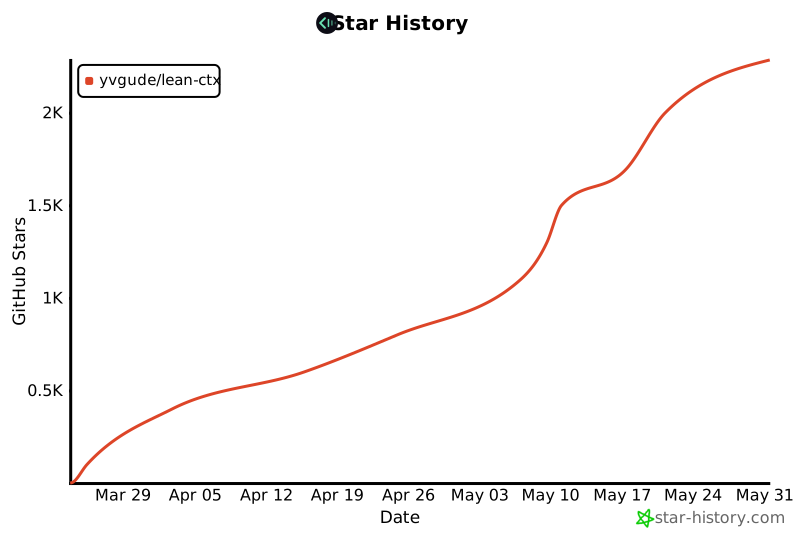
- **2,600+ GitHub stars** — and counting
- **260+ forks** — active community contributions
- **200+ releases** — shipped near-daily since launch
- **30+ supported AI coding agents** — broadest MCP compatibility
- **76 MCP tools** — from simple file reads to multi-agent orchestration
- Used in production by teams running Claude Code, Cursor, and Codex daily
- **Live adoption metrics**: [leanctx.com/metrics](https://leanctx.com/metrics/) — installs, stars and savings, updated continuously
## Docs
- **Reference (every function, by user journey)**: [docs/reference/](docs/reference/README.md) — 11 journeys + CLI/MCP/config appendices
- Getting started: https://leanctx.com/docs/getting-started
- Tools reference: https://leanctx.com/docs/tools/
- CLI reference: https://leanctx.com/docs/cli-reference/
- What is LeanCTX: https://leanctx.com/what-is-leanctx/
- Comparison (vs RTK, Context+, MemGPT): https://leanctx.com/compare/
- Pricing & Cloud (local use is free forever): https://leanctx.com/pricing/
- FAQ: [discord-faq.md](discord-faq.md)
- Feature catalog (SSOT snapshot): [LEANCTX_FEATURE_CATALOG.md](LEANCTX_FEATURE_CATALOG.md)
- Monorepo guide: [docs/guides/monorepo.md](docs/guides/monorepo.md)
- Architecture: [ARCHITECTURE.md](ARCHITECTURE.md)
- Vision: [VISION.md](VISION.md)
## Privacy & security
- **No telemetry by default**
- **Optional anonymous stats sharing** (opt-in during setup)
- **Disableable update check** (config `update_check_disabled = true` or `LEAN_CTX_NO_UPDATE_CHECK=1`)
- **40+ security hardening fixes** in v3.5.16 (path traversal, injection, CSPRNG, CSP, resource limits — [details](CHANGELOG.md))
- Runs locally; your code never leaves your machine unless you explicitly enable cloud sync
See [SECURITY.md](SECURITY.md).
## Uninstall
One command removes **everything** — it stops all processes, then deletes hooks,
editor configs, rules, autostart (LaunchAgent/systemd), the data dir, **and the
binary itself**:
```bash
lean-ctx uninstall # full clean removal
lean-ctx uninstall --dry-run # preview every change, write nothing
lean-ctx uninstall --keep-config # keep MCP configs + rules (for reinstall)
lean-ctx-off # or just disable for the current shell session
```
No binary on PATH (or you used the curl installer)? Run the same removal from the installer:
```bash
curl -fsSL https://leanctx.com/install.sh | sh -s -- --uninstall
```
If you installed via a package manager, `uninstall` removes everything it wrote and
tells you the one command to finish removing the binary:
```bash
brew uninstall lean-ctx # Homebrew
cargo uninstall lean-ctx # cargo install
npm uninstall -g lean-ctx-bin # npm
pi uninstall npm:pi-lean-ctx # Pi Coding Agent
```
## Star History
## Contributing
Start with [CONTRIBUTING.md](CONTRIBUTING.md). Easy first PR: propose a new CLI compression pattern via the [issue template](.github/ISSUE_TEMPLATE/compression_pattern.md).
## License
Apache License 2.0 — see [LICENSE](LICENSE).