https://github.com/zackbradys/fleet
Rancher Fleet - Kubernetes + GitOps
https://github.com/zackbradys/fleet
Last synced: 11 months ago
JSON representation
Rancher Fleet - Kubernetes + GitOps
- Host: GitHub
- URL: https://github.com/zackbradys/fleet
- Owner: zackbradys
- License: mit
- Created: 2023-09-14T03:49:50.000Z (almost 3 years ago)
- Default Branch: main
- Last Pushed: 2025-02-01T15:33:02.000Z (over 1 year ago)
- Last Synced: 2025-02-15T07:30:21.758Z (over 1 year ago)
- Homepage:
- Size: 59.6 KB
- Stars: 2
- Watchers: 2
- Forks: 5
- Open Issues: 0
-
Metadata Files:
- Readme: README.md
- License: LICENSE.md
Awesome Lists containing this project
README
## Rancher Fleet - Kubernetes + GitOps
### Deployment Instructions
- Apply both the Fleet GitRepo commands from below to the `local` cluster. I find it easiest to use the kubectl shell inside of the Rancher Manager.
- Add a Cluster Label to each cluster: **Rancher Manager UI -> Hamburger Menu -> Continuous Delivery -> Clusters -> Select Cluster & Edit Labels**
- For Rancher Longhorn, use the label: `longhorn=enabled`
- For Rancher NeuVector, use the label: `neuvector=enabled`
- For Rancher Monitoring, use the label: `monitoring=enabled`
- For Rancher Logging, use the label: `monitoring=enabled`
- For Rancher KubeWarden, use the label: `kubewarden=enabled`
### Fleet Local and Fleet Default
```bash
### Adds the GitRepo(s) to the local cluster.
kubectl apply -f https://raw.githubusercontent.com/zackbradys/fleet/main/gitrepo-local.yaml
### Adds the GitRepo(s) to all downstream cluster(s).
kubectl apply -f https://raw.githubusercontent.com/zackbradys/fleet/main/gitrepo-default.yaml
```
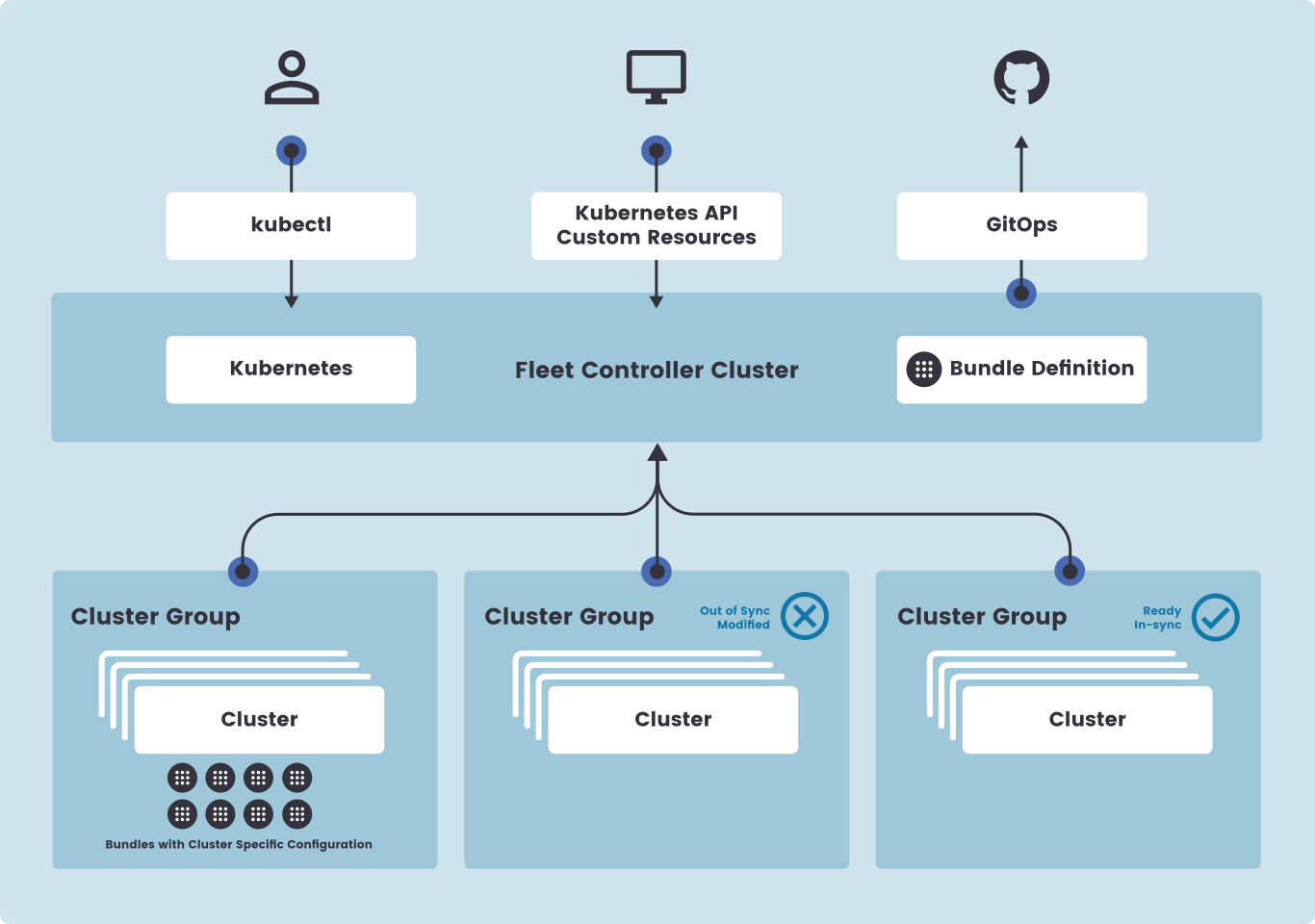
### Fleet Deployment Architecture Diagram