https://github.com/zakimohammed/ng-fate
🔮 A tool for deciding the fate of an Angular project.
https://github.com/zakimohammed/ng-fate
angular csharp dotnet ng-fate
Last synced: 3 months ago
JSON representation
🔮 A tool for deciding the fate of an Angular project.
- Host: GitHub
- URL: https://github.com/zakimohammed/ng-fate
- Owner: ZakiMohammed
- License: mit
- Created: 2023-06-23T07:17:22.000Z (about 3 years ago)
- Default Branch: master
- Last Pushed: 2023-07-30T09:53:04.000Z (almost 3 years ago)
- Last Synced: 2025-06-26T15:51:57.965Z (about 1 year ago)
- Topics: angular, csharp, dotnet, ng-fate
- Language: C#
- Homepage:
- Size: 2.17 MB
- Stars: 0
- Watchers: 1
- Forks: 0
- Open Issues: 0
-
Metadata Files:
- Readme: README.md
- License: LICENSE.md
Awesome Lists containing this project
README
# 🔮 NgFate - Fate of Angular App
A tool for deciding the fate of an Angular project. This will help to provide reports on the Angular app structure, routes, dependencies and relations.
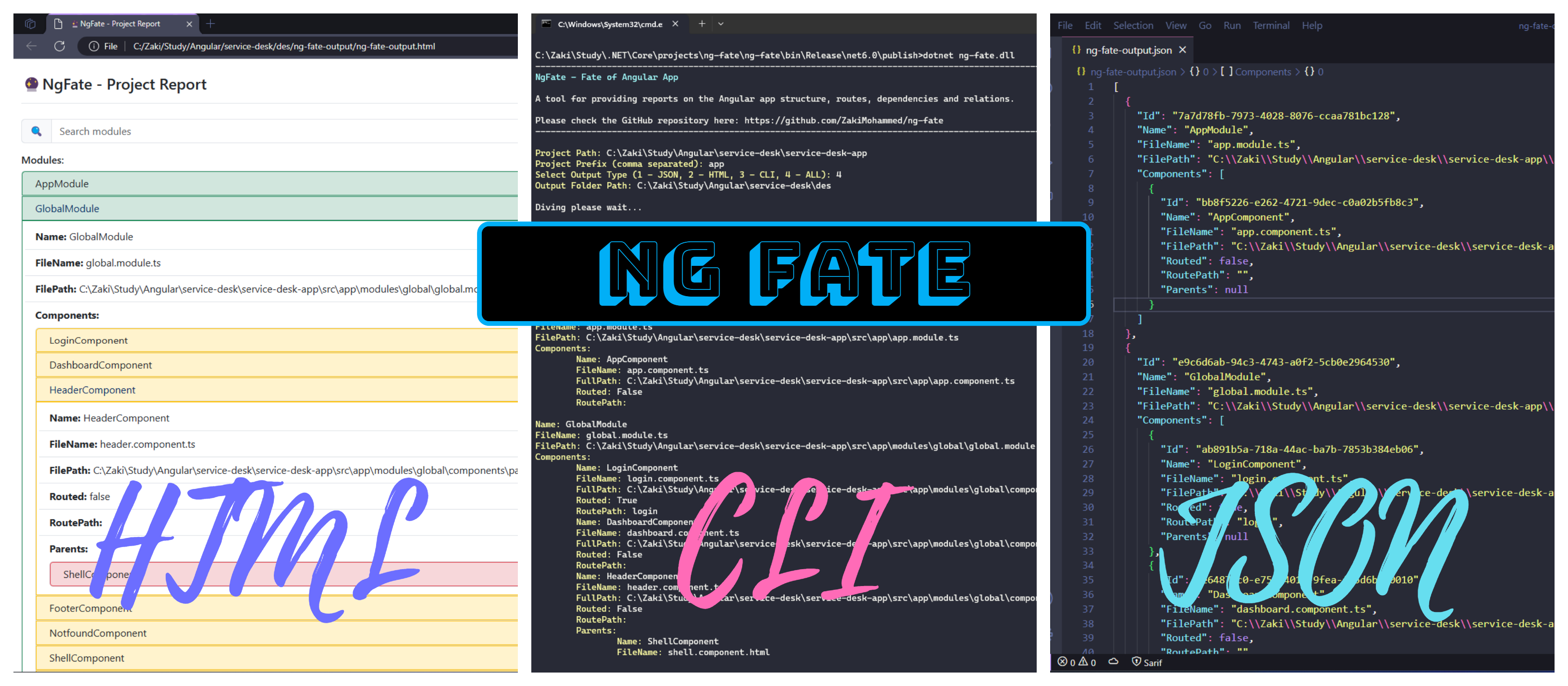
## 🍳 CodeOmelet - Blog Post
Check out the CodeOmelet blog post for this project.
Link: https://codeomelet.com/posts/ng-fate-a-tool-for-deciding-the-fate-of-an-angular-app
___
## 🚚 Download and Run
- Download .NET if you don't have it already from here [Download .NET](https://dotnet.microsoft.com/en-us/download).
- Download the app from the latest [Releases](https://github.com/ZakiMohammed/ng-fate/releases) section.
- Unzip the project in the directory of your choice.
- Open terminal.
- Go to `publish` folder in the terminal:
```
C:\Users\zshaikh>cd C:\Users\zshaikh\Downloads\publish
```
- Run the app by using the executable:
- Enter `ng-fate.exe` and press Enter.
```
C:\Users\zshaikh>ng-fate.exe
```
- Run the app by using the dotnet command:
- Enter `dotnet ng-fate.dll` and press Enter.
```
C:\Users\zshaikh>dotnet ng-fate.dll
```
## 🏃♂️ Run Application
NgFate requires bunch of input from you in order to decide fate of your app.
### Example:
An example of such input values are shown below:
- Project Path: C:\Zaki\Study\Angular\service-desk\service-desk-app
- Project Prefix (comma separated): app,jam,van
- Select Output Type (1 - JSON, 2 - HTML, 3 - CLI, 4 - ALL): 4
- Output Folder Path: C:\Zaki\Study\Angular\service-desk\des
### Input Details:
Below gives detailing to these inputs:
- `Project Path`: Path to your Angular project.
- `Project Prefix (comma separated)`: Multiple comma separated values can be provided as app prefix (e.g app,jam,van).
- `Select Output Type (1 - JSON, 2 - HTML, 3 - CLI, 4 - ALL)`:
1. If you want a `.json` file as an output select first option.
1. If you want a `.html` file as an output select second option.
1. If you want output in the terminal it self select third option.
1. If you want all of the above select fourth option.
- `Output Folder Path`: Path to your directory where you want all the output files to be generated.
Diagram:
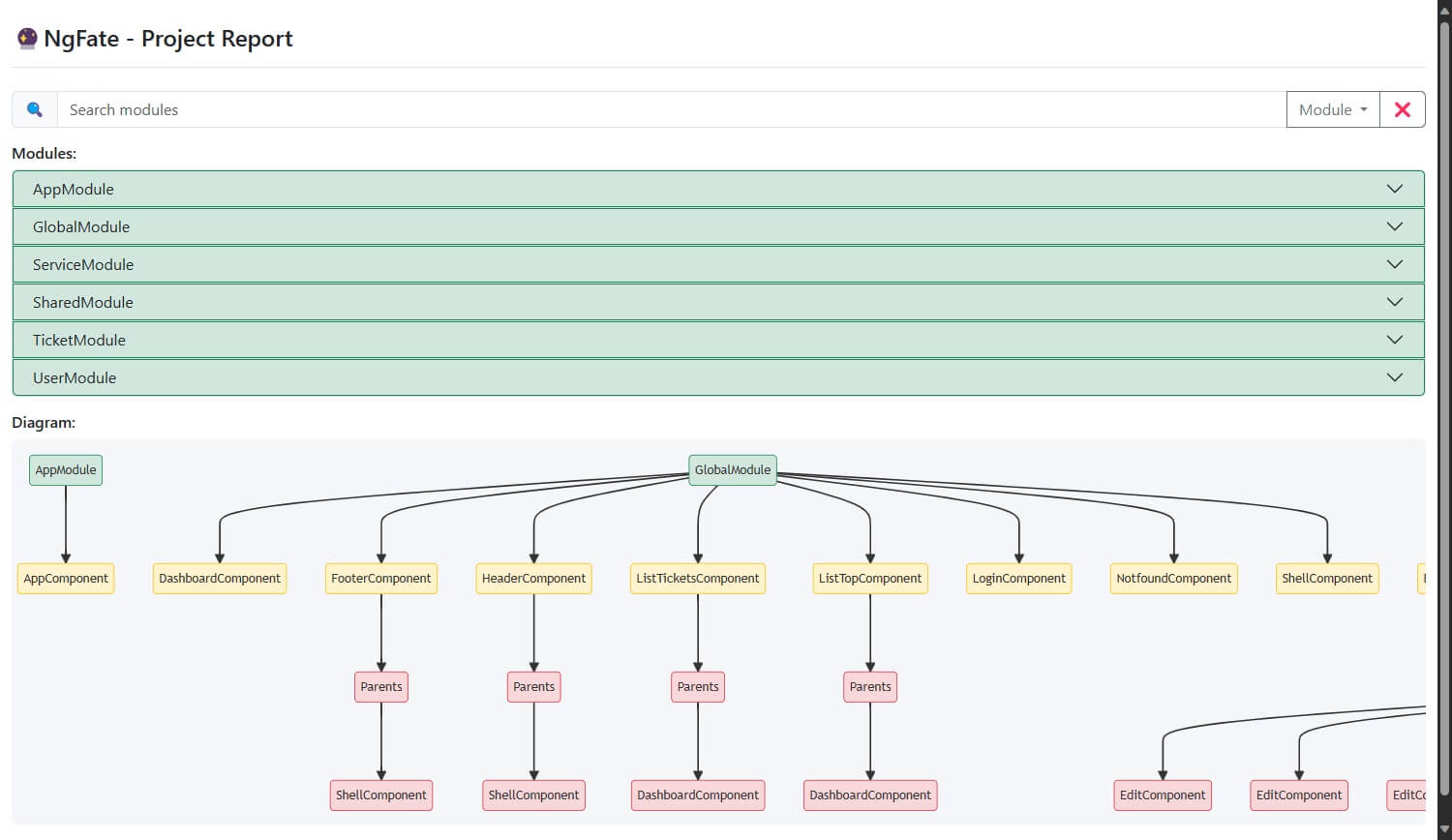
Watch a demo video here:
https://codeomelet.com/Media/Images/posts/ng-fate-download-run-output.webm
## ⚠️ Limitations
Currently the NgFate is rookie and have to evolve a lot. For starter NgFate is looking for some ideal structuring of the Angular project as per the Angular official document.
Check and verify if your app is adhering to these limitations:
- NgFate doesn't support stand alone components yet.
- The module and component naming must follow Angular guide.
- Each module and component files must ends with the convention `*.module.ts` and `*.component.ts`.
- Properly formatted declarations of components within @NgModule decorator (either in single line or new line).
- Properly formatted routes configurations (path and component properties).
- Prefix must be provided while providing the input to NgFate (it is case sensitive).
- If Angular App's TypeScript files are not formatted with any formatters like Prettier or VS Code Default Formatter then NgFate might not work as expected. Make sure to format your application TypeScript files.
## 🍷 Future Scope
For the interstellar travel of NgFate below are some key features considered as a future scope for the tool:
- Pipes and directives considerations.
- Version Support: Adhering to the latest releases of Angular.
- AI support for speeding up performance.
- Fault tolerance and better logging.
___
Below topics are for further read.
## 🧪 Algorithm:
1. get all '.module.ts' files
1. get all 'declarations' array data from NgModules
1. decompose fileName based on camelCasing of name
1. get file path by search fileName in the directory
1. read '*-routing.module.ts' file and search name of component if existed
1. get the path name while searching for component in routing file
1. search for 'header.component.html' file in entire project and get the .html parent files
1. decompose fileName from name
## 🌳 Data Structure:
```
[
// 1. get all '.module.ts' files
{
name: 'AppModule',
fileName: 'app.module.ts',
components: [
// 2. get all 'declarations' array data from NgModules
{
name: 'LoginComponent',
fileName: 'login.component.ts', // 3. decompose fileName based on camelCasing of name
filePath: 'src/app/pages/login.component.ts', // 4. get file path by search fileName in the directory
routed: true, // 5. read '*-routing.module.ts' file and search name of component if existed
routePath: 'login', // 6. get the path name while searching for component in routing file
parents: [],
},
{
name: 'HeaderComponent',
fileName: 'header.component.ts',
filePath: 'src/app/components/header.component.ts',
routed: false, // 5. read '*-routing.module.ts' file and search name of component if existed
routePath: null,
parents: [
// 7. search for 'header.component.html' file in entire project and get the .html parent files
{
name: 'MainComponent',
fileName: 'main.component.ts', // 8. decompose fileName from name
filePath: 'src/app/components/main.component.ts', // 4. get file path by search fileName in the directory
},
],
},
],
},
];
```