https://github.com/zanysoft/laravel-menu
https://github.com/zanysoft/laravel-menu
Last synced: about 1 year ago
JSON representation
- Host: GitHub
- URL: https://github.com/zanysoft/laravel-menu
- Owner: zanysoft
- License: mit
- Created: 2019-05-24T07:03:34.000Z (about 7 years ago)
- Default Branch: master
- Last Pushed: 2019-05-24T07:27:05.000Z (about 7 years ago)
- Last Synced: 2025-06-06T00:43:11.852Z (about 1 year ago)
- Language: JavaScript
- Size: 97.7 KB
- Stars: 5
- Watchers: 1
- Forks: 0
- Open Issues: 0
-
Metadata Files:
- Readme: README.md
- License: LICENSE
Awesome Lists containing this project
README
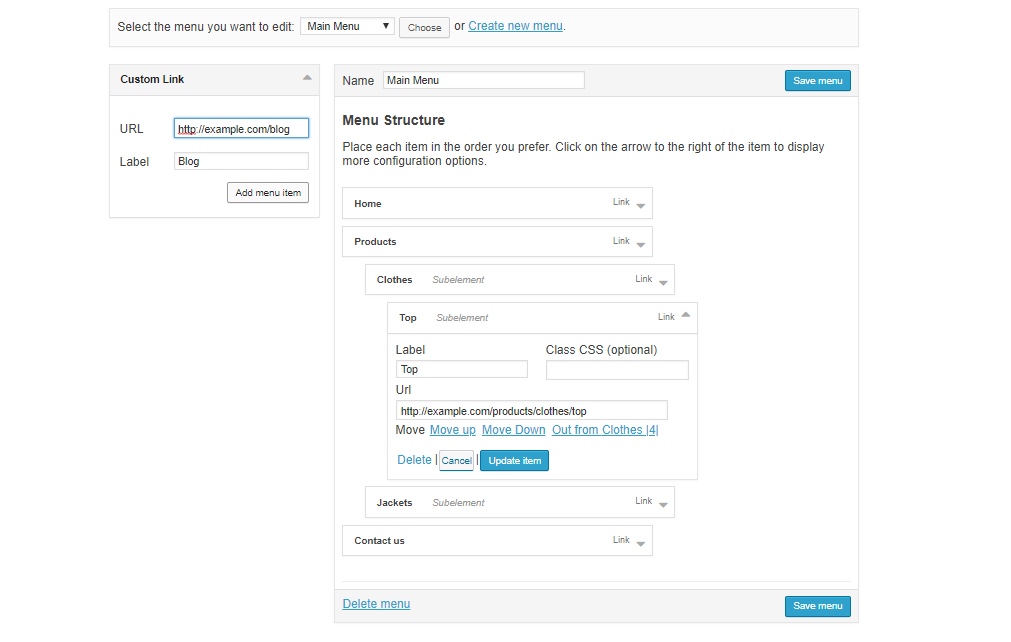
# Laravel Drag and Drop menu editor like wordpress
### Installation
1. Run
```php
composer require zanysoft/laravel-menu
```
***Step 2 & 3 are optional if you are using laravel 5.5***
2. Add the following class, to "providers" array in the file config/app.php (optional on laravel 5.5)
```php
ZanySoft\Menu\MenuServiceProvider::class,
```
3. add facade in the file config/app.php (optional on laravel 5.5)
```php
'Menu' => ZanySoft\Menu\Facades\Menu::class,
```
4. Run publish
```php
php artisan vendor:publish --provider="ZanySoft\Menu\MenuServiceProvider"
```
5. Configure (optional) in ***config/menu.php*** :
- ***CUSTOM MIDDLEWARE:*** You can add you own middleware
- ***TABLE PREFIX:*** By default this package will create 2 new tables named "menus" and "menu_items" but you can still add your own table prefix avoiding conflict with existing table
- ***TABLE NAMES*** If you want use specific name of tables you have to modify that and the migrations
- ***Custom routes*** If you want to edit the route path you can edit the field
6. Run migrate
```php
php artisan migrate
```
DONE
### Menu Builder Usage Example - displays the builder
On your view blade file
```php
@extends('app')
@section('contents')
{!! Menu::render() !!}
@endsection
//YOU MUST HAVE JQUERY LOADED BEFORE menu scripts
@push('scripts')
{!! Menu::scripts() !!}
@endpush
```
### Get Menu Items By Menu ID
```php
use ZanySoft\Menu\Facades\Menu;
...
/*
Parameter: Menu ID
Return: Array
*/
$menuList = Menu::get(1);
```
### Get Menu Items By Menu Name
In this example, you must have a menu named *Admin*
```php
use ZanySoft\Menu\Facades\Menu;
...
/*
Parameter: Menu ID
Return: Array
*/
$menuList = Menu::getByName('Admin');
```
### Using The Model
Call the model class
```php
use ZanySoft\Menu\Models\Menus;
use ZanySoft\Menu\Models\MenuItems;
```
### Menu Usage Example (a)
A basic two-level menu can be displayed in your blade template
```php
// Used to get the menu items into the blade template
$public_menu = Menu::getByName('Public');
```
### Menu Usage Example (b)
Now inside your blade template file place the menu using this simple example
```php
```
### Customization
you can edit the menu interface in ***resources/views/vendor/menu/menu-html.blade.php***
### Compatibility
* Tested with laravel 5.2, 5.3, 5.4, 5.5, 5.6, 5.7