https://github.com/zapier/type-system-benchmarks
Benchmark several type systems and ways to build them (right now Typescript and Flow)
https://github.com/zapier/type-system-benchmarks
Last synced: about 1 year ago
JSON representation
Benchmark several type systems and ways to build them (right now Typescript and Flow)
- Host: GitHub
- URL: https://github.com/zapier/type-system-benchmarks
- Owner: zapier
- Archived: true
- Created: 2019-07-11T17:49:41.000Z (almost 7 years ago)
- Default Branch: master
- Last Pushed: 2020-04-04T23:47:15.000Z (about 6 years ago)
- Last Synced: 2024-11-14T17:48:09.124Z (over 1 year ago)
- Language: TypeScript
- Homepage:
- Size: 199 KB
- Stars: 4
- Watchers: 55
- Forks: 1
- Open Issues: 1
-
Metadata Files:
- Readme: README.md
Awesome Lists containing this project
- awesome-list - type-system-benchmarks
README
# Type System Benchmarks
`type-system-benchmarks` aims to compare the bare performance of Flow and Typescript on real world projects.
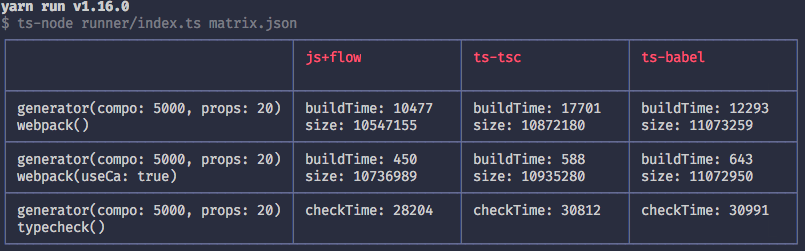
Typescript 3.5 vs Flow 0.102
## Usage
To run all the benchmarks:
```
yarn benchmark
```
## Apps
Apps represent typical JavaScript, Flow or Typescript projects with their respective configurations. Benchmarks are run for each app available in the [apps](apps) directory.
Apps names follow the following name convention: `{language}+{variation}`.
`language` can be either `js` or `ts`. Note that TypeScript is represented as a language as it's not only a type system, but a superset of JavaScript.
`variation` is a generic placeholder that represents a given way to integrate one of the type system. `js+flow` represents a basic Flow integration, `ts-babel` represents a Babel integration of Typescript, whereas `ts-tsc` represents a standard Typescript integration using the official compiler.
## Benchmarks
Benchmarks focus on measuring the performance of a specific feature of Flow / Typescript against a given app. Currently there are two benchmarks: **typecheck** and **webpack**.
### Typecheck
This benchmark measures how bare tools perform to only type checking. This is useful to gauge how a typical IDE integration or CI will perform when type checking.
### Webpack
This benchmark measures how both tools perform when integrated with Webpack. This is useful to gauge how it affects (re)build times.
It accepts the following options:
- **useCache** _(default: `false`)_ - If `true` the benchmark will leverage the `cache-loader` and make a first compilation pass to populate its cache. It will then measure the second compilation pass reusing that cache.
- **transpileOnly** _(default: `true`)_ - If `false` the benchmarks will measure both typechecking and transpilation using Webpack. Under the hood it will configure the appropriate loaders to parallelize both operations.
## Code generator
In order to run benchmarks on apps that simulate a real world example, `type-system-benchmarks` uses a code generator under the hood. Currently it's rather simple and basically generates a bunch of React components.
It accepts the following options:
- **components** - The number of components to generate.
- **props** - The number of props per components to generate.
## Benchmarks matrix
`type-system-benchmarks` uses a [matrix.json](matrix.json) file to describe which benchmarks to run against which apps. You can modify this file in order to add/remove bencharmks/apps.
The file contains 3 sections:
- `apps` - An array of apps name (ie. `ts+babel`).
- `benchmarks` - An array of benchmarks with optional options (ie. `webpack`). Note that if you want to pass benchmark's option you can use an array like so: `['webpack', { useCache: true }]`.
- `generatorOptions` - An array of generator options.