https://github.com/zazuko/vscode-sparql-notebook
Visual Studio Code SPARQL Notebook Extension
https://github.com/zazuko/vscode-sparql-notebook
notebook rdf sparql vscode vscode-extension
Last synced: about 1 year ago
JSON representation
Visual Studio Code SPARQL Notebook Extension
- Host: GitHub
- URL: https://github.com/zazuko/vscode-sparql-notebook
- Owner: zazuko
- License: other
- Created: 2021-12-01T14:05:28.000Z (over 4 years ago)
- Default Branch: main
- Last Pushed: 2025-02-17T09:05:21.000Z (over 1 year ago)
- Last Synced: 2025-04-15T02:09:24.167Z (about 1 year ago)
- Topics: notebook, rdf, sparql, vscode, vscode-extension
- Language: TypeScript
- Homepage: https://marketplace.visualstudio.com/items?itemName=Zazuko.sparql-notebook
- Size: 3.69 MB
- Stars: 28
- Watchers: 6
- Forks: 8
- Open Issues: 15
-
Metadata Files:
- Readme: README.md
- Changelog: CHANGELOG.md
- License: LICENSE.md
Awesome Lists containing this project
README
# VSCode SPARQL Notebook
This extension provides a _SPARQL Notebook_ mode for [Visual Studio Code](https://code.visualstudio.com). This is a powerful way to document SPARQL queries and make them execute as notebook code cells.
Use a SPARQL notebook to:
- Provide hands-on SPARQL training
- Document data available via SPARQL
- Validate data via SPARQL
- Run queries against a SPARQL endpoint
- Run queries against a local RDF file
This notebook can render SPARQL SELECT results and RDF graphs via SPARQL CONSTRUCT queries.

The extension automatically installs the [Stardog RDF Grammars](https://marketplace.visualstudio.com/items?itemName=stardog-union.stardog-rdf-grammars) and [SPARQL Language Server](https://marketplace.visualstudio.com/items?itemName=stardog-union.vscode-langserver-sparql) extensions for SPARQL syntax highlighting and auto-completion.
This extension is still pretty raw but it works for us [tm]. Bug reports & contributions are very welcome!
## Get the Extension
- [VSCode Marketplace](https://marketplace.visualstudio.com/items?itemName=Zazuko.sparql-notebook)
- [Open VSX Registry](https://open-vsx.org/extension/zazuko/sparql-notebook)
## Manual
- [Manual](./doc/00_intro.md)
## Features
- Open any `.sparqlbook` file as a Notebook.
- Execute query blocks in the Notebook UI and view output.
- Configure endpoint connections in the SPARQL Notebook side panel.
- Export a `.sparqlbook` file to Markdown.
- Attach `.sparql` or `.rq` files to cells.
- Use a local RDF file as a data source.
## Installation
You can install it directly from the Visual Studio Code Extension tab. It is available on the [Marketplace](https://marketplace.visualstudio.com/items?itemName=Zazuko.sparql-notebook)
## Usage
Open any `.sparqlbook` file with the `Open With` menu option. Then, select the `SPARQL Notebook` format. Connect to a SPARQL Endpoint and execute query blocks and view output interactively.
## Endpoints
Endpoints are the destinations for sending SPARQL queries, and there are two types:
### Remote Servers (HTTP / HTTPS)
You can connect to a remote server by clicking the `+` button in the `SPARQL Connections` panel. Fill in the server URL and optional credentials. If you omit credentials, the extension will attempt a connection without them. This connection is used throughout the entire notebook, except when a cell defines its own endpoint.
### Local Endpoints
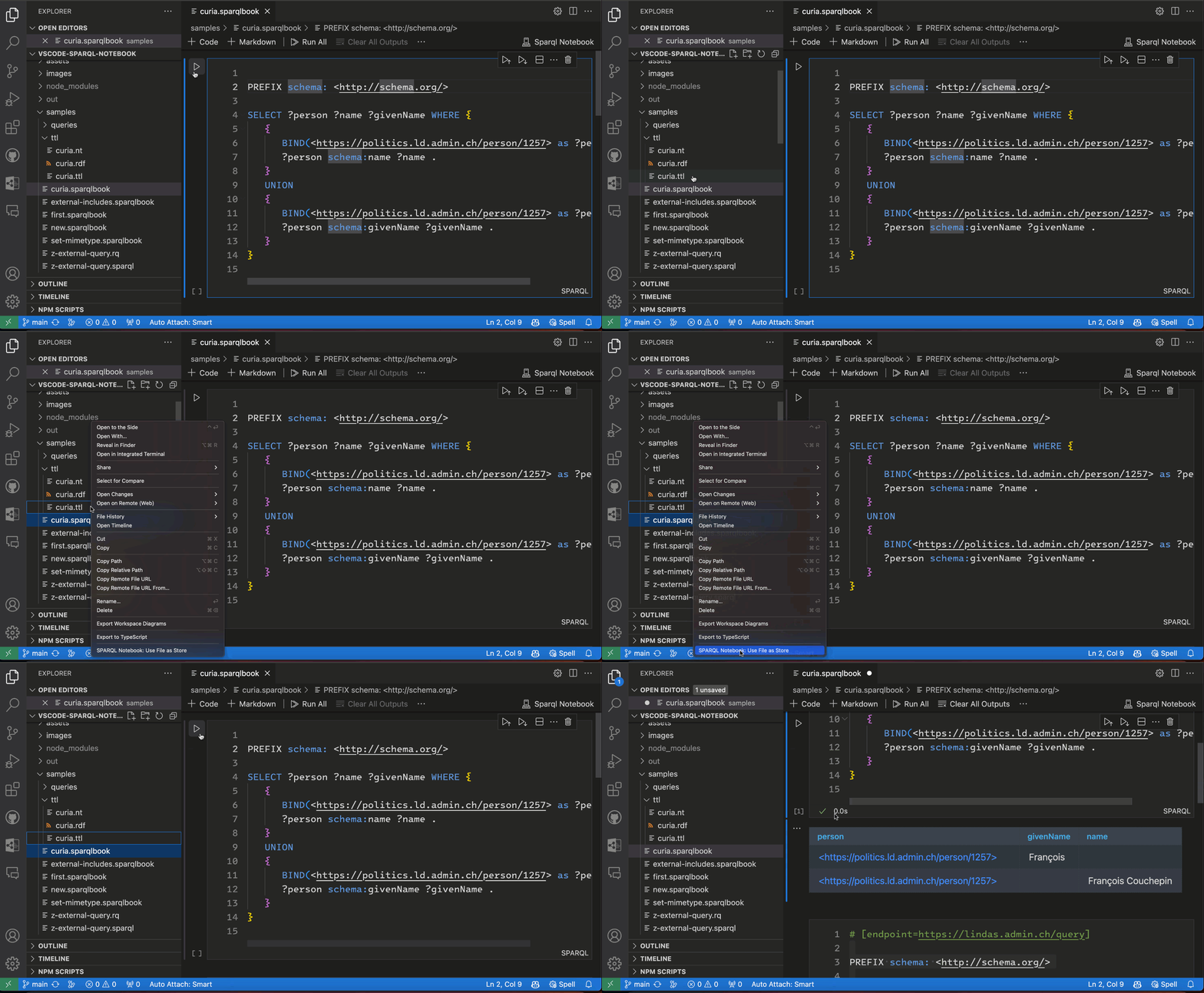
Configure a local endpoint by right-clicking on a TTL, NT, or RDF file and selecting `SPARQL Notebook: Use File as Store`. This creates a new local endpoint populated with the chosen file's content. The entire notebook uses this endpoint, except when a cell specifies its own.
### Cell-Specific Endpoints
You can assign an endpoint to a specific cell by adding a comment with the endpoint URL or file path in a code cell:
```sparql
# [endpoint=https://lindas.admin.ch/query]
```
or
```sparql
# [endpoint=./relative/path/file.ttl]
```
```sparql
# [endpoint=/absolute/path/file.ttl]
```
Working with relative paths makes the notebook portable.
For file based endpoints you can have multiple files in the endpoint definitions in many ways:
Absolute or relative paths pattern are supported but i suggest to use relative paths for portability.
```sparql
# [endpoint=./rdf/{a,b}.ttl]
```
or
```sparql
# [endpoint=./rdf/*.ttl]
```
or
```sparql
# [endpoint=./rdf/a.ttl]
# [endpoint=./rdf/b.ttl]
```
Note: You cannot mix HTTP endpoints and file endpoints in the same cell.
### Cell Status Bar
The cell status bar displays information about the endpoint in use and its source.
## Code Cell (SPARQL Cell)
A code cell contains a SPARQL query, which can be a SELECT, ASK, CONSTRUCT, or DESCRIBE query. Execute a code cell by clicking the Run Cell button in the cell toolbar or pressing Ctrl+Enter (or Option+Enter on Mac).
### Query from a file
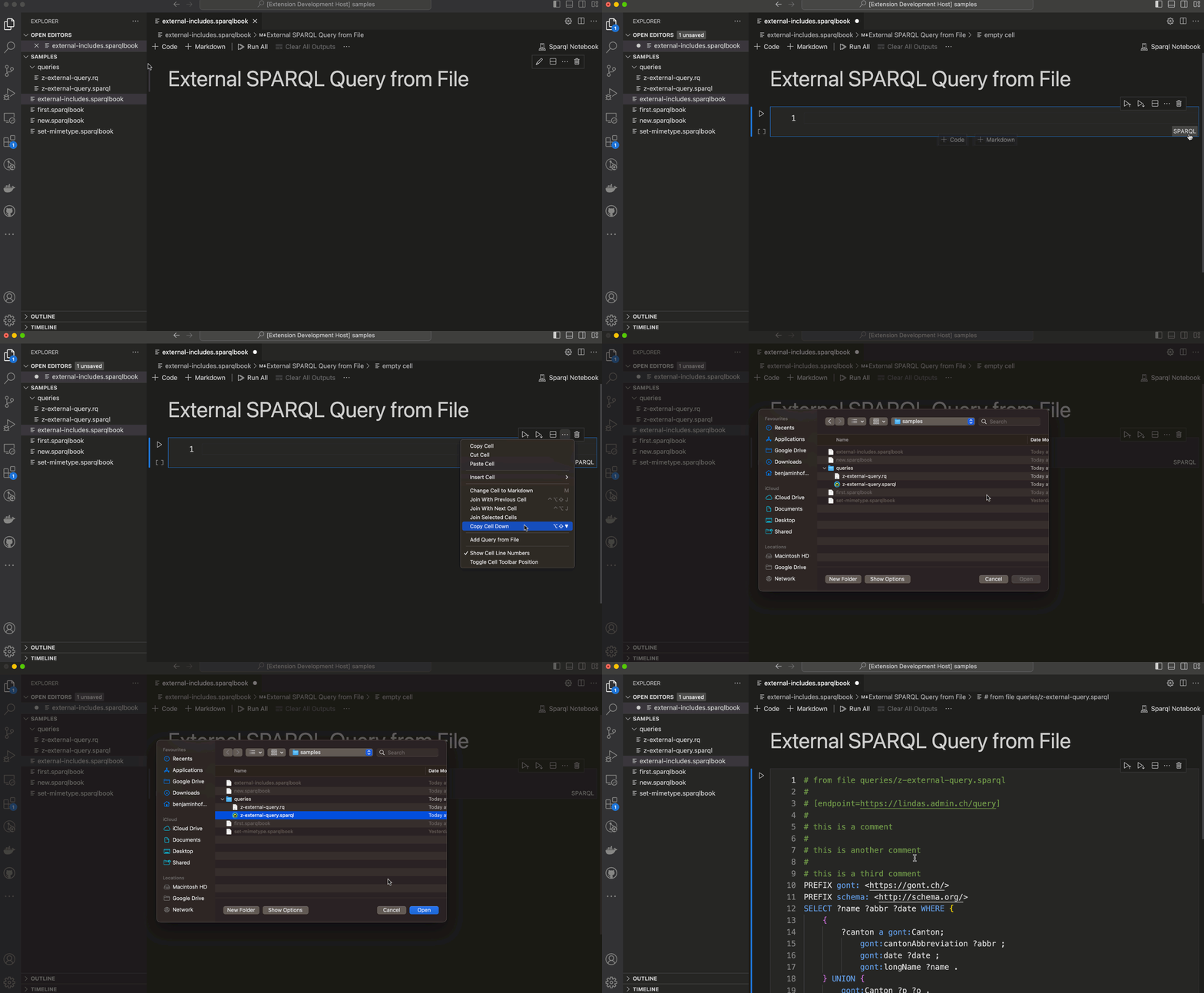
You can attach a query file to a cell. The query file will load and execute when you run the cell. Supported file extensions include `.sparql` and `.rq`. Saving the notebook also saves the query file.
### Cell Status Bar
The cell status bar indicates whether the cell uses a query file.
## FAQ
### Show SELECT Results as a Table
Technically that means set the default renderer for MIME-Type `application/sparql-results+json`.
1. in the output cell, choose `application/sparql-results+json`
2. Open the Command Palette (Ctrl+Shift+P or Cmd+Shift+P on Mac),
3. Search for "mime" and click: "Notebook: Save Mimetype Display Order"
4. You will be prompted to choose either to ...
- enable that default setting globally (choose "User Settings")
- or locally for that specific workspace (choose "Workspace Settings")

### Export as Markdown
Right click a `.sparqlbook`file and select `Export to Markdown`.
## Contribute
This extension uses the [
Notebook API ](https://code.visualstudio.com/api/extension-guides/notebook). Contributions & bug fixes are always welcome!
h
## Credits
- Stardog VSCode Extensions, https://github.com/stardog-union/stardog-vsc
- Oxigraph, https://github.com/oxigraph
- Random Fractals Inc., https://marketplace.visualstudio.com/items?itemName=RandomFractalsInc.vscode-data-table
And all contributors ❤️