https://github.com/zeezide/swiftpmcatalog
Metadata driving the SwiftPM Catalog application
https://github.com/zeezide/swiftpmcatalog
swift swift-package-manager
Last synced: 10 months ago
JSON representation
Metadata driving the SwiftPM Catalog application
- Host: GitHub
- URL: https://github.com/zeezide/swiftpmcatalog
- Owner: ZeeZide
- License: mit
- Created: 2019-11-04T12:01:55.000Z (over 6 years ago)
- Default Branch: develop
- Last Pushed: 2023-11-29T17:23:45.000Z (over 2 years ago)
- Last Synced: 2023-11-29T18:33:30.266Z (over 2 years ago)
- Topics: swift, swift-package-manager
- Language: Swift
- Homepage: https://zeezide.com/en/products/swiftpmcatalog/
- Size: 53.7 KB
- Stars: 58
- Watchers: 4
- Forks: 9
- Open Issues: 4
-
Metadata Files:
- Readme: README.md
- License: LICENSE
Awesome Lists containing this project
README
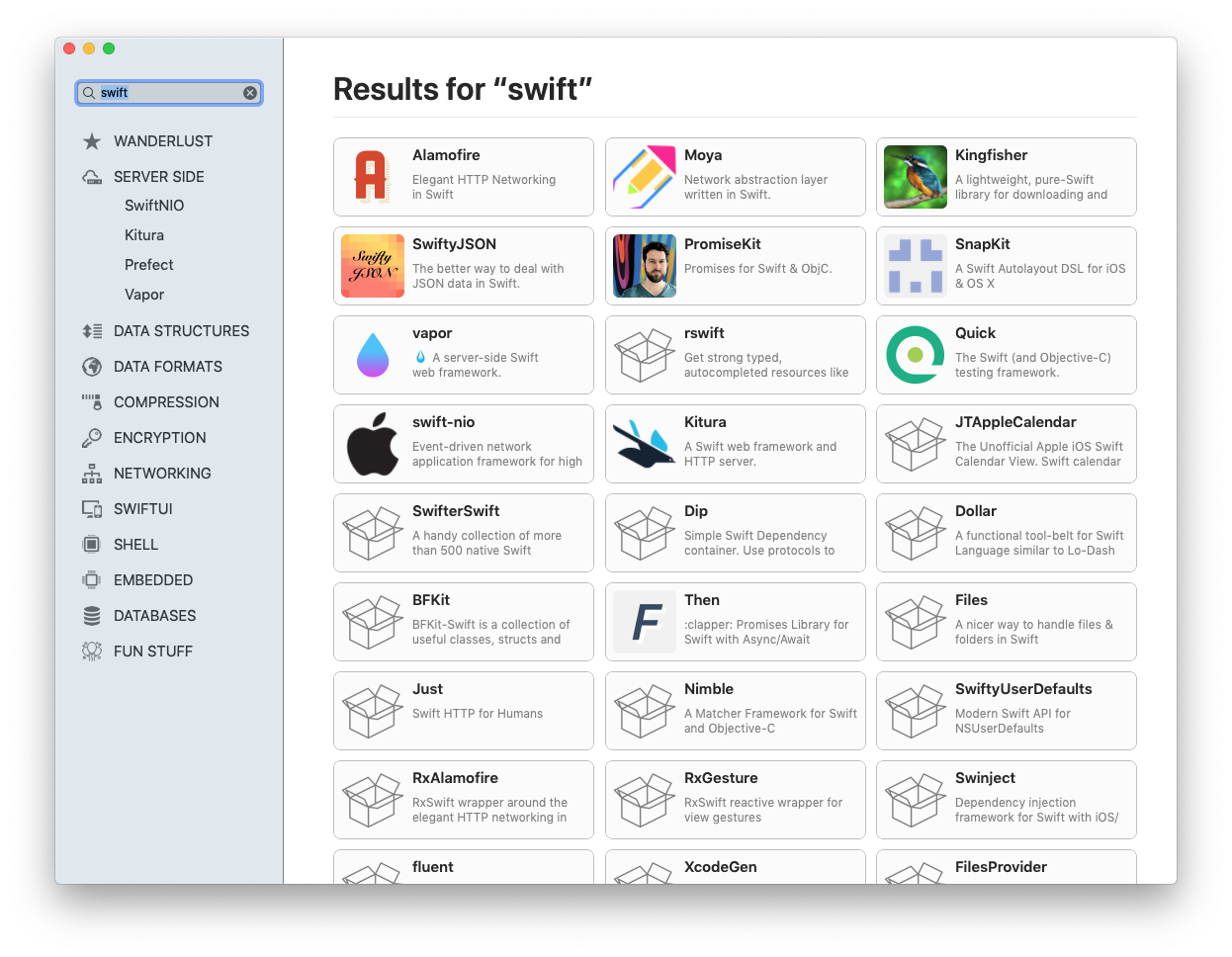
SwiftPM Catalog

This repository contains the meta data driving the
[SwiftPM Catalog](https://zeezide.com/en/products/swiftpmcatalog/index.html)
macOS application.
It enhances the search data provided by the
excellent
[SwiftPM Library](https://github.com/daveverwer/SwiftPMLibrary)
with categorization information, in addition to some extra meta data.
## Pull Requests Welcome!
If you'd like to add icons or snapshots, rearrange or promote
certain packages in a section, feel free to submit a pull request.
Before submitting, please make sure the JSON is valid, e.g. using:
```shell
make validate
```
> Note: When icons are from a resizable source, we prefer the 256x256 images.
### Testing
You can test changes by setting the `CatalogInfoURL` user default.
The default's default is this URL of this repo:
`https://raw.githubusercontent.com/ZeeZide/SwiftPMCatalog/master/catalog-info.json`.
But you can point it to any location you like.
E.g. `defaults write NSGlobalDomain CatalogInfoURL "http://myserver/catalog-info.plist"`, or start the app on the commandline
with the `-CatalogInfoURL "http://myserver/catalog-info.plist"` argument.
The app tries to refresh from that URL on every restart.
## Catalog JSON Format
We now generate the `catalog-info.json` from separate JSON files:
- the `index.json` files contained in the `sidebar` subfolder,
this hierarchy represents what is shown in the app's sidebar
- `icons.json` contains repository to icon mappings
- `snapshot-images.json` contains images for the bigger widget views
(if missing those are autogenerated using WebKit)
The main catalog content is a set of "sections" shown in the sidebar.
Those can have "subsections" and "content".
The "content" is again an array of different content types (currently two
kinds of lists).
### Sections
Sections are stored under the "sidebar" key, they have:
- a "title"
- (currently) a static "image" (e.g. "ImDiscover") stored in the asset catalog
of the application
- a "Content" array
- optionally "subsections"
Example:
```json
{ "title": "Wanderlust",
"image": "ImDiscover",
"content": [
{
"title" : "All Things Swift",
"type" : "small-list",
"needle" : "swift",
"rows" : 2
}
]
}
```
### Content
Currently there are two types of content:
- "small-list"
- "snapshot-list"
Small lists can be driven by either a
[SwiftPM Library](https://github.com/daveverwer/SwiftPMLibrary)
query,
or by a static set of repository URLs.
"snapshot-lists" are always backed by repository URLs.
Sample small query list:
```json
{
"title" : "All Things Swift",
"type" : "small-list",
"needle" : "swift",
"rows" : 2
}
```
Sample snapshot list:
```json
{
"type": "snapshot-list",
"title": "Big ones",
"repositories": [
"https://github.com/swiftwebui/SwiftWebUI.git",
"https://github.com/mxcl/PromiseKit.git"
]
}
```
### Overriding Images
Using the catalog you can override default images generated by the application.
#### Icons
Note: When icons are from a resizable source, we prefer the 256x256 images.
Note: GitHub org image do not need to be added. If one is missing, please file an issue instead of a PR. Thanks!
Would be nice to have better auto icon lookup, but right now you can override
icons.
```json
"icons": {
"https://github.com/SnapKit/SnapKit.git":
"https://avatars0.githubusercontent.com/u/7809696?s=256&v=4"
}
```
#### Snapshot Images
By default snapshots are generated by snapshotting the repository web page.
But you can also provide a nicer, more descriptive image. Which can even
point to an animated GIF.
Note: Images a preferable at 1.6x scale (e.g. 640x400).
Example:
```json
"snapshot-images": {
"https://github.com/swiftwebui/SwiftWebUI.git":
"http://www.alwaysrightinstitute.com/images/swiftwebui/AvocadoCounter/AvocadoCounter.gif"
}
```
## Links
- [SwiftPM Catalog](https://zeezide.com/en/products/swiftpmcatalog/index.html)
macOS application.
- [SwiftPM Library](https://github.com/daveverwer/SwiftPMLibrary)
## Who
Brought to you by [ZeeZide](http://zeezide.de).
We like
[feedback](https://twitter.com/ziezeit),
GitHub stars,
cool [contract work](http://zeezide.com/en/services/services.html),
presumably any form of praise you can think of.