https://github.com/zeroby0/open-terminal-here
Open Windows Terminal with Right Click.
https://github.com/zeroby0/open-terminal-here
Last synced: 8 months ago
JSON representation
Open Windows Terminal with Right Click.
- Host: GitHub
- URL: https://github.com/zeroby0/open-terminal-here
- Owner: zeroby0
- License: mit
- Created: 2020-09-17T19:10:13.000Z (over 5 years ago)
- Default Branch: master
- Last Pushed: 2020-10-30T07:42:20.000Z (over 5 years ago)
- Last Synced: 2025-06-12T02:05:39.609Z (about 1 year ago)
- Language: PowerShell
- Size: 1.22 MB
- Stars: 6
- Watchers: 2
- Forks: 1
- Open Issues: 1
-
Metadata Files:
- Readme: README.md
- License: LICENSE
Awesome Lists containing this project
README
# Open Terminal here
[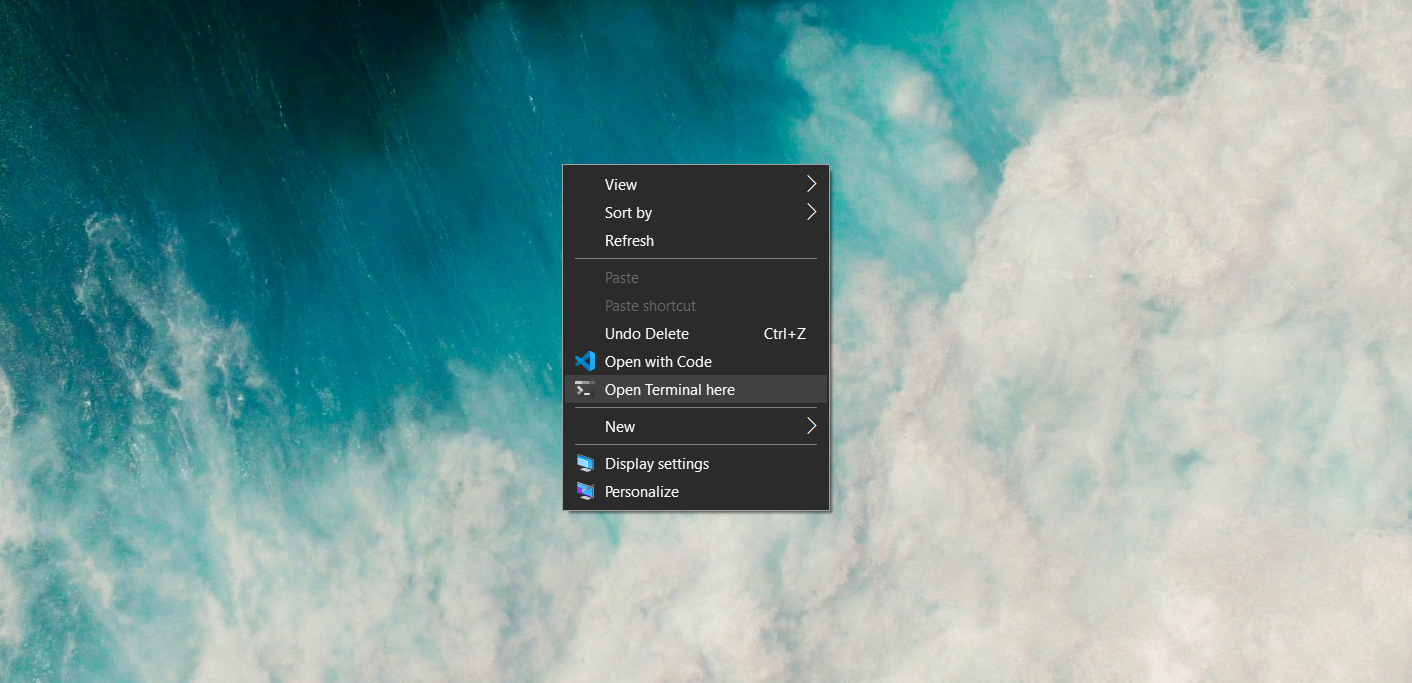 ][terminal-app]
Open Windows Terminal in current folder with Right-Click.
Works with the [new Windows Terminal][terminal-app] by Microsoft which is [significantly better][terminal-better] than CMD and Powershell.
## Installation
[Download add.ps1][add-ps1] > Right-Click add.ps1 > `Run with PowerShell`.
## Credits:
* Icon: [By Microsoft][terminal-icon]
* Registry keys: Adapted from [this comment][registry-keys-comment]
* Adding Registry keys with PowerShell: [This StackOverflow answer][powershell-regkeys]
[terminal-app]: https://www.microsoft.com/en-in/p/windows-terminal/9n0dx20hk701?rtc=1&activetab=pivot:overviewtab
[terminal-better]: https://devblogs.microsoft.com/commandline/introducing-windows-terminal/
[add-ps1]: https://github.com/zeroby0/open-terminal-here/releases/download/v1.0.1/add.ps1
[terminal-icon]: https://github.com/microsoft/terminal/blob/master/res/terminal.ico
[registry-keys-comment]: https://github.com/microsoft/terminal/issues/1060#issuecomment-497539461
[powershell-regkeys]: https://stackoverflow.com/questions/58205772/powershell-to-add-reg-key