https://github.com/zeroultra/unityvisualgraphnode
Unity 可视化节点编辑器
https://github.com/zeroultra/unityvisualgraphnode
unity unity-editor
Last synced: about 1 year ago
JSON representation
Unity 可视化节点编辑器
- Host: GitHub
- URL: https://github.com/zeroultra/unityvisualgraphnode
- Owner: ZeroUltra
- License: apache-2.0
- Created: 2021-10-29T09:23:48.000Z (over 4 years ago)
- Default Branch: main
- Last Pushed: 2025-03-27T13:32:22.000Z (about 1 year ago)
- Last Synced: 2025-04-04T00:12:46.543Z (about 1 year ago)
- Topics: unity, unity-editor
- Language: C#
- Homepage:
- Size: 10.8 MB
- Stars: 14
- Watchers: 1
- Forks: 1
- Open Issues: 0
-
Metadata Files:
- Readme: README.md
- License: LICENSE
Awesome Lists containing this project
README
# UnityVisualGraphNode
## Unity 可视化节点编辑器

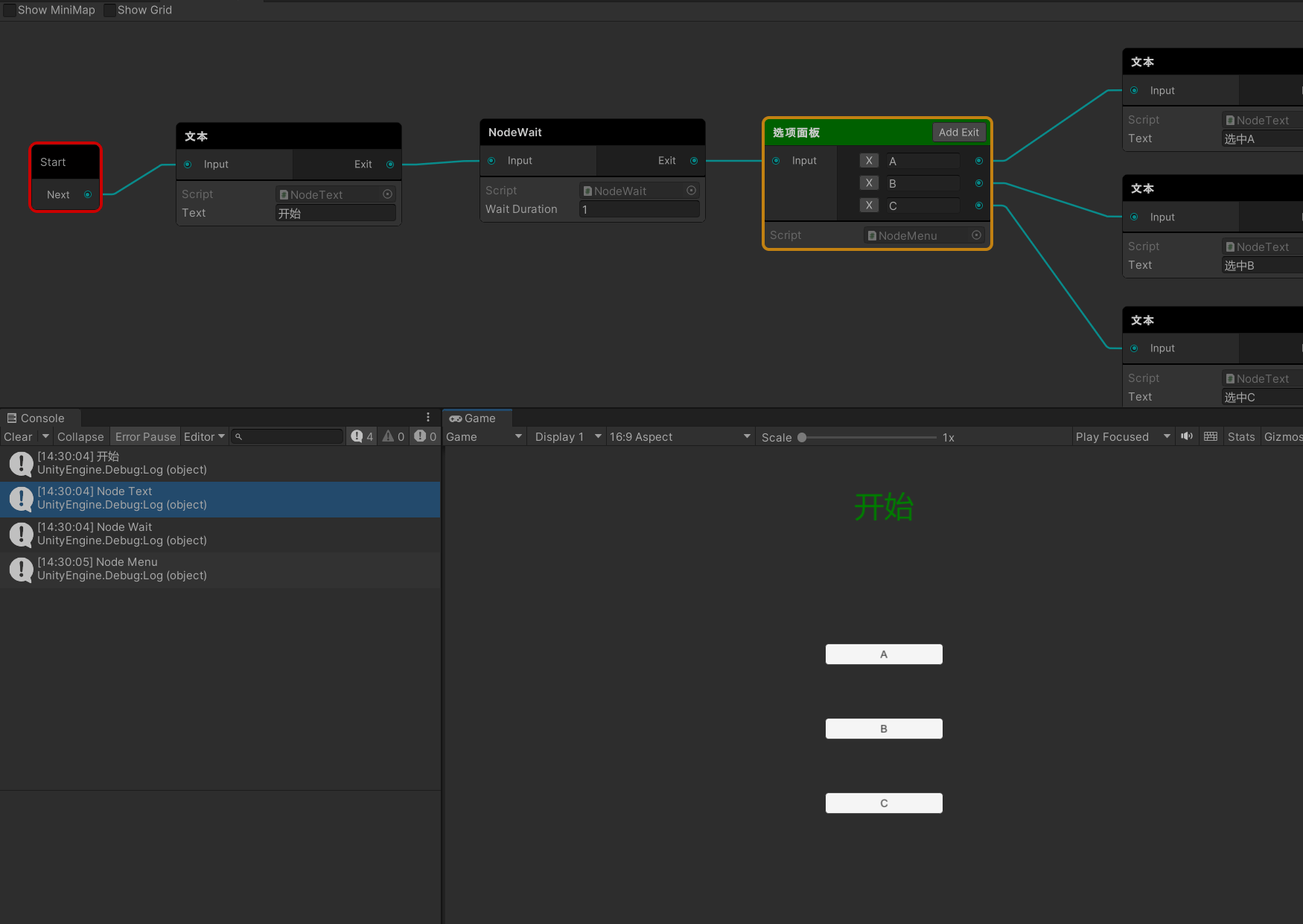
* 高度自由定制
* 运行时定位节点
## 如何使用
1. 新建脚本继承`NodeBase`即可(可直接使用 Project试图中鼠标右键点击->Create->Visual Node C# Script)
```c#
using VisualGraphNodeSystem;
using VisualGraphRuntime;
//不添加NodeName特性则为脚本默认名
//节点名字 order:排序(超过10中间会有横线) iconName:图标名字(unity中内置图标名字) titleBgColorString:标题背景颜色
[NodeName("node示例", order=1, iconName = "d_ContentSizeFitter Icon"),titleBgColorString="#ffffff"]
//输入输出端口类型 (输入输出端口数量)
[NodePortAggregate(NodePortAggregateAttribute.PortAggregate.Single, NodePortAggregateAttribute.PortAggregate.Single)]
public class NodeSample : VisualNodeBase
{
public float waitDuration;
}
```
其中图标名字均是unity内部icon可参考:[jasursadikov/unity-editor-icons) (github.com)](https://github.com/jasursadikov/unity-editor-icons)
支持自定义序列化保存
```c#
using VisualGraphRuntime;
using UnityEngine;
using VisualGraphNodeSystem;
[NodeName("NodeWait")]
[NodePortAggregate(NodePortAggregateAttribute.PortAggregate.Single, NodePortAggregateAttribute.PortAggregate.Single)]
public class NodeWait : VisualNodeBase
{
public float waitDuration = 1.0f;
public override string ToSerialize()
{
return $"@NodeWait|{waitDuration}";
}
public override void FromSerialize(string str)
{
waitDuration = float.Parse(str.Split("|")[1]);
}
}
```
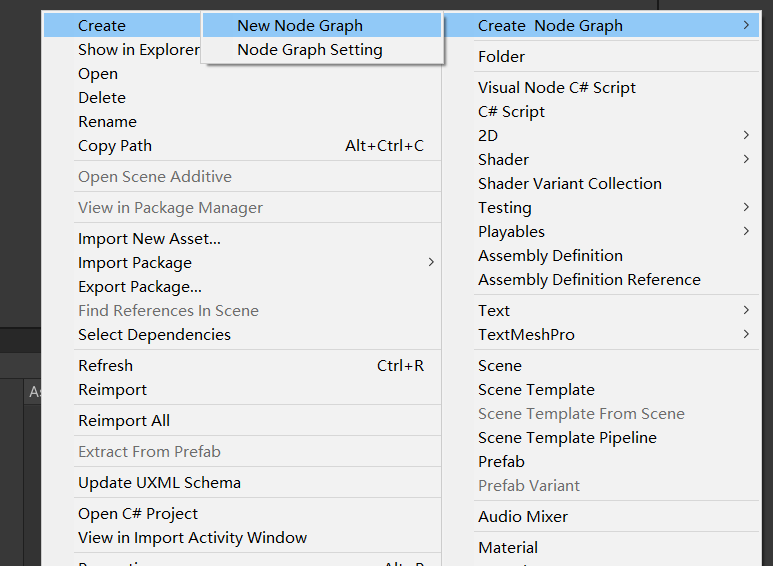
2. 新建一个NodeGrpah,进行节点编辑
3. 根据节点内部逻辑,自行编辑代码
4. **具体可导入Sample文件夹查看示例**
5. `NodeGraphSetting`是一些常用配置
## 注意点
**可以对node自行绘制,有两种方式**
* 使用IMGUI,和普通继承Editor重写相同,缺点是如果太多会导致界面卡顿(原因是需要太多draw)
* 使用UIElements,需要继承VisualGraphNodeView,使用UIElements的UI绘制,这个不会导致卡顿
* 可使用类似Odin插件等自行绘制
具体代码可查看示例文件夹`NodeSampleEditor.cs`
测试使用的是**Unity2021.3.x 2022.3.x**版本
如果有其他版本问题,请提交issue
## ChangeLog
#### v1.0.3
* 修复一些bug
* 添加窗口`Reload`按钮,用于重新绘制界面
* 添加`搜索框`,搜索节点描述,并定位
#### v1.0.2
* [NodeName] 属性增加 titleBgColorString选项,可自定义标题背景颜色
* 在设置面板中增加默认标题背景色以及是否显示索引选项
#### v1.0.1
* 修复界面reload domain之后定位和缩放问题(原先reload之后会变成刚打开的状态)
* 添加`Serialize And Save`功能,用于将节点自定义序列化保存/反序列化读取
#### v1.0.0
提交1.0包
## 其他
[Unity-Visual-Graph-Editor](https://github.com/BusStopStudios/Unity-Visual-Graph-Editor)
基于上面这个repo进行了修改
使用的第三方插件:
[dbrizov/NaughtyAttributes: Attribute Extensions for Unity (github.com)](https://github.com/dbrizov/NaughtyAttributes)