https://github.com/zetatez/evolving
MacOS下控制同花顺进行交易, 无券商限制.
https://github.com/zetatez/evolving
python quantitative-trading stock-market stocks stocks-trading strategy trading-api
Last synced: 4 months ago
JSON representation
MacOS下控制同花顺进行交易, 无券商限制.
- Host: GitHub
- URL: https://github.com/zetatez/evolving
- Owner: zetatez
- License: mit
- Created: 2020-11-09T05:53:10.000Z (over 5 years ago)
- Default Branch: main
- Last Pushed: 2026-04-02T05:18:28.000Z (4 months ago)
- Last Synced: 2026-04-02T18:44:34.637Z (4 months ago)
- Topics: python, quantitative-trading, stock-market, stocks, stocks-trading, strategy, trading-api
- Language: Python
- Homepage: https://github.com/zetatez/evolving
- Size: 1.37 MB
- Stars: 67
- Watchers: 5
- Forks: 24
- Open Issues: 2
-
Metadata Files:
- Readme: README.md
- License: LICENSE
Awesome Lists containing this project
README
# Looking For Maintainers
# Welcome to the evolving !
[`evolving`](https://github.com/zetatez/evolving) is a trading engine for MacOS system.
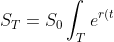}du)
## Get in touch!
- E-mail: zetatez@icloud.com
- Wechat Group

## Installation guide
1. Requirements
- cliclick >= 4.0.1
- python >= 3.8.5
- 同花顺 == Version 2.3.1
2. Dependencies
```bash
brew install cliclick
pip install `curl -fsSL https://raw.githubusercontent.com/zetatez/evolving/main/requirements.txt`
```
4. Installation
- It is strongly recommended to use the source code.
4. Configuration
Note:
- You need to log in broker and bank account manually at least once.
- If you want to use the email notification module, you need to register a 163 email account.
```bash
mkdir -p ~/.config/evolving
vim ~/.config/evolving/config.yaml
```
```yaml
evolving:
trading:
userid: "THS id"
password: "THS password"
broker_code: "PAZQ"
broker_account: "your broker account"
broker_password: "broker account password"
bank_name: "bank name"
bank_account: "your bank account"
bank_password: "bank account password"
mail:
mail_host: smtp.163.com
mail_sender: your email address@163.com
mail_license: your email license
mail_receivers:
- your email address@163.com
```
`mail_receivers` can also be provided as a semicolon separated string if you prefer not to use a YAML list.
5. Authorization
- Mac -> Systerm Preference -> Security & Privacy -> Privacy -> unluck -> "Accessibility" AND "Full Disk Access".
- [x] Terminal
- [x] osascript
6. Tutorial
A brief **tutorial** can be found at [***wik***i](https://github.com/zetatez/evolving/wiki).
## For more information
- Hints:
- You need to log in broker and bank account manually at least once.
- If you want to use the email notification module, you need to register a 163 email account.
- Technically, there is no restriction on brokers, but I didn't develop it all. If you don't find the broker you want, you can make a little change to the `asloginBroker` of script [*ascmd.py*](https://github.com/zetatez/evolving/blob/main/evolving/ascmds.py).
Up to now, The supported brokers are
- ZXZQ -- 中信证券
- PAZQ -- 平安证券
- ZSZQ -- 浙商证券
- GTJA -- 国泰君安
- GJZQ -- 国金证券
- XYZQ -- 兴业证券
- ZJZQ -- 中金证券
- ZTZQ -- 中泰证券
Note: For different brokers, the display might be different. That is to say, the code might need to be slightly adjusted according to the different brokers.
## To contribute
To contribute in this repo, please open a [pull request](https://help.github.com/articles/using-pull-requests/#fork--pull) from your fork of this repo.
## LICENSE
Released under the [MIT](./LICENSE) License.