https://github.com/zhisme/lazy_names
Ease your console typing with redefining constants by shorter version
https://github.com/zhisme/lazy_names
console constants irb pry ruby
Last synced: over 1 year ago
JSON representation
Ease your console typing with redefining constants by shorter version
- Host: GitHub
- URL: https://github.com/zhisme/lazy_names
- Owner: zhisme
- License: mit
- Created: 2020-11-24T17:14:50.000Z (over 5 years ago)
- Default Branch: master
- Last Pushed: 2025-03-26T21:14:05.000Z (over 1 year ago)
- Last Synced: 2025-03-26T22:25:06.269Z (over 1 year ago)
- Topics: console, constants, irb, pry, ruby
- Language: Ruby
- Homepage:
- Size: 42 KB
- Stars: 5
- Watchers: 0
- Forks: 0
- Open Issues: 1
-
Metadata Files:
- Readme: README.md
- License: LICENSE.txt
Awesome Lists containing this project
README
[](https://github.com/zhisme/lazy_names/actions/workflows/rake.yml)
[](https://badge.fury.io/rb/lazy_names)

[](https://hitsofcode.com/github/zhisme/lazy_names/view?branch=master)
[](https://codecov.io/gh/zhisme/lazy_names)

# lazy_names
lazy_names helps programmer to type faster very-long class names constants by defining them on a shorter version.
If you are lazy like me typing many times a day in console long constants then this gem will ease your development process.
## Why
Consider this example from pry terminal session.
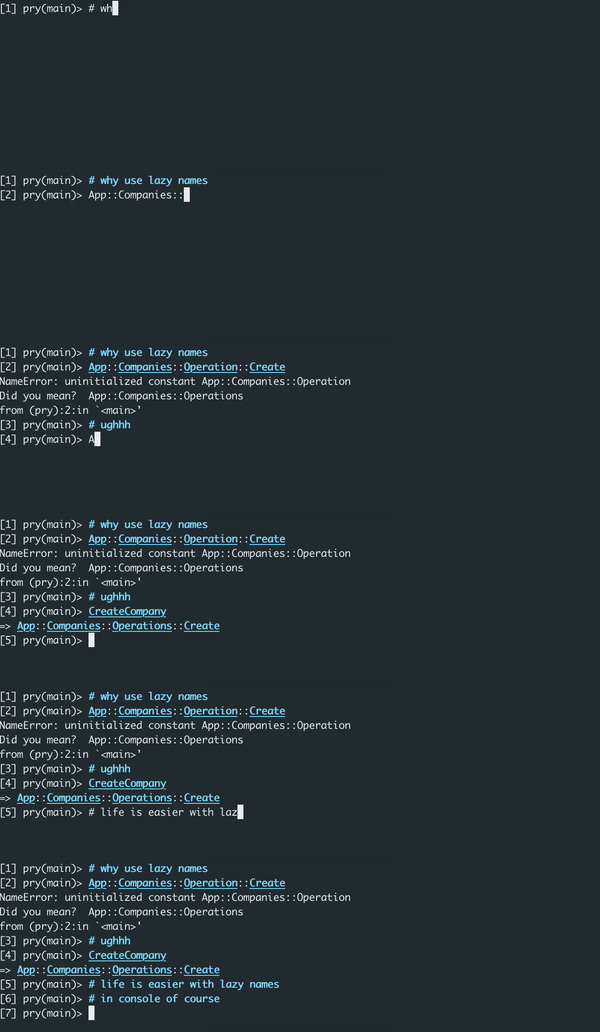
The idea is to reduce typing of long namespaced constants to shorter versions. It's very useful when you have a lot of nested namespaces and you need to access them frequently. This gem will take your responsibility to redefine constants to shorter versions and making constant/classes validations.
## Installation
1. Add this line to your application's Gemfile:
```ruby
group :development do
gem 'lazy_names'
end
```
2. Setup your console to automatically load lazy names
- If you are using pry, add this line to `~/.pryrc` or per project `myproject/.pryrc`
```ruby
if defined?(LazyNames)
Pry.config.hooks.add_hook(:when_started, :lazy_names) do
LazyNames.load_definitions!
end
end
```
- If you are using irb, add this line to `~/.irbrc` or per project `myproject/.irbrc`
```ruby
if defined?(LazyNames)
LazyNames.load_definitions!
end
```
3. And then execute:
```bash
bundle
```
4. Create your own lazy_names config where you define constants
```bash
cp .lazy_names.tt.yml ~/.lazy_names.yml
```
5. Login into your rails or non-rails console
```bash
$ bundle exec rails c # or bin/console
# your shorter version of constants are available now, enjoy!
```
## Configuration
### Global definition
Take a look onto `lazy_names.tt.yml` it has very basic template for you to start.
```yml
---
my_awesome_project:
definitions:
'Models::Users::CreditCard': 'MUCC'
```
`my_awesome_project` should be you project/folder name
So consider this example:
```sh
$ pwd
/Users/name/my_awesome_project
```
The last folder name of you ruby project must match the same one in your configuration.
After **definitions** sections you can actually redefine your long constants.
So in this example `Models::Users::CreditCard` is your real project constant and
`MUCC` will be your short variant of it, so you can access `Models::Users::CreditCard`
from `MUCC`. `MUCC` and any other right hand side can be any value, you define the best-suitable names.
You can define as many constants as you want. The same rule applies for projects.
Your config can have multiple constant definitions per namespace.
```yml
---
my_awesome_project:
definitions:
'Models::Users::CreditCard': 'MUCC'
my_another_project:
definitions:
'OtherLongConst': 'Short'
```
### Project definitions
In the meantime you can put your `.lazy_names.yml` config directly to project folder, it will be looked up firstly from project.
Just do not forget to put in your `.gitignore`. I believe every developer defines shorter versions of constants by his own opinion.
```sh
echo '.lazy_names.yml' >> .gitignore
```
If project folder doesn't contain any `.lazy_names.yml`, it will fallback to home directory.
Configuration per project a bit different: you don't need to specify global scope `my_awesome_project`, you can skip forward to definitions
```yml
---
definitions:
'Models::Users::CreditCard: 'MUCC'
```
Example config can be found in `.lazy_names.tt.project.yml`
## Development
After checking out the repo, run `bin/setup` to install dependencies. Then, run `rake spec` to run the tests. You can also run `bin/console` for an interactive prompt that will allow you to experiment.
After you make changes ensure to run `rake rubocop` to check if your code meets linter standards.
To install this gem onto your local machine, run `bundle exec rake install`.
## Contributing
Bug reports and pull requests are welcome on GitHub at https://github.com/zhisme/lazy_names.
Ensure the CI build is green by validating tests are passing and coverage is not decreased.
## License
The gem is available as open source under the terms of the [MIT License](https://opensource.org/licenses/MIT).