https://github.com/zhixiaoqiang/yapi2code
一个 VS Code 扩展,支持基于 YAPI 生成 JS/TS/Dart 代码,开箱即用,支持自定义 | a VS Code extension that generates JS/TS/Dart code based on YAPI. It includes features such as zero configuration, full interface preview, availability for internal network, multiple login methods, high performance...
https://github.com/zhixiaoqiang/yapi2code
ts vscode vscode-extension yapi
Last synced: 5 months ago
JSON representation
一个 VS Code 扩展,支持基于 YAPI 生成 JS/TS/Dart 代码,开箱即用,支持自定义 | a VS Code extension that generates JS/TS/Dart code based on YAPI. It includes features such as zero configuration, full interface preview, availability for internal network, multiple login methods, high performance...
- Host: GitHub
- URL: https://github.com/zhixiaoqiang/yapi2code
- Owner: zhixiaoqiang
- License: mit
- Created: 2022-10-31T06:24:17.000Z (over 3 years ago)
- Default Branch: main
- Last Pushed: 2025-08-04T11:53:58.000Z (12 months ago)
- Last Synced: 2025-08-04T12:07:57.933Z (12 months ago)
- Topics: ts, vscode, vscode-extension, yapi
- Language: TypeScript
- Homepage: https://marketplace.visualstudio.com/items?itemName=zhixiaoqiang.yapi-to-code
- Size: 1.71 MB
- Stars: 20
- Watchers: 1
- Forks: 5
- Open Issues: 3
-
Metadata Files:
- Readme: README.EN.md
- Changelog: CHANGELOG.md
- License: LICENSE
Awesome Lists containing this project
README
# YAPI TO CODE

[marketplace.visualstudio](https://marketplace.visualstudio.com/items?itemName=zhixiaoqiang.yapi-to-code)
中文|ENGLISH
## Features
1. 🙈 Zero configuration, ready to use out of the box
2. 🔥 Full interface preview
3. ✨ Available for internal network
4. 😼 Multiple login methods
5. ⚡️ High performance
6. ✍️ Supports js configuration for custom output
7. ⚡️ Rapid development experience - Rspack
8. ...
## TODO
- [x] 1. Customizable template generation & template switch preview
- [ ] 2. Optional project group - Speed up requests & improve performance
- [ ] 3. Asynchronous request loading
- [ ] 4. Optimize page performance
- [ ] 5. Support for custom parsing
- [x] 6. Replace yarn with pnpm
- [x] 7. Migrate to Rspack
- [ ] 8. Replace function type detection from `typescript` to `ts-morph`, effectively reducing 90% of the volume
- [ ] 9. Support for detecting interface definition updates
- [ ] ...
## Login to YAPI
For the first time use, enter the service address & account password of YAPI to log in.

## Usage
After logging in, vscode has the ability to access YAPI interfaces and can automatically convert any interface into a type.
#### Code Diagnosis Function
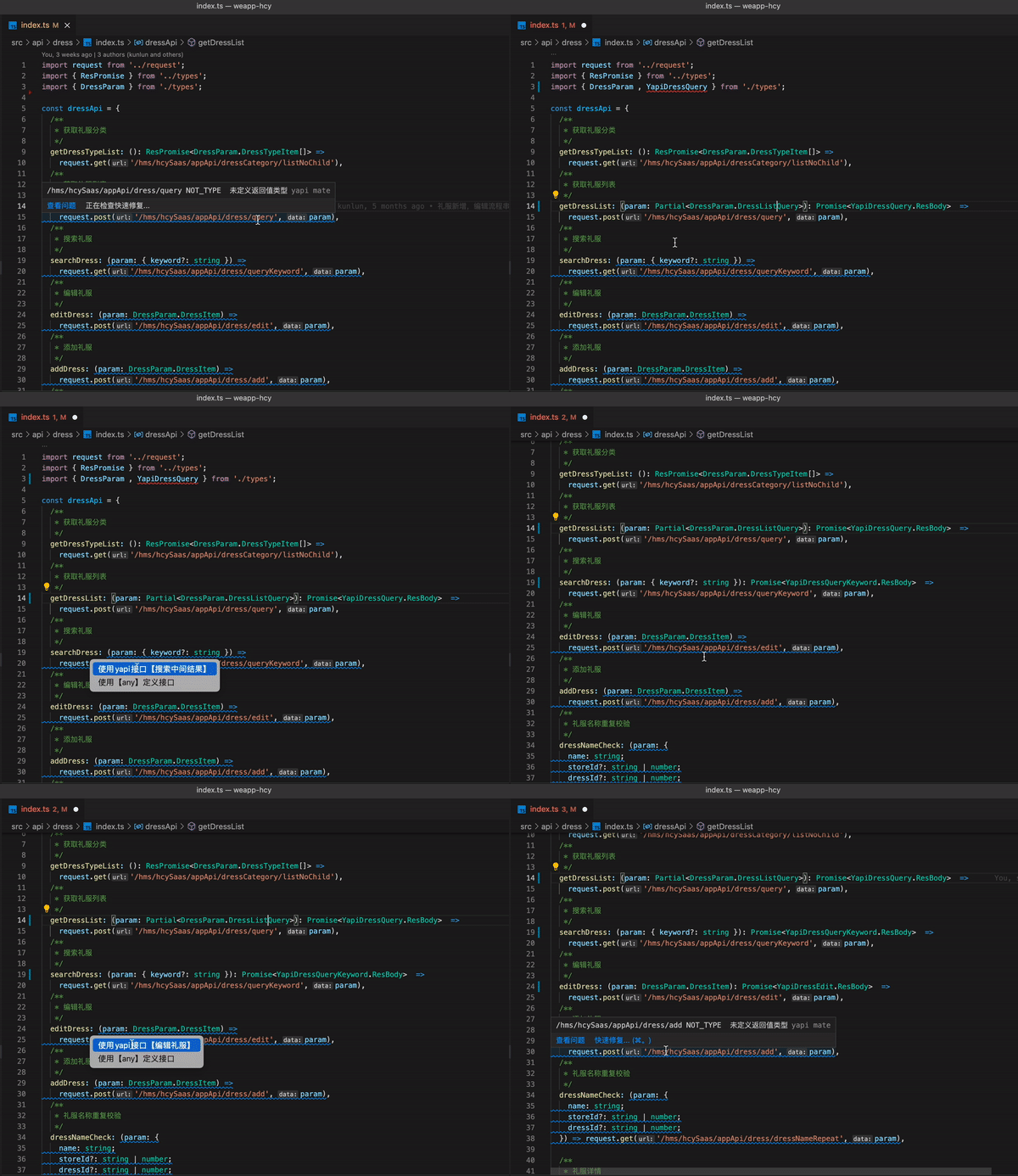
Yapi To Code warns of undefined parameter types or return value types in the document in a wavy form, and can directly add interface types to the project through quick fixes.
#### Interface Browser
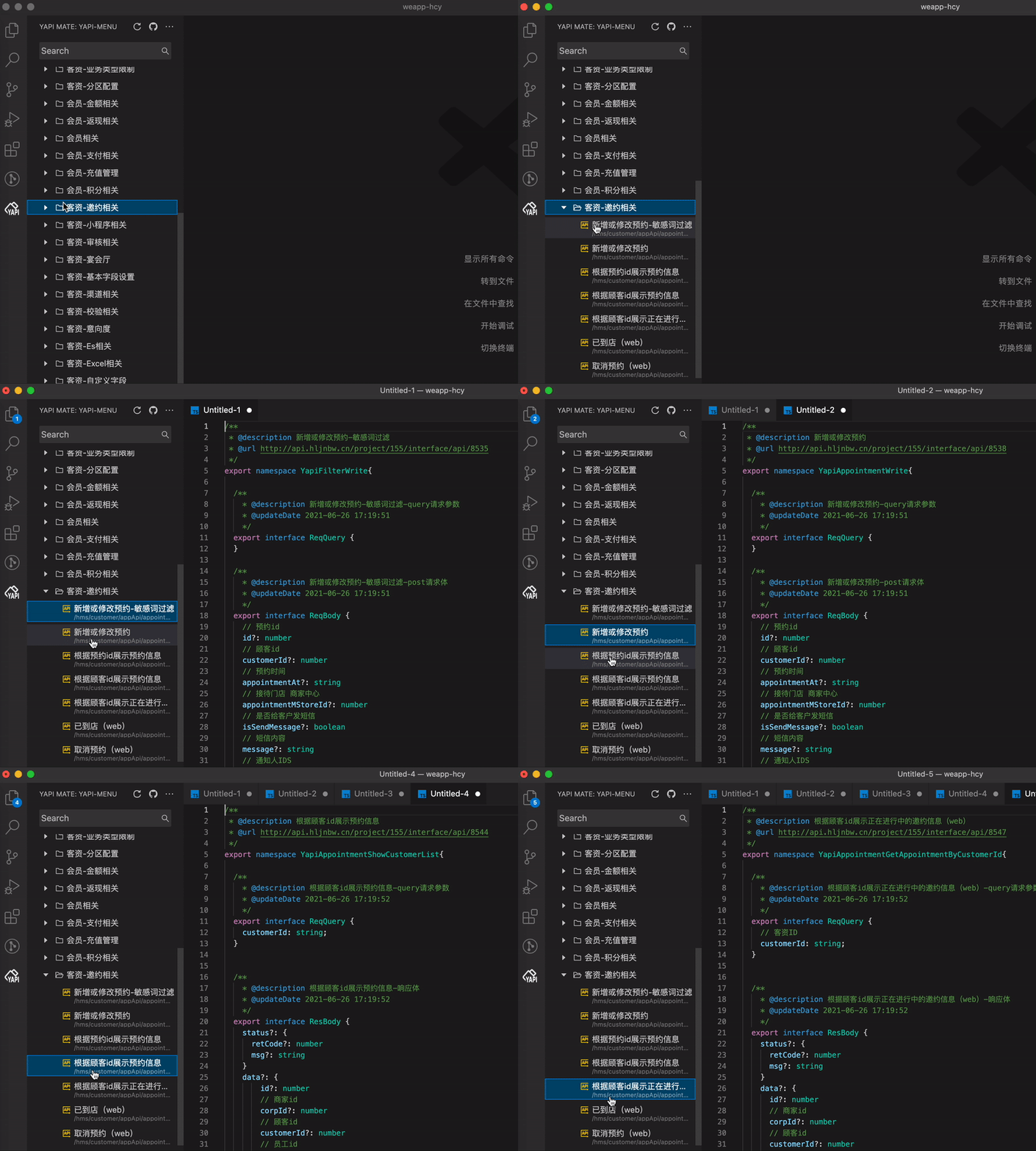
Yapi To Code also provides an interface preview function. You can preview the interface type by searching and selecting the interface, and then copy the type to the project.
##### Open in New Window
By default, interfaces are previewed in the same window. If you need to preview in a new window, you can click on the following Icon:

##### Refresh & Clear Directives
Sometimes, when certain interfaces are updated, you may need to refresh specific interfaces. Right-click on the tree to perform a re-request operation.
The clear operation only deletes the content of child items permanently.

#### Custom Rendering
Workspace configuration: You can modify the output fields, the position of the type filling, etc.

Config file:`yapi-to-code.config.cjs` **priority**
```js
module.exports = () => {
return {
/** 域名:优先取工作区缓存的域名(登录成功的域名) */
host: 'http://yapi.internal.com',
/** banner 头部内容,可以填写导入的请求实例等 */
banner: '',
/** 生成 res 包含的属性,默认 all, 可指定为 data、custom
* 'all' | 'data' | 'custom'
*/
responseKey: 'all',
/** 生成 res 指定的属性值,仅当 responseKey 选择 custom 是有效,默认 data, 可指定为任意 key(支持链式:data.result) */
responseCustomKey: 'data',
/** resDataTypeContent 放置的位置是外层的 Promise 还是作为请求方法的泛型 post
* 'outerFunction' | 'fetchMethodGeneric'
*/
responseTypePosition: 'outerFunction',
/** 开启自动格式化 */
format: false,
/** 缩进使用 tab,或者 双空格 */
useTab: false,
/** 自定义生成 request 方法 */
genRequest(
{
comment,
fnName,
IReqTypeName,
IResTypeName,
requestFnName,
apiPath,
},
data
) {
const params = IReqTypeName ? `data: ${IReqTypeName}` : ''
const dataContent = IResTypeName ? 'data' : ''
return (
`\n${comment}\n
export async function ${fnName}(${params}) {
return request.${requestFnName}<${IResTypeName}>('${apiPath}', ${dataContent})
}`
)
}
}
}
```
## Webview & VS Code Data Flow.png

## Development Debugging
> Dependencies on src/server src/webview resources are required
### Compile Pre-Dependencies
#### Rspack ⚡️⚡️⚡️
```bash
pnpm i
cd src/server && pnpm start
cd src/webview && pnpm start
```
### Select Client + Server

> Tips: Node logs can be viewed in the debug console of the source code editor, and webview logs can be viewed in the invoked editor's devtool.
### Package Release
> Package and publish VS Code Extension through vsce
```bash
pnpm package
pnpm pub
```