https://github.com/ziadea/smartwebscraper-cv
SmartWebScraper-CV – AI-Powered Web Page Zone Detection SmartWebScraper-CV est un projet avancé en Computer Vision et NLP qui combine le scraping visuel de pages web, la détection automatique de zones (comme les headers, footers, ads, contenus, etc.), l’OCR, et un module NLP interactif ainsi que l integration de 2 LLM mistral et gemini.
https://github.com/ziadea/smartwebscraper-cv
ai annotations application computer-vision detectron2 gemini mistral nlp ocr ollama padde paddelocr roboflow roboflow-dataset spacy web web-application web-scraping workflow
Last synced: 4 months ago
JSON representation
SmartWebScraper-CV – AI-Powered Web Page Zone Detection SmartWebScraper-CV est un projet avancé en Computer Vision et NLP qui combine le scraping visuel de pages web, la détection automatique de zones (comme les headers, footers, ads, contenus, etc.), l’OCR, et un module NLP interactif ainsi que l integration de 2 LLM mistral et gemini.
- Host: GitHub
- URL: https://github.com/ziadea/smartwebscraper-cv
- Owner: ZIADEA
- License: mit
- Created: 2025-03-26T12:04:34.000Z (over 1 year ago)
- Default Branch: main
- Last Pushed: 2025-06-13T16:03:20.000Z (about 1 year ago)
- Last Synced: 2025-06-13T16:59:16.053Z (about 1 year ago)
- Topics: ai, annotations, application, computer-vision, detectron2, gemini, mistral, nlp, ocr, ollama, padde, paddelocr, roboflow, roboflow-dataset, spacy, web, web-application, web-scraping, workflow
- Language: Jupyter Notebook
- Homepage:
- Size: 2.65 MB
- Stars: 1
- Watchers: 1
- Forks: 1
- Open Issues: 3
-
Metadata Files:
- Readme: README.md
- License: LICENSE
Awesome Lists containing this project
README
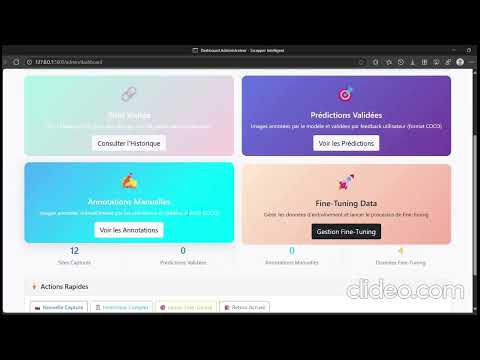
## 🎥 Demo
Découvrez une démonstration complète de l'application **SmartWebScraper-CV** en action :
[](https://youtu.be/TIGsxCHhcps)
## 🚀 Installation Rapide
### Prérequis
- Python 3.9 ou supérieur
- 8+ GB RAM (16 GB recommandé)
- GPU NVIDIA optionnel (améliore les performances)
### Installation
```bash
# Clonage du projet
git clone https://github.com/ZIADEA/SmartWebScraper-CV.git
cd SmartWebScraper-CV/LocalApp/SMARTWEBSCRAPPER-CV
# Environnement virtuel (optionnel)
python -m venv venv
source venv/bin/activate # Linux/Mac
# ou venv\Scripts\activate # Windows
# Dépendances
pip install -r requirements.txt
# Modèles NLP
python -c "import nltk; nltk.download('punkt'); nltk.download('stopwords')"
python -m spacy download fr_core_news_sm
# Detectron2 (voir guides spécifiques selon votre OS)
pip install 'git+https://github.com/facebookresearch/detectron2.git'
```
### Configuration
1. **Créer le fichier .env avec votre clé API Gemini :**
```bash
GEMINI_API_KEY=your-gemini-api-key
ADMIN_EMAIL=admin@example.com
ADMIN_PASSWORD=your_password
```
2. **Installer et lancer Ollama (optionnel) :**
```bash
# Télécharger depuis https://ollama.com/
ollama run mistral
```
3. **Lancer l'application :**
```bash
python run.py
```
4. **Accéder aux interfaces :**
- Interface utilisateur : http://localhost:5000
- Interface admin : http://localhost:5000/admin/login
## 📖 Documentation Complète
La documentation complète est disponible sur ReadTheDocs :
[](https://smartwebscraper-cv.readthedocs.io/)
### 📚 Sections Principales
- [⚙️ Installation Locale](docs/source/installation/local.rst)
- [🚀 Distribution et Support](docs/source/deployment/distribution.rst)🎯 Introduction et Contexte](docs/source/introduction/contexte.rst)
- [📊 Acquisition des Données](docs/source/data/constitution.rst)
- [🏷️ Annotation et Dataset](docs/source/annotation/objectifs.rst)
- [🤖 Modélisation Computer Vision](docs/source/modeling/detection.rst)
- [📝 Traitement NLP](docs/source/nlp/traitement.rst)
- [🏗️ Architecture Application](docs/source/architecture/structure.rst)
- [# SmartWebScraper-CV
[](https://www.python.org/downloads/)
[](https://opensource.org/licenses/MIT)
[](https://smartwebscraper-cv.readthedocs.io/fr/latest/?badge=latest)
> **Application intelligente d'annotation de pages web par Computer Vision, OCR, NLP et LLM**
Projet de fin d'année - ENSAM Meknès, Filière IATD-SI
**Auteurs :** DJERI-ALASSANI OUBENOUPOU & EL MAJDI WALID
**Encadrant :** Professeur Tawfik MASROUR
**Date :** 16 Juin 2025
## 🎯 Aperçu du Projet
SmartWebScraper-CV révolutionne l'extraction de contenu web en combinant plusieurs technologies d'IA pour analyser visuellement les pages web, contournant ainsi les limitations du scrapping traditionnel (obfuscation HTML, JavaScript, contenu dynamique).
### 🚀 Fonctionnalités Principales
- **🖼️ Capture Intelligente** : Screenshot automatique avec gestion du contenu dynamique
- **🎯 Détection Automatique** : 18 zones fonctionnelles détectées (header, content, ads, etc.)
- **📝 OCR Avancé** : Extraction précise du texte avec PaddleOCR
- **🧠 Analyse NLP** : Résumé, Q&A, extraction d'entités avec NLTK/spaCy
- **🤖 IA Générative** : Intégration Gemini API et Mistral (Ollama)
- **👨💼 Double Interface** : Utilisateur final + Administrateur pour validation
## 🏗️ Architecture Technique
```mermaid
flowchart TD
A[URL Web] --> B[Capture Selenium/Playwright]
B --> C[Détection Computer Vision]
C --> D[Zones Annotées]
D --> E[Extraction OCR]
E --> F[Traitement NLP]
F --> G[Interface Utilisateur]
G --> H[Feedback & Amélioration]
H --> I[Fine-tuning Modèle]
```
### 🛠️ Technologies Utilisées
| Domaine | Technologies |
|---------|-------------|
| **Computer Vision** | Detectron2, Faster R-CNN, annotations COCO |
| **OCR** | PaddleOCR, prétraitement OpenCV |
| **NLP** | NLTK, spaCy, TF-IDF, Word2Vec, clustering |
| **LLM** | Gemini API, Mistral via Ollama |
| **Web Framework** | Flask, HTML5 Canvas, interface responsive |
| **Web Scraping** | Selenium, undetected-chromedriver, Playwright |
## 📊 Performances
| Métrique | Score | Description |
|----------|-------|-------------|
| **mAP Détection** | 41.6% | Précision moyenne détection d'objets |
| **Qualité OCR** | >90% | Taux d'extraction sur texte net |
| **Temps Traitement** | 4-6s | Capture + détection + OCR + NLP |
| **Classes Détectées** | 18+1 | Zones fonctionnelles web |
## 🚀 Installation Rapide
### Prérequis
- Python 3.9-3.10
- 8+ GB RAM (16 GB recommandé)
- GPU NVIDIA optionnel (améliore les performances)
### Installation Automatique
```bash
# Clonage du projet
git clone https://github.com/ZIADEA/SmartWebScraper-CV.git
cd SmartWebScraper-CV/LocalApp/SMARTWEBSCRAPPER-CV
# Installation automatique
python setup.py
```
### Installation Manuelle
```bash
# Environnement virtuel
python -m venv venv
source venv/bin/activate # Linux/Mac
# ou venv\Scripts\activate # Windows
# Dépendances
pip install -r requirements.txt
# Modèles NLP
python -c "import nltk; nltk.download('punkt'); nltk.download('stopwords')"
python -m spacy download fr_core_news_sm
# Detectron2
pip install 'git+https://github.com/facebookresearch/detectron2.git'
```
### Configuration
1. **Copier le fichier de configuration :**
```bash
cp .env.example .env
```
2. **Configurer les clés API dans `.env` :**
```bash
GEMINI_API_KEY=your-gemini-api-key
SERPAPI_KEY=your-serpapi-key
OLLAMA_BASE_URL=http://localhost:11434
```
3. **Lancer l'application :**
```bash
python run.py
```
4. **Accéder aux interfaces :**
- Interface utilisateur : http://localhost:5000
- Interface admin : http://localhost:5000/admin/login
## 📖 Documentation Complète
La documentation complète est disponible sur ReadTheDocs :
[](https://smartwebscraper-cv.readthedocs.io/)
### 📚 Sections Principales
- [🎯 Introduction et Contexte](docs/source/introduction/contexte.rst)
- [📊 Acquisition des Données](docs/source/data/constitution.rst)
- [🏷️ Annotation et Dataset](docs/source/annotation/objectifs.rst)
- [🤖 Modélisation Computer Vision](docs/source/modeling/detection.rst)
- [📝 Traitement NLP](docs/source/nlp/traitement.rst)
- [🏗️ Architecture Application](docs/source/architecture/structure.rst)
- [⚙️ Guide d'Installation Locale](docs/source/installation/local.rst)
- [🔄 Workflow Complet](docs/source/usage/workflow.rst)
- [🚀 Distribution et Support](docs/source/deployment/distribution.rst)
## 🎮 Utilisation
### Interface Utilisateur
1. **Soumission d'URL** : Entrez l'URL de la page à analyser
2. **Capture Automatique** : Screenshot et détection des zones
3. **Sélection des Zones** : Choisissez les éléments à analyser
4. **Extraction de Contenu** : OCR et traitement NLP automatique
5. **Interaction Intelligente** : Questions, résumés, analyses
### Interface Administrateur
1. **Validation d'Annotations** : Contrôle qualité des prédictions
2. **Correction Manuelle** : Amélioration des données d'entraînement
3. **Fine-tuning** : Relancement de l'entraînement avec nouvelles données
4. **Métriques** : Suivi des performances du système
## 🔧 API et Intégration
### API REST
```python
# Exemple d'utilisation de l'API
import requests
# Capture et analyse d'une page
response = requests.post('http://localhost:5000/api/analyze',
json={'url': 'https://example.com'})
result = response.json()
# result contient : zones détectées, texte extrait, métadonnées
```
### Docker
```bash
# Construction de l'image
docker build -t smartwebscraper .
# Lancement avec volumes persistants
docker run -p 5000:5000 -v $(pwd)/data:/app/data smartwebscraper
```
## 🎯 Cas d'Usage
- **🔍 Analyse UX/UI** : Détection automatique des zones publicitaires
- **📚 Recherche Académique** : Constitution de corpus textuels annotés
- **🤖 Entraînement IA** : Dataset COCO de pages web réelles
- **📊 Veille Concurrentielle** : Extraction automatisée de contenu
- **♿ Accessibilité** : Amélioration de la navigation pour malvoyants
## 🛡️ Résolution de Problèmes
### Erreurs Courantes
| Erreur | Solution |
|--------|----------|
| `CUDA out of memory` | Définir `FORCE_CPU_MODE=True` dans `.env` |
| `ModuleNotFoundError: detectron2` | Réinstaller via GitHub : `pip install 'git+https://github.com/facebookresearch/detectron2.git'` |
| `spaCy model not found` | `python -m spacy download fr_core_news_sm` |
| `PaddleOCR download failed` | Vérifier connexion Internet et réessayer |
### Performance
```bash
# Mode CPU forcé (machines limitées)
export FORCE_CPU_MODE=True
# Logs détaillés pour debug
export FLASK_DEBUG=1
python run.py 2>&1 | tee logs/debug.log
```
## 🤝 Contribution
Nous accueillons les contributions ! Voici comment participer :
1. **Fork** le projet
2. **Créer** une branche (`git checkout -b feature/amélioration`)
3. **Commit** vos changements (`git commit -am 'Ajout nouvelle fonctionnalité'`)
4. **Push** vers la branche (`git push origin feature/amélioration`)
5. **Créer** une Pull Request
### 🐛 Signaler un Bug
Utilisez les [GitHub Issues](https://github.com/votre-repo/SmartWebScraper-CV/issues) avec :
- Description détaillée du problème
- Étapes de reproduction
- Logs d'erreur
- Configuration système
## 📈 Roadmap
### Version 2.0 (Prévue)
- [ ] Support multilingue complet
- [ ] API REST publique
- [ ] Interface mobile responsive
- [ ] Apprentissage par renforcement (RLHF)
- [ ] Dashboard analytics temps réel
### Version 2.1 (Future)
- [ ] Intégration cloud (AWS, GCP)
- [ ] Mode batch processing
- [ ] Plugin navigateur
- [ ] Support vidéos web
## 📄 Licence
Ce projet est sous licence MIT. Voir le fichier [LICENSE](LICENSE) pour plus de détails.
## 🙏 Remerciements
- **ENSAM Meknès** - Cadre académique et infrastructure
- **Professeur Tawfik MASROUR** - Encadrement et conseils
- **Facebook AI Research** - Detectron2 framework
- **Google** - Gemini API et modèles de base
- **Communauté Open Source** - Outils et bibliothèques
## 📞 Contact
- **DJERI-ALASSANI OUBENOUPOU** - djeryala@gmail.com
- **Documentation** - [ReadTheDocs](https://smartwebscraper-cv.readthedocs.io/)
---
**🎓 ENSAM Meknès - IATD-SI 2025**
*Ingénierie de l'Intelligence Artificielle et des Technologies de la Donnée pour les Systèmes Industriels*