https://github.com/zifter/clickhouse-migrations
Simple migration tool for clickhouse database
https://github.com/zifter/clickhouse-migrations
clickhouse database migration python
Last synced: 3 months ago
JSON representation
Simple migration tool for clickhouse database
- Host: GitHub
- URL: https://github.com/zifter/clickhouse-migrations
- Owner: zifter
- License: mit
- Created: 2021-12-27T08:34:43.000Z (over 4 years ago)
- Default Branch: main
- Last Pushed: 2025-07-20T15:16:19.000Z (12 months ago)
- Last Synced: 2025-07-20T17:24:47.606Z (12 months ago)
- Topics: clickhouse, database, migration, python
- Language: Python
- Homepage:
- Size: 111 KB
- Stars: 23
- Watchers: 2
- Forks: 6
- Open Issues: 0
-
Metadata Files:
- Readme: README.md
- Changelog: CHANGELOG.md
- License: LICENSE
- Codeowners: .github/CODEOWNERS
Awesome Lists containing this project
README
[](https://github.com/zifter/clickhouse-migrations/actions/workflows/ci.yaml)
[](https://github.com/zifter/clickhouse-migrations/releases)
[]([https://badge.fury.io/py/clickhouse-migrate](https://pypi.org/project/clickhouse-migrations/))
[](https://pypi.org/project/clickhouse-migrations/)
[](https://pypi.org/project/clickhouse-migrations/)
[](https://zifter.github.io/)
# Clickhouse Migrations
Python library for creating and applying migrations in ClickHouse database.
Development and Maintenance of large-scale db systems many times requires constant changes to the actual DB system.
Holding off the scripts to migrate these will be painful.
## Features:
* Supports multi statements - more than one query per migration file.
* Allow running migrations out-of-box
* Simple file migrations format: {VERSION}_{name}.sql
* Supports Cluster deployments, makes sure that migrations state is consistent on all cluster nodes
## Known alternatives
This package originally forked from [clickhouse-migrator](https://github.com/delium/clickhouse-migrator).
Package | Differences
-------|---------
[clickhouse-migrator](https://github.com/delium/clickhouse-migrator) | Doesn't support multistatement in a single file , to heavy because of pandas, looks like abandoned
[django-clickhouse](https://github.com/carrotquest/django-clickhouse) | Need django
[clickhouse-migrate](https://github.com/trushad0w/clickhouse-migrate) | Doesn't support multistatement
## Installation
You can install from pypi using `pip install clickhouse-migrations`.
## Migration files
Migration files follow the naming convention `{VERSION}_{name}.sql`, e.g. `001_init.sql`, `002_add_users.sql`.
Each file contains one or more SQL statements separated by semicolons:
```sql
-- migrations/001_init.sql
CREATE TABLE mydb.events (
id UInt32,
name String
) ENGINE = MergeTree()
ORDER BY id;
ALTER TABLE mydb.events ADD COLUMN created_at DateTime DEFAULT now();
```
## Usage
### In command line
```bash
clickhouse-migrations --db-host localhost \
--db-port 9000 \
--db-user default \
--db-password secret \
--db-name test \
--migrations-dir ./migrations
```
Alternatively, connect via URL:
```bash
clickhouse-migrations --db-url clickhouse://default:secret@localhost:9000/test \
--migrations-dir ./migrations
```
All options can also be set via environment variables:
CLI flag | Environment variable | Default
---------|---------------------|--------
`--db-host` | `DB_HOST` | `localhost`
`--db-port` | `DB_PORT` | `9000`
`--db-user` | `DB_USER` | `default`
`--db-password` | `DB_PASSWORD` | *(empty)*
`--db-name` | `DB_NAME` | —
`--db-url` | `DB_URL` | —
`--migrations-dir` | `MIGRATIONS_DIR` | `./migrations`
`--cluster-name` | `CLUSTER_NAME` | —
`--multi-statement` | `MULTI_STATEMENT` | `true`
`--create-db-if-not-exists` | `CREATE_DB_IF_NOT_EXISTS` | `true`
`--dry-run` | `DRY_RUN` | `false`
`--fake` | `FAKE` | `false`
`--secure` | `SECURE` | `false`
`--log-level` | `LOG_LEVEL` | `WARNING`
### In code
```python
from clickhouse_migrations.clickhouse_cluster import ClickhouseCluster
cluster = ClickhouseCluster(
db_host="localhost",
db_port=9000,
db_user="default",
db_password="secret",
)
cluster.migrate(
db_name="test",
migration_path="./migrations",
cluster_name=None,
create_db_if_no_exists=True,
multi_statement=True,
dryrun=False,
fake=False,
)
```
Alternatively, connect via URL:
```python
cluster = ClickhouseCluster(db_url="clickhouse://default:secret@localhost:9000/test")
cluster.migrate(db_name="test", migration_path="./migrations")
```
Parameter | Description | Default
-------|-------------|--------
`db_host` | ClickHouse database hostname | `localhost`
`db_port` | ClickHouse database port | `9000`
`db_user` | ClickHouse user | `default`
`db_password` | ClickHouse password | *(empty)*
`db_url` | ClickHouse connection URL (alternative to individual params) | —
`db_name` | ClickHouse database name | —
`migration_path` | Path to directory with migration files | `./migrations`
`explicit_migrations` | Explicit list of migrations to apply | `[]`
`cluster_name` | Name of ClickHouse topology cluster from `` | —
`create_db_if_no_exists` | Create the database if it does not exist | `True`
`multi_statement` | Allow multiple statements per migration file | `True`
`dryrun` | Print migrations without executing them | `False`
`fake` | Mark migrations as applied without executing SQL | `False`
`secure` | Use secure (TLS) connection | `False`
### Notes
The ClickHouse driver does not natively support executing multiple statements in a single query.
To allow for multiple statements in a single migration, you can use the `multi_statement` param.
There are two important caveats:
* This mode splits the migration text into separately-executed statements by a semi-colon `;`. Thus cannot be used when a statement in the migration contains a string with a semi-colon.
* The queries are not executed in any sort of transaction/batch, meaning you are responsible for fixing partial migrations.
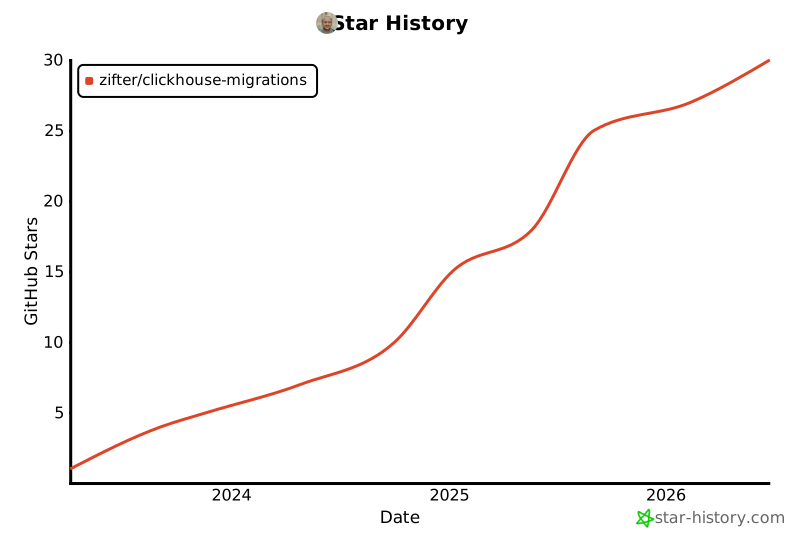
## Star History
[](https://star-history.com/#zifter/clickhouse-migrations&Date)