https://github.com/zikwall/clickhouse-docs
🐾 ClickHouse Database + Apache Kafka + Zookeeper + Configure Cluster (Shards, Replicated)
https://github.com/zikwall/clickhouse-docs
analytics apache-kafka clickhouse cluster docs statistics zookeeper
Last synced: 5 months ago
JSON representation
🐾 ClickHouse Database + Apache Kafka + Zookeeper + Configure Cluster (Shards, Replicated)
- Host: GitHub
- URL: https://github.com/zikwall/clickhouse-docs
- Owner: zikwall
- Created: 2019-10-15T11:46:42.000Z (over 6 years ago)
- Default Branch: master
- Last Pushed: 2020-02-25T11:17:03.000Z (over 6 years ago)
- Last Synced: 2025-02-23T20:44:01.741Z (over 1 year ago)
- Topics: analytics, apache-kafka, clickhouse, cluster, docs, statistics, zookeeper
- Language: SQL
- Size: 134 KB
- Stars: 7
- Watchers: 3
- Forks: 0
- Open Issues: 0
-
Metadata Files:
- Readme: README.md
Awesome Lists containing this project
README
# 💛 ClickHouse. 💙 Kafka. 💚 Zookeeper. ❤️ Clusters.
##### 😋 _For the little ones_ 👲
###### _Recommended Blog: [Geek Notes - Roman Bogachev](https://bogachev.biz)_
###### _Great presentation on CH: [Introduction to the Mysteries of ClickHouse Replication, By Robert Hodges and Altinity Engineering Team](https://www.slideshare.net/Altinity/introduction-to-the-mysteries-of-clickhouse-replication-by-robert-hodges-and-altinity-engineering-team)_
### README
This manual uses specific, working examples, the general concept of which:
```css
Clients --> Events --> (Nginx + Rsyslog) --> Golang middleware --> Apache Kafka
| <---> Shard O \
--> Apache Kafka | <---> Shard I | <---> Distributed Server <---> Analyst
| <---> Shard II /
```
#### Replicated concept
```css
--> Apache Kafka
--> CH Kafka Engine Table
--> Main Consummer (Materialized View) --> Main Storage Table
\..> First Aggregate MV --> ReplicatedSumminMergeTree
\..> Second Aggregate MV --> ReplicatedAggregatingMergeTree
```
## TABLE OF CONTENTS
1. [ClickHouse](#clickhouse)
1. [Installation](#clickhouse-installation)
2. [Start](#clickhouse-start)
3. [Configuration](#clickhouse-configuration)
4. [An interesting selection of articles that you can read](#clickhouse-reeading)
2. [Apache Kafka](#kafka)
1. [Installation](#kafka-installation)
2. [Configuration](#kafka-configuration)
3. [Systemd and run](#kafka-start)
4. [Kafka command line starter pack](#kafka-getting-starter)
5. [Create Kafka Topics in 3 Easy Steps](#kafka-create-topic-three-steep)
3. [Zookeeper](#zookeeper)
1. [Before installation proccess](#zookeeper-before-installation)
2. [Installation](#zookeeper-installation)
3. [Configuration](#zookeeper-configuration)
4. [Start](#zookeeper-start)
4. [Cluster and Replicated](#cluster)
1. [Configuration](#cluster-configuration)
2. [SetUp Distributed server](#cluster-distributed)
3. [Testing data](#cluster-testing)
5. [Import from MySQL to ClickHouse](#clikchouse-import-mysql)
6. [Rsyslog && Nginx](#rsyslog-nginx)
## STRUCTURE OF FILES
1. [MAIN](#file-readme-md)
2. [Distributed Table](https://github.com/zikwall/clickhouse-docs/blob/master/src/sql/distributed.sql)
3. [Materialized View](https://github.com/zikwall/clickhouse-docs/blob/master/src/sql/mv.sql)
4. [Queue Table (Kafka ENGINE)](https://github.com/zikwall/clickhouse-docs/blob/master/src/sql/queue.sql)
5. [Stat Table (Merge Tree, Replicated Merge Tree)](https://github.com/zikwall/clickhouse-docs/blob/master/src/sql/stat.sql)
6. [GoLang Data Generator](https://github.com/zikwall/clickhouse-docs/blob/master/src/generator.go)
1. 1️⃣ __Check SSE:__ `grep -q sse4_2 /proc/cpuinfo && echo "SSE 4.2 supported" || echo "SSE 4.2 not supported"`
2. 2️⃣ `deb http://repo.yandex.ru/clickhouse/trusty/ dists/stable/main/binary-amd64/`
- **or** ↘️ `echo "deb [ arch=amd64 ] http://repo.yandex.ru/clickhouse/deb/stable/ main/" | tee /etc/apt/sources.list.d/clickhouse.list`
3. 3️⃣ **APT**
- 1️⃣ `sudo apt-key adv --keyserver hkp://keyserver.ubuntu.com:80 --recv E0C56BD4`
- 2️⃣ `sudo apt-get update`
- 3️⃣ `sudo apt-get install clickhouse-client clickhouse-server`
#### Start
- 📯 `sudo service clickhouse-server start`

⚠️ _It is advisable to mount a separate disk for data storage_
#### An interesting selection of articles that you can read
##### Only Russian Habr && HighLoad
1. [2019.06.08 Анализ производительности запросов в ClickHouse. Доклад Яндекса](https://habr.com/ru/company/yandex/blog/459198/)
2. [2018.11.22 Использование ClickHouse в VK, или Зачем мы написали KittenHouse](https://habr.com/ru/company/vk/blog/430168/)
3. [2017.02.27 ClickHouse: очень быстро и очень удобно](https://habr.com/ru/post/322724/)
4. [2016.11.07 Как запустить ClickHouse своими силами и выиграть джекпот](https://habr.com/ru/company/smi2/blog/314558/)
5. [2016.11.07 Масштабирование ClickHouse, управление миграциями и отправка запросов из PHP в кластер](https://habr.com/ru/company/smi2/blog/314558/)
6. [2018.06.25 Как VK вставляет данные в ClickHouse с десятков тысяч серверов](https://www.highload.ru/siberia/2018/abstracts/3614)
7. [Масштабирование ClickHouse, управление миграциями и отправка запросов из PHP в кластер](https://habr.com/ru/company/smi2/blog/317682/)
8. [Как мы в ivi переписывали etl: Flink+Kafka+ClickHouse](https://habr.com/ru/company/ivi/blog/347408/)
1. `sudo apt install default-jre`
2. `java -version`
3. Download from https://kafka.apache.org/quickstart and `tar -xvzf /path/to/kafka_tmp/kafka.tgz --strip 1`
1. `nano ~/kafka/config/server.properties`
2. Add lines to end of file: `delete.topic.enable = true`
3. The server.properties file defines the following important properties required for Kafka broker:
```bash
# Broker identifier. This should be a unique number for each broker.
Broker.id = 0
# Listening port
port = 9092
# Directory where log files will be stored
log.dir = /tmp/kafka-logs
# By default, the number of sections of magazines per topic.
num.partitions = 2
# Zookeeper connection string
zookeeper.connect = localhost:2181
```
1. **Zookeeper service:**
- `sudo nano /etc/systemd/system/zookeeper.service`
- insert next lines (**only example**) ❗️
```bash
[Unit]
Requires=network.target remote-fs.target
After=network.target remote-fs.target
[Service]
Type=simple
User=kafka
ExecStart=/kafka/kafka/bin/zookeeper-server-start.sh /kafka/kafka/config/zookeeper.properties
ExecStop=/kafka/kafka/bin/zookeeper-server-stop.sh
Restart=on-abnormal
[Install]
WantedBy=multi-user.target
```
2. **Kafka service:**
- `sudo nano /etc/systemd/system/kafka.service`
- insert (**example**) ❗️
```bash
[Unit]
Requires=zookeeper.service
After=zookeeper.service
[Service]
Type=simple
User=kafka
ExecStart=/bin/sh -c '/kafka/kafka/bin/kafka-server-start.sh /kafka/kafka/config/server.properties > /kafka/kafka/kafka.log 2>&1'
ExecStop=/kafka/kafka/bin/kafka-server-stop.sh
Restart=on-abnormal
[Install]
WantedBy=multi-user.target
```
### Kafka command line starter pack
1. **Create topic:** `bin/kafka-topics.sh --create --zookeeper localhost:2181 --replication-factor 1 --partitions 1 --topic myTopicName`
2. **Run consumer:** `bin/kafka-console-consumer.sh --bootstrap-server localhost:9092 --topic myTopicName --from-beginning`
3. **Run producer:** `bin/kafka-console-producer.sh --broker-list localhost:9092 --topic myTopicName`
4. **Delete topic:** `bin/kafka-topics.sh --zookeeper localhost:2181 --delete --topic myTopicName`
5. **Get topic list:** `bin/kafka-topics.sh --list --zookeeper localhost:2181`
6. **Get count messages of topic:** `bin/kafka-run-class.sh kafka.tools.GetOffsetShell --broker-list localhost:9092 --topic statopic001 --time -1`
### Create Kafka Topics in 3 Easy Steps

Creating a topic in production is an operative task that requires awareness and preparation. In this tutorial, we’ll explain all the parameters to consider when creating a new topic in production.
Setting the partition count and replication factor is required when creating a new Topic and the following choices affect the performance and reliability of your system.
**Create a topic**
```
kafka/bin/kafka-topics.sh --create \
--zookeeper localhost:2181 \
--replication-factor 2 \
--partitions 3 \
--topic unique-topic-name
```
**PARTITIONS**
Kafka topics are divided into a number of partitions, which contains messages in an unchangeable sequence. Each message in a partition is assigned and identified by its unique offset.
Partitions allow us to split the data of a topic across multiple brokers balance the load between brokers. Each partition can be consumed by only one consumer group, so the parallelism of your service is bound by the number of partition the topic has.
The number of partitions is affected by two main factors, the number of messages and the avg size of each message. In case the volume is high you will need to use the number of brokers as a multiplier, to allow the load to be shared on all consumers and avoid creating a hot partition which will cause a high load on a specific broker. We aim to keep partition throughput up to 1MB per second.
Set Number of Partitions
`--partitions [number]`
**REPLICAS**

Kafka optionally replicates topic partitions in case the leader partition fails and the follower replica is needed to replace it and become the leader. When configuring a topic, recall that partitions are designed for fast read and write speeds, scalability, and for distributing large amounts of data. The replication factor (RF), on the other hand, is designed to ensure a specified target of fault-tolerance. Replicas do not directly affect performance since at any given time, only one leader partition is responsible for handling producers and consumer requests via broker servers.
Another consideration when deciding the replication factor is the number of consumers that your service needs in order to meet the production volume.
**Set Replication Factor (RF)**
In case your topic is using keys, consider using RF 3 otherwise, 2 should be sufficient.
`--replication-factor [number]`
### Before installation proccess
1. `sudo apt-get update`
2. Check Java `java --version`
3. If Java is not installed:
- `apt-get install default-jre`
- If you need a Java development kit (JDK) that is needed to compile Java applications (for example: Apache Ant, Apache Maven, Eclipse or IntelliJ IDEA), then you need to install: `apt-get install default-jdk`
1. Download from (https://www.apache.org/dyn/closer.cgi/zookeeper/) example: `wget -P /home/master/zookeepertmp/ http://apache-mirror.rbc.ru/pub/apache/zookeeper/stable/apache-zookeeper-3.5.5-bin.tar.gz`
2. Example unpack: `tar -xvzf /home/master/zookeepertmp/apache-zookeeper-3.5.5-bin.tar.gz --strip 1`
1. Copy config file: `cp /path/to/zookeeper/conf/zoo_sample.cfg /path/to/zookeeper/conf/zoo.cfg`
2. Delete comments (OPTIONAL)
example config:
```bash
tickTime=2000
initLimit=5
syncLimit=2
dataDir=/clh/zookeeper/data
clientPort=2181
```
1. `bin/zkServer.sh start`
#### :exclamation: _This step requires you to complete the previous paragraph on Zookeeper_ :exclamation:
##### :question: _An example of a cluster of two shards with one replica_ :question:
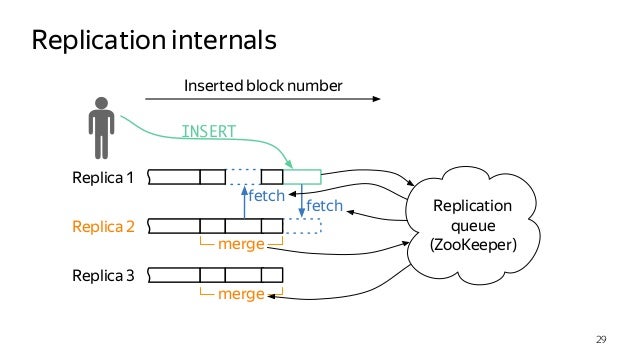
0. :zero: On each server, you need to add a local IP address to the Clickhouse hosts configuration /etc/clickhouse-server/config.xml:
```xml
::1
--local-ip-here--
```
1. :one: Configure Zookeeper config on each replica server, example:
```xml
--host or ip address here--
2181
```
2. :two: Configure macros file, or macros section:
- First replica on first shard:
```xml
01
01
clh-01
```
- Second replica on second shard:
```xml
01
02
clh-02
```
3. :three: We create identical tables on each replica server, see: https://gist.github.com/zikwall/764673dfcd3c5fa4225b57a1a2899311#file-stat-sql
#### SetUp Distributed server
> Those. each server will store a piece of the table (also called shards). But in this case, the work with the table becomes more complicated. After all, how to make a selection that processes all the data at once?
For this, Clickhouse has a special table engine - **Distributed**. It just addresses the indicated problem. Instead of the functions of a regular table, it sends requests to different servers and collects data from them. Then the collected data is further processed locally (for example, grouped) and the results are returned to the client.
> On a separate server (from which we will send requests) we will configure a cluster that points to shard servers. To do this, add the following to the _****_ block in the settings file _(/etc/clickhouse-server/config.xml)_:
1. :one: Edit config.xml section __remote servers__ or __clickhouse_remote_servers.xml__
example:
```xml
--host_or_ip_address--
9000
--password_here--
--host_or_ip_address--
9000
--password_here--
```
> You can fill in data from non-shard tables that could be generated by a GoLang script
**Export** table from not Replicated table, example: `clickhouse-client -h::1 -udefault --password=passwordhere --max_threads=1 --query="select * from monit.stat where day_begin >= 1563310800 and day_begin <= 1563829200 FORMAT Native" > /home/bduser/clh_exports/stat_1563310800_1563829200.native`
>You may encounter errors, for example, a password entry field will be written to the dump. To fix you can do this trick
`sed '1d' stat_1563397200.csv | clickhouse-client -h::1 -udefault --password=passhere --query="INSERT INTO monit.stat FORMAT CSV"`
This error can be resolved immediately by specifying the password in the command line when connecting clickhouse client
**Import:** `clickhouse-client -h::1 -udefault --password --max_threads=1 --query="INSERT INTO monit.stat FORMAT Native" < stat_1563310800_1563829200.native`
***
## Import from MySQL to ClickHouse
**Import to Click House Server:** `cat table.tsv | clickhouse-client --query="INSERT INTO first_base.table_name FORMAT CSV" -h::1 --password`
**Export from MySQL to TSV**: `mysql -Bse "select all_fields_here from db_name.table_name_here" > table.tsv -h hostname -u username -p`
**Export from MySQL table (as CSV) AND INSERT TO Click House Table:** `mysql -u username -p --compress -ss -e "SELECT all_fields_here FROM db_name.table_name" test | sed 's/\"//g;s/\t/","/g;s/^/"/;s/$/"/' | clickhouse-client --query="INSERT INTO first_base.table_name FORMAT TSV" -h hostname`
Setup action: /etc/rsyslog.d/default.conf
```
local6.* action(type="omprog" binary="/path/to/hadnler/(php), (go), (peyhton)")
```
Nginx setup: /etc/nginx/sites-available/your-service.conf
```
access_log syslog:server={ip:port},facility=local6 example_name_here;
```
Example PHP Handler @see: [Here](https://github.com/zikwall/clickhouse-docs/blob/master/src/php_handler.php)