https://github.com/zinadesign/google-forms-email-sender
Google Apps Script for Automatically Send Confirmation Emails from Google Forms.
https://github.com/zinadesign/google-forms-email-sender
automatic email-sender google-apps-script google-forms
Last synced: 7 months ago
JSON representation
Google Apps Script for Automatically Send Confirmation Emails from Google Forms.
- Host: GitHub
- URL: https://github.com/zinadesign/google-forms-email-sender
- Owner: zinadesign
- License: gpl-3.0
- Created: 2020-04-20T15:08:02.000Z (about 6 years ago)
- Default Branch: master
- Last Pushed: 2021-05-18T09:36:43.000Z (about 5 years ago)
- Last Synced: 2024-02-11T13:28:02.227Z (over 2 years ago)
- Topics: automatic, email-sender, google-apps-script, google-forms
- Language: JavaScript
- Homepage:
- Size: 332 KB
- Stars: 4
- Watchers: 2
- Forks: 2
- Open Issues: 1
-
Metadata Files:
- Readme: README.md
- License: LICENSE
Awesome Lists containing this project
README
# Google Forms Email Sender
Simple Google Apps Script for automatically send confirmation emails from Google Forms.
## Content Table
* [Install Email Sender to Google Form](#install-email-sender-to-google-form)
* [Quotas for Emails per day](#quotas-for-emails-per-day)
* [Configure Email Sender](#configure-email-sender)
## Install Email Sender to Google Form
1. Create a Google Form: https://docs.google.com/forms/
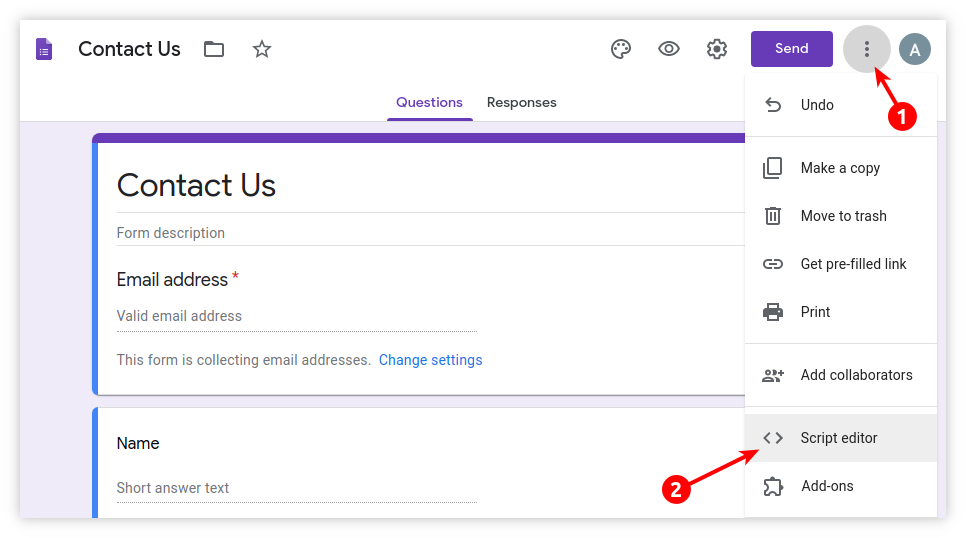
2. Click **Menu** → **Script editor**:
3. Copy and paste code from [Code.gs](Code.gs) and press `Ctrl`+`S`
4. Create template file: **File** → **New** → **HTML file**, Enter new file name: `Template`
5. Copy and paste code from [Template.html](Template.html) and press `Ctrl`+`S`
6. Go to **Code.gs** tab in left sidebar and run once function `installTriggers`: **Select function** → **installTriggers** → press **Play** button:

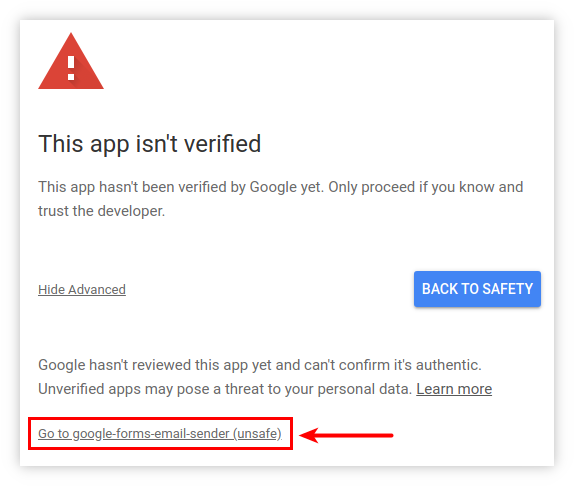
7. Allow permissions on next pop-ups:
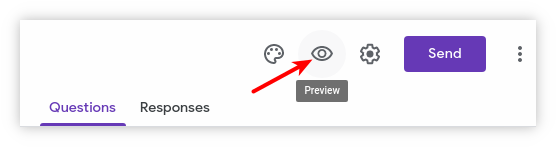
8. Test Email Sender: go to your form, click **Preview** icon, fill form and submit, check your email box.
## Quotas for Emails per day
Keep in mind that each additional email address in the settings is an additional email recipient.
Google Apps Script services impose [daily quotas](https://developers.google.com/apps-script/guides/services/quotas) on email recipients per day:
* Free edition (*@gmail.com) — 100 letters per day
* G Suite — 1500 letters per day
The size of the remaining daily quota is displayed in the bottom of the letter to the form owner — see `= remainingDailyQuota ?>` in the **Template.html**.
## Configure Email Sender
All settings are set in the main script **Code.gs**:
```javascript
var params = {
to: '', // Primary (visible) recipient address.
cc: '', // Visible copies.
bcc: '', // Hidden copies.
replyTo: '', // Email for reply from user.
name: '', // Name of company or site.
subject: '{{formTitle}} — Request #{{date}}{{quotaNumber}}',
timezone: 'GMT+3',
dateFormat: 'Md', // Date format for {{date}}
template: 'Template.html', // Email body template.
};
```
Emails for fields **to**, **cc**, **bcc**, **replyTo** can be written in two forms:
> `'user@domain.com'`
> `'User Name «Company» '`
Multiple email addresses are allowed, separated by commas:
> `'user@domain.com, info@example.com'`
If the **to** field is empty, the letter will be sent to the email address of the form owner.
Similarly if the **replyTo** field is empty, if the user decides to respond to the letter, the form owner email will be substituted as the recipient.
If the **subject** field is empty, it will be substituted a form heading.
A number **{{date}}{{quotaNumber}}** in the subject line is needed so that Gmail does not group letters in chains.
Formats **dateFormat** according to the specification described in [SimpleDateFormat](https://docs.oracle.com/javase/7/docs/api/java/text/SimpleDateFormat.html).
The main text of the letter is edited in the **Template.html**.