https://github.com/zirafa/inkscape-hatch-patterns
Patterns for mechanical drawings in Inkscape by HenJan van der Pol
https://github.com/zirafa/inkscape-hatch-patterns
Last synced: about 1 year ago
JSON representation
Patterns for mechanical drawings in Inkscape by HenJan van der Pol
- Host: GitHub
- URL: https://github.com/zirafa/inkscape-hatch-patterns
- Owner: zirafa
- License: cc0-1.0
- Created: 2019-02-15T23:17:09.000Z (over 7 years ago)
- Default Branch: master
- Last Pushed: 2024-02-24T21:21:45.000Z (over 2 years ago)
- Last Synced: 2025-03-24T04:43:26.312Z (about 1 year ago)
- Language: Python
- Homepage:
- Size: 717 KB
- Stars: 59
- Watchers: 3
- Forks: 10
- Open Issues: 2
-
Metadata Files:
- Readme: README.md
- License: LICENSE
Awesome Lists containing this project
README
# Inkscape Hatch Patterns
This is a mirror of HenJan van der Pol's excellent [Patterns for Mechanical Drawings in Inkscape](https://inkscape.org/~henkjan_nl/%E2%98%85patterns-for-mechanical-drawings-in-inkscape). The original ZIP package was missing the Defs.txt which is included here. It can also be generated by running the python script: ```python3 HatchPatterns.py```
All credit for this goes to [HenkJan van der Pol](https://inkscape.org/~henkjan_nl/) for this very helpful pattern library.
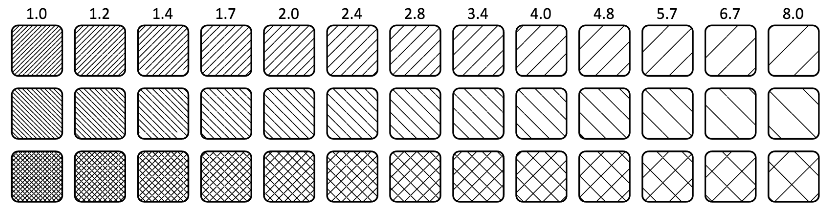
## How to use
### Single Pattern Usage
- Read HenkJan van der Pol's [instructions (PDF)](Patterns%20for%20mechanical%20drawings%20in%20Inkscape.pdf) on how to manually copy patterns via copying and pasting object properties.
### Add to pattern fill dropdown
Copy [`HatchPatterns.svg`](HatchPatterns.svg) into your Inkscape paint patterns folder:
#### MacOS
```shell
cp HatchPatterns.svg /Applications/Inkscape.app/Contents/Resources/share/inkscape/paint/
```
#### Windows
```shell
copy HatchPatterns.svg "C:\Program Files\Inkscape\share\inkscape\paint\"
```
Relaunch Inkscape. The patterns will be available from the pattern fill dropdown:

### Add as a paint server (this also adds to the pattern fill dropdown)
This method installs the pattern as a paint server in your Inkscape user config directory rather than the app directory (which could get overwritten). You can find your Inkscape user config directory path by going to Inkscape > Settings > System and looking for the User Config path.
#### Linux
```shell
cp paint/HatchPatterns.svg ~/.config/inkscape/paint/
```
#### MacOS
```shell
cp paint/HatchPatterns.svg ~/Library/Application Support/org.inkscape.Inkscape/config/inkscape/paint/
```
Relaunch Inkscape. The hatches are available from the Object > Paint Servers menu under the name "Hatch Patterns" (as from the in `paint/HatchPatterns.svg`). The patterns should also be available from the pattern fill dropdown.