https://github.com/ziyi2/cz-example
cz工具集示例
https://github.com/ziyi2/cz-example
Last synced: 11 months ago
JSON representation
cz工具集示例
- Host: GitHub
- URL: https://github.com/ziyi2/cz-example
- Owner: ziyi2
- Created: 2019-04-27T11:57:08.000Z (about 7 years ago)
- Default Branch: master
- Last Pushed: 2019-04-27T13:45:45.000Z (about 7 years ago)
- Last Synced: 2025-04-04T22:33:21.690Z (about 1 year ago)
- Language: JavaScript
- Size: 8.69 MB
- Stars: 27
- Watchers: 1
- Forks: 13
- Open Issues: 0
-
Metadata Files:
- Readme: README.md
- Changelog: CHANGELOG.md
Awesome Lists containing this project
README
# cz-example
cz工具集示例,包含以下工具类型:
- 适配器:用于配置cz的提交说明
- 校验:校验提交说明是否符合规范
- 日志:根据提交说明的类型快速生成日志
## Commitizen
全局安装cz
``` javascript
npm install -g commitizen
```
## 适配器
### cz-conventional-changelog
如果想使用符合Angular规范提交说明的cz适配器
``` javascript
commitizen init cz-conventional-changelog --save --save-exact
```
> 该命令执行`cz-conventional-changelog`依赖安装和在`pacakge.json`中配置`config.commitizen`适配器路径。
执行提交说明命令`git cz`:
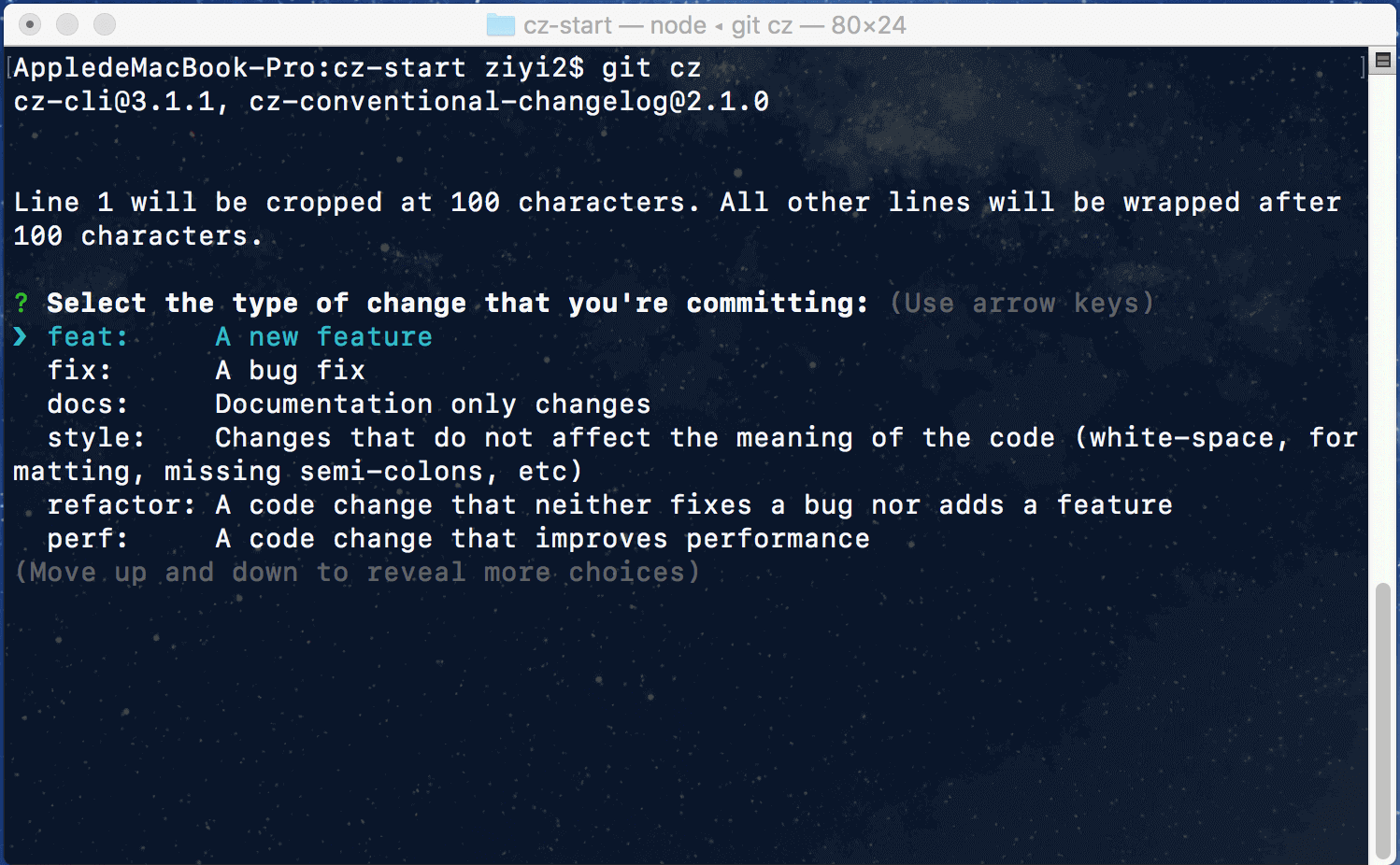
代码提交后,查看远程提交说明信息:

### cz-customizable
如果想定制说明,可以使用该cz适配器
``` javascript
npm install cz-customizable --save-dev
```
该适配器需要手动配置cz的适配器路径,在`pacakge.json`中
``` javascript
"config": {
"commitizen": {
"path": "node_modules/cz-customizable"
}
}
```
新增`.cz-config`定制说明的配置文件(以下是一个汉化示例):
``` javascript
'use strict';
module.exports = {
types: [
{value: '特性', name: '特性: 一个新的特性'},
{value: '修复', name: '修复: 修复一个Bug'},
{value: '文档', name: '文档: 变更的只有文档'},
{value: '格式', name: '格式: 空格, 分号等格式修复'},
{value: '重构', name: '重构: 代码重构,注意和特性、修复区分开'},
{value: '性能', name: '性能: 提升性能'},
{value: '测试', name: '测试: 添加一个测试'},
{value: '工具', name: '工具: 开发工具变动(构建、脚手架工具等)'},
{value: '回滚', name: '回滚: 代码回退'}
],
scopes: [
{name: '模块1'},
{name: '模块2'},
{name: '模块3'},
{name: '模块4'}
],
// it needs to match the value for field type. Eg.: 'fix'
/*
scopeOverrides: {
fix: [
{name: 'merge'},
{name: 'style'},
{name: 'e2eTest'},
{name: 'unitTest'}
]
},
*/
// override the messages, defaults are as follows
messages: {
type: '选择一种你的提交类型:',
scope: '选择一个scope (可选):',
// used if allowCustomScopes is true
customScope: 'Denote the SCOPE of this change:',
subject: '短说明:\n',
body: '长说明,使用"|"换行(可选):\n',
breaking: '非兼容性说明 (可选):\n',
footer: '关联关闭的issue,例如:#31, #34(可选):\n',
confirmCommit: '确定提交说明?'
},
allowCustomScopes: true,
allowBreakingChanges: ['特性', '修复'],
// limit subject length
subjectLimit: 100
};
```
执行提交说明命令`git cz`:
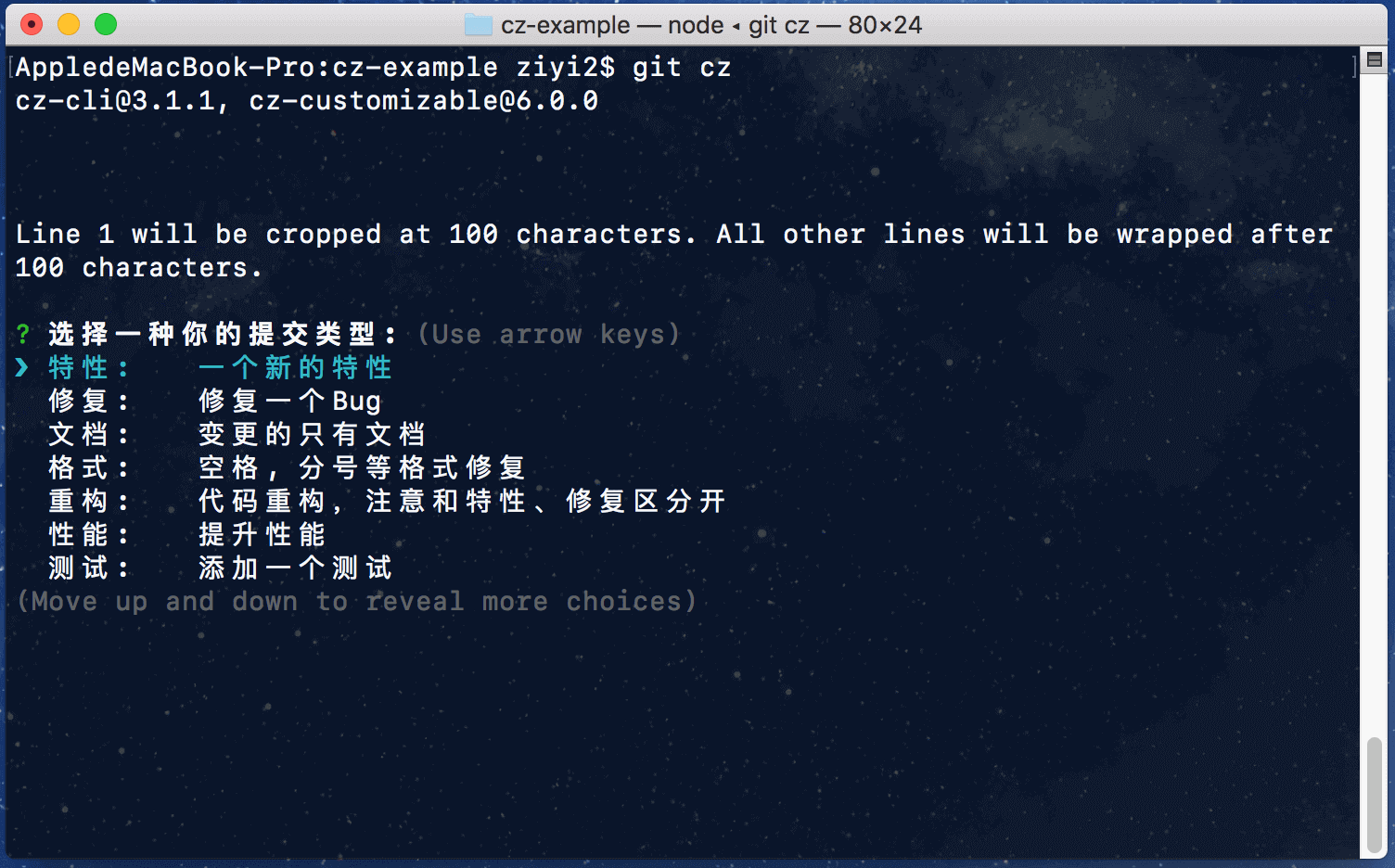
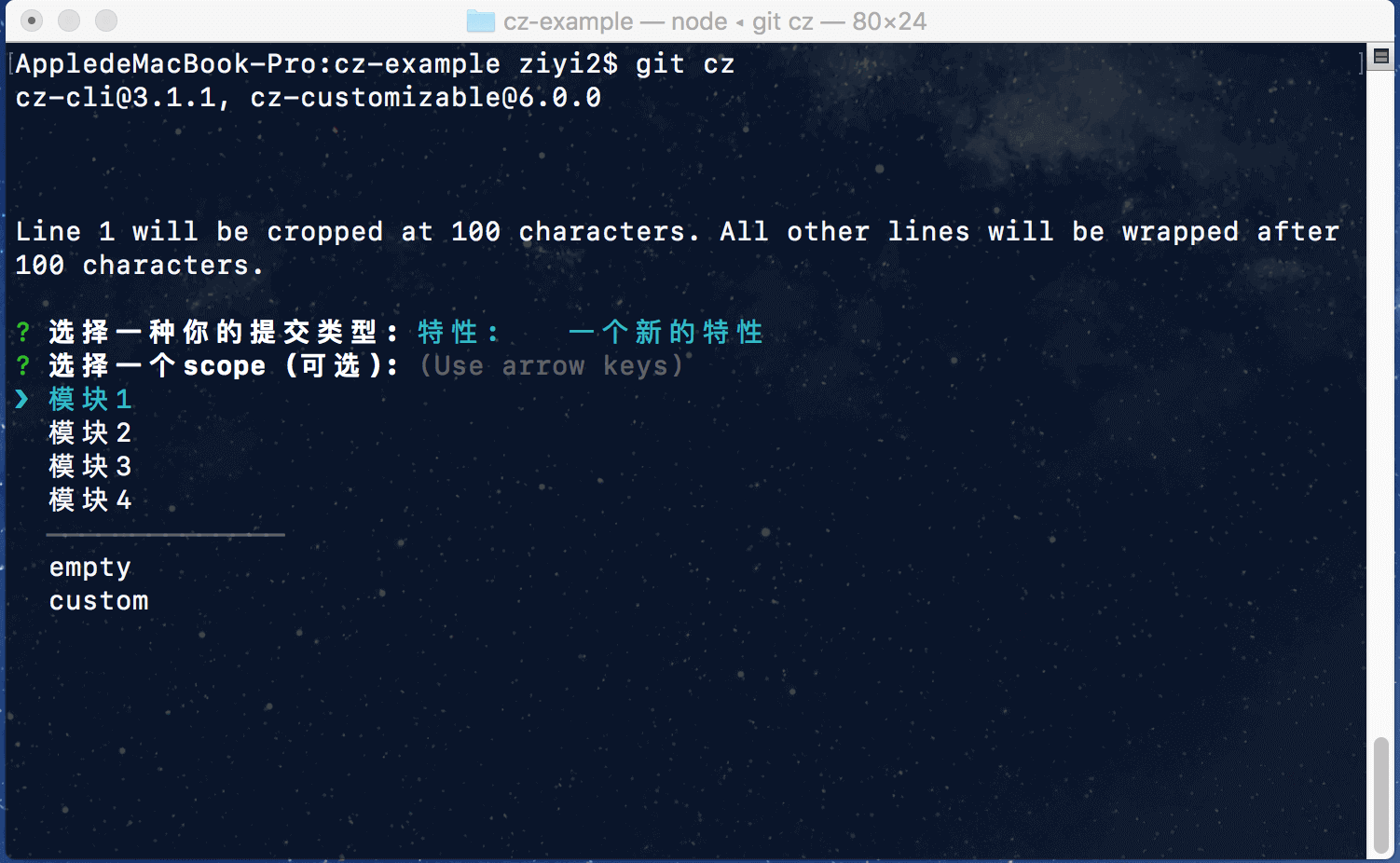
查看远程提交说明:

## 校验
### commitlint
校验提交说明是否符合规范
安装校验工具
``` javascript
npm install --save-dev @commitlint/cli
```
#### @commitlint/config-conventional
安装符合Angular风格的校验规则
``` javascript
npm install --save-dev @commitlint/config-conventional
```
新建`commitlint.config.js`文件并设置校验规则:
``` javascript
module.exports = {
extends: ['@commitlint/config-conventional']
};
```
安装huksy(git钩子工具)
``` javascript
npm install husky --save-dev
```
在package.json中配置`git commit`提交时的校验钩子:
``` javascript
"husky": {
"hooks": {
"commit-msg": "commitlint -E HUSKY_GIT_PARAMS"
}
}
```
需要注意,使用该校验规则不能对`.cz-config.js`进行不符合Angular规范的定制处理,例如之前的汉化,此时需要将`.cz-config.js`的文件按照官方示例文件[cz-config-EXAMPLE.js](https://github.com/leonardoanalista/cz-customizable/blob/master/cz-config-EXAMPLE.js)进行符合Angular风格的改动:
``` javascript
'use strict';
module.exports = {
types: [
{value: 'feat', name: 'feat: A new feature'},
{value: 'fix', name: 'fix: A bug fix'},
{value: 'docs', name: 'docs: Documentation only changes'},
{value: 'style', name: 'style: Changes that do not affect the meaning of the code\n (white-space, formatting, missing semi-colons, etc)'},
{value: 'refactor', name: 'refactor: A code change that neither fixes a bug nor adds a feature'},
{value: 'perf', name: 'perf: A code change that improves performance'},
{value: 'test', name: 'test: Adding missing tests'},
{value: 'chore', name: 'chore: Changes to the build process or auxiliary tools\n and libraries such as documentation generation'},
{value: 'revert', name: 'revert: Revert to a commit'},
{value: 'WIP', name: 'WIP: Work in progress'}
],
scopes: [
{name: 'accounts'},
{name: 'admin'},
{name: 'exampleScope'},
{name: 'changeMe'}
],
// it needs to match the value for field type. Eg.: 'fix'
/*
scopeOverrides: {
fix: [
{name: 'merge'},
{name: 'style'},
{name: 'e2eTest'},
{name: 'unitTest'}
]
},
*/
// override the messages, defaults are as follows
messages: {
type: 'Select the type of change that you\'re committing:',
scope: '\nDenote the SCOPE of this change (optional):',
// used if allowCustomScopes is true
customScope: 'Denote the SCOPE of this change:',
subject: 'Write a SHORT, IMPERATIVE tense description of the change:\n',
body: 'Provide a LONGER description of the change (optional). Use "|" to break new line:\n',
breaking: 'List any BREAKING CHANGES (optional):\n',
footer: 'List any ISSUES CLOSED by this change (optional). E.g.: #31, #34:\n',
confirmCommit: 'Are you sure you want to proceed with the commit above?'
},
allowCustomScopes: true,
allowBreakingChanges: ['feat', 'fix'],
// limit subject length
subjectLimit: 100
};
```
执行错误的提交说明:
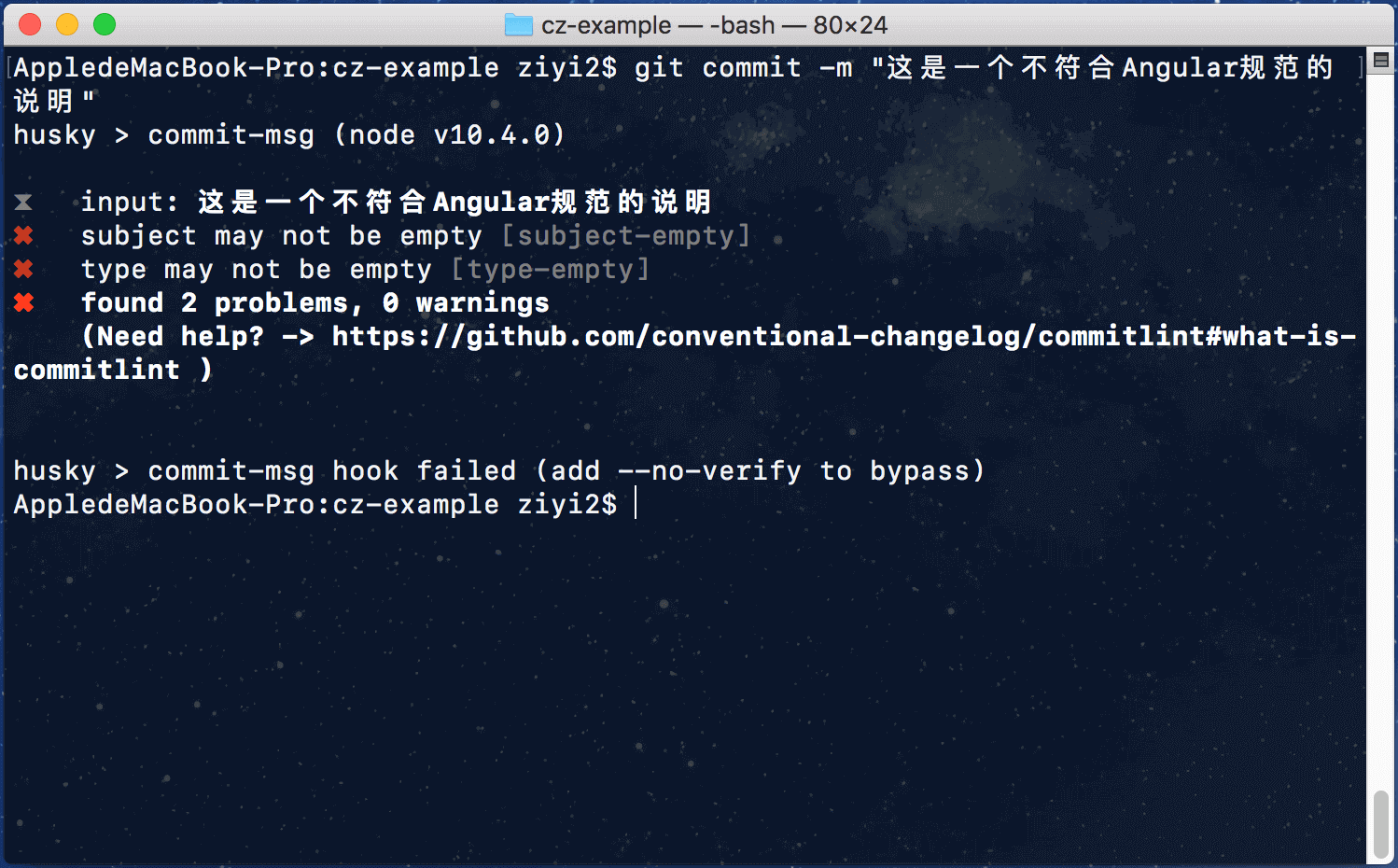
执行符合Angular规范的提交说明:
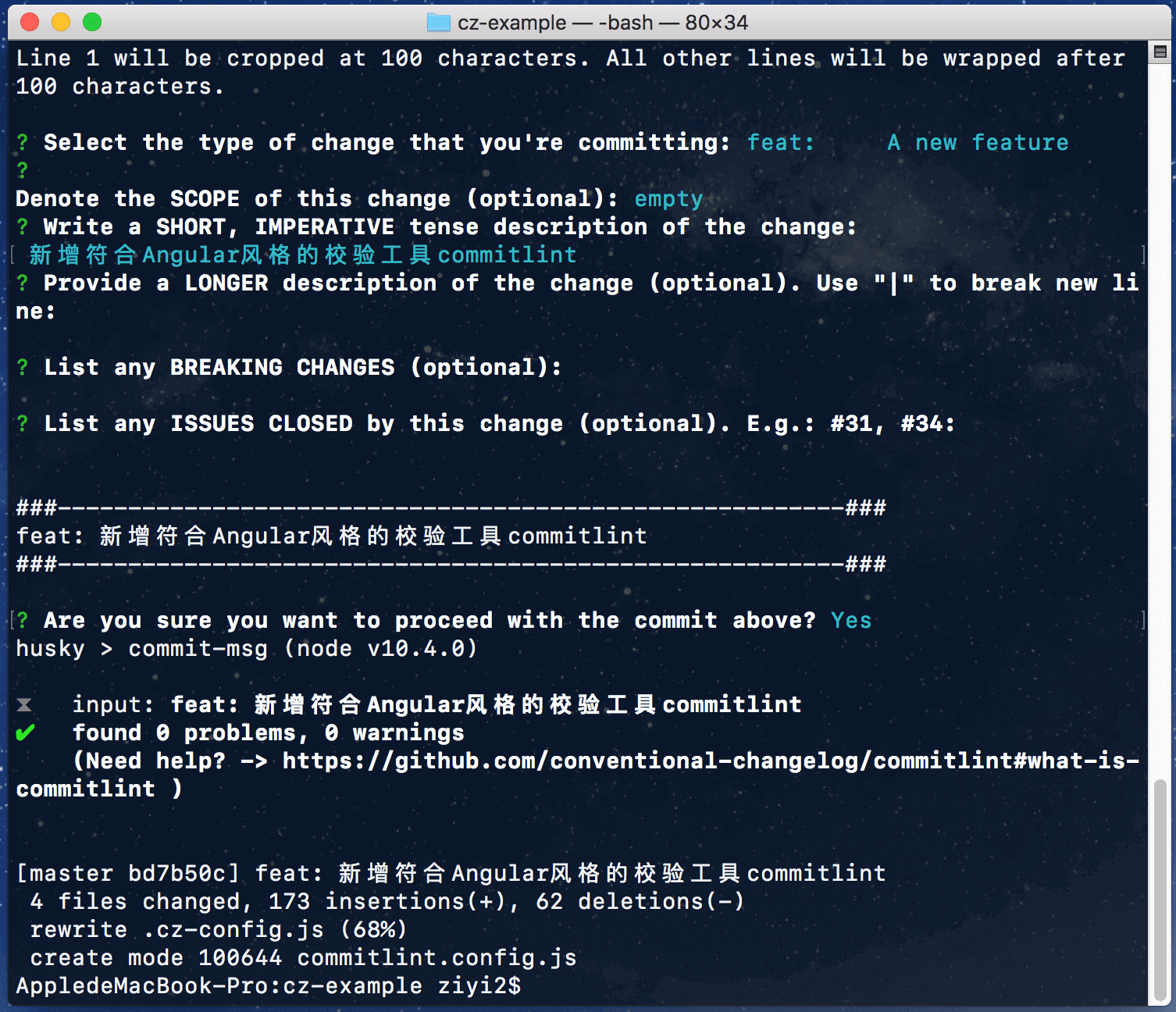
### validate-commit-msg
也可以使用工具对cz提交说明进行校验,具体可查看[validate-commit-msg](https://github.com/Frikki/validate-commit-message)。
### commitlint-config-cz
如果是使用cz-customizable适配器做了破坏Angular风格的提交说明配置,那么不能使用@commitlint/config-conventional进行提交说明校验,可以使用[commitlint-config-cz](https://github.com/whizark/commitlint-config-cz)对定制化提交说明进行校验。
## 日志
安装生成日志工具
``` javascript
npm install conventional-changelog-cli -D
```
配置生成日志的命令
``` javascript
"version": "conventional-changelog -p angular -i CHANGELOG.md -s -r 0 && git add CHANGELOG.md"
```
执行`npm run version`后可查看生产的日志[CHANGELOG.md](https://github.com/ziyi2/cz-example/blob/master/CHANGELOG.md)。
> 注意要使用正确的`Header`的`type`,否则生成的日志会不准确,这里只是一个示例,生成的日志不是很严格。