https://github.com/zkreations/blogger-admin-wp
Layout for Blogger that mimics the WordPress admin panel
https://github.com/zkreations/blogger-admin-wp
blogger blogger-template blogger-templates blogger-theme scss
Last synced: about 1 year ago
JSON representation
Layout for Blogger that mimics the WordPress admin panel
- Host: GitHub
- URL: https://github.com/zkreations/blogger-admin-wp
- Owner: zkreations
- License: mit
- Created: 2025-02-02T19:10:18.000Z (over 1 year ago)
- Default Branch: main
- Last Pushed: 2025-02-07T17:24:14.000Z (over 1 year ago)
- Last Synced: 2025-03-09T14:43:06.632Z (over 1 year ago)
- Topics: blogger, blogger-template, blogger-templates, blogger-theme, scss
- Language: SCSS
- Homepage:
- Size: 39.1 KB
- Stars: 4
- Watchers: 0
- Forks: 0
- Open Issues: 0
-
Metadata Files:
- Readme: README.md
- License: LICENSE
Awesome Lists containing this project
README
# Blogger AdminWP
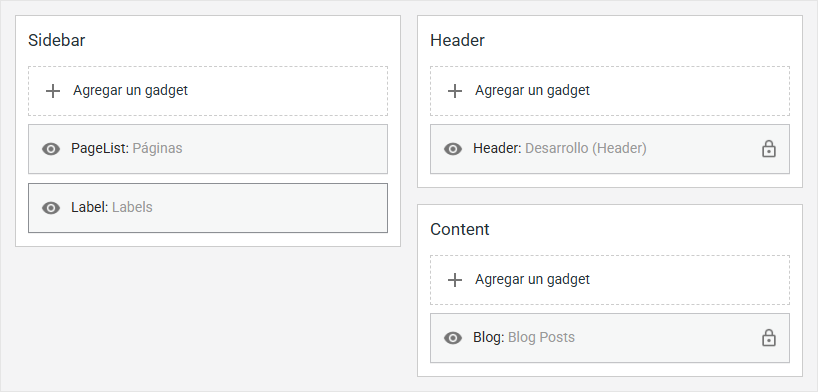
This project is designed to override the styles of Blogger's administration panel, specifically the "Layout" section, which is used to manage the template's widgets. It is easy to install and does not require advanced knowledge.
## Installation
Copy the contents of the `main.css` or `main.min.css` file, then in your Blogger XML template, add the following code just before the `` tag:
```xml
```
If you are working on a larger project using a development environment (such as [Hamlet](https://github.com/zkreations/hamlet)), you can install it as an npm dependency:
```bash
npm install blogger-admin-wp
```
Then, you need to include the CSS file in your project. The import path would be something like this:
```bash
node_modules/blogger-admin-wp/main.min.css
```
## Usage
Once installed, you will see some changes in Blogger's admin panel. The next step is to create the layout, which consists of columns. Each column must have a container with the class `layout-section`, as follows:
```html
```
This class only affects the design mode. However, if this mandatory container interferes with your template's design, you can create it conditionally:
```xml
```
This way, the container will only be displayed in design mode and will not affect your template's layout. Alternatively, you can add the `layout-section` class to an existing container in your design. Each container with the `layout-section` class will be displayed as a column in design mode.
## Enabling editing button
By default, to edit a widget you can click anywhere on a widget. If you want to disable this functionality and show an edit button, create a container that wraps all your layout sections and add the `layout-edit` class:
```xml
```
## Customization
If you want to customize the styles, you can edit the variables located in `abstracts/_variables.scss` and recompile the CSS file.
## License
blog-admin-wp is licensed under the MIT License.