https://github.com/zmeadows/lldbg
A lightweight native GUI for LLDB.
https://github.com/zmeadows/lldbg
c clang cpp debugger gcc gdb gui imgui linux lldb llvm macos osx unix
Last synced: 4 months ago
JSON representation
A lightweight native GUI for LLDB.
- Host: GitHub
- URL: https://github.com/zmeadows/lldbg
- Owner: zmeadows
- License: mit
- Created: 2019-02-03T23:01:28.000Z (over 7 years ago)
- Default Branch: master
- Last Pushed: 2024-07-08T00:13:31.000Z (about 2 years ago)
- Last Synced: 2024-08-05T17:24:52.643Z (almost 2 years ago)
- Topics: c, clang, cpp, debugger, gcc, gdb, gui, imgui, linux, lldb, llvm, macos, osx, unix
- Language: C++
- Homepage:
- Size: 6.76 MB
- Stars: 131
- Watchers: 7
- Forks: 14
- Open Issues: 5
-
Metadata Files:
- Readme: README.md
- License: LICENSE.txt
Awesome Lists containing this project
- awesome-hacking-lists - zmeadows/lldbg - A lightweight native GUI for LLDB. (C++)
README
[](https://github.com/zmeadows/lldbg/actions/workflows/ci-linux.yml)
[](https://github.com/zmeadows/lldbg/actions/workflows/ci-macos.yml)
[](https://github.com/zmeadows/lldbg/actions/workflows/ci-windows.yml)
[](https://github.com/zmeadows/lldbg/actions/workflows/code-quality.yml)
---
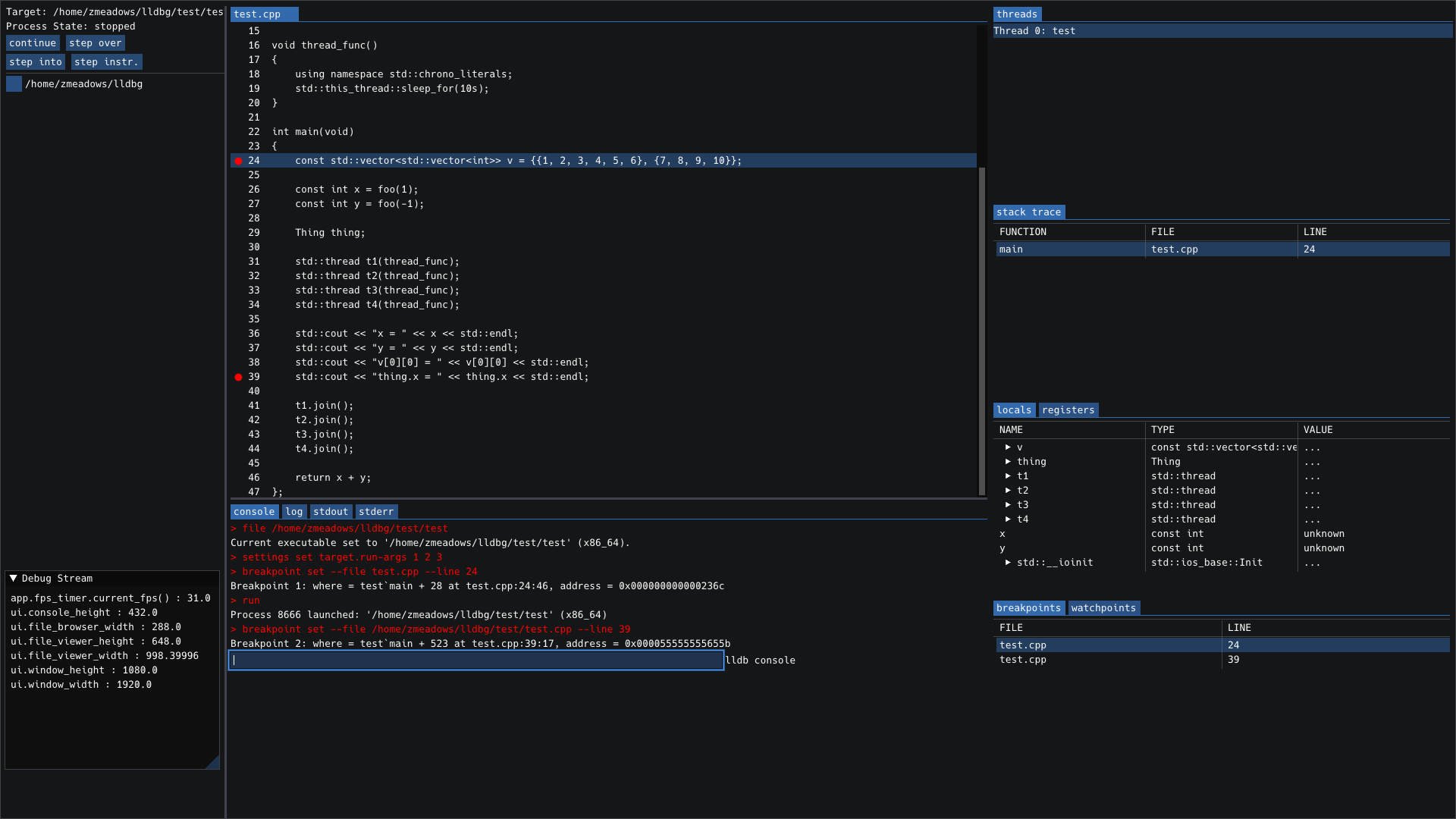
lldbg is a native GUI for lldb which is currently in alpha stage.
Right now you *probably* shouldn't attempt to use it unless you want to contribute to the development in some way, either directly or by submitting issues.
The basic idea is to provide vim/emacs users with a lightweight, easy-to-compile, easy-to-use likeness of what you would see in a full-featured IDE debugger interface.
Primary goals are:
* open/close and respond to user input instantly, 100% of the time
* function intuitively so that 'using lldbg' is not a skill you have to learn
* require no outside configuration files or complicated setup
* the build should 'just work' on almost any system
* launch with the many of the same command line options as lldb itself
[Issues](https://github.com/zmeadows/lldbg/issues) are welcome.
## Install / Build (End Users)
# Build & Run Guide — lldbgui
This repo ships CMake presets for two audiences:
- **End users:** `user-release` — quick, optimized Release build with LTO; no dev extras.
- **Developers:** `dev` — RelWithDebInfo + `compile_commands.json` for IDEs and tools.
The presets use the **Ninja** generator and place build trees under `build//`.
> Minimum tooling:
CMake ≥ 3.20, Ninja, a C++17 compiler, and LLDB.
ImGui/GLFW/fmt/cxxopts are resolved automatically (system packages preferred; vendored fallbacks are pinned in `cmake/LLDBGDeps.cmake`).
OpenGL is required.
---
## TL;DR
```bash
# Clone
git clone git@github.com:zmeadows/lldbg.git lldbg && cd lldbg
# End users: fast Release build
cmake --preset user-release
cmake --build --preset user-release -j
# Developers: debug info + compile_commands.json
cmake --preset dev
cmake --build --preset dev -j
# Run (binary lives in the build tree)
./build/user-release/lldbgui # or: ./build/dev/lldbgui
```
---
## 1) Platform prerequisites
### macOS (Apple Silicon or Intel)
- Install **Xcode Command Line Tools** (for AppleClang & SDKs):
```bash
xcode-select --install
```
- Install Homebrew packages:
```bash
brew install cmake ninja pkg-config fmt glfw cxxopts llvm
```
To help CMake find the LLVM/LLDB config packages:
```bash
export CMAKE_PREFIX_PATH="$(brew --prefix llvm):$(brew --prefix)"
export LLVM_DIR="$(brew --prefix llvm)/lib/cmake/llvm"
export LLDB_DIR="$(brew --prefix llvm)/lib/cmake/lldb"
```
> On macOS, the build prefers **AppleClang** for ABI compatibility. If you see an error about non‑Apple Clang, either set:
```bash
export CC="$(xcrun --find clang)" CXX="$(xcrun --find clang++)"
```
or deliberately override with `-DLLDBG_ALLOW_NON_APPLECLANG=ON`.
### Ubuntu/Debian
```bash
sudo apt-get update
sudo apt-get install -y \
build-essential ninja-build cmake pkg-config \
clang lldb liblldb-dev \
libgl1-mesa-dev
```
> Notes:
> - If you prefer GCC, omit `clang` and rely on `gcc/g++`.
> - `libgl1-mesa-dev` provides OpenGL headers; GLFW/ImGui/fmt/cxxopts are fetched if not present.
### Fedora
```bash
sudo dnf install -y \
gcc-c++ clang ninja-build cmake pkg-config \
lldb lldb-devel \
mesa-libGL-devel
```
### Arch Linux
```bash
sudo pacman -S --needed \
base-devel ninja cmake pkgconf \
clang lldb \
mesa
```
---
## 2) End users — Release build (`user-release`)
This preset enables LTO and disables dev extras.
```bash
cmake --preset user-release
cmake --build --preset user-release -j
```
Artifacts:
- Binary: `build/user-release/lldbgui`
Optional toggles (pass via `-D...` to the *configure* step):
- `-DLLDBG_USE_SYSTEM_DEPS=ON|OFF` — prefer system packages (default **ON**) or force vendored.
- `-DLLDBG_WARN_AS_ERRORS=ON|OFF` — treat warnings as errors (default **OFF** here).
### Run
Launch the UI directly:
```bash
./build/user-release/lldbgui
```
A few useful CLI options (subset):
- `-f, --file ` — debug this program
- `-p, --attach-pid ` — attach to PID
- `-n, --attach-name ` — attach to process by name
- `--workdir ` — set initial file browser root
- `--loglevel `
Example:
```bash
./build/user-release/lldbgui --file ./a.out --loglevel info
```
---
## 3) Developers — Debug‑friendly build (`dev`)
Generates **RelWithDebInfo** binaries and writes `compile_commands.json` for IDEs/linters.
```bash
cmake --preset dev
# alternative: symlink compile_commands.json to root repo directory for editors
# cmake --preset dev -DCMAKE_EXPOSE_COMPILE_COMMANDS=ON
cmake --build --preset dev -j
```
Artifacts:
- Binary: `build/dev/lldbgui`
- Compilation DB: `build/dev/compile_commands.json`
### Editor & tooling hints
- **clangd/VSCode/CLion**: point to `build/dev/compile_commands.json`.
- **clang-tidy / clang-format**: versions pinned in repo (see `.clang-tidy`, `.clang-format`):
```bash
# Example: run clang-tidy on sources using the dev build directory
clang-tidy -p build/dev --config-file=.clang-tidy $(git ls-files 'src' | grep -E '\.(c|cc|cpp|cxx|m|mm)$')
```
### Running tests
If/when tests are added, you can use the CTest preset:
```bash
ctest --preset dev --output-on-failure
```
---
## 4) Common customizations
- Select a specific compiler:
```bash
# Clang
CC=clang CXX=clang++ cmake --preset dev
# GCC
CC=gcc CXX=g++ cmake --preset dev
```
- Clean the build:
```bash
cmake --build --preset dev --target clean
# or blow away the tree:
rm -rf build/dev
```
- Change build type ad‑hoc (developers):
```bash
cmake -S . -B build/dev -G Ninja -DCMAKE_BUILD_TYPE=Debug
```
---
## 5) Troubleshooting
- **LLDB not found**
- macOS: ensure Xcode CLTs are installed; if using Homebrew LLVM, export `CMAKE_PREFIX_PATH`, `LLVM_DIR`, `LLDB_DIR` as above.
- Linux: install `lldb` + headers (`liblldb-dev` / `lldb-devel`) from your distro.
- **OpenGL/GLFW errors**
- Install OpenGL dev headers (`libgl1-mesa-dev` on Debian/Ubuntu; `mesa-libGL-devel` on Fedora).
- GLFW will be fetched automatically if not present, but it still requires platform GL/X11 headers on Linux.
- **Non‑Apple Clang on macOS**
- By default the build prefers AppleClang. To force a different toolchain:
```bash
cmake -S . -B build/dev -G Ninja -DLLDBG_ALLOW_NON_APPLECLANG=ON
```
- **Ninja not found**
- Install it via your package manager (see prerequisites) or run `brew install ninja`.
---
## 6) What the presets do
- **`user-release`**
`CMAKE_BUILD_TYPE=Release`, **LTO enabled**, warnings not-as-errors.
- **`dev`**
`CMAKE_BUILD_TYPE=RelWithDebInfo`, exports `compile_commands.json`, warnings as-errors.
(See `CMakePresets.json` for exact values.)
---
Happy hacking! If you hit build issues on a new distro, paste the full CMake output and we’ll sort it out.
## Developers
see [Contributing](./docs/CONTRIBUTING.md)
## Changelog
see [Changelog](./docs/CHANGELOG.md)