https://github.com/zodiac1978/aged-content-message
WordPress plugins displaying a message at the top of single posts published x years ago or earlier, informing about content that may be outdated.
https://github.com/zodiac1978/aged-content-message
wordpress wordpress-development wordpress-plugin
Last synced: about 2 months ago
JSON representation
WordPress plugins displaying a message at the top of single posts published x years ago or earlier, informing about content that may be outdated.
- Host: GitHub
- URL: https://github.com/zodiac1978/aged-content-message
- Owner: Zodiac1978
- Created: 2014-11-06T10:40:01.000Z (over 11 years ago)
- Default Branch: master
- Last Pushed: 2024-03-24T14:46:12.000Z (over 2 years ago)
- Last Synced: 2025-03-18T01:17:45.118Z (over 1 year ago)
- Topics: wordpress, wordpress-development, wordpress-plugin
- Language: PHP
- Homepage: https://wordpress.org/plugins/aged-content-message/
- Size: 431 KB
- Stars: 0
- Watchers: 3
- Forks: 2
- Open Issues: 5
-
Metadata Files:
- Readme: README.md
- Changelog: CHANGELOG.md
Awesome Lists containing this project
README
# Aged Content Message
* Contributors: zodiac1978, glueckpress, soean, kau-boy, bueltge, chrico
* Donate Link: https://paypal.me/zodiac1978
* Tags: content, notification, text, message, date, time, outdated, simple, warning, alert
* Requires at least: 3.9
* Tested up to: 6.4
* Stable tag: 1.4.4
* License: GPLv3
* License URI: http://www.gnu.org/licenses/gpl-3.0.html
Displays a message at the top of single posts published x years ago or earlier, informing about content that may be outdated.
## Description
This simple WordPress plugin displays a message in any single post that has been published x years ago from the current time or earlier. The default time to count back is 1 year. Minimal post age as well as message text, HTML, and CSS are [fully customizable via settings](#frequently-asked-questions).
### Languages
* English (en_US) _(default)_
* German (de_DE)
* Formal German (de_DE_formal)
## Installation
If you don’t know how to install a plugin for WordPress, [here’s how](https://wordpress.org/documentation/article/manage-plugins/#installing-plugins-1).
## Frequently Asked Questions
### I can’t find the settings page, where is it?
**It’s right there, under General Settings in your admin menu.** Configurable settings are:
* __Activate Message__: By default, no message will show up on your website until you activate it here.
* __Minimal Post Age__: Set a number of years for posts to be considered aged. Default: 1.
* __Message Heading__: Heading text. Default: _The times, they are a-changin’_. (Dylan, google him.)
* __Message Body (Singular)__: Singular form of the message text, for 1 year-old posts.
* __Message Body (Plural)__: Plural form of the message text, for 2+ year-old posts.
* __Message Class Attribute__: CSS class name(s) applied upon the message’s wrapping `
`.
* __Message HTML__: HTML template for the message. You can completely control its output via this field if you want, or use placeholders for heading and text.
* __Message CSS__: Customize the visual styling of your message right here. Or not.
### Can I disable default styles?
Sure, just empty the _CSS_ field and no styles shall be applied. If you want to add styles to your theme instead, this might get you started:
```css
/* Default styles */
.aged-content-message {
background: #f7f7f7;
border-left: 5px solid #f39c12;
font-family: inherit;
font-size: .875rem;
line-height: 1.5;
margin: 1.5rem 0;
padding: 1.5rem;
}
.aged-content-message h5 {
font-family: inherit;
font-size: .8125rem;
font-weight: bold;
line-height: 2;
margin: 0;
padding: 0;
text-transform: uppercase;
}
.aged-content-message p {
margin: 0;
padding: 0;
}
```
### Where have all the filters gone?
You can still use those good old filters from [v1.3](https://github.com/Zodiac1978/aged-content-message/tree/v1.3), like for this conditional handbrake that doesn’t have a setting (yet):
```php
/* Set condition for displaying message to include pages. */
function yourprefix_aged_content_message__the_content_condition() {
return ! is_single() && ! is_page();
}
add_action( 'aged_content_message__the_content_condition',
'yourprefix_aged_content_message__the_content_condition' );
```
## Screenshots
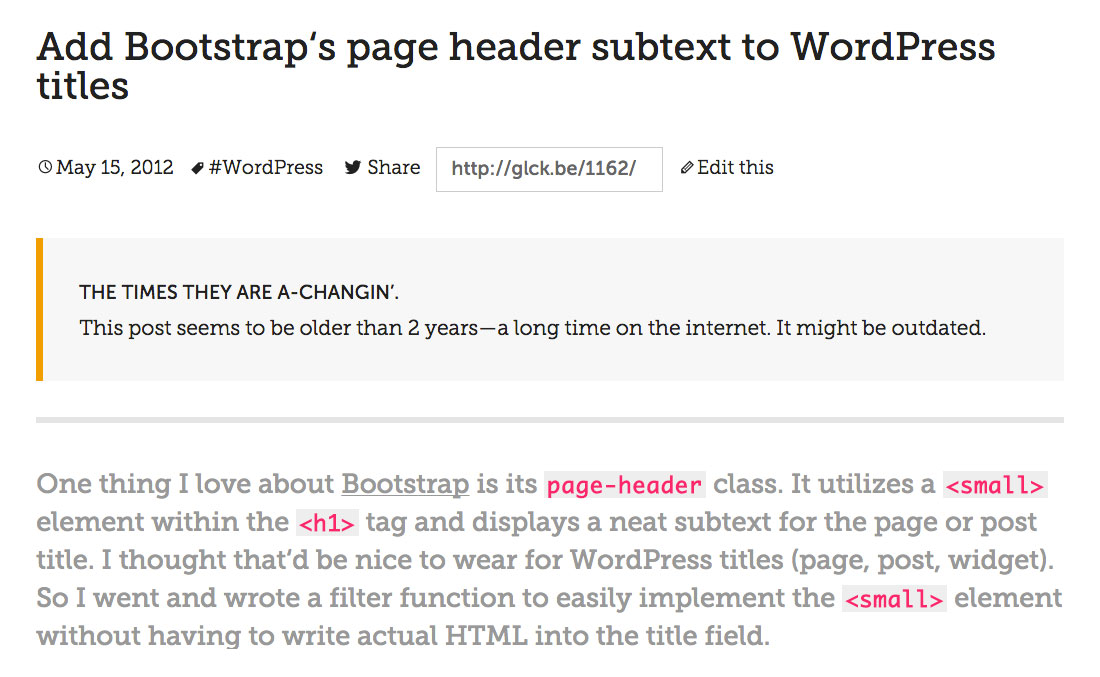
_“The times, they are a-chagin’”: Message on a single post view informing about content that might be outdated._
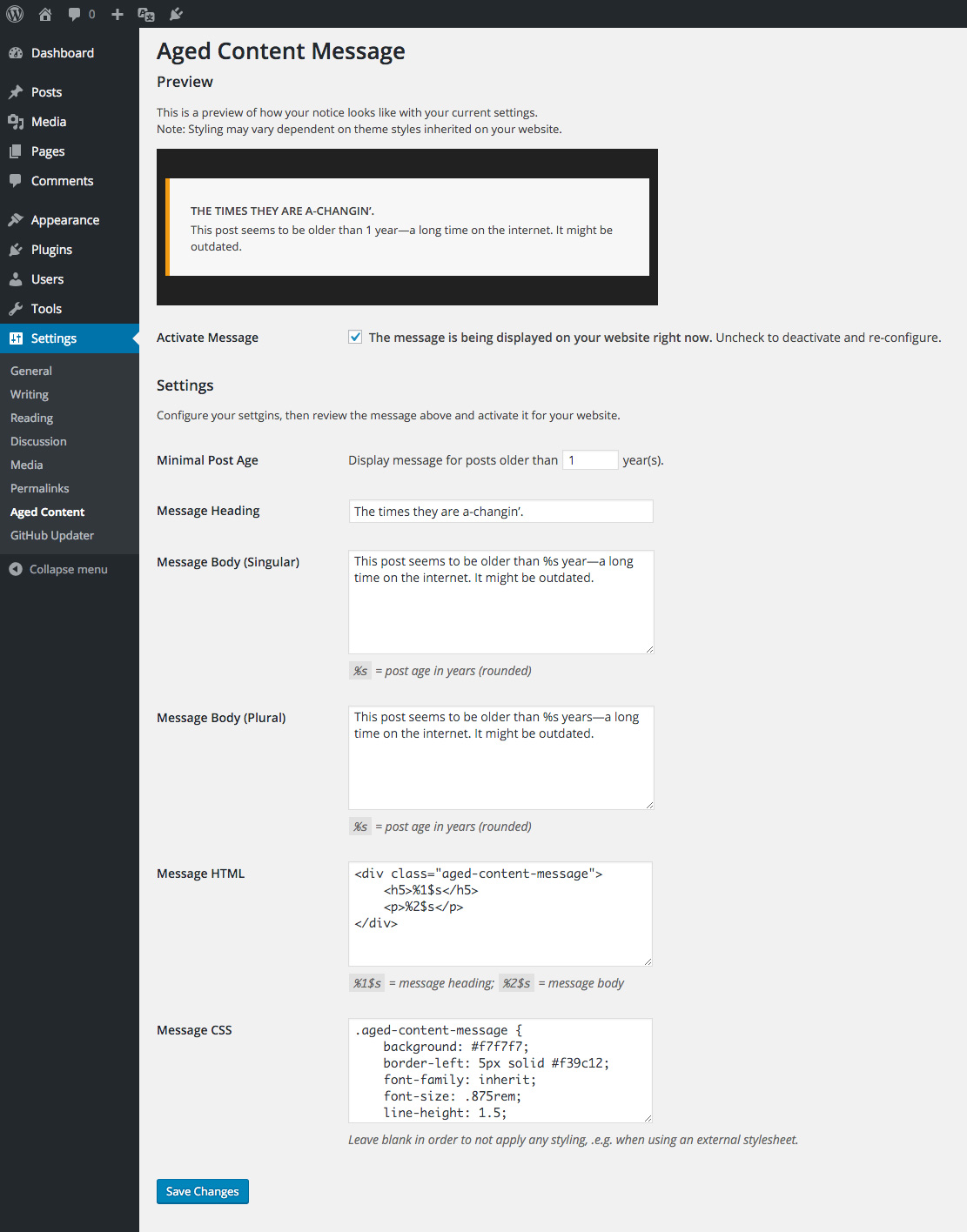
_Settings page_