https://github.com/zoom/meetingsdk-web-sample
Zoom Meeting SDK web sample
https://github.com/zoom/meetingsdk-web-sample
sample-app
Last synced: 5 months ago
JSON representation
Zoom Meeting SDK web sample
- Host: GitHub
- URL: https://github.com/zoom/meetingsdk-web-sample
- Owner: zoom
- License: other
- Created: 2017-04-28T16:25:31.000Z (about 9 years ago)
- Default Branch: master
- Last Pushed: 2025-03-06T14:07:14.000Z (over 1 year ago)
- Last Synced: 2025-03-06T15:22:58.323Z (over 1 year ago)
- Topics: sample-app
- Language: HTML
- Homepage: https://developers.zoom.us/docs/meeting-sdk/web/
- Size: 46.1 MB
- Stars: 631
- Watchers: 48
- Forks: 337
- Open Issues: 18
-
Metadata Files:
- Readme: README.md
- Changelog: CHANGELOG.md
- Contributing: CONTRIBUTING.md
- License: LICENSE.md
Awesome Lists containing this project
README
# Zoom Meeting SDK Web Sample
> **Note**: Use of this sample app is subject to our [Terms of Use](https://explore.zoom.us/en/legal/zoom-api-license-and-tou/).
The [Zoom Meeting SDK for web](https://developers.zoom.us/docs/meeting-sdk/web/) embeds Zoom Meeting and Webinar experiences directly in your web application using a highly optimized WebAssembly module. Get started with the [@zoom/meetingsdk](https://www.npmjs.com/package/@zoom/meetingsdk) npm package.
## 🚀 Quick Start
### 1. Clone the Repository
```bash
git clone https://github.com/zoom/sample-app-web.git
cd sample-app-web
```
### 2. Choose Your Implementation
This repository contains three different implementation approaches:
| Implementation | Technology | Port | UI | Use Case |
|---|---|---|---|---|
| **Components** | React + TypeScript + Vite | 3000 | Component View | Modern, flexible component-based integration |
| **Local** | React + Webpack + NPM | 9999 | Client View | Traditional client view with npm packages |
| **CDN** | Vanilla JS + Webpack + CDN | 9999 | Client View | Simple CDN-based integration |
Navigate to your preferred implementation:
```bash
cd Components # or Local, or CDN
```
### 3. Install Dependencies
```bash
npm install
```
**Note**: For Node.js 16, use `npm install --force`
### 4. Set Up Authentication Backend
The Meeting SDK requires a signature from an authentication backend:
```bash
git clone https://github.com/zoom/meetingsdk-auth-endpoint-sample --depth 1
cd meetingsdk-auth-endpoint-sample
cp .env.example .env
```
Edit `.env` with your credentials:
```env
CLIENT_SECRET=your_client_secret_here
# or
ZOOM_MEETING_SDK_SECRET=your_sdk_secret_here
```
Start the auth backend:
```bash
npm install && npm run start
```
### 5. Run the Sample App
```bash
npm start
```
## 📱 Usage
1. Open your browser:
- **Components**: http://localhost:3000
- **Local/CDN**: http://localhost:9999
2. Enter your meeting details:
- Meeting/Webinar number
- Passcode
- Role (Host or Attendee)
- Click "Join"
## 🎯 Implementation Types
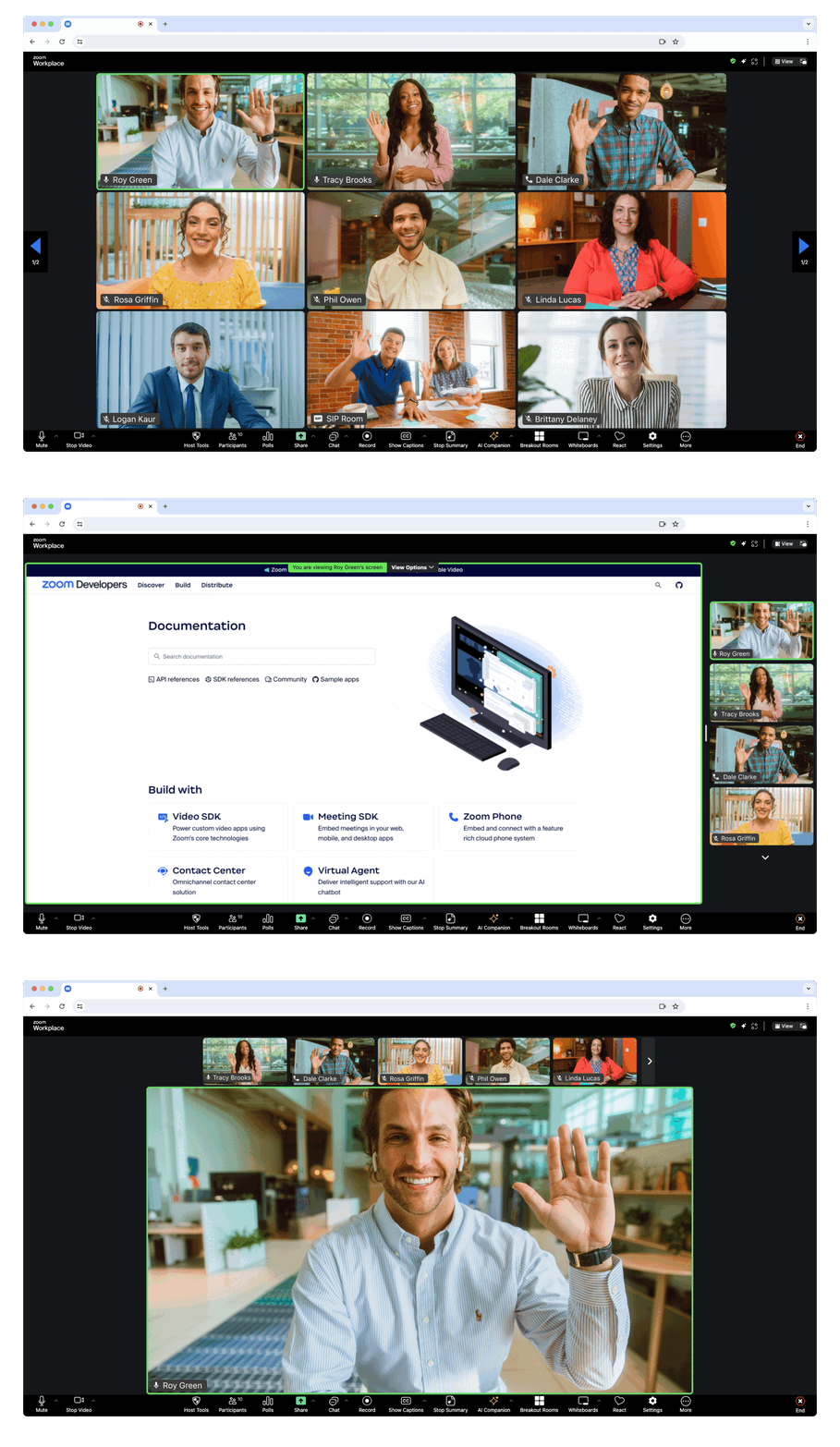
### Client View

**Full-page meeting experience** - Displays the Meeting SDK as a complete interface, providing the same experience as the [Zoom Web Client](https://support.zoom.us/hc/en-us/articles/214629443-Zoom-Web-Client) within your web page.
### Component View
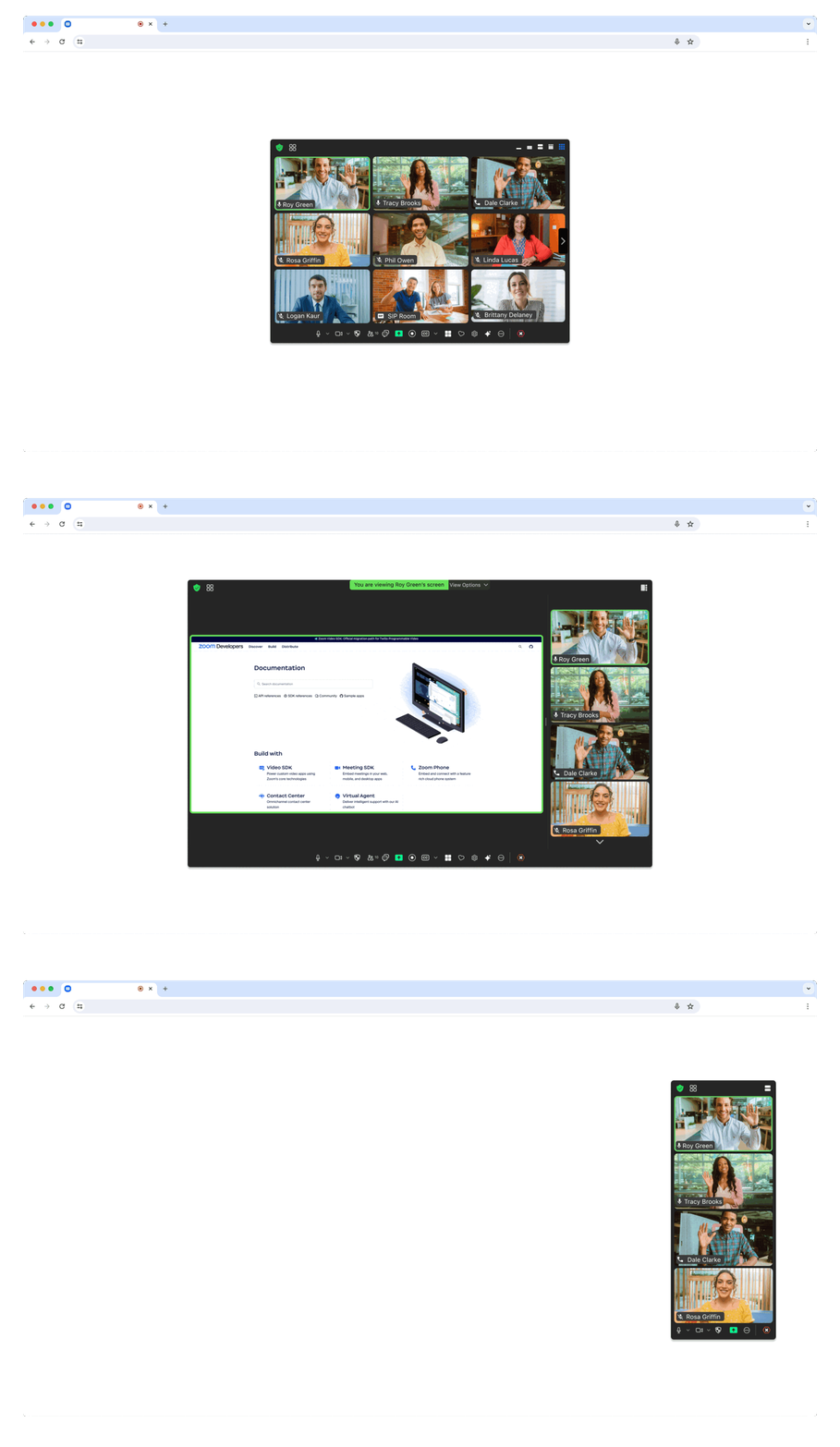
**Flexible component integration** - Embed individual meeting components within your existing page layout for custom designs and user experiences.
## 📚 Additional Resources
- [Meeting SDK Documentation](https://developers.zoom.us/docs/meeting-sdk/web/)
- [Gallery View Requirements](https://developers.zoom.us/docs/meeting-sdk/web/gallery-view/)
- [Authentication Guide](https://developers.zoom.us/docs/meeting-sdk/auth/#generate-a-meeting-sdk-jwt)
## 🏛️ Zoom for Government (ZFG)
For government applications, you need to apply for a new SDK key at [ZFG Marketplace](https://marketplace.zoomgov.com/).
### Option 1: Use ZFG-specific SDK version
```json
{
"dependencies": {
"@zoom/meetingsdk": "3.11.2-zfg"
}
}
```
### Option 2: Configure ZFG endpoints
**Client View:**
```javascript
ZoomMtg.setZoomJSLib("https://source.zoomgov.com/{VERSION}/lib", "/av");
ZoomMtg.init({
webEndpoint: "www.zoomgov.com",
});
```
**Component View:**
```javascript
const client = ZoomMtgEmbedded.createClient();
client.init({
assetPath: 'https://source.zoomgov.com/{VERSION}/lib/av',
webEndpoint: "www.zoomgov.com"
});
```
## 💬 Need Help?
- [Developer Support](https://developers.zoom.us/support/) - Technical support
- [Developer Forum](https://devforum.zoom.us) - Community discussions
- [Premier Developer Support](https://www.zoom.com/en/support-plans/developer/) - Priority support plans