https://github.com/zoom/webhook-sample
Receive Zoom webhooks.
https://github.com/zoom/webhook-sample
sample-app
Last synced: 12 months ago
JSON representation
Receive Zoom webhooks.
- Host: GitHub
- URL: https://github.com/zoom/webhook-sample
- Owner: zoom
- License: other
- Created: 2021-11-02T19:00:24.000Z (over 4 years ago)
- Default Branch: master
- Last Pushed: 2024-12-10T17:33:58.000Z (over 1 year ago)
- Last Synced: 2025-04-06T13:45:30.421Z (about 1 year ago)
- Topics: sample-app
- Language: JavaScript
- Homepage:
- Size: 37.1 KB
- Stars: 25
- Watchers: 9
- Forks: 25
- Open Issues: 1
-
Metadata Files:
- Readme: README.md
- Contributing: CONTRIBUTING.md
- License: LICENSE.md
Awesome Lists containing this project
README
# Zoom Webhook sample
Use of this sample app is subject to our [Terms of Use](https://explore.zoom.us/en/legal/zoom-api-license-and-tou/).
---
**NOTE:** This Sample App has been updated to use the [Webhook Secret Token](https://developers.zoom.us/docs/api/rest/webhook-reference/#verify-webhook-events) instead of the [Webhook Verification Token](https://developers.zoom.us/docs/api/rest/webhook-reference/#verify-webhook-events) to validate requests are sent from Zoom.
---
This is a Node.js / Express server that receives [Zoom Platform Webhooks](https://developers.zoom.us/docs/api/rest/webhook-reference/#enable-webhooks) and [Zoom Video SDK Webhooks](https://developers.zoom.us/docs/api/rest/webhook-reference/#enable-webhooks).
If you would like to skip these steps and just deploy the finished code to a managed service, click the Deploy to Railway/Render/Heroku button. (You will still need to configure a few simple things, so skip to [Deployment](#deployment).)
| Railway | Render | Heroku |
|:-:|:-:|:-:|
| [](https://railway.app/template/ERSEbO?referralCode=HTPdHX) | [](https://render.com/deploy?repo=https://github.com/zoom/webhook-sample) | [](https://heroku.com/deploy?template=https://github.com/zoom/webhook-sample) |
## Installation
In terminal, run the following command to clone the repo:
`$ git clone https://github.com/zoom/webhook-sample.git`
## Setup
1. In terminal, cd into the cloned repo:
`$ cd webhook-sample`
1. Then install the dependencies:
`$ npm install`
1. Create an environment file to store your Webhook Secret Token:
`$ touch .env`
1. Add the following code to the .env file, and insert your [Zoom Webhook Secret Token](https://developers.zoom.us/docs/api/rest/webhook-reference/#verify-webhook-events):
```
ZOOM_WEBHOOK_SECRET_TOKEN=ZOOM_WEBHOOK_SECRET_TOKEN_HERE
```
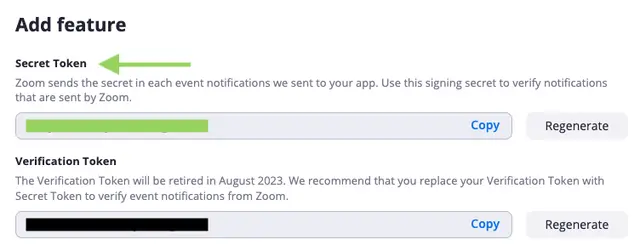
> The Webhook Secret Token allows you to [verify webhook requests come from Zoom](https://developers.zoom.us/docs/api/rest/webhook-reference/#verify-webhook-events) and for Zoom to [validate that you control your webhook endpoint](https://developers.zoom.us/docs/api/rest/webhook-reference/#validate-your-webhook-endpoint).
1. Save and close .env.
1. Start the server:
`$ npm run start`
1. We need to expose the local server to the internet to accept post requests, we will use [Ngrok](https://ngrok.com) (free) for this.
Once installed, open a new terminal tab and run:
`$ ngrok http 4000`
> NOTE: [I've put ngrok in my PATH so I can call it globally.](https://stackoverflow.com/a/36759493/6592510)
1. Copy the ngrok https url and paste it in the Bot endpoint URL input on your Zoom App's Features section. Remember to include `/webhook` path.
Example: `https://abc123.ngrok.io/webhook`
1. Click "Validate".
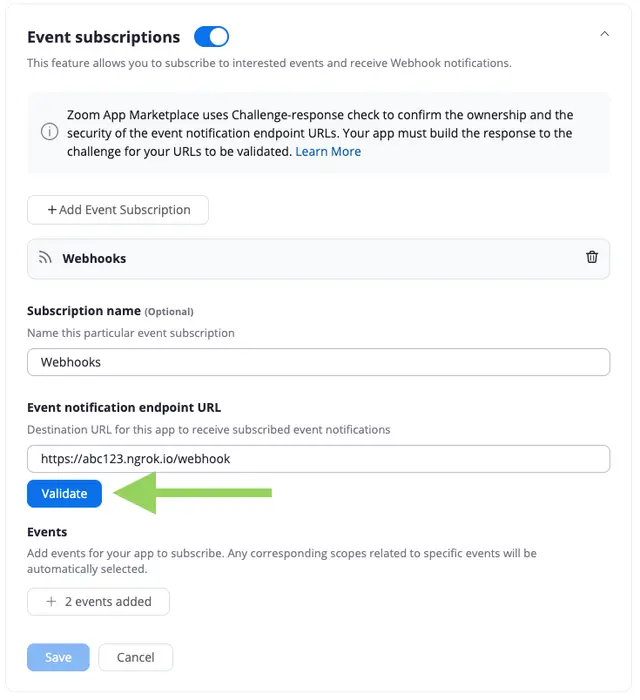
1. Choose the events you'd like to subscribe to.
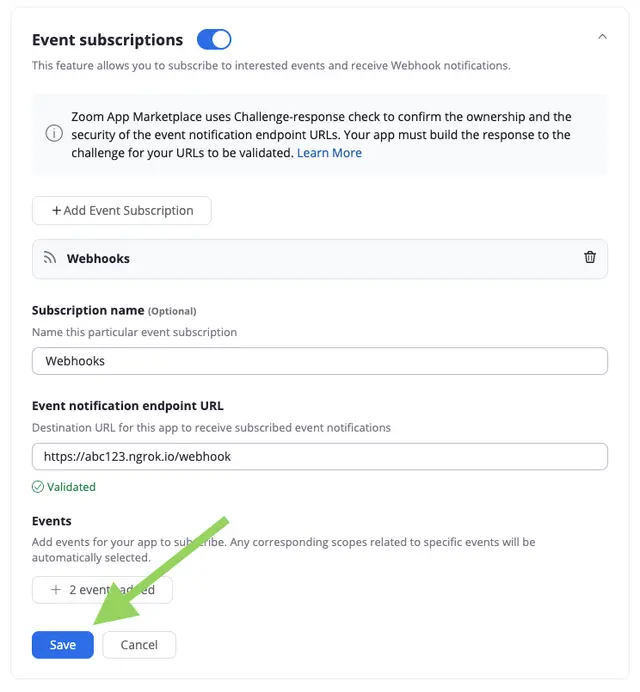
1. Click "Save".
## Usage
1. Trigger the respective Webhook.
For example, if you chose the [Start Meeting Webhook](https://developers.zoom.us/docs/api/rest/reference/zoom-api/events/#operation/meeting.started), start a Zoom Meeting. You will see the Webhook headers and payload logged in terminal.
```json
{
"host": "abc123.ngrok.io",
"user-agent": "Zoom Marketplace/1.0a",
"content-length": "335",
"authorization": "{LEGACY_WEBHOOK_VERIFICATION_TOKEN}",
"clientid": "{CLIENT_ID}",
"content-type": "application/json; charset=utf-8",
"x-forwarded-for": "{X_FORWARDED_FOR}",
"x-forwarded-proto": "https",
"x-zm-request-timestamp": "X_ZM_REQUEST_TIMESTAMP",
"x-zm-signature": "v0={HASHED_WEBHOOK_SECRET_TOKEN}",
"x-zm-trackingid": "{X_ZM_TRACKINGID}",
"accept-encoding": "gzip"
}
```
```json
{
"event": "meeting.started",
"payload": {
"account_id": "{ACCOUNT_ID}",
"object": {
"duration": 0,
"start_time": "2021-11-02T20:43:19Z",
"timezone": "America/Denver",
"topic": "{TOPIC}",
"id": "{MEETING_ID}",
"type": 4,
"uuid": "{MEETING_UUID}",
"host_id": "{HOST_ID}"
}
},
"event_ts": 1635885799302
}
```
## Deployment
### Deploy to a Managed Service
1. After clicking the "Deploy to " button, enter a name for your app (or leave it blank to have a name generated for you), and insert your [Zoom Webhook Secret Token](https://developers.zoom.us/docs/api/rest/webhook-reference/#verify-webhook-events):
- `ZOOM_WEBHOOK_SECRET_TOKEN` (Your Zoom Webhook Secret Token, found on your App's Features page)
1. Then click "Deploy App".
1. Copy the url and paste it in the Event notification endpoint URL input on your Zoom App's Features section. Remember to include `/webhook` path.
Example: `https://abc123.provider.com/webhook`
### Other Server Hosting
1. For Other Server Hosting information, see [this tutorial](https://developer.mozilla.org/en-US/docs/Learn/Server-side/Express_Nodejs/deployment#choosing_a_hosting_provider).
1. Copy the deployed url and paste it in the Event notification endpoint URL input on your Zoom App's Features section. Remember to include `/webhook` path.
Example: `https://abc123.compute-1.amazonaws.com/webhook`
Now you are ready to [receive Zoom webhooks](#usage).
## Need help?
If you're looking for help, try [Developer Support](https://devsupport.zoom.us) or our [Developer Forum](https://devforum.zoom.us). Priority support is also available with [Premier Developer Support](https://explore.zoom.us/docs/en-us/developer-support-plans.html) plans.