https://github.com/zrafa/fatfingershell
FatFingerShell is a terminal emulator for Openmoko, and other Linux phones/tablets. It provides a complete fullscreen keyboard on screen, and sound/screen/vibrator feedback.
https://github.com/zrafa/fatfingershell
Last synced: about 1 year ago
JSON representation
FatFingerShell is a terminal emulator for Openmoko, and other Linux phones/tablets. It provides a complete fullscreen keyboard on screen, and sound/screen/vibrator feedback.
- Host: GitHub
- URL: https://github.com/zrafa/fatfingershell
- Owner: zrafa
- License: gpl-2.0
- Created: 2012-03-26T14:44:21.000Z (about 14 years ago)
- Default Branch: master
- Last Pushed: 2021-11-04T17:44:48.000Z (over 4 years ago)
- Last Synced: 2023-03-23T02:05:36.535Z (about 3 years ago)
- Language: C
- Homepage: http://fz.hobby-site.org/om/fatfingershell/
- Size: 1.07 MB
- Stars: 1
- Watchers: 1
- Forks: 0
- Open Issues: 0
-
Metadata Files:
- Readme: README
- License: COPYING
Awesome Lists containing this project
README
FatFingerShell virtual terminal
===============================
FatFingerShell is a terminal emulator for tablets, phones and
other Linux devices with just touchscreen.
2009-2012 - Rafael Ignacio Zurita
FatFingerShell is free software; you can redistribute it and/or modify
it under the terms of the GNU General Public License as published by
the Free Software Foundation; either version 2 of the License, or
(at your option) any later version.
Check how it looks at :
[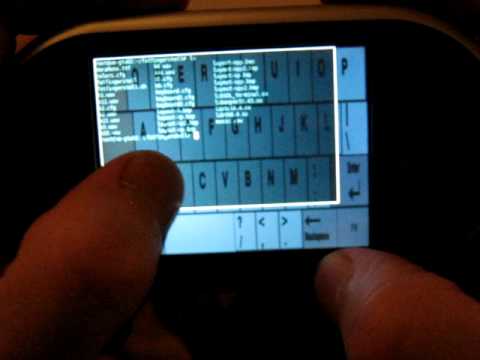](https://www.youtube.com/watch?v=9qR4FETGzkA)
Features
--------
Features include :
- full on screen keyboard
- big keys
- sound, screen and vibration feedback
- color settings for layers
- configuration files for keyboard layouts
- scroll
- most used shell/vi keys are on the first layout
It is possible to set colors and transparency, set new keyboard layouts
(hard yet) and replace the sounds.
The fullscreen keyboard aims to be useful for bash, vi and common console
tools, like top, mocp, mplayer, mc, GNU tools, etc. The idea is to be
comfortable for fat fingers on devices without a real keyboard.
Also, having easy-to-use scripts for calling or sms, would do fatfingershell
useful for all the phone functions device provides.
How to install and test
=======================
Building from sources
---------------------
cd src/
make
Install on PC
-------------
copy fatfingershell binary to /usr/bin/ or your prefered bin directory.
copy fonts/* share/
copy share/ directory whereever you want
Run fatfingershell with :
fatfingershell -d share/ -e /bin/bash
Install on Openmoko Freerunner
------------------------------
opkg install http://fz.hobby-site.org/om/fatfingershell/fatfingershell_0.2_armv4t.ipk
Just tap in the fatfingershell icon. Or run /usr/bin/fatfingershell.sh
For exit, just exit the shell (whit the shell command "exit" or CTRL+D for example).
Fn key changes the keyboard layout.
CTRL+, and CTRL+. to do scroll up/down.
Running on console of Freerunner
--------------------------------
cd /var/gamerunner/usr/share/fatfingershell
export SDL_VIDEODRIVER=fbcon
export SDL_VIDEO_FBCON_ROTATION=CCW
/var/gamerunner/usr/bin/fatfingershell -e /bin/bash
Running on X
------------
Sound and Vibration
-------------------
To disable vibration, modify /usr/bin/fatfingershell.sh and remove the -v argument.
If you want sound, modify /usr/bin/fatfingershell.sh and add the -s argument.
If you have problems with sound, try to kill other applications
using the sound device (check with lsof -n | egrep "dsp|snd").
Maybe you need to load the oss emulation module as well. You can do that with:
modprobe snd_pcm_oss ; modprobe snd_mixer_oss
Some Tips, or if there are problems
-----------------------------------
In some distributions, ncurses apps do not look well (top, mc, mocp)
with fatfingershell. You need to set TERM=vt100. From fatfingershell you can
run :
export TERM=vt100
or add "export TERM=vt100" into ~/.bashrc, or in your specific shell rc file.
You also would like to set utf8 as locale (if you see ugly frames,
or weird locations for labels in ncurses apps). Check LC_ALL. Maybe you need
to run :
export LC_ALL=utf-8
If you are a really good geek, you would like install bash as well, and then,
set -o vi :-)
If you want to test other configured colors :
- replace colors.cfg with colors.cfg.example2
- edit fatfingershell.sh : replace the "./fatfingershell -e bash" with
./fatfingershell -d -e bash
or just edit colors.cfg and set your prefered colors.
Configuration
=============
This fat finger shell has several configuration files.
keyboard.cfg and keyboard2.cfg
------------------------------
These files are very similar, and both of them set
the location on screen of every key.
The format is:
x1 y1 x2 y2 key capital-key sound-number
The idea is this:
x1, y1, x2 and y2 are the two coordinates of the key, so if you want
to modify the layout you can use gimp to modify the bitmap and then
you need to modify these keyboard.cfg and keyboard1.cfg configuration
files.
key and capital-key are the symbols for the pressed key. These symbols are
sent to shell. For example "e E". capital-key is the SHIF+key or CAPS-LOCK+key.
sound-number is a sound for the key pressed/released. There are four
sounds. If you check the original configuration files the sounds are
differents for neighbor keys. so you can recognize if you press the proper
key or not. Of course, you need to listen for a while the different sounds
for every key.
colors.cfg
----------
This configuration file set the colors for the middle layer and uppermost
layer (font).
The file has two lines. Each line has four values (integer 0-255). Format:
red-value green-value blue-value tranparency
red-value green-value blue-value tranparency
The first line is for the middle layer. The second line is for the uppermost
layer (font).
Examples:
0 0 0 100
26 160 26 255
(green font, dark gray middle layer. Nice contrast with default background
keyboard layout.)
228 223 145 200
0 0 0 255
(black font, beige middle layer. Nice contrast with black&white background
keyboard layout.)
Keyboard layout
---------------
There are two background keyboard layouts to choose. The layouts are identical
but the default uses gray&black colors and the second one black&white.
If you want to use black&white use the "-d" command line argument for the binary.
TODO (and bugs to fix)
======================
- Arrow keys
- Avoid "export TERM=vt100"
- Add an option to choose the terminal size (80x24, 90x30, etc)
- Write tiny and cool scripts to do, from shell, calls/sms, etc.
Source Code
===========
https://github.com/zrafa/fatfingershell
Notes
=====
This software uses the source code of :
- xvt
- SDL_terminal
And the next libraries :
- SDL
- SDL_Mixer
- SDL_ttf
- SDL_image
- util
The original libSDL_terminal was modified. Commented the "ttfwasinit()" call
because it gives an exception float when running.
Modificado