https://github.com/zth/rescript-edgedb
Use EdgeDB fully type safe in ReScript. Embed EdgeQL right in your ReScript source code.
https://github.com/zth/rescript-edgedb
Last synced: 9 months ago
JSON representation
Use EdgeDB fully type safe in ReScript. Embed EdgeQL right in your ReScript source code.
- Host: GitHub
- URL: https://github.com/zth/rescript-edgedb
- Owner: zth
- Created: 2023-09-26T19:40:17.000Z (almost 3 years ago)
- Default Branch: main
- Last Pushed: 2024-08-22T21:49:26.000Z (almost 2 years ago)
- Last Synced: 2025-03-11T03:50:12.870Z (over 1 year ago)
- Language: ReScript
- Size: 193 KB
- Stars: 44
- Watchers: 2
- Forks: 1
- Open Issues: 3
-
Metadata Files:
- Readme: README.md
- Changelog: CHANGELOG.md
Awesome Lists containing this project
README
# rescript-edgedb
Use EdgeDB fully type safe in ReScript. Embed EdgeQL right in your ReScript source code.
## Getting started
> There's a dedicated VSCode extension for `rescript-edgedb` that will give you a few goodies like in-editor errors for your ReScript EdgeQL queries. Install from here: https://marketplace.visualstudio.com/items?itemName=GabrielNordeborn.vscode-rescript-edgedb. Read more about [its capabilities here](#vscode-extension).
```bash
npm i rescript-edgedb rescript-embed-lang
```
Also make sure you have `@rescript/core >= 1.3.0`. It's required from `rescript-edgedb >=0.8.0`.
Setup your `bsconfig.json`/`rescript.json`:
```json
"bs-dependencies": ["@rescript/core", "rescript-edgedb"]
"ppx-flags": ["rescript-embed-lang/ppx"]
```
The `rescript-edgedb` watcher needs to run for your EdgeQL to be compiled. Set up scripts in your `package.json` to do that:
```json
"scripts": {
"build:edgedb": "rescript-edgedb generate --output ./src/__generated__ --src ./src",
"watch:edgedb": "npm run build:edgedb -- --watch"
}
```
> The CLI will walk upwards looking for `edgedb.toml` in order to find how to connect to your database. So, you don't need to give the CLI any details on how to connect your database (although you can if you want).
- `--src` should point to the root directory where you have ReScript files that contain `%edgeql` tags you want compiled. This directory will be searched (and watched) recursively.
- `--output` should point to the directory where you want all _generated_ files to end up. This needs to be a directory that's part of your ReScript project, so the ReScript compiler can pick them up.
### Writing queries
Finally, after starting `npm run watch:edgedb` and ensuring the console output looks fine, we can write our first EdgeQL query:
```rescript
// Movies.res
let findMovies = %edgeql(`
# @name findMovies
select Movie {
title,
status,
actors: {
name,
age
}
} filter
.title = $movieTitle`)
```
Executing the query is done by passing it the `client`, and arguments if it takes any.
```rescript
let findMovies = %edgeql(`
# @name findMovies
select Movie {
title,
status,
actors: {
name,
age
}
} filter
.title = $movieTitle`)
// array
let movies = await client->findMovies({
movieTitle: title,
})
```
There's just one thing to notice in relation to regular EdgeQL - we require you to put a comment at the top of your query with a `@name` annotation, naming the query. This is because we need to be able to discern which query is which in the current ReScript file, since you can put as many queries as you want in the same ReScript file.
### `let` binding or `module`
EdgeQL can be written both as a `let` binding like above, or as a `module` binding:
```rescript
// Movies.res
let findMovies = %edgeql(`
# @name findMovies
select Movie {
title,
status,
actors: {
name,
age
}
} filter
.title = $movieTitle
`)
let movies = await client->findMovies({
movieTitle: "Jalla Jalla",
})
module DeleteMovie = %edgeql(`
# @name deleteMovie
delete Movie filter
.title = $movieTitle
`)
let _maybeDeletedMovie = await client->DeleteMovie.query({
title: "Jalla Jalla"
})
```
The _only_ difference between these two is that the `let` binding gives you access to the generated `query` (which you use to execute the query) directly, whereas the `module` binding gives you access to the _entire_ generated module for the EdgeQL you write. This includes `query` (like with the `let` binding), the generated types for all of the query contents (args and response), and an extra `transaction` function that you can use in transactions. More about transactions below.
`let` binding style EdgeQL is the thing you'll use most of all - it's to the point, and can be defined anywhere. `module` bindings need to be at the top level. But, sometimes you need it.
> We might consider adding a "transaction mode" to the `let` binding as well in the future. Defining the queries inline is very powerful, and forcing you to define things at the top level because of `module` isn't the best DX at all times.
### Using transactions
There's a `transaction` function emitted for each EdgeQL query. You can use that to do your operation in a transaction:
```rescript
let client = EdgeDB.Client.make()
// Remember to define your EdgeQL using a module, so you get easy access to all generated functions.
module InsertMovie = %edgeql(`
# @name insertMovie
insert Movie {
title := $title,
status := $status
}`)
await client->EdgeDB.Client.transaction(async tx => {
await tx->InsertMovie.transaction({
title: "Jalla Jalla",
status: #Published
})
})
```
### Cardinality
> Cardinality = how many results are returned from your query.
EdgeDB and `rescript-edgedb` automatically manages the cardinality of each query for you. That means that you can always trust the return types of your query. For example, adding `limit 1` to the `findMovies` query above would make the return types `option` instead of `array`.
Similarily, you can design the query so that it expects there to always be exactly 1 response, and error if that's not the case. In that case, the return type would be `result`.
Here's a complete list of the responses your EdgeQL queries can produce:
- `void` - Nothing. No results are returned at all.
- `array` - Many. A list of all results.
- `option` - Maybe one.
- `result` Exactly one. Or an error.
## The CLI
You can get a full list of supported CLI commands by running `npx rescript-edgedb --help`. More documentation on the exact parameters available is coming.
## So, how does it work?
`rescript-edgedb` consists of 2 parts:
1. A code generator that generates ReScript from your EdgeQL.
2. A PPX transform that swaps your `%edgeql` tag to its corresponding generated code, via [`rescript-embed-lang`](https://github.com/zth/rescript-embed-lang).
Take this query as an example:
```rescript
// Movies.res
let findMovies = %edgeql(`
# @name findMovies
select Movie {
title,
status,
actors: {
name,
age
}
} filter
.title = $movieTitle`)
```
The `rescript-edgedb` tooling finds this `%edgeql` tag, and generates a file called `Movies__edgeql.res` from it, using code generation leveraging the official EdgeDB type generation tooling. That file will contain generated code and types for the `findMovies` query:
```rescript
// @sourceHash 18807b4839373ee493a3aaab68766f53
// @generated This file is generated automatically by rescript-edgedb, do not edit manually
module FindMoviesQuery = {
let queryText = `select Movie {
title,
status,
actors: {
name,
age
}
} filter
.title = $movieTitle`
type args = {
movieTitle: string,
}
type response_actors = {
name: string,
age: Null.t,
}
type response = {
title: string,
status: [#Published | #Unpublished],
actors: array,
}
let query = (client: EdgeDB.Client.t, args: args): promise> => {
client->EdgeDB.QueryHelpers.many(queryText, ~args)
}
let transaction = (transaction: EdgeDB.Transaction.t, args: args): promise> => {
transaction->EdgeDB.TransactionHelpers.many(queryText, ~args)
}
}
```
Thanks to `rescript-embed-lang`, you don't have to think about that generated file at all. It's automatically managed for you.
## VSCode extension
`rescript-edgedb` comes with a dedicated [VSCode extension](https://marketplace.visualstudio.com/items?itemName=GabrielNordeborn.vscode-rescript-edgedb) designed to enhance the experience of using ReScript and EdgeDB together. Below is a list of how you use it, and what it can do.
> NOTE: Make sure you install the [official EdgeDB extension](https://marketplace.visualstudio.com/items?itemName=magicstack.edgedb) as well, so you get syntax highlighting and more.
### Snippets
Snippets for easily adding new `%edgeql` blocks are included:
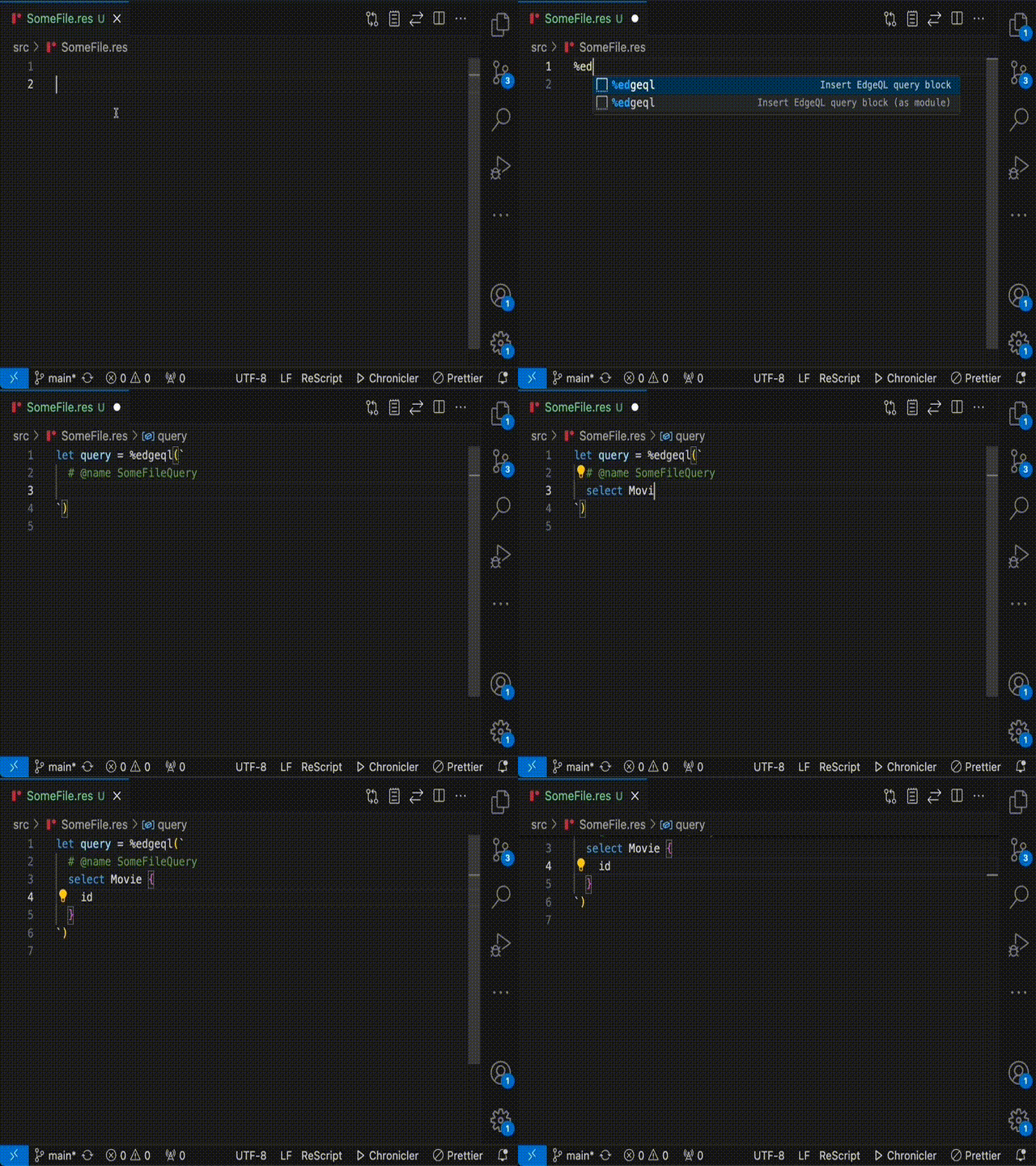
These appear as soon as you start writing `%edgeql` in a ReScript file.
### In editor error messages
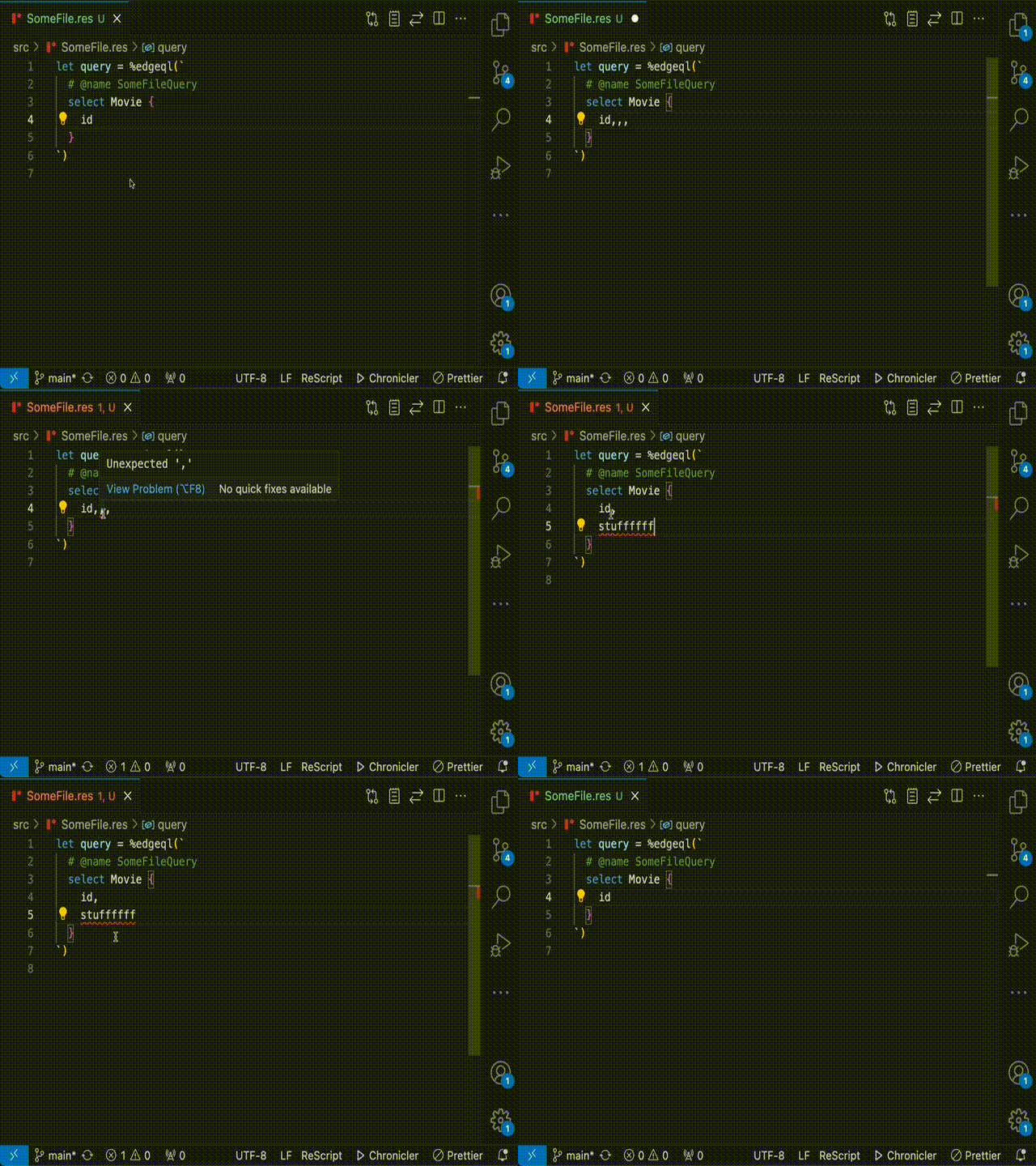
Any errors for your EdgeQL queries will show directly in your ReScript files that define them:
### Easily edit queries in the dedicated EdgeDB UI
You can easily open the local EdgeDB UI, edit your query in there (including running it, etc), and then insert the modified query back:
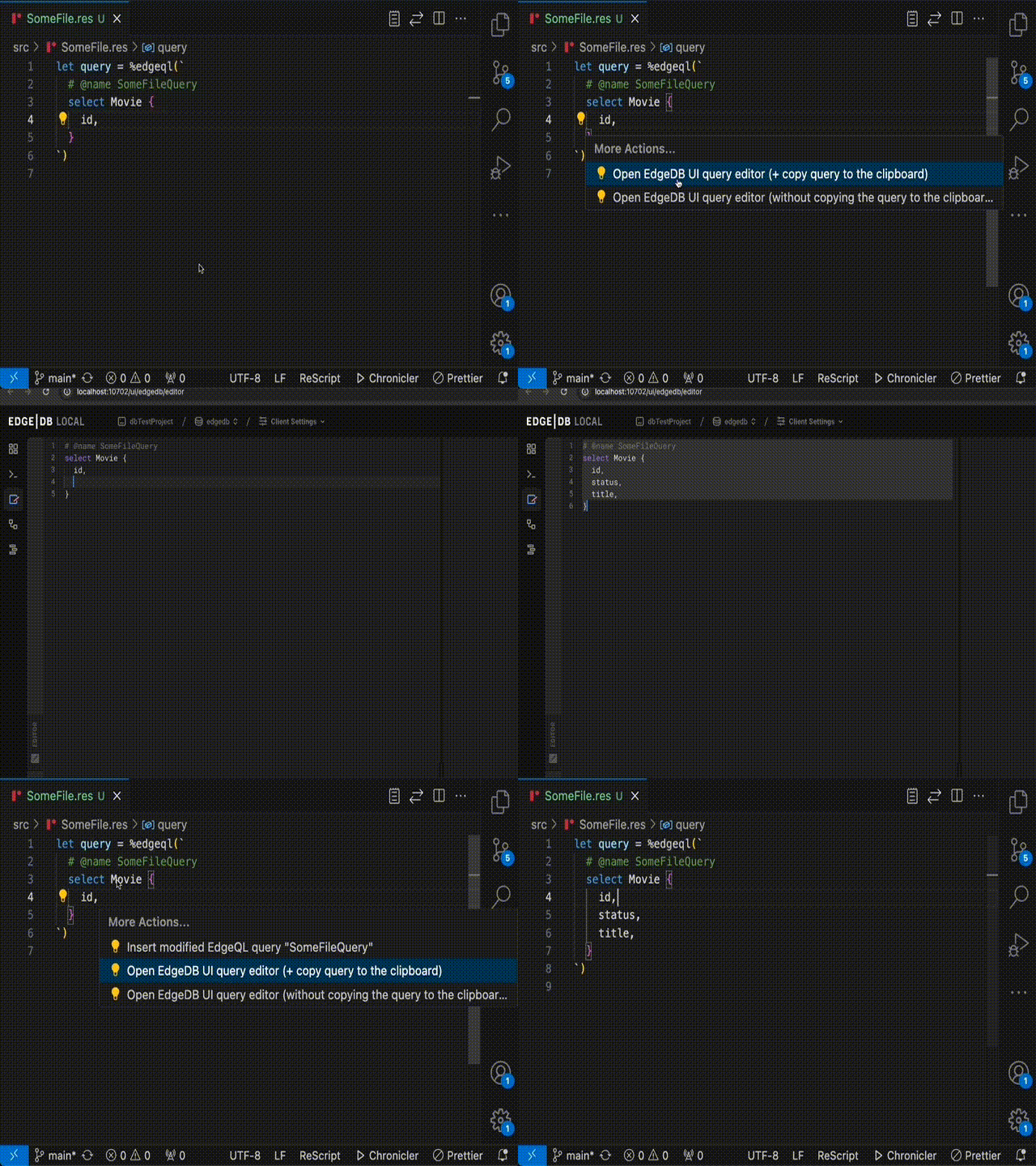
It works like this:
1. Put the cursor in the query you want to edit.
2. Activate code actions.
3. Select the code action for opening the EdgeDB UI and copying the query.
4. The local EdgeDB query editor UI will now open in your browser, and the EdgeQL query you had your cursor in will be copied to your clipboard.
5. Paste the query into the query editor and make the edits you want.
6. Copy the entire query text and go back to VSCode and the file which has your query.
7. Activate code actions again and select the code action for inserting your modified query.
8. Done!
## FAQ
**Should I check the generated files into source control?**
Yes, you should. This ensures building the project doesn't _have_ to rely on a running EdgeDB instance (which the code generation tooling requires).
## Contributing
`rescript-edgedb` leverages Bun for local development, including running tests.