https://github.com/zuixjs/zuix-web-flix
Netflix app clone as a progressive web app template
https://github.com/zuixjs/zuix-web-flix
html in-browser-bundler mobile-app progressive-web-app responsive-design web-template zuix
Last synced: 4 months ago
JSON representation
Netflix app clone as a progressive web app template
- Host: GitHub
- URL: https://github.com/zuixjs/zuix-web-flix
- Owner: zuixjs
- License: mit
- Created: 2018-08-19T01:47:46.000Z (almost 8 years ago)
- Default Branch: master
- Last Pushed: 2022-03-16T08:06:33.000Z (over 4 years ago)
- Last Synced: 2024-05-01T06:45:17.152Z (about 2 years ago)
- Topics: html, in-browser-bundler, mobile-app, progressive-web-app, responsive-design, web-template, zuix
- Language: JavaScript
- Homepage: https://zuixjs.github.io/zuix-web-flix/
- Size: 863 KB
- Stars: 141
- Watchers: 12
- Forks: 41
- Open Issues: 0
-
Metadata Files:
- Readme: README.md
- License: LICENSE
Awesome Lists containing this project
README
# zuix-web-flix
A Progressive Web App template inspired by Netflix mobile app.
This template is built with just HTML, JavaScript and CSS so that it can be eventually integrated with your favourite development environment and build tools.
## Features
- Design inspired to Netflix mobile app
- Modular and component-based structure using zUIx.js
- In-browser bundler: can pack all resources in a single file and boost-up loading speed
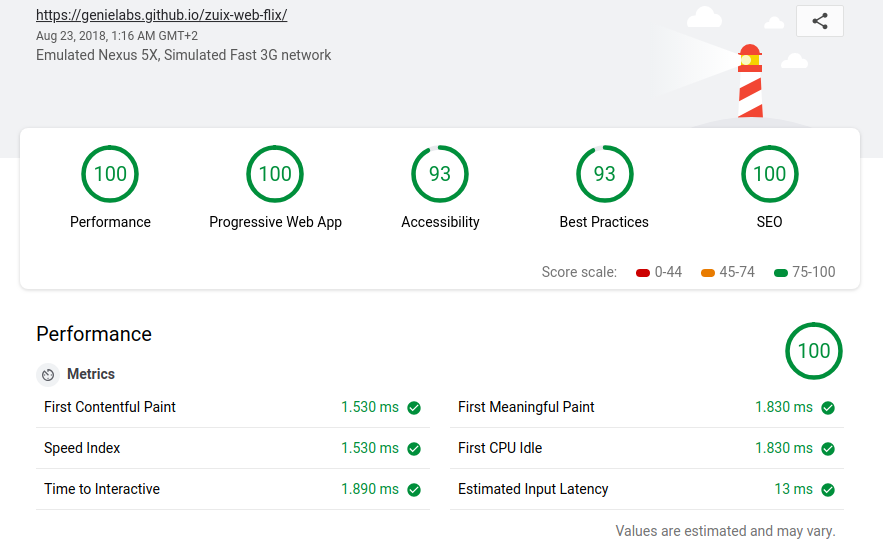
- PWA LightHouse score 100/100 (!)
### Demo Website
https://zuixjs.github.io/zuix-web-flix
# How to use this template
The **./source** folder contains the *development* version of the website, while the **./docs** folder the *production* bundled version.
## Basic usage
If you have *Node.js* installed, for a quick setup you can use the integrated web server which will serve files from the *./source* folder.
Install the development dependencies with `npm install` and then start the web server:
```
npm start
```
If you don't want to use the integrated web server, you can setup any other web server by creating a new host with the root path pointing to the *./source* folder.
## Site structure in brief
The main file is the `index.html`. This file includes some layout bits that are located in the `layout/` folder and the main application pages that are located in the `pages/` folder.
```
./source/
layout/
footer.css
footer.html
header.css
header.html
pages/
about.css
about.html
home.css
home.html
home.js
home/ (folder with other files referenced in home.html/js)
notifications.css
notifications.html
search.css
search.html
shared/
(not used yet)
```
A simple page is defined by the `.css` and `.html` files. A page might also require some bits of *JavaScript* in which case also a `.js` file with the same base name is present.
A complete example is the `pages/home` page which has a `.js` file (*controller*) and also loads some *local* bits that are placed in the `pages/home/` folder.
The `shared/` folder contains indeed bits that are *shared* across the whole application and that are usually referenced by different pages.
As you can see in the `index.html` file those pages and layout bits are loaded using some special tag attributes that are `data-ui-include` (to load simple content pages) and `data-ui-load` to load pages or components that also have a JavaScript controller.
**index.html** (main body)
```html
```
For a deeper insight on using these special attributes for component-based developemnt with **zUIx.js** see related link at the bottom of this page.
### Movie lists
The list of movies shown in the main page are located in the `./pages/home/` folder and consists of a static list of items to which is bound a *controller* that carry the duty of querying the [The Movie Database](https://www.themoviedb.org/) to fetch data and images of each title.
Each *movie item* is defined as follow:
```
```
The `data-ui-load="controllers/movie_db"` attribute will make *zUIx.js* to load the `./controllers/movie_db.js` on the element. This contoller will read the `title` attribute of the element and fetch the movie data using *TheMovieDB API*.
To make this work on your local copy, you must obtain an API key and put the value at the beginning of the `./controllers/movie_db.js` file:
```javascript
// TODO: get your free TMDB API key from https://themoviedb.org
const tmdbKey = '--put--your-tmdb-api-key-here--';
```
You can of course replace the static movie lists with server generated lists that renders the *movie items* as described above.
### Main page
The main page is formed by a cover, which collapses as the page is scrolled, and a *movie details page* which pop-ups when a movie item is tapped.
The main page is available throught the global object `mainPage` and exposes two method: `cover` and `sync`.
The first method is used to set which movie title to show as the main page cover, while the latter is used to synchronize the cover with the page scroll.
You can see how these methods are implemented in the `./pages/home.js` file and how these are used in the main `index.js` file.
The *details page* is available as the global object `detailsPage` and it has two methods: `show` and `hide`.
The first method requires the movie item data as argument. You can see how it is used in the `./controllers/movie_db.js` file to open a movie detail when the preview image is tapped.
### About the @lib prefix
The special *@lib* prefix is used with the `data-ui-include` and `data-ui-load` attribute to load components from a shared location that by default will point to the [zKit](https://zuixjs.github.io/zkit/) components library.
This path is resolved to `https://zuixjs.github.io/zkit/lib/` but can also be customized to point to a different location:
```javascript
zuix.store('config', {
libraryPath: 'https://my.shared.components.io/lib/'
});
```
You can so create your own shared component library to use across all of your websites.
### Further implementation details
If you have more questions about how to use this template do not esitate to [file an issue](https://github.com/zuixjs/zuix-web-flix/issues).
## Service Worker and Offline mode
A service worker is also included with this template. This is a script (`sw.js`) that runs in the background as a seprate thread from the main page and takes care of providing caching of most resources with a fallback mechanism in presence of network errors.
This makes the application to launch even if there's no network connection, like with a real mobile app. It also provide a configurable `404.html` *"not found"* page and `offline.html` page.
When publishing a new version of the application the *version number* found at the top of the `sw.js` file **must be increased** in order to clean the cache and correctly update the application files.
## Debugging
To enable verbose debugging information in the browser console, comment out the last line in the `index.js` file as shown below:
``` javascript
// Turn off debug output
//window.zuixNoConsoleOutput = true;
```
## Bundling
Bundling is the process of collecting all resources used in a page and then compiling them into a single and optimized file.
This will drastically narrow down the number of network requests the browser will make to complete the page loading, thus resulting in a faster startup.
There are actually two way of doing this:
- **In-Browser** bundler:
this method does not require any build tool nor plugins, it just works in the browser as-is.
- **Web-Starter** bundler:
is the [zuix-web-starter](https://github.com/zuixjs/zuix-web-starter) bare template, with a bunch of extra features and enhancements. It requires *Node.js* to be installed.
This template is already configured for **in-browser** bundling.
### In-Browser bundling
When the website is ready for production you can decide to bundle it in order to gain better performances. All of its components and resources will be crunched into a single file and loaded from memory rather than from network/localhost.
#### Step by step guide
Open the development website and generate the application bundle by typing in the **browser console** the command
```javascript
zuix.saveBundle()
```
This will create and save the **app.bundle.js** file to the *Downloads* folder.
Copy all files from the *source* folder to the **production** folder (*./docs*) with the exception of *./components*, *./controllers*, *./pages*, *./layout* and *./index.css*.
These folders contain *zuix* components and pages that are already packed in the *app.bundle.js* file.
Copy *app.bundle.js* to the *production* folder. Edit the `index.html` file in the *production* folder and in the `head` section replace the `js/zuix-bundler.min.js` script import with `app.bundle.js`.
```html
```
You can also remove all `js/zuix*.*` files from the *production* folder but keep the `zuix.min.js` one.
#### Remarks
When using *lazy-loading* only components loaded so far will be included in the bundle (incremental bundling).
To force inclusion of all components/resources used in the page, issue the following commands in the console:
```javascript
// disable lazy-loading
zuix.lazyLoad(false)
// force loading of all components
zuix.componentize()
// create the bundle
zuix.saveBundle()
```
Also external JavaScript libraries and CSS files can be included in the page bundle. In order to achieve this, remove the `` or `` and instead use the method `zuix.using(...)` to load the script/css.
```javascript
// Loading a .css style
const flaCss = 'https://cdnjs.cloudflare.com/ajax/libs/flex-layout-attribute/1.0.3/css/flex-layout-attribute.min.css';
zuix.using('style', flaCss, function(res, styleObject) {
console.log("Added Flex Layout Attributes CSS.", res, styleObject);
});
// Loading a .js script
const momentJs = 'https://momentjs.com/downloads/moment.js';
zuix.using('script', momentJs, function(res, scriptObject){
console.log("Added Moment.js.", res, scriptObject);
});
```
Place the *using* commands preferably at the top of `index.js`. You can remove from the *production* folder all files imported with the *using* command.
# Further reading
- [zUIx.js](https://zuixjs.org)
- [zKit](https://zuixjs.github.io/zkit/)
- [Progressive Web App](https://developers.google.com/web/progressive-web-apps)
- [Service Workers](https://developers.google.com/web/fundamentals/primers/service-workers)