https://github.com/zvec-ai/zvec-studio
visual management tool for zvec
https://github.com/zvec-ai/zvec-studio
fastapi react tauri ui uvicorn zvec
Last synced: about 2 months ago
JSON representation
visual management tool for zvec
- Host: GitHub
- URL: https://github.com/zvec-ai/zvec-studio
- Owner: zvec-ai
- License: apache-2.0
- Created: 2026-05-21T03:19:11.000Z (about 2 months ago)
- Default Branch: main
- Last Pushed: 2026-05-21T08:41:49.000Z (about 2 months ago)
- Last Synced: 2026-05-21T09:57:59.288Z (about 2 months ago)
- Topics: fastapi, react, tauri, ui, uvicorn, zvec
- Language: TypeScript
- Homepage: https://zvec.org/en/
- Size: 1.41 MB
- Stars: 0
- Watchers: 0
- Forks: 0
- Open Issues: 0
-
Metadata Files:
- Readme: README.md
- Changelog: CHANGELOG.md
- Contributing: CONTRIBUTING.md
- License: LICENSE
Awesome Lists containing this project
README
English | 中文

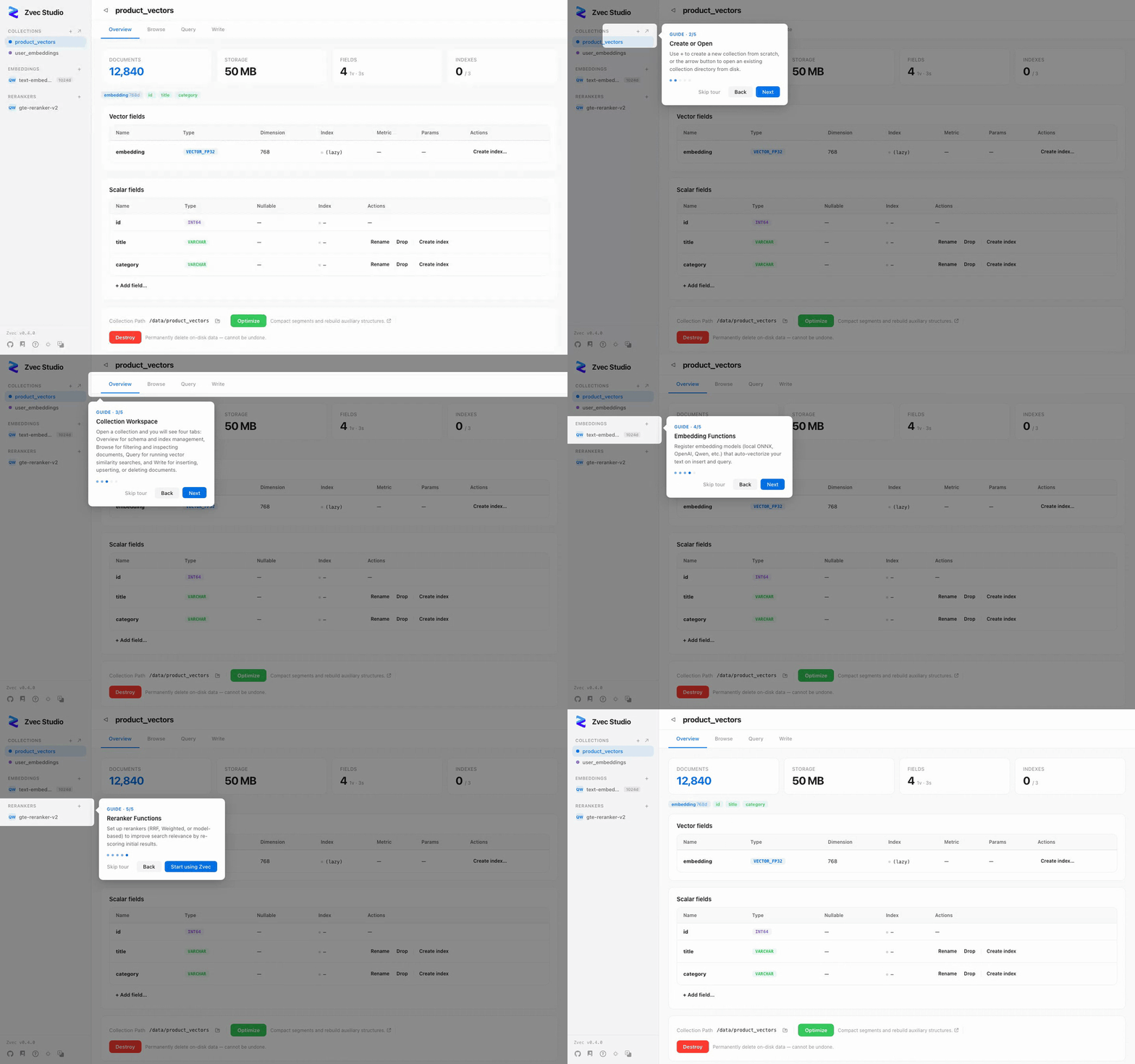
Visual management tool for the Zvec embedded vector database
Browse data, test queries, and manage schemas — without writing code.




---
## 📦 Installation
### Option 1: pip (recommended for developers)
Requires Python 3.10 – 3.14.
```bash
pip install zvec-studio
zvec-studio
```
Opens http://127.0.0.1:7860 in your browser.
> **Need embedding & reranking?** Install with the `[ai]` extra to enable built-in embedding & reranking functions:
>
> ```bash
> pip install zvec-studio[ai]
> ```
### Option 2: Desktop download (experimental)
Grab the installer for your platform from [GitHub Releases](https://github.com/zvec-ai/zvec-studio/releases):
| Platform | Architectures | Installer |
|----------|---------------|-----------|
| macOS | Apple Silicon (arm64) | `.dmg` |
| Linux | x86_64, arm64 | `.deb` / `.AppImage` |
| Windows | x86_64 | `.msi` / `.exe` |
Double-click to run — no Python needed.
### Option 3: From source
```bash
git clone https://github.com/zvec-ai/zvec-studio.git
cd zvec-studio
make install # install Node + Python dependencies
make dev # starts backend + frontend dev servers
```
> **Need embedding & reranking?** `make install` does NOT install AI runtime
> dependencies (`sentence-transformers`, `dashscope`, etc.) to keep CI fast. Run
> `make install.ai` instead if you want to use built-in functions like
> `local-dense`, `bm25`, or `dashscope`.
> Prerequisites: **Node.js ≥ 20**, **pnpm ≥ 9**, **Python ≥ 3.10**, **Rust** (desktop only).
> See [Contributing](https://github.com/zvec-ai/zvec-studio/blob/main/CONTRIBUTING.md) for the full dev setup guide.
## ⚡ Quick Start
1. **Create a collection** — Collections → Create. Define vector and scalar fields.
2. **Insert data** — Paste JSON documents in the Write tab.
3. **Vector search** — Paste a query vector in the Query tab, set TopK, hit Search.
4. **AI search** — Register an embedding model, then search by typing text directly.
Full walkthrough → [Getting Started](https://github.com/zvec-ai/zvec-studio/blob/main/docs/getting-started.md)
## 📖 Documentation
| | |
|---|---|
| [Getting Started](https://github.com/zvec-ai/zvec-studio/blob/main/docs/getting-started.md) | 10-minute walkthrough from install to first search |
| [Architecture](https://github.com/zvec-ai/zvec-studio/blob/main/docs/architecture.md) | Request flow, module map, code index |
| [API Reference](https://github.com/zvec-ai/zvec-studio/blob/main/docs/api.md) | REST endpoints, request/response formats, error codes |
| [Testing](https://github.com/zvec-ai/zvec-studio/blob/main/docs/testing.md) | Test strategy, self-verification loop, performance baselines |
| [Packaging](https://github.com/zvec-ai/zvec-studio/blob/main/docs/PACKAGING.md) | PyInstaller + Tauri cross-platform packaging |
| [Contributing](https://github.com/zvec-ai/zvec-studio/blob/main/CONTRIBUTING.md) | Dev setup, code style, commit workflow |
## 🗺️ Roadmap
| Version | Focus |
|---------|-------|
| **v0.1.x** (current) | Collection CRUD, schema evolution, document ops, vector search, AI extension, i18n, desktop app |
| **v0.2.x** | Data import/export, virtual scrolling, batch operations, advanced search |
| **v0.3.x** | Vector visualization (UMAP/t-SNE), clustering, AI Agent, SDK code generation |
| **v0.4.x** | VS Code extension, API Playground, webhooks & notifications |
## 🤝 Contributing
Contributions welcome! See [CONTRIBUTING.md](https://github.com/zvec-ai/zvec-studio/blob/main/CONTRIBUTING.md) for details.
```bash
make dev # Start dev servers
make verify # Lint + typecheck + tests
```
## 📄 License
[Apache License 2.0](https://github.com/zvec-ai/zvec-studio/blob/main/LICENSE)