https://github.com/zxce3/video-stream-beta
new update on link below
https://github.com/zxce3/video-stream-beta
python telegram telegram-bot youtube youtube-dl
Last synced: about 1 year ago
JSON representation
new update on link below
- Host: GitHub
- URL: https://github.com/zxce3/video-stream-beta
- Owner: Zxce3
- License: gpl-3.0
- Created: 2021-09-10T15:28:49.000Z (almost 5 years ago)
- Default Branch: main
- Last Pushed: 2024-06-08T17:11:04.000Z (about 2 years ago)
- Last Synced: 2025-03-29T12:51:26.158Z (about 1 year ago)
- Topics: python, telegram, telegram-bot, youtube, youtube-dl
- Language: Python
- Homepage: https://git.io/JuLmt
- Size: 1.2 MB
- Stars: 2
- Watchers: 2
- Forks: 12
- Open Issues: 1
-
Metadata Files:
- Readme: README.md
- License: LICENSE
Awesome Lists containing this project
README

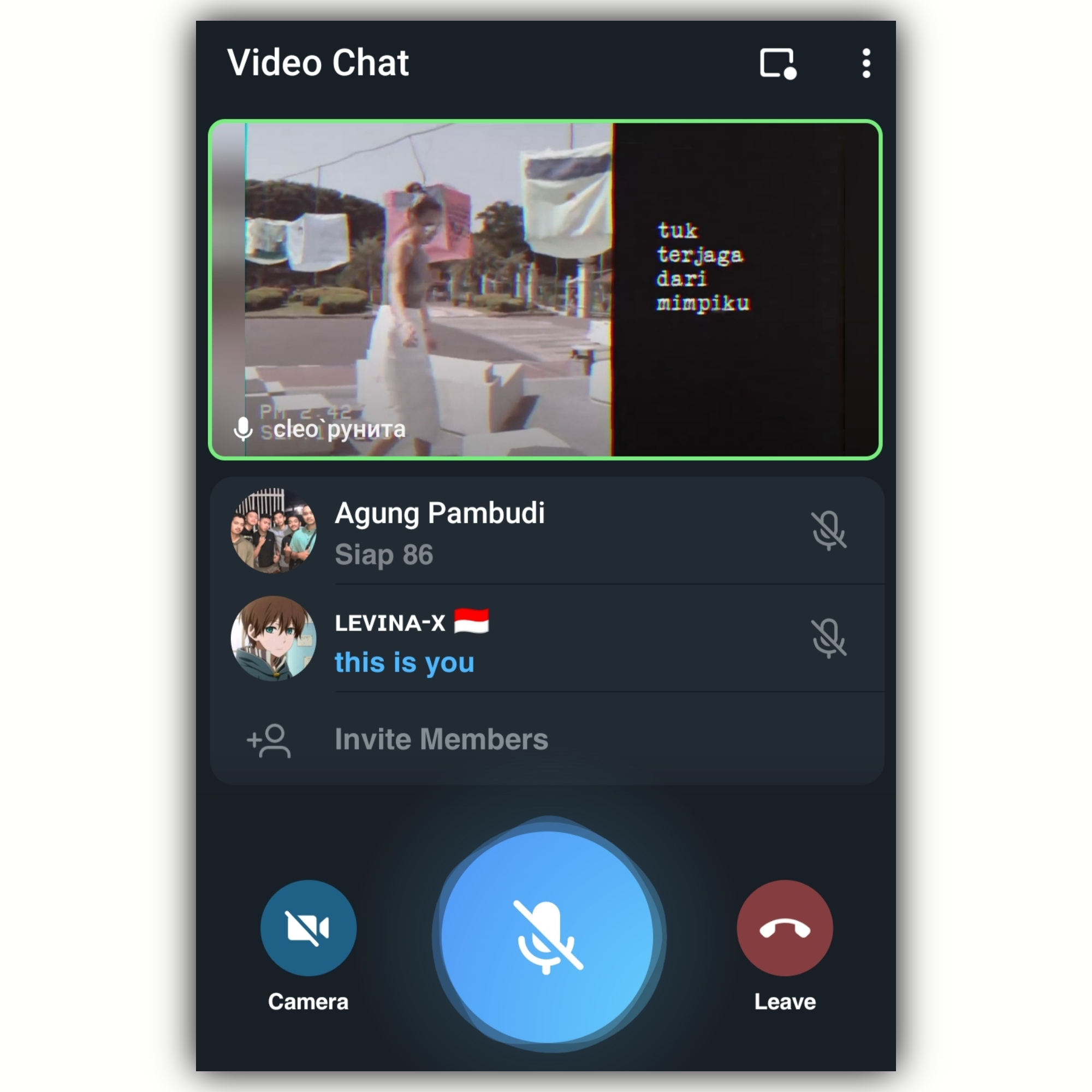
Video Stream is an Advanced Telegram Bot that's allow you to play Video & Music on Telegram Group Video Chat





## 📊 Stats
[](https://www.codefactor.io/repository/github/zxce3/video-stream-beta)
## 🧪 Get `SESSION_NAME` from below:
[](https://replit.com/@levinalab/StringSession#main.py) ``Pyrogram``
## 🎭 Preview
## ✨ More Features
- Music & Video stream support
- MultiChat support
- Playlist & Queue support
- Skip, Pause, Resume, Stop feature
- Music & Video downloader feature
- Inline Search support
- YouTube direct search support
- YouTube/Local/Live/m3u8 stream support
- Inline Search support
- Control With Button support
- Volume Control
- Userbot Auto Join
- Direct Updater
## 🛠 Commands:
| Command | Description |
| ------ | ------ |
| `/play (query)` | play music from youtube |
| `/vplay (query)` | play video from youtube |
| `/vstream (live link)` | play video live streaming video |
| `/pause` | pause the streaming (admin only) |
| `/resume` | resume the streaming (admin only) |
| `/skip` | switch to next stream (admin only) |
| `/stop` | end the streaming (admin only) |
| `/vmute` | for mute the userbot on voice chat |
| `/vunmute` | for unmute the userbot on voice chat |
| `/volume 1/200` | adjust the volume of userbot (userbot must be admin) |
| `/playlist` | show you all the current stream list |
| `/song (query)` | download music from youtube |
| `/video (query)` | download video from youtube |
| `/userbotjoin` | invite the userbot to join group (admin only) |
| `/userbotleave` | instruct userbot to leave the group (admin only) |
| `/leaveall` | order the userbot to leave from all group (sudo only) |
| `/update` | update your bot directly without leaving telegram (sudo only) |
| `/restart` | restart your bot directly without leaving telegram (sudo only) |
| `/clean` | clean all raw files |
| `/rmd` | clean all downloaded files |
## Heroku Deployment 💜
The easy way to host this bot, deploy to Heroku, Change the app country to Europe (it will help to make the bot stable).
[](https://heroku.com/deploy?template=https://github.com/zxce3/video-stream-beta)
## VPS Deployment 📡
Get the best Quality of streaming performance by hosting it on VPS, here's the step's:
```sh
sudo apt update && apt upgrade -y
sudo apt install git curl python3-pip ffmpeg -y
pip3 install -U pip
curl -sL https://deb.nodesource.com/setup_16.x | bash -
sudo apt-get install -y nodejs
npm i -g npm
git clone https://github.com/zxce3/video-stream-beta # clone the repo.
cd video-stream-beta
pip3 install -U -r requirements.txt
cp example.env .env # use vim to edit ENVs
vim .env # fill up the ENVs (Steps: press i to enter in insert mode then edit the file. Press Esc to exit the editing mode then type :wq! and press Enter key to save the file).
python3 main.py # run the bot.
# continue the host with screen or anything else, thanks for reading.
```
# Credits 💖
- [Levina](https://github.com/levina-lab) ``Dev``
- [Zxce3](https://github.com/Zxce3) ``Dev``
- [DoellBarr](https://github.com/DoellBarr) ``Dev``
- [tofikdn](https://github.com/tofikdn) ``Dev``
- [Makoto-XD](https://github.com/Makoto-XD) ``Supporter``
- [Laky's](https://github.com/Laky-64) for [``py-tgcalls``](https://github.com/pytgcalls/pytgcalls)
- [Dan](https://github.com/delivrance) for [``Pyrogram``](https://github.com/pyrogram)
### Support & Updates 🎑

