https://github.com/btc415/ecom_mern
https://github.com/btc415/ecom_mern
Last synced: 12 months ago
JSON representation
- Host: GitHub
- URL: https://github.com/btc415/ecom_mern
- Owner: BTC415
- Created: 2023-10-21T11:54:18.000Z (over 2 years ago)
- Default Branch: master
- Last Pushed: 2024-02-01T09:58:06.000Z (about 2 years ago)
- Last Synced: 2024-11-02T12:52:15.786Z (over 1 year ago)
- Language: TypeScript
- Size: 3.19 MB
- Stars: 9
- Watchers: 1
- Forks: 0
- Open Issues: 0
-
Metadata Files:
- Readme: README.md
Awesome Lists containing this project
README
# Fast Marketplace: eCommerce Platform Project
Fast Marketplace is a case study of a eCommerce platform implemented using Next.js, TypeScript, Tailwind CSS, Redux, NextAuth, Cloud Firestore Database, Webhooks, and Stripe Payments Checkout.
Includes eCommerce features like Shopping Cart, Checkout Payment, and Customer Order History.

## Tech Stack
- Next.js
- React.js
- TypeScript
- Redux
- Tailwind CSS
- NextAuth
- Stripe Checkout
- Webhooks
- Firebase
## Features
- Responsive UI with Tailwind CSS.
- Shopping Cart
- Payment Checkout flow with Stripe
- Customer Order History
- State Management with Redux.
- Data fetching and caching techniques using SSR (Server Side Rendering) with Next.js.
- User Authentication with NextAuth.
- Robust code using TypeScript.
## Screen Captures


## Screenshots


## Installation
First, clone the project and open it with Visual Studio Code:
```bash
git clone https://github.com/BTC415/Ecom_MERN.git
cd Ecom_MERN
code .
```
Then, create a .env.local file in the root of the project and configure the following environment variables:
```
# Authentication
# Need to add Authorized redirect URIs to Google Cloud
# http://localhost:3000/api/auth/callback/google
# https://your.deployment.url.com/api/auth/callback/google
GOOGLE_ID=
GOOGLE_SECRET=
NEXTAUTH_URL=http://localhost:3000
# Firebase
FIREBASE_API_KEY=
FIREBASE_AUTH_DOMAIN=
FIREBASE_PROJECT_ID=
FIREBASE_STORAGE_BUCKET=
FIREBASE_MESSAGING_SENDER_ID=
FIREBASE_APP_ID=
# Firebase Admin SDK
FIREBASE_ADMIN_PROJECT_ID=
FIREBASE_ADMIN_PRIVATE_KEY=
FIREBASE_ADMIN_CLIENT_EMAIL=
# Stripe Payments
# More info: https://stripe.com/docs/payments/accept-a-payment
STRIPE_PUBLIC_KEY=
STRIPE_SECRET_KEY=
# Stripe Terminal/CLI
STRIPE_SIGNING_SECRET=
HOST=http://localhost:3000
```
To send Stripe events to a local webhook install Stripe CLI, login into your Stripe account, and use the --forward-to flag pointing to the webhook endpoint, and create a trigger for successful customer payments :
```bash
brew install stripe/stripe-cli/stripe
stripe login
stripe listen --forward-to localhost:3000/api/webhook
stripe trigger checkout.session.completed
```
Finally, install all the Fast Marketplace dependencies and run the application:
```bash
yarn
yarn dev
```
Now the application is running on http://localhost:3000 🚀
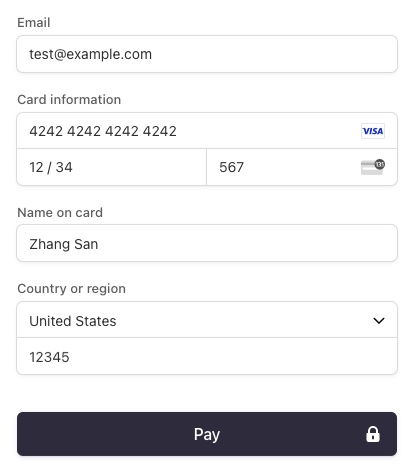
## How to test Stripe Checkout
The current Stripe Checkout implementation simulates payments in test mode.
⛔️ Please, do not use real card details. Use the following test card details:
* Use a card number, such as 4242 4242 4242 4242. Enter the card number in the Dashboard or in any payment form.
* Use a valid future date, such as 12/34.
* Use any three-digit CVC (four digits for American Express cards).
* Use any value you like for other form fields.