https://olib-ai.github.io/mailcue/
All-in-one email testing server - SMTP, IMAP, DKIM, DMARC, SpamAssassin, GPG, REST API & Web UI in a single Docker container
https://olib-ai.github.io/mailcue/
ci-cd developer-tools devtools dkim dmarc docker dovecot email email-server email-testing fastapi imap mail-server postfix react self-hosted smtp spamassassin testing webhook
Last synced: 22 days ago
JSON representation
All-in-one email testing server - SMTP, IMAP, DKIM, DMARC, SpamAssassin, GPG, REST API & Web UI in a single Docker container
- Host: GitHub
- URL: https://olib-ai.github.io/mailcue/
- Owner: Olib-AI
- License: mit
- Created: 2026-02-28T19:39:23.000Z (5 months ago)
- Default Branch: main
- Last Pushed: 2026-06-26T23:53:39.000Z (27 days ago)
- Last Synced: 2026-06-27T01:21:36.259Z (27 days ago)
- Topics: ci-cd, developer-tools, devtools, dkim, dmarc, docker, dovecot, email, email-server, email-testing, fastapi, imap, mail-server, postfix, react, self-hosted, smtp, spamassassin, testing, webhook
- Language: Python
- Homepage: https://olib-ai.github.io/mailcue/
- Size: 2.87 MB
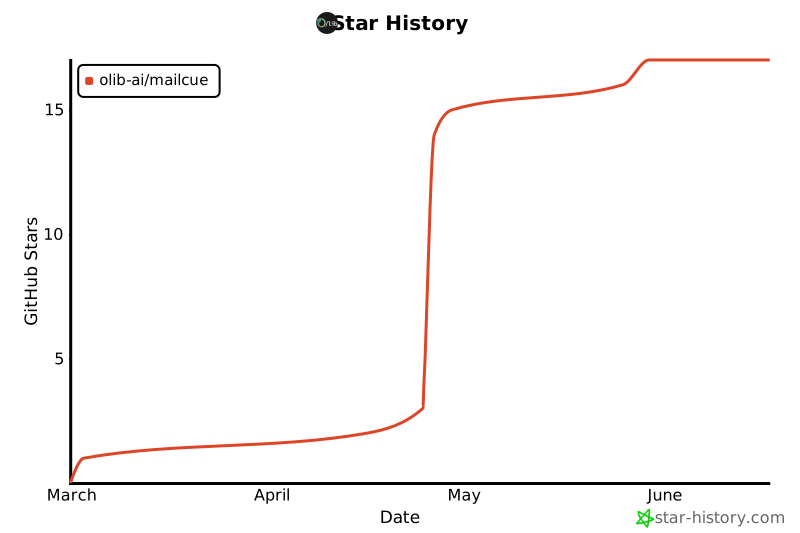
- Stars: 17
- Watchers: 0
- Forks: 3
- Open Issues: 2
-
Metadata Files:
- Readme: README.md
- License: LICENSE
Awesome Lists containing this project
- awesome-ai-startups - MailCue - MailCue is an all-in-one email testing server packaged in a single Docker container. (💻 Coding & Developer Tools)
README

A realistic email testing server in a single Docker container.







---
MailCue packages Postfix, Dovecot, OpenDKIM, OpenDMARC, SpamAssassin, a FastAPI REST API, and a React web UI into one Docker container managed by s6-overlay. It runs a full mail stack with IMAP/POP3 access, DKIM signing, DMARC verification, spam filtering, TLS, and GPG encryption, so you can test email the way it behaves in production. Set `MAILCUE_MODE=production` and the same container runs as a real mail server.
**[Features](#features)** · **[Quick start](#quick-start)** · **[Documentation](#documentation)** · **[Contributing](#contributing)**


## Features
| Capability | What it does |
|---|---|
| Catch-all SMTP | Accepts mail for any address on any domain. Nothing leaves the container. |
| IMAP and POP3 | Read captured mail with any standard client over STARTTLS or implicit TLS. |
| Web UI | React app with a mailbox sidebar, folder navigation, an email viewer, and a compose dialog. |
| REST API and SDKs | JSON API for sending, receiving, injecting, searching, and deleting email, with Python and Node SDKs. |
| Email injection | Insert messages straight into a mailbox over IMAP APPEND for deterministic test setup, with realistic headers. |
| DKIM, DMARC, SPF | OpenDKIM signing, OpenDMARC verification, and SPF policy checks, with Authentication-Results headers. |
| Spam filtering | SpamAssassin scores inbound mail with a configurable threshold, Bayesian filtering, and RBL checks. |
| TLS everywhere | Auto-generated certificates for SMTP STARTTLS, IMAPS, and POP3S. Upload your own from the UI. |
| GPG / PGP-MIME | Per-mailbox GPG keys. Sign, encrypt, verify, and decrypt mail (RFC 3156). Publish keys to keys.openpgp.org. |
| Real-time events | A Server-Sent Events stream pushes email.received, email.deleted, mailbox.created, and more. |
| Scoped API keys | X-API-Key auth with per-key scopes (read, send, delete, and more) and an optional mailbox allow-list. |
| MCP server | An official Model Context Protocol server gives an AI agent its own mailbox. |
| Domain management | Add custom domains with automatic DKIM and a DNS dashboard for MX, SPF, DKIM, DMARC, MTA-STS, and TLS-RPT. |
| Multi-user | Per-user mailbox quotas and isolated mailboxes, emails, GPG keys, and API keys. |
| Production mode | A hardened mail server with strict domains, required TLS, DMARC reject, and Let's Encrypt certificates. |
| Provider sandbox | Capture outbound SMS, voice, and chat API traffic with wire-identical endpoints and signed webhooks. |
| Single container | One docker run. No external database, Redis, or message queue. SQLite with optional AES-256 encryption. |
## Quick start
### Docker Compose
```bash
git clone https://github.com/Olib-AI/mailcue.git
cd mailcue
docker compose up -d
```
Open **http://localhost:8088** and log in with username `admin` and password `mailcue`.
### Docker run
```bash
docker run -d \
--name mailcue \
-p 8088:80 \
-p 25:25 \
-p 587:587 \
-p 143:143 \
-p 993:993 \
-v mailcue-data:/var/mail/vhosts \
-v mailcue-db:/var/lib/mailcue \
-e MAILCUE_DOMAIN=mailcue.local \
-e MAILCUE_ADMIN_PASSWORD=mailcue \
ghcr.io/olib-ai/mailcue
```
### Check it works
```bash
curl http://localhost:8088/api/v1/health
```
## Documentation
> 📖 Read the full, interactive guides on the **[Official MailCue Documentation Website](https://olib-ai.github.io/mailcue/)**.
| Guide | Covers |
|---|---|
| [Architecture](docs/guides/architecture.md) | Container layout, request flow, and tech stack. |
| [Configuration](docs/guides/configuration.md) | Environment variables and exposed ports. |
| [API reference](docs/guides/api.md) | REST endpoints, authentication, and API key scopes. |
| [Production deployment](docs/guides/production.md) | Hardened mode, DNS records, and TLS certificates. |
| [Email clients and TLS trust](docs/guides/clients.md) | IMAP/POP3/SMTP setup and trusting the CA. |
| [Using in CI/CD](docs/guides/ci.md) | Pipeline setup and platform examples. |
| [MCP server](docs/guides/mcp.md) | Give an AI agent its own mailbox over MCP. |
| [Provider sandbox and HTTP bin](docs/guides/sandbox.md) | Capture SMS, voice, and chat traffic, and inspect HTTP requests. |
| [Sharing MailCue across projects](docs/guides/networking.md) | Run one container behind a shared Docker network. |
| [Development and contributing](docs/guides/development.md) | Local setup, linting, tests, and the PR process. |
The API is also served as interactive Swagger UI at `/api/docs`, with machine-readable specs in [openapi.json](openapi.json) and [postman_collection.json](postman_collection.json).
The SDKs and MCP server have their own docs: [Python SDK](sdks/python/README.md), [Node SDK](sdks/node/README.md), and [MCP server](sdks/mcp-node/README.md).
## Contributing
Contributions are welcome. See [Development and contributing](docs/guides/development.md) for local setup, linting, type checks, tests, and the pull request process.
## License
MIT. See [LICENSE](LICENSE).
## Star History
## Links
- **Olib AI**: [www.olib.ai](https://www.olib.ai)
- **GitHub**: [github.com/Olib-AI/mailcue](https://github.com/Olib-AI/mailcue)
- **Container registry**: [ghcr.io/olib-ai/mailcue](https://github.com/Olib-AI/mailcue/pkgs/container/mailcue)
- **API docs**: available at `/api/docs` when running
- **Issues**: [github.com/Olib-AI/mailcue/issues](https://github.com/Olib-AI/mailcue/issues)
- **Discussions**: [github.com/Olib-AI/mailcue/discussions](https://github.com/Olib-AI/mailcue/discussions)
---
If you find MailCue useful, please consider giving it a star on GitHub. It helps others discover the project.
Built by Olib AI