https://github.com/enriko-riba/pixi-scenegraph
SceneGraph engine for pixi.js
https://github.com/enriko-riba/pixi-scenegraph
engine pixi scene scenegraph typescript
Last synced: 7 months ago
JSON representation
SceneGraph engine for pixi.js
- Host: GitHub
- URL: https://github.com/enriko-riba/pixi-scenegraph
- Owner: enriko-riba
- License: mit
- Created: 2019-01-10T12:41:27.000Z (over 7 years ago)
- Default Branch: master
- Last Pushed: 2025-01-24T19:00:27.000Z (over 1 year ago)
- Last Synced: 2025-10-25T16:52:42.945Z (10 months ago)
- Topics: engine, pixi, scene, scenegraph, typescript
- Language: TypeScript
- Size: 1.62 MB
- Stars: 17
- Watchers: 2
- Forks: 2
- Open Issues: 1
-
Metadata Files:
- Readme: README.md
- License: LICENSE
Awesome Lists containing this project
README
# Scene Graph Engine for PIXI
Link to [API documentation](https://enriko-riba.github.io/pixi-scenegraph/generated/index.html)
## What is pixi-scenegraph?
**pixi-scenegraph** is a package providing scene management features for **PIXI v8**
It allows defining scenes and switching between them e.g. MainMenuScene, GameScene, OptionsScene etc.
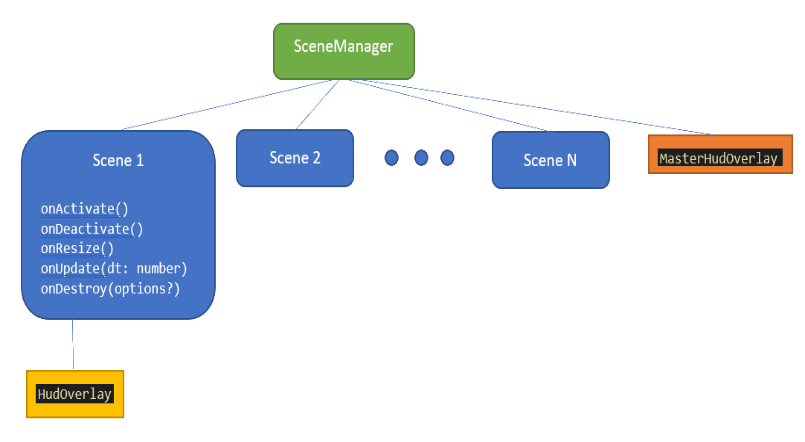
The following image represents the object hierarchy:
**pixi-scenegraph** is written in typescript and aimed for typescript users but not limited to typescript only projects.
>*.ts -> import {SceneManager} from "pixi-scenegraph";
>*.js -> var sg = require("pixi-scenegraph"); let scm = new sg.SceneManager();
### What is a Scene
A Scene is like a PIXI stage, a container holding all objects we want to display. Think of scenes as game state containers e.g: loading scene, menu scene, options scene, in-game scene etc.
A scene **must have a unique name** and the SceneManager can reference scenes by that name:
sceneManager.ActivateScene("sceneName");
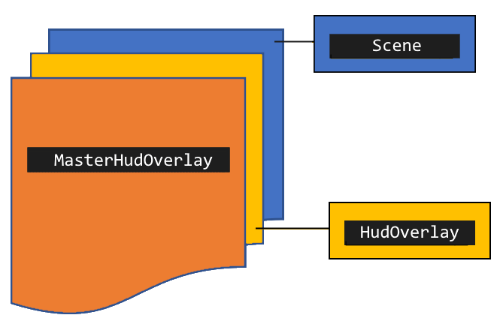
Only one scene at a time is active and only the active scene is rendered. A scene can have a HudOverlay which is a container object rendered over the scene. In addition a MasterHudOverlay can be attached to the SceneManager. The MasterHudOverlay is rendered over all other content.
Z-Index
### Show me a 'Hello World' example
const scm = new SceneManager(renderOptions);
const myScene = new MyScene();
scm.AddScene(myScene);
scm.ActivateScene(myScene); // or by name scm.ActivateScene('scene_name')
### How do I switch scenes?
const myScene1 = new MyScene1(); // name id 'scene_1'
const myScene2 = new MyScene2(); // name id 'scene_2'
const menuScene = new MenuScene(); // name id 'menu'
scm.AddScene(myScene1);
scm.AddScene(myScene2);
scm.AddScene(menuScene);
scm.ActivateScene(menuScene);
inside the MenuScene class:
btnStart.onClick = () => this.sceneManager.ActivateScene("scene_1");
### Angular 7 based example
[git repository](https://github.com/enriko-riba/scenegraph-ng)
## Documentation
[API documentation](https://enriko-riba.github.io/pixi-scenegraph/generated/index.html)